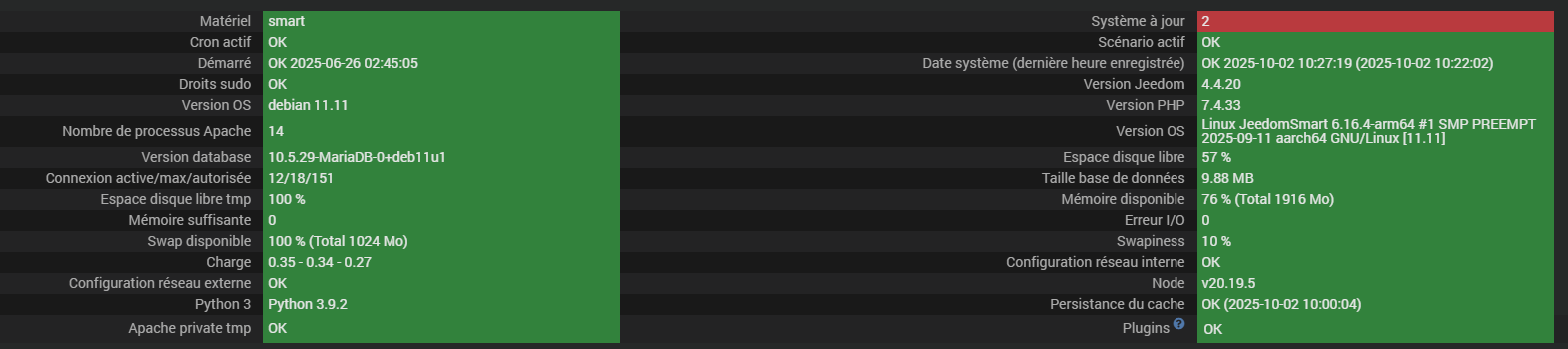
Bon donc c’est pas une date qui vient d’un matériel sur le réseau, c’est forcement quelque part au niveau de la SMART mais vu que l’heure système (timedatectl) est bonne je ne vois pas quoi corriger.
J’ai essayé de cheminer sur ce que fait le backup pour en arriver à écraser le fichier started avec cette date de juin mais je ne vois pas
Désolé j’ai plus d’idées. Je pensais à modifier au niveau du BIOS de la machine mais je sais pas comment te faire accéder à ce menu. J’imagine que l’équipe Jeedom maitrise ça pour ce matériel.
Merci pour l’intérêt du sujet car ce matin et malgré toutes les manip d’hier même message
J’espère qu’il y a tout je suis sur mon tél
cat /etc/ntp.conf
# /etc/ntp.conf, configuration for ntpd; see ntp.conf(5) for help

driftfile /var/lib/ntp/ntp.drift

# Leap seconds definition provided by tzdata
leapfile /usr/share/zoneinfo/leap-seconds.list

# Enable this if you want statistics to be logged.
#statsdir /var/log/ntpstats/

statistics loopstats peerstats clockstats
filegen loopstats file loopstats type day enable
filegen peerstats file peerstats type day enable
filegen clockstats file clockstats type day enable


# You do need to talk to an NTP server or two (or three).
#server ntp.your-provider.example

# pool.ntp.org maps to about 1000 low-stratum NTP servers.  Your server will
# pick a different set every time it starts up.  Please consider joining the
# pool: <http://www.pool.ntp.org/join.html>
pool 0.debian.pool.ntp.org iburst
pool 1.debian.pool.ntp.org iburst
pool 2.debian.pool.ntp.org iburst
pool 3.debian.pool.ntp.org iburst


# Access control configuration; see /usr/share/doc/ntp-doc/html/accopt.html for
# details.  The web page <http://support.ntp.org/bin/view/Support/AccessRestrictions>
# might also be helpful.
#
# Note that "restrict" applies to both servers and clients, so a configuration
# that might be intended to block requests from certain clients could also end
# up blocking replies from your own upstream servers.

# By default, exchange time with everybody, but don't allow configuration.
restrict -4 default kod notrap nomodify nopeer noquery limited
restrict -6 default kod notrap nomodify nopeer noquery limited

# Local users may interrogate the ntp server more closely.
restrict 127.0.0.1
restrict ::1

# Needed for adding pool entries
restrict source notrap nomodify noquery

# Clients from this (example!) subnet have unlimited access, but only if
# cryptographically authenticated.
#restrict 192.168.123.0 mask 255.255.255.0 notrust


# If you want to provide time to your local subnet, change the next line.
# (Again, the address is an example only.)
#broadcast 192.168.123.255

# If you want to listen to time broadcasts on your local subnet, de-comment the
# next lines.  Please do this only if you trust everybody on the network!
#disable auth
#broadcastclient
Avez vous la possibilité de monter une sauvegarde sur une autre plateforme (RPI, VM, …) afin de faire le levé de doute entre la partie hardware et la partie software ?
Alors comme je suis entêté… Et qui ne risque rien…
J’ai supprimé les log
Supprimer le répertoire temp/jeedom
Désactiver TOUS les plugins
Attendu env 1h
Redémarrer Jeedom
Réactivé mqtt manager et jeezigbee
Relancé les dépendances et le demon
Tout est vert
Et oh miracle les dates démarrage et cache sont revenues sur septembre
Suite et fin j’espère
Ce matin aucune erreur d’ horodatage dans les log
Le page santé est ok et la date de démarrage est bien restée en septembre
Démarré OK 2025-09-24 12:21:05 Date système (dernière heure OK 2025-09-25 08:10:00 (2025-09-25 07:22:02)
Je vais tenter de réactiver les plugin 1 par 1 pour voir
J’ai seulement ces 3 lignes qui existaient déjà mais étaient parmi les centaines de lignes en erreur
0000|iptables/1.8.7 Failed to initialize nft: Protocol not supported
0001|iptables/1.8.7 Failed to initialize nft: Protocol not supported
0002|iptables/1.8.7 Failed to initialize nft: Protocol not supported
0003|scenario : OK
0004|Enable task : OK
0005|Check Network Conf : OK
0006|rm : option invalide -- '/'
0007|Saisissez « rm --help » pour plus d'informations
Merci a tous de m’avoir fait découvrir des commandes totalement inconnues et incompréhensibles pour moi🤣
Alors comme annoncé dans le message ci-dessous, mon déménagement approche (J-9)
Après toutes les manip effectuées, (surtout le fait de désactiver tous les plugins et redémarrer au bout d’une heure) mon jeedom est (enfin était) redevenu stable
Après 1 semaine de controles OK, j’ai décidé de me remettre dans la situation future :
=> débrancher Jeedom de la box internet et le laisser tourner en autonomie
1 seul scénario programmé quotidiennement pour faire une simulation de présence (le scénario fonctionne très bien)
Résultat, au bout de 2 jours, je rebranche internet et catastrophe, je me retrouve dans le meme situation avec les pbs d’horodatage et autres nombreux messages dans les logs
Je pense que ça peut être une piste a creuser pour évolutions futures surtout en cas de longues coupures internet
Doit-on en conclure que Jeedom NE PEUT se passer d’internet ?
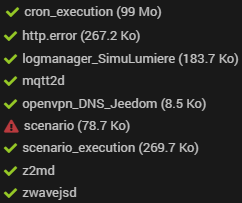
log cron-execution : ( plusieurs centaines de milliers de lignes) tronqué heureusement)
-------------------- TRUNCATED LOG --------------------
724594|tar: 81/5b65714c6f676963537461747573417474723536375d5b315d.doctrinecache.data : l'horodatage 2025-06-26 02:46:10 est situé 64.294915887 secondes dans le futur.
724595|tar: 81/5b636d64436163686541747472383536385d5b315d.doctrinecache.data : l'horodatage 2025-09-24 12:00:07 est situé 7809301.294828384 secondes dans le futur.
724596|tar: 81/5b636d64436163686541747472393438315d5b315d.doctrinecache.data : l'horodatage 2025-09-24 12:00:06 est situé 7809300.294764257 secondes dans le futur.
724597|tar: 81/5b646570656e64616e63796d717474325d5b315d.doctrinecache.data : l'horodatage 2025-09-24 13:09:02 est situé 7813436.294701796 secondes dans le futur.
724598|tar: 81/5b636d64436163686541747472393232375d5b315d.doctrinecache.data : l'horodatage 2025-09-29 19:57:04 est situé 8269918.294638294 secondes dans le futur.
724599|tar: 81 : l'horodatage 2025-06-26 02:46:10 est situé 64.294597417 secondes dans le futur.
724600|tar: 82/5b63726f6e4361636865417474723436313838355d5b315d.doctrinecache.data : l'horodatage 2025-09-24 12:06:02 est situé 7809656.294511039 secondes dans le futur.
724601|tar: 82 : l'horodatage 2025-09-28 01:14:05 est situé 8116139.294469038 secondes dans le futur.
http_error
-------------------- TRUNCATED LOG --------------------
1666|[Thu Jun 26 02:44:57.780342 2025] [mpm_prefork:notice] [pid 411:tid 411] AH00163: Apache/2.4.65 (Debian) configured -- resuming normal operations
1667|[Thu Jun 26 02:44:57.781219 2025] [core:notice] [pid 411:tid 411] AH00094: Command line: '/usr/sbin/apache2'
1668|[Thu Jun 26 02:47:09.800371 2025] [mpm_prefork:notice] [pid 411:tid 411] AH00170: caught SIGWINCH, shutting down gracefully
1669|[Thu Jun 26 02:44:57.737524 2025] [mpm_prefork:notice] [pid 413:tid 413] AH00163: Apache/2.4.65 (Debian) configured -- resuming normal operations
1670|[Thu Jun 26 02:44:57.740287 2025] [core:notice] [pid 413:tid 413] AH00094: Command line: '/usr/sbin/apache2'
1671|[Thu Jun 26 02:46:10.257568 2025] [mpm_prefork:notice] [pid 413:tid 413] AH00170: caught SIGWINCH, shutting down gracefully
1672|[Thu Jun 26 02:44:57.732881 2025] [mpm_prefork:notice] [pid 424:tid 424] AH00163: Apache/2.4.65 (Debian) configured -- resuming normal operations
1673|[Thu Jun 26 02:44:57.733867 2025] [core:notice] [pid 424:tid 424] AH00094: Command line: '/usr/sbin/apache2'
1674|[Thu Jun 26 02:47:09.752194 2025] [mpm_prefork:notice] [pid 424:tid 424] AH00170: caught SIGWINCH, shutting down gracefully
1675|[Thu Jun 26 02:44:57.790896 2025] [mpm_prefork:notice] [pid 414:tid 414] AH00163: Apache/2.4.65 (Debian) configured -- resuming normal operations
1676|[Thu Jun 26 02:44:57.793153 2025] [core:notice] [pid 414:tid 414] AH00094: Command line: '/usr/sbin/apache2'
log scénario
0352|[2025-06-26 02:46:11] ERROR  : Scenario  : [PILOTAGE ][Aucun][S_JEEDOM_REBOOT]. Erreur : [MySQL] Error code : 70100 (1927). Connection was killed  : INSERT INTO `event` SET `datetime`=:datetime, `name`=:name,`option`=:option
0353|[2025-06-26 02:46:11] ERROR  : Scenario  : [PILOTAGE ][Aucun][S_JEEDOM_REBOOT]. Erreur : [MySQL] Error code : 70100 (1927). Connection was killed  : INSERT INTO `event` SET `datetime`=:datetime, `name`=:name,`option`=:option
0354|[2025-06-26 02:46:10] ERROR  : Scenario  : [PILOTAGE ][Aucun][S_JEEDOM_REBOOT]. Erreur : [MySQL] Error code : 70100 (1927). Connection was killed  : INSERT INTO `event` SET `datetime`=:datetime, `name`=:name,`option`=:option
0355|[2025-06-26 02:46:09] ERROR  : Scenario  : [PILOTAGE ][Aucun][S_JEEDOM_REBOOT]. Erreur : [MySQL] Error code : 70100 (1927). Connection was killed  : INSERT INTO `event` SET `datetime`=:datetime, `name`=:name,`option`=:option
0356|[2025-06-26 02:46:10] ERROR  : Scenario  : [PILOTAGE ][Aucun][S_JEEDOM_REBOOT]. Erreur : [MySQL] Error code : 70100 (1927). Connection was killed  : INSERT INTO `event` SET `datetime`=:datetime, `name`=:name,`option`=:option
0357|[2025-06-26 02:46:10] ERROR  : Scenario  : [PILOTAGE ][Aucun][S_JEEDOM_REBOOT]. Erreur : [MySQL] Error code : 70100 (1927). Connection was killed  : INSERT INTO `event` SET `datetime`=:datetime, `name`=:name,`option`=:option