Je viens rebotter la box Atlas, que faut il vérifier maintenant ?
Est ce que tu as toujours des erreurs dans le plugin docker ?
Est ce que le plugin eufy s’est lancé correctement ou pas ?
Logs concernant docker2

Logs concernant Eufy

Sinon pas d’autres logs en défauts pour le moment
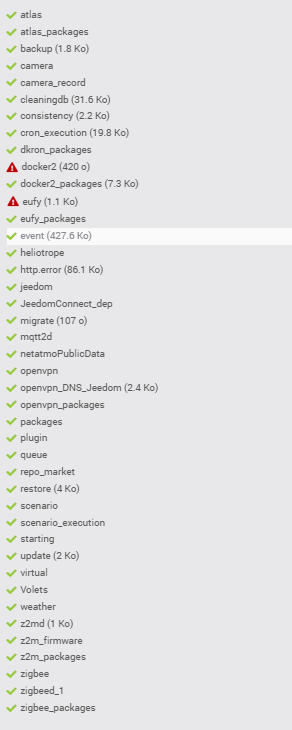
Que ferais tu maintenant ?
Rootard,
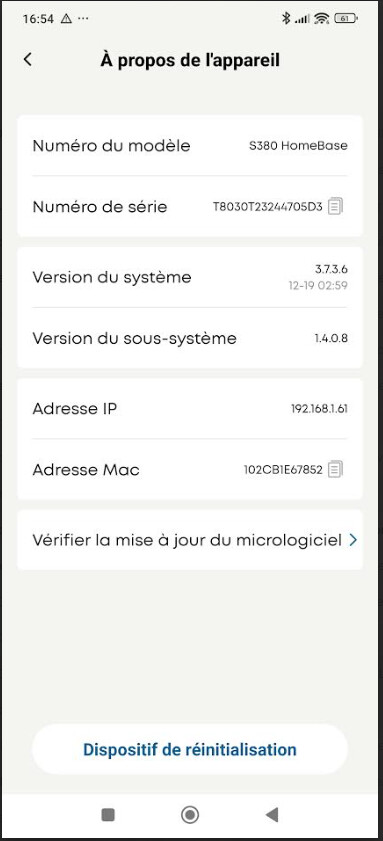
Je ne sait pas ci cela à une incidence, mais sur la HomeBase S380, je suis en version 3.7.3.6
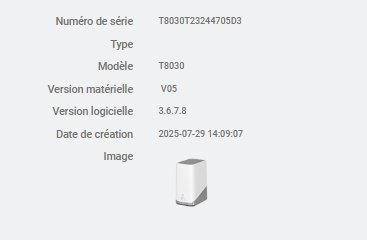
et sur la home base du plugin Eufy je suis en 3.6.7.8
Sinon, quand j’ai appuyer sur le bouton Setup docker
J’ai les retour suivant, dont l’image qui n’est pas installée, peux tu me dire a quoi cela correspond ?
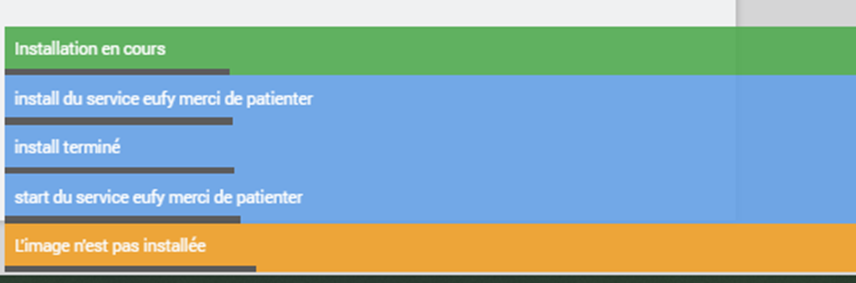
Re
Ton probleme est lié à ton install de docker et/ou à la compatibilité de l’image eufy_security_ws avec ton matériel.
Le plugin Eufy n’a rien a voir avec ca.
Pour vérifier ton install docker relances la commande sudo docker info et postes moi la log
ci dessous mon retour
Client: Docker Engine - Community
 Version:    29.2.1
 Context:    default
 Debug Mode: false
 Plugins:
  buildx: Docker Buildx (Docker Inc.)
    Version:  v0.31.1
    Path:     /usr/libexec/docker/cli-plugins/docker-buildx
  compose: Docker Compose (Docker Inc.)
    Version:  v5.0.2
    Path:     /usr/libexec/docker/cli-plugins/docker-compose

Server:
Cannot connect to the Docker daemon at unix:///var/run/docker.sock. Is the docker daemon running?
[EDIT] tu as bien mis le sudo?
Si oui c’est tjs pas bon…ton docker est HS.
Désinstalle le plugin docker
puis désinstalle docker manuellement:
sudo apt-get purge -y docker-engine docker docker.io docker-ce docker-ce-cli docker-compose-plugin
sudo apt-get autoremove -y --purge docker-engine docker docker.io docker-ce docker-compose-plugin
puis reinstalle le plugin docker
et tagges le sujet avec plugin-docker2 
Ci dessous les copies d’ecran
sudo apt-get purge -y docker-engine docker docker.io docker-ce docker-ce-cli docker-compose-plugin
```Reading package lists...
Building dependency tree...
Reading state information...
Package 'docker-engine' is not installed, so not removed
Package 'docker' is not installed, so not removed
Package 'docker.io' is not installed, so not removed
The following packages were automatically installed and are no longer required:
  docker-buildx-plugin docker-ce-rootless-extras libslirp0 slirp4netns
Use 'sudo apt autoremove' to remove them.
The following packages will be REMOVED:
  docker-ce* docker-ce-cli* docker-compose-plugin*
0 upgraded, 0 newly installed, 3 to remove and 0 not upgraded.
After this operation, 171 MB disk space will be freed.
(Reading database ...
(Reading database ... 5%
(Reading database ... 10%
(Reading database ... 15%
(Reading database ... 20%
(Reading database ... 25%
(Reading database ... 30%
(Reading database ... 35%
(Reading database ... 40%
(Reading database ... 45%
(Reading database ... 50%
(Reading database ... 55%
(Reading database ... 60%
(Reading database ... 65%
(Reading database ... 70%
(Reading database ... 75%
(Reading database ... 80%
(Reading database ... 85%
(Reading database ... 90%
(Reading database ... 95%
(Reading database ... 100%
(Reading database ... 61853 files and directories currently installed.)
Removing docker-ce (5:29.2.1-1~debian.11~bullseye) ...
Removing docker-ce-cli (5:29.2.1-1~debian.11~bullseye) ...
Removing docker-compose-plugin (5.0.2-1~debian.11~bullseye) ...
Processing triggers for man-db (2.9.4-2) ...
(Reading database ...
(Reading database ... 5%
(Reading database ... 10%
(Reading database ... 15%
(Reading database ... 20%
(Reading database ... 25%
(Reading database ... 30%
(Reading database ... 35%
(Reading database ... 40%
(Reading database ... 45%
(Reading database ... 50%
(Reading database ... 55%
(Reading database ... 60%
(Reading database ... 65%
(Reading database ... 70%
(Reading database ... 75%
(Reading database ... 80%
(Reading database ... 85%
(Reading database ... 90%
(Reading database ... 95%
(Reading database ... 100%
(Reading database ... 61650 files and directories currently installed.)
Purging configuration files for docker-ce (5:29.2.1-1~debian.11~bullseye) ...

```sudo apt-get autoremove -y --purge docker-engine docker docker.io docker-ce docker-compose-plugin
``Reading package lists...
Building dependency tree...
Reading state information...
Package 'docker-engine' is not installed, so not removed
Package 'docker' is not installed, so not removed
Package 'docker.io' is not installed, so not removed
Package 'docker-ce' is not installed, so not removed
Package 'docker-compose-plugin' is not installed, so not removed
The following packages will be REMOVED:
  docker-buildx-plugin* docker-ce-rootless-extras* libslirp0* slirp4netns*
0 upgraded, 0 newly installed, 4 to remove and 0 not upgraded.
After this operation, 111 MB disk space will be freed.
(Reading database ...
(Reading database ... 5%
(Reading database ... 10%
(Reading database ... 15%
(Reading database ... 20%
(Reading database ... 25%
(Reading database ... 30%
(Reading database ... 35%
(Reading database ... 40%
(Reading database ... 45%
(Reading database ... 50%
(Reading database ... 55%
(Reading database ... 60%
(Reading database ... 65%
(Reading database ... 70%
(Reading database ... 75%
(Reading database ... 80%
(Reading database ... 85%
(Reading database ... 90%
(Reading database ... 95%
(Reading database ... 100%
(Reading database ... 61648 files and directories currently installed.)
Removing docker-buildx-plugin (0.31.1-1~debian.11~bullseye) ...
Removing docker-ce-rootless-extras (5:29.2.1-1~debian.11~bullseye) ...
Removing slirp4netns (1.0.1-2) ...
Removing libslirp0:arm64 (4.4.0-1+deb11u2) ...
Processing triggers for man-db (2.9.4-2) ...
Processing triggers for libc-bin (2.31-13+deb11u13) ...`
Log eufy
0000|[2026-02-10 18:14:41] ERROR  Attention je pense qu'il y a un soucis avec le démon que j'ai relancé plus de 3 fois consécutivement
0001|[2026-02-10 18:14:42] DEBUG  debian OS version: 11
0002|[2026-02-10 18:14:42] DEBUG  Py executable: /usr/bin/python3
0003|[2026-02-10 18:14:42] DEBUG  >>> Checking container 127.0.0.1:3000
0004|[2026-02-10 18:14:42] DEBUG  Container 127.0.0.1:3000 is not responding :(
0005|[2026-02-10 18:14:42] ERROR  Container Eufy non démarré
0006|[2026-02-10 18:15:15] DEBUG  docker est déjà installé
0007|[2026-02-10 18:15:15] INFO  >>> Début de l'opération install du service Eufy
0008|[2026-02-10 18:15:15] DEBUG  images installées:
0009|[2026-02-10 18:15:15] DEBUG  container actif:
0010|[2026-02-10 18:15:15] DEBUG  hardware arch: aarch64
0011|[2026-02-10 18:15:15] DEBUG  DOCKER_DEFAULT_PLATFORM=linux/arm64 docker pull bropat/eufy-security-ws:latest
0012|Cannot connect to the Docker daemon at unix:///var/run/docker.sock. Is the docker daemon running?
0013|[2026-02-10 18:15:16] INFO  >>> Fin de l'opération install du service Eufy
0014|[2026-02-10 18:15:16] INFO  >>> Début de l'opération start du service Eufy
0015|[2026-02-10 18:15:16] DEBUG  images installées:
0016|[2026-02-10 18:15:16] DEBUG  container actif:
0017|[2026-02-10 18:15:16] DEBUG  hardware arch: aarch64
0018|[2026-02-10 18:15:16]WARNING >>> start du service Eufy: L'image n'est pas installée
0019|[2026-02-10 18:15:54] INFO  >>> Début de l'opération stop du service Eufy
0020|[2026-02-10 18:15:54] DEBUG  images installées:
0021|[2026-02-10 18:15:54] DEBUG  container actif:
0022|[2026-02-10 18:15:54] DEBUG  hardware arch: aarch64
0023|[2026-02-10 18:15:54]WARNING >>> stop du service Eufy: Le container n'est pas démarré
0024|[2026-02-10 18:15:54] INFO  >>> Début de l'opération uninstall du service Eufy
0025|[2026-02-10 18:15:54] DEBUG  images installées:
0026|[2026-02-10 18:15:54] DEBUG  container actif:
0027|[2026-02-10 18:15:55] DEBUG  hardware arch: aarch64
0028|[2026-02-10 18:15:55] INFO  >>> Fin de l'opération uninstall du service Eufy
0029|[2026-02-10 18:16:10] ERROR  Attention je pense qu'il y a un soucis avec le démon que j'ai relancé plus de 3 fois consécutivement
0030|[2026-02-10 18:16:12] DEBUG  debian OS version: 11
0031|[2026-02-10 18:16:12] DEBUG  Py executable: /usr/bin/python3
0032|[2026-02-10 18:16:12] DEBUG  >>> Checking container 127.0.0.1:3000
0033|[2026-02-10 18:16:12] DEBUG  Container 127.0.0.1:3000 is not responding :(
0034|[2026-02-10 18:16:12] ERROR  Container Eufy non démarré
0035|[2026-02-10 18:18:11] INFO  >>> Début de l'opération stop du service Eufy
0036|[2026-02-10 18:18:11] DEBUG  images installées:
0037|[2026-02-10 18:18:11] DEBUG  container actif:
0038|[2026-02-10 18:18:11] DEBUG  hardware arch: aarch64
0039|[2026-02-10 18:18:11]WARNING >>> stop du service Eufy: Le container n'est pas démarré
0040|[2026-02-10 18:18:11] INFO  >>> Début de l'opération start du service Eufy
0041|[2026-02-10 18:18:11] DEBUG  images installées:
0042|[2026-02-10 18:18:11] DEBUG  container actif:
0043|[2026-02-10 18:18:11] DEBUG  hardware arch: aarch64
0044|[2026-02-10 18:18:11]WARNING >>> start du service Eufy: L'image n'est pas installée
0045|[2026-02-10 20:14:23] DEBUG  Lancement de : /var/www/html/core/class/../../core/php/jeePlugin.php  plugin_id=eufy function=remove callInstallFunction=1
0046|[2026-02-10 23:21:48] DEBUG  Lancement de : /var/www/html/core/class/../../core/php/jeePlugin.php  plugin_id=eufy function=pre_update callInstallFunction=1
0047|[2026-02-10 23:21:49] DEBUG  Lancement de : /var/www/html/core/class/../../core/php/jeePlugin.php  plugin_id=eufy function=post_plugin_install callInstallFunction=1
0048|[2026-02-10 23:21:58] INFO  Début d'activation du plugin
0049|[2026-02-10 23:22:00] INFO  Info sur le démon : {"log":"eufy","state":"nok","launchable":"ok","launchable_message":"Gestion automatique d\u00e9sactiv\u00e9e","auto":"0","last_launch":"2026-02-10 18:16:10"}
0050|[2026-02-10 23:22:00] DEBUG  Lancement de : /var/www/html/core/class/../../core/php/jeePlugin.php  plugin_id=eufy function=install callInstallFunction=1
0051|[2026-02-10 23:22:00] DEBUG  initConfig mode=local
0052|[2026-02-10 23:22:19] ERROR  Attention je pense qu'il y a un soucis avec le démon que j'ai relancé plus de 3 fois consécutivement
0053|[2026-02-10 23:22:20] ERROR  Container Eufy non démarré
0054|Cannot connect to the Docker daemon at unix:///var/run/docker.sock. Is the docker daemon running?
0055|Cannot connect to the Docker daemon at unix:///var/run/docker.sock. Is the docker daemon running?
0056|[2026-02-11 00:04:28] ERROR  Attention je pense qu'il y a un soucis avec le démon que j'ai relancé plus de 3 fois consécutivement
0057|[2026-02-11 00:04:30] ERROR  Container Eufy non démarré
0058|Cannot connect to the Docker daemon at unix:///var/run/docker.sock. Is the docker daemon running?
0059|[2026-02-11 00:08:12] ERROR  Attention je pense qu'il y a un soucis avec le démon que j'ai relancé plus de 3 fois consécutivement
0060|[2026-02-11 00:08:13] ERROR  Container Eufy non démarré
log docker
0000|[2026-02-10 18:15:02] ERROR  Expression cron non valide pour Docker 1 : */5 * * * *
0001|[2026-02-10 18:20:03] ERROR  Expression cron non valide pour Docker 1 : */5 * * * *
0002|[2026-02-10 18:25:03] ERROR  Expression cron non valide pour Docker 1 : */5 * * * *
0003|[2026-02-10 18:30:03] ERROR  Expression cron non valide pour Docker 1 : */5 * * * *
0004|[2026-02-10 18:35:03] ERROR  Expression cron non valide pour Docker 1 : */5 * * * *
0005|[2026-02-10 18:40:03] ERROR  Expression cron non valide pour Docker 1 : */5 * * * *
0006|[2026-02-10 18:45:02] ERROR  Expression cron non valide pour Docker 1 : */5 * * * *
0007|[2026-02-10 18:50:03] ERROR  Expression cron non valide pour Docker 1 : */5 * * * *
0008|[2026-02-10 18:55:03] ERROR  Expression cron non valide pour Docker 1 : */5 * * * *
0009|[2026-02-10 19:00:03] ERROR  Expression cron non valide pour Docker 1 : */5 * * * *
0010|[2026-02-10 19:05:03] ERROR  Expression cron non valide pour Docker 1 : */5 * * * *
0011|[2026-02-10 19:10:03] ERROR  Expression cron non valide pour Docker 1 : */5 * * * *
0012|[2026-02-10 19:15:02] ERROR  Expression cron non valide pour Docker 1 : */5 * * * *
0013|[2026-02-10 19:20:03] ERROR  Expression cron non valide pour Docker 1 : */5 * * * *
0014|[2026-02-10 19:25:02] ERROR  Expression cron non valide pour Docker 1 : */5 * * * *
0015|[2026-02-10 19:30:02] ERROR  Expression cron non valide pour Docker 1 : */5 * * * *
0016|[2026-02-10 19:35:02] ERROR  Expression cron non valide pour Docker 1 : */5 * * * *
0017|[2026-02-10 19:40:02] ERROR  Expression cron non valide pour Docker 1 : */5 * * * *
0018|[2026-02-10 19:45:03] ERROR  Expression cron non valide pour Docker 1 : */5 * * * *
0019|[2026-02-10 19:50:03] ERROR  Expression cron non valide pour Docker 1 : */5 * * * *
0020|[2026-02-10 19:55:02] ERROR  Expression cron non valide pour Docker 1 : */5 * * * *
0021|[2026-02-10 20:00:02] ERROR  Expression cron non valide pour Docker 1 : */5 * * * *
0022|[2026-02-10 20:05:02] ERROR  Expression cron non valide pour Docker 1 : */5 * * * *
0023|[2026-02-10 20:10:02] ERROR  Expression cron non valide pour Docker 1 : */5 * * * *
0024|[2026-02-10 23:20:03] ERROR  Expression cron non valide pour Docker 1 : */5 * * * *
0025|[2026-02-10 23:25:02] ERROR  Expression cron non valide pour Docker 1 : */5 * * * *
0026|[2026-02-10 23:30:02] ERROR  Expression cron non valide pour Docker 1 : */5 * * * *
0027|[2026-02-10 23:35:02] ERROR  Expression cron non valide pour Docker 1 : */5 * * * *
0028|[2026-02-10 23:40:02] ERROR  Expression cron non valide pour Docker 1 : */5 * * * *
0029|[2026-02-10 23:45:02] ERROR  Expression cron non valide pour Docker 1 : */5 * * * *
0030|[2026-02-10 23:50:03] ERROR  Expression cron non valide pour Docker 1 : */5 * * * *
0031|[2026-02-10 23:55:02] ERROR  Expression cron non valide pour Docker 1 : */5 * * * *
0032|[2026-02-11 00:10:02] ERROR  Expression cron non valide pour Docker 1 : */5 * * * *
Sinon sur la config Eufy le demon est toujours non ok
et le message: l’image n’est pas installé , est apparu.
Je te remercie encore pour tes efforts et ta patience et te dit bonne nuit
Editez les logs svp !
1 « J'aime »
Bonjour
Inutile de regarder les logs Eufy tant que docker ne sera pas correctement installé…
Que donne la commande:
sudo apt —list| grep docker
Et ajoutes le tag plugin-docker2 dans ton sujet pour que d’autres puissent t’aider
Ci dessous les copies d’ecran du deroulement et log en final
sudo apt-get purge -y docker-engine docker docker.io docker-ce docker-ce-cli docker-compose-plugin
```Reading package lists...
Building dependency tree...
Reading state information...
Package 'docker-engine' is not installed, so not removed
Package 'docker' is not installed, so not removed
Package 'docker.io' is not installed, so not removed
The following packages were automatically installed and are no longer required:
  docker-buildx-plugin docker-ce-rootless-extras libslirp0 slirp4netns
Use 'sudo apt autoremove' to remove them.
The following packages will be REMOVED:
  docker-ce* docker-ce-cli* docker-compose-plugin*
0 upgraded, 0 newly installed, 3 to remove and 0 not upgraded.
After this operation, 171 MB disk space will be freed.
(Reading database ...
(Reading database ... 5%
(Reading database ... 10%
(Reading database ... 15%
(Reading database ... 20%
(Reading database ... 25%
(Reading database ... 30%
(Reading database ... 35%
(Reading database ... 40%
(Reading database ... 45%
(Reading database ... 50%
(Reading database ... 55%
(Reading database ... 60%
(Reading database ... 65%
(Reading database ... 70%
(Reading database ... 75%
(Reading database ... 80%
(Reading database ... 85%
(Reading database ... 90%
(Reading database ... 95%
(Reading database ... 100%
(Reading database ... 61853 files and directories currently installed.)
Removing docker-ce (5:29.2.1-1~debian.11~bullseye) ...
Removing docker-ce-cli (5:29.2.1-1~debian.11~bullseye) ...
Removing docker-compose-plugin (5.0.2-1~debian.11~bullseye) ...
Processing triggers for man-db (2.9.4-2) ...
(Reading database ...
(Reading database ... 5%
(Reading database ... 10%
(Reading database ... 15%
(Reading database ... 20%
(Reading database ... 25%
(Reading database ... 30%
(Reading database ... 35%
(Reading database ... 40%
(Reading database ... 45%
(Reading database ... 50%
(Reading database ... 55%
(Reading database ... 60%
(Reading database ... 65%
(Reading database ... 70%
(Reading database ... 75%
(Reading database ... 80%
(Reading database ... 85%
(Reading database ... 90%
(Reading database ... 95%
(Reading database ... 100%
(Reading database ... 61650 files and directories currently installed.)
Purging configuration files for docker-ce (5:29.2.1-1~debian.11~bullseye) ...

```sudo apt-get autoremove -y --purge docker-engine docker docker.io docker-ce docker-compose-plugin
``Reading package lists...
Building dependency tree...
Reading state information...
Package 'docker-engine' is not installed, so not removed
Package 'docker' is not installed, so not removed
Package 'docker.io' is not installed, so not removed
Package 'docker-ce' is not installed, so not removed
Package 'docker-compose-plugin' is not installed, so not removed
The following packages will be REMOVED:
  docker-buildx-plugin* docker-ce-rootless-extras* libslirp0* slirp4netns*
0 upgraded, 0 newly installed, 4 to remove and 0 not upgraded.
After this operation, 111 MB disk space will be freed.
(Reading database ...
(Reading database ... 5%
(Reading database ... 10%
(Reading database ... 15%
(Reading database ... 20%
(Reading database ... 25%
(Reading database ... 30%
(Reading database ... 35%
(Reading database ... 40%
(Reading database ... 45%
(Reading database ... 50%
(Reading database ... 55%
(Reading database ... 60%
(Reading database ... 65%
(Reading database ... 70%
(Reading database ... 75%
(Reading database ... 80%
(Reading database ... 85%
(Reading database ... 90%
(Reading database ... 95%
(Reading database ... 100%
(Reading database ... 61648 files and directories currently installed.)
Removing docker-buildx-plugin (0.31.1-1~debian.11~bullseye) ...
Removing docker-ce-rootless-extras (5:29.2.1-1~debian.11~bullseye) ...
Removing slirp4netns (1.0.1-2) ...
Removing libslirp0:arm64 (4.4.0-1+deb11u2) ...
Processing triggers for man-db (2.9.4-2) ...
Processing triggers for libc-bin (2.31-13+deb11u13) ...`

Log Eufy
0000|[2026-02-10 18:14:41] ERROR Attention je pense qu’il y a un soucis avec le démon que j’ai relancé plus de 3 fois consécutivement
0001|[2026-02-10 18:14:42] DEBUG debian OS version: 11
0002|[2026-02-10 18:14:42] DEBUG Py executable: /usr/bin/python3
0003|[2026-02-10 18:14:42] DEBUG >>> Checking container 127.0.0.1:3000
0004|[2026-02-10 18:14:42] DEBUG Container 127.0.0.1:3000 is not responding :frowning:
0005|[2026-02-10 18:14:42] ERROR Container Eufy non démarré
0006|[2026-02-10 18:15:15] DEBUG docker est déjà installé
0007|[2026-02-10 18:15:15] INFO >>> Début de l’opération install du service Eufy
0008|[2026-02-10 18:15:15] DEBUG images installées:
0009|[2026-02-10 18:15:15] DEBUG container actif:
0010|[2026-02-10 18:15:15] DEBUG hardware arch: aarch64
0011|[2026-02-10 18:15:15] DEBUG DOCKER_DEFAULT_PLATFORM=linux/arm64 docker pull bropat/eufy-security-ws:latest
0012|Cannot connect to the Docker daemon at unix:///var/run/docker.sock. Is the docker daemon running?
0013|[2026-02-10 18:15:16] INFO >>> Fin de l’opération install du service Eufy
0014|[2026-02-10 18:15:16] INFO >>> Début de l’opération start du service Eufy
0015|[2026-02-10 18:15:16] DEBUG images installées:
0016|[2026-02-10 18:15:16] DEBUG container actif:
0017|[2026-02-10 18:15:16] DEBUG hardware arch: aarch64
0018|[2026-02-10 18:15:16]WARNING >>> start du service Eufy: L’image n’est pas installée
0019|[2026-02-10 18:15:54] INFO >>> Début de l’opération stop du service Eufy
0020|[2026-02-10 18:15:54] DEBUG images installées:
0021|[2026-02-10 18:15:54] DEBUG container actif:
0022|[2026-02-10 18:15:54] DEBUG hardware arch: aarch64
0023|[2026-02-10 18:15:54]WARNING >>> stop du service Eufy: Le container n’est pas démarré
0024|[2026-02-10 18:15:54] INFO >>> Début de l’opération uninstall du service Eufy
0025|[2026-02-10 18:15:54] DEBUG images installées:
0026|[2026-02-10 18:15:54] DEBUG container actif:
0027|[2026-02-10 18:15:55] DEBUG hardware arch: aarch64
0028|[2026-02-10 18:15:55] INFO >>> Fin de l’opération uninstall du service Eufy
0029|[2026-02-10 18:16:10] ERROR Attention je pense qu’il y a un soucis avec le démon que j’ai relancé plus de 3 fois consécutivement
0030|[2026-02-10 18:16:12] DEBUG debian OS version: 11
0031|[2026-02-10 18:16:12] DEBUG Py executable: /usr/bin/python3
0032|[2026-02-10 18:16:12] DEBUG >>> Checking container 127.0.0.1:3000
0033|[2026-02-10 18:16:12] DEBUG Container 127.0.0.1:3000 is not responding :frowning:
0034|[2026-02-10 18:16:12] ERROR Container Eufy non démarré
0035|[2026-02-10 18:18:11] INFO >>> Début de l’opération stop du service Eufy
0036|[2026-02-10 18:18:11] DEBUG images installées:
0037|[2026-02-10 18:18:11] DEBUG container actif:
0038|[2026-02-10 18:18:11] DEBUG hardware arch: aarch64
0039|[2026-02-10 18:18:11]WARNING >>> stop du service Eufy: Le container n’est pas démarré
0040|[2026-02-10 18:18:11] INFO >>> Début de l’opération start du service Eufy
0041|[2026-02-10 18:18:11] DEBUG images installées:
0042|[2026-02-10 18:18:11] DEBUG container actif:
0043|[2026-02-10 18:18:11] DEBUG hardware arch: aarch64
0044|[2026-02-10 18:18:11]WARNING >>> start du service Eufy: L’image n’est pas installée
0045|[2026-02-10 20:14:23] DEBUG Lancement de : /var/www/html/core/class/…/…/core/php/jeePlugin.php plugin_id=eufy function=remove callInstallFunction=1
0046|[2026-02-10 23:21:48] DEBUG Lancement de : /var/www/html/core/class/…/…/core/php/jeePlugin.php plugin_id=eufy function=pre_update callInstallFunction=1
0047|[2026-02-10 23:21:49] DEBUG Lancement de : /var/www/html/core/class/…/…/core/php/jeePlugin.php plugin_id=eufy function=post_plugin_install callInstallFunction=1
0048|[2026-02-10 23:21:58] INFO Début d’activation du plugin
0049|[2026-02-10 23:22:00] INFO Info sur le démon : {« log »:« eufy »,« state »:« nok »,« launchable »:« ok »,« launchable_message »:« Gestion automatique d\u00e9sactiv\u00e9e »,« auto »:« 0 »,« last_launch »:« 2026-02-10 18:16:10 »}
0050|[2026-02-10 23:22:00] DEBUG Lancement de : /var/www/html/core/class/…/…/core/php/jeePlugin.php plugin_id=eufy function=install callInstallFunction=1
0051|[2026-02-10 23:22:00] DEBUG initConfig mode=local
0052|[2026-02-10 23:22:19] ERROR Attention je pense qu’il y a un soucis avec le démon que j’ai relancé plus de 3 fois consécutivement
0053|[2026-02-10 23:22:20] ERROR Container Eufy non démarré
0054|Cannot connect to the Docker daemon at unix:///var/run/docker.sock. Is the docker daemon running?
0055|Cannot connect to the Docker daemon at unix:///var/run/docker.sock. Is the docker daemon running?
0056|[2026-02-11 00:04:28] ERROR Attention je pense qu’il y a un soucis avec le démon que j’ai relancé plus de 3 fois consécutivement
0057|[2026-02-11 00:04:30] ERROR Container Eufy non démarré
0058|Cannot connect to the Docker daemon at unix:///var/run/docker.sock. Is the docker daemon running?
0059|[2026-02-11 00:08:12] ERROR Attention je pense qu’il y a un soucis avec le démon que j’ai relancé plus de 3 fois consécutivement
0060|[2026-02-11 00:08:13] ERROR Container Eufy non démarré
Vous pouvez aussi éditer vos précédents messages, inutile de reposter. Cela devrait être plus simple pour vous et aider à la clarté du fil en lui-même.
Avant de réinstaller proprement il faut vérifier quels sont les packages docker encore installés
Que donne la commande apt list que j’ai indiquée plus haut?
Bonjour Rootard,
ci dessous le retour de ta commande
sudo apt list | grep docker
docker-buildx-plugin/bullseye,now 0.31.1-1~debian.11~bullseye arm64 [installed,automatic]
docker-ce-cli/bullseye,now 5:29.2.1-1~debian.11~bullseye arm64 [installed]
docker-ce-rootless-extras/bullseye,now 5:29.2.1-1~debian.11~bullseye arm64 [installed,automatic]
docker-ce/bullseye,now 5:29.2.1-1~debian.11~bullseye arm64 [installed]
docker-clean/oldoldstable 2.0.4-3 all
docker-compose-plugin/bullseye,now 5.0.2-1~debian.11~bullseye arm64 [installed]
docker-compose/oldoldstable 1.25.0-1 all
docker-doc/oldoldstable-security 20.10.5+dfsg1-1+deb11u4 all
docker-model-plugin/bullseye 1.0.10-1~debian.11~bullseye arm64
docker-registry/oldoldstable,oldoldstable-security 2.7.1+ds2-7+deb11u1 arm64
docker.io/oldoldstable-security 20.10.5+dfsg1-1+deb11u4 arm64
docker2aci/oldoldstable 0.17.2+dfsg-2.1+b5 arm64
docker/oldoldstable 1.5-2 all
elpa-dockerfile-mode/oldoldstable 1.2-2 all
golang-docker-credential-helpers/oldoldstable 0.6.3-1+b6 arm64
golang-github-appc-docker2aci-dev/oldoldstable 0.17.2+dfsg-2.1 all
golang-github-docker-distribution-dev/oldoldstable,oldoldstable-security 2.7.1+ds2-7+deb11u1 all
golang-github-docker-docker-credential-helpers-dev/oldoldstable 0.6.3-1 all
golang-github-docker-docker-dev/oldoldstable-security 20.10.5+dfsg1-1+deb11u4 all
golang-github-docker-go-connections-dev/oldoldstable 0.4.0-3 all
golang-github-docker-go-dev/oldoldstable 0.0~git20160303.0.d30aec9-3 all
golang-github-docker-go-events-dev/oldoldstable 0.0~git20190806.e31b211-1 all
golang-github-docker-go-metrics-dev/oldoldstable 0.0.1-1 all
golang-github-docker-go-units-dev/oldoldstable 0.4.0-3 all
golang-github-docker-leadership-dev/oldoldstable 0.1.0-1.1 all
golang-github-docker-libkv-dev/oldoldstable 0.2.1-2 all
golang-github-docker-libtrust-dev/oldoldstable 0.0~git20150526.0.9cbd2a1-3.1 all
golang-github-docker-notary-dev/oldoldstable 0.6.1~ds2-6 all
golang-github-docker-spdystream-dev/oldoldstable 0.2.0-1 all
golang-github-fsouza-go-dockerclient-dev/oldoldstable 1.6.6-1 all
golang-github-samalba-dockerclient-dev/oldoldstable 0.0~git20160531.0.a303626-2 all
kdocker/oldoldstable 5.3-1 arm64
libnss-docker/oldoldstable 0.02-1+b1 arm64
python3-docker/oldoldstable 4.1.0-1.2 all
python3-dockerpty/oldoldstable 0.4.1-2 all
python3-dockerpycreds/oldoldstable 0.3.0-1.1 all
ruby-docker-api/oldoldstable 1.22.2-1.1 all
wmdocker/oldoldstable 1.5-2 arm64
Donc je comprends que tu as réinstallé docker
Essaies:
sudo systemctl start docker
sudo docker info
ci dessous le retour
sudo systemctl start docker
Job for docker.service failed because the control process exited with error code.
See "systemctl status docker.service" and "journalctl -xe" for details.
sudo docker info
Client: Docker Engine - Community
 Version:    29.2.1
 Context:    default
 Debug Mode: false
 Plugins:
  buildx: Docker Buildx (Docker Inc.)
    Version:  v0.31.1
    Path:     /usr/libexec/docker/cli-plugins/docker-buildx
  compose: Docker Compose (Docker Inc.)
    Version:  v5.0.2
    Path:     /usr/libexec/docker/cli-plugins/docker-compose

Server:
Cannot connect to the Docker daemon at unix:///var/run/docker.sock. Is the docker daemon running?
Lances les 2 commandes demandées et captures les logs
Bonjour Rootard,
ci dessous les log
sudo systemctl start docker
Job for docker.service failed because the control process exited with error code.
See "systemctl status docker.service" and "journalctl -xe" for details.
sudo docker info
Client: Docker Engine - Community
 Version:    29.2.1
 Context:    default
 Debug Mode: false
 Plugins:
  buildx: Docker Buildx (Docker Inc.)
    Version:  v0.31.1
    Path:     /usr/libexec/docker/cli-plugins/docker-buildx
  compose: Docker Compose (Docker Inc.)
    Version:  v5.0.2
    Path:     /usr/libexec/docker/cli-plugins/docker-compose

Server:
Cannot connect to the Docker daemon at unix:///var/run/docker.sock. Is the docker daemon running?
Concernant les logs
Pour docker 2
0000|[2026-02-12 09:00:03] ERROR  Expression cron non valide pour Docker 1 : */5 * * * *
0001|[2026-02-12 09:05:02] ERROR  Expression cron non valide pour Docker 1 : */5 * * * *
Pour Eufy
0000|[2026-02-12 09:00:04] ERROR  Attention je pense qu'il y a un soucis avec le démon que j'ai relancé plus de 3 fois consécutivement
0001|[2026-02-12 09:00:06] DEBUG  [checkContainer] container localhost:3000 is not responding :(
0002|[2026-02-12 09:00:06] ERROR  Container Eufy non démarré
0003|[2026-02-12 09:05:02] ERROR  Attention je pense qu'il y a un soucis avec le démon que j'ai relancé plus de 3 fois consécutivement
0004|[2026-02-12 09:05:04] DEBUG  [checkContainer] container localhost:3000 is not responding :(
0005|[2026-02-12 09:05:04] ERROR  Container Eufy non démarré
Lances ces 2 commandes avec sudo devant