Pour moi je n’ai pas d’infos il est vide.
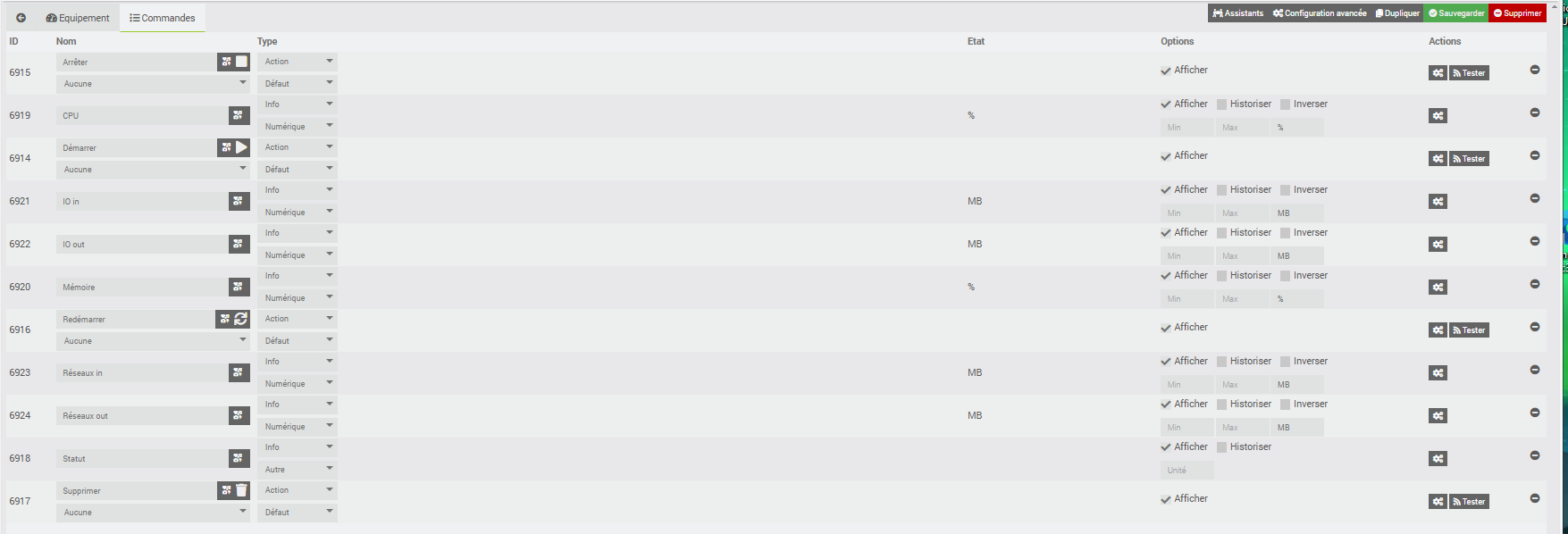
clique sur le bouton tester à coté de la commande démarrer
ci joint les messages d’erreur:
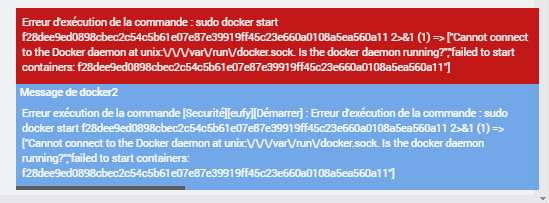
Mouais ton docker est dans les choux …
Tu peux copier ici le log du docker2_packages en texte préformaté ?
0000|+ echo '*******************Begin of package installation******************'
0001|*******************Begin of package installation******************
0002|+ touch /tmp/jeedom_install_in_progress_docker2
0003|+ echo 1
0004|+ echo 2
0005|+ sudo chmod +x /var/www/html/core/class/../../plugins/docker2/resources/pre-install.sh
0006|+ sudo /var/www/html/core/class/../../plugins/docker2/resources/pre-install.sh
0007|Docker arch found : arm64
0008|Hit:1 http://deb.debian.org/debian bullseye InRelease
0009|Hit:2 http://deb.debian.org/debian bullseye-updates InRelease
0010|Get:3 http://security.debian.org/debian-security bullseye-security InRelease [27.2 kB]
0011|Hit:4 https://download.docker.com/linux/debian bullseye InRelease
0012|Hit:5 https://deb.nodesource.com/node_22.x nodistro InRelease
0013|Ign:6 https://repo.distrib.works/apt  InRelease
0014|Ign:7 https://repo.distrib.works/apt  Release
0015|Ign:8 https://repo.distrib.works/apt  Packages
0016|Ign:9 https://repo.distrib.works/apt  Translation-en
0017|Ign:10 https://repo.distrib.works/apt  Translation-fr
0018|Get:8 https://repo.distrib.works/apt  Packages
0019|Ign:9 https://repo.distrib.works/apt  Translation-en
0020|Ign:10 https://repo.distrib.works/apt  Translation-fr
0021|Ign:9 https://repo.distrib.works/apt  Translation-en
0022|Ign:10 https://repo.distrib.works/apt  Translation-fr
0023|Ign:9 https://repo.distrib.works/apt  Translation-en
0024|Ign:10 https://repo.distrib.works/apt  Translation-fr
0025|Ign:9 https://repo.distrib.works/apt  Translation-en
0026|Ign:10 https://repo.distrib.works/apt  Translation-fr
0027|Ign:9 https://repo.distrib.works/apt  Translation-en
0028|Ign:10 https://repo.distrib.works/apt  Translation-fr
0029|Ign:9 https://repo.distrib.works/apt  Translation-en
0030|Ign:10 https://repo.distrib.works/apt  Translation-fr
0031|Fetched 41.0 kB in 3s (15.9 kB/s)
0032|Reading package lists...
0033|+ echo 3
0034|+ sudo killall apt apt-get unattended-upgr
0035|apt: no process found
0036|apt-get: no process found
0037|+ sudo rm /var/lib/apt/lists/lock
0038|+ sudo rm /var/cache/apt/archives/lock
0039|+ sudo rm /var/lib/dpkg/lock /var/lib/dpkg/lock-frontend
0040|+ sudo sudo dpkg --configure -a --force-confdef
0041|+ sudo apt update
0042|WARNING: apt does not have a stable CLI interface. Use with caution in scripts.
0043|Hit:1 http://deb.debian.org/debian bullseye InRelease
0044|Hit:2 http://security.debian.org/debian-security bullseye-security InRelease
0045|Hit:3 http://deb.debian.org/debian bullseye-updates InRelease
0046|Hit:4 https://download.docker.com/linux/debian bullseye InRelease
0047|Hit:5 https://deb.nodesource.com/node_22.x nodistro InRelease
0048|Ign:6 https://repo.distrib.works/apt  InRelease
0049|Ign:7 https://repo.distrib.works/apt  Release
0050|Ign:8 https://repo.distrib.works/apt  Packages
0051|Ign:9 https://repo.distrib.works/apt  Translation-en
0052|Ign:10 https://repo.distrib.works/apt  Translation-fr
0053|Get:8 https://repo.distrib.works/apt  Packages
0054|Ign:9 https://repo.distrib.works/apt  Translation-en
0055|Ign:10 https://repo.distrib.works/apt  Translation-fr
0056|Ign:9 https://repo.distrib.works/apt  Translation-en
0057|Ign:10 https://repo.distrib.works/apt  Translation-fr
0058|Ign:9 https://repo.distrib.works/apt  Translation-en
0059|Ign:10 https://repo.distrib.works/apt  Translation-fr
0060|Ign:9 https://repo.distrib.works/apt  Translation-en
0061|Ign:10 https://repo.distrib.works/apt  Translation-fr
0062|Ign:9 https://repo.distrib.works/apt  Translation-en
0063|Ign:10 https://repo.distrib.works/apt  Translation-fr
0064|Ign:9 https://repo.distrib.works/apt  Translation-en
0065|Ign:10 https://repo.distrib.works/apt  Translation-fr
0066|Fetched 13.8 kB in 3s (5292 B/s)
0067|Reading package lists...
0068|Building dependency tree...
0069|Reading state information...
0070|All packages are up to date.
0071|+ echo 4
0072|+ sudo apt install -o Dpkg::Options::=--force-confdef -y apt-transport-https
0073|WARNING: apt does not have a stable CLI interface. Use with caution in scripts.
0074|Reading package lists...
0075|Building dependency tree...
0076|Reading state information...
0077|apt-transport-https is already the newest version (2.2.4).
0078|0 upgraded, 0 newly installed, 0 to remove and 0 not upgraded.
0079|+ echo 5
0080|+ sudo apt install -o Dpkg::Options::=--force-confdef -y ca-certificates
0081|WARNING: apt does not have a stable CLI interface. Use with caution in scripts.
0082|Reading package lists...
0083|Building dependency tree...
0084|Reading state information...
0085|ca-certificates is already the newest version (20210119).
0086|0 upgraded, 0 newly installed, 0 to remove and 0 not upgraded.
0087|+ echo 6
0088|+ sudo apt install -o Dpkg::Options::=--force-confdef -y curl
0089|WARNING: apt does not have a stable CLI interface. Use with caution in scripts.
0090|Reading package lists...
0091|Building dependency tree...
0092|Reading state information...
0093|curl is already the newest version (7.74.0-1.3+deb11u16).
0094|0 upgraded, 0 newly installed, 0 to remove and 0 not upgraded.
0095|+ echo 7
0096|+ sudo apt install -o Dpkg::Options::=--force-confdef -y gnupg
0097|WARNING: apt does not have a stable CLI interface. Use with caution in scripts.
0098|Reading package lists...
0099|Building dependency tree...
0100|Reading state information...
0101|gnupg is already the newest version (2.2.27-2+deb11u3).
0102|0 upgraded, 0 newly installed, 0 to remove and 0 not upgraded.
0103|+ echo 8
0104|+ sudo apt install -o Dpkg::Options::=--force-confdef -y lsb-release
0105|WARNING: apt does not have a stable CLI interface. Use with caution in scripts.
0106|Reading package lists...
0107|Building dependency tree...
0108|Reading state information...
0109|lsb-release is already the newest version (11.1.0).
0110|0 upgraded, 0 newly installed, 0 to remove and 0 not upgraded.
0111|+ echo 9
0112|+ sudo apt install -o Dpkg::Options::=--force-confdef -y docker-ce
0113|WARNING: apt does not have a stable CLI interface. Use with caution in scripts.
0114|Reading package lists...
0115|Building dependency tree...
0116|Reading state information...
0117|docker-ce is already the newest version (5:29.2.1-1~debian.11~bullseye).
0118|0 upgraded, 0 newly installed, 0 to remove and 0 not upgraded.
0119|+ echo 10
0120|+ sudo apt install -o Dpkg::Options::=--force-confdef -y docker-ce-cli
0121|WARNING: apt does not have a stable CLI interface. Use with caution in scripts.
0122|Reading package lists...
0123|Building dependency tree...
0124|Reading state information...
0125|docker-ce-cli is already the newest version (5:29.2.1-1~debian.11~bullseye).
0126|0 upgraded, 0 newly installed, 0 to remove and 0 not upgraded.
0127|+ echo 11
0128|+ sudo apt install -o Dpkg::Options::=--force-confdef -y containerd.io
0129|WARNING: apt does not have a stable CLI interface. Use with caution in scripts.
0130|Reading package lists...
0131|Building dependency tree...
0132|Reading state information...
0133|containerd.io is already the newest version (2.2.1-1~debian.11~bullseye).
0134|0 upgraded, 0 newly installed, 0 to remove and 0 not upgraded.
0135|+ echo 12
0136|+ sudo chmod +x /var/www/html/core/class/../../plugins/docker2/resources/post-install.sh
0137|+ sudo /var/www/html/core/class/../../plugins/docker2/resources/post-install.sh
0138|% Total    % Received % Xferd  Average Speed   Time    Time     Time  Current
0139|Dload  Upload   Total   Spent    Left  Speed
0140|0     0    0     0    0     0      0      0 --:--:-- --:--:-- --:--:--     0
  0     0    0     0    0     0      0      0 --:--:-- --:--:-- --:--:--     0
  0     0    0     0    0     0      0      0 --:--:-- --:--:-- --:--:--     0
0141|34 22.8M   34 8141k    0     0  6476k      0  0:00:03  0:00:01  0:00:02 6476k
 83 22.8M   83 19.1M    0     0  8673k      0  0:00:02  0:00:02 --:--:-- 11.1M
100 22.8M  100 22.8M    0     0  9026k      0  0:00:02  0:00:02 --:--:-- 11.1M
0142|+ echo 13
0143|+ php /var/www/html/core/class/../php/jeecli.php plugin dependancy_end docker2
0144|+ echo 14
0145|+ rm /tmp/jeedom_install_in_progress_docker2
0146|+ echo '*******************End of package installation******************'
0147|*******************End of package installation******************
Curieux, pas d’erreur à l’installation visiblement pourtant.
Bon bah la désolé je passe mon tour ça dépasse mes compétences sur le sujet.
Pas de problèmes, merci pour ton aide.
Je bais ouvrir un ticket à Jeedom.
Bonne nuit Aurel, je vais me coucher…
Salut
C’est quoi comme HW?
Peux tu lancer ces commandes:
su -
uname -a
cat /proc/cpuinfo
docker info
docker images
Bonjour Rootard,
Désolé mais avec mon niveau de débutant, je ne sais pas ce que veux dire HW.


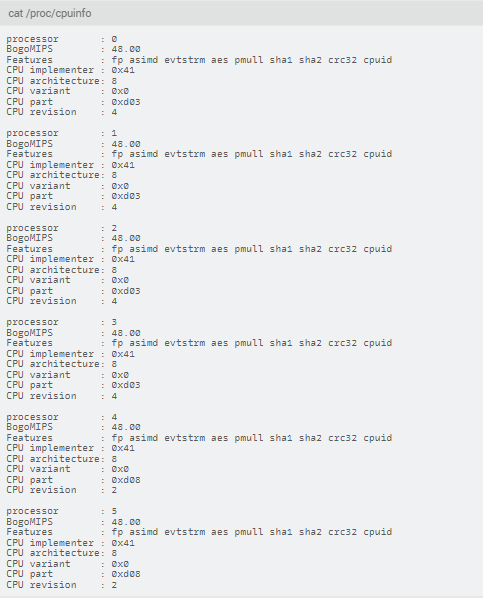
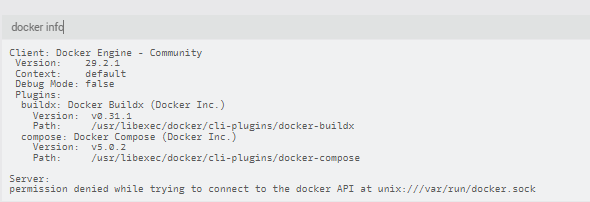

Pourquoi une majuscule à su?
Antoine
Bonjour Tonio,
merci pour la correction
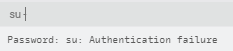
Il faut entrer le mot de passe sudo ensuite. Depuis jeedom je sais pas la manip.
Sous ssh (putty) il y a un prompt pour.
Antoine
Pour information, j’ai peux être fait une erreur de débutant.
J’ai supprimé le plugin Docker et je l’ai ensuite réinstallé.
Avant j’avais

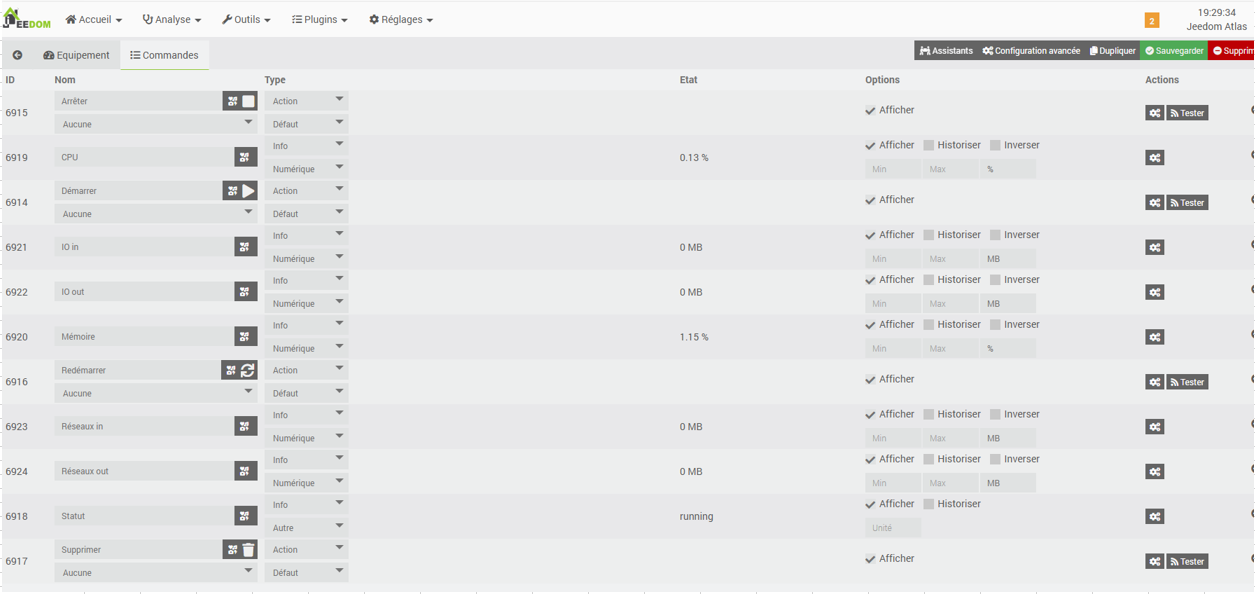
Maintenant j’ai

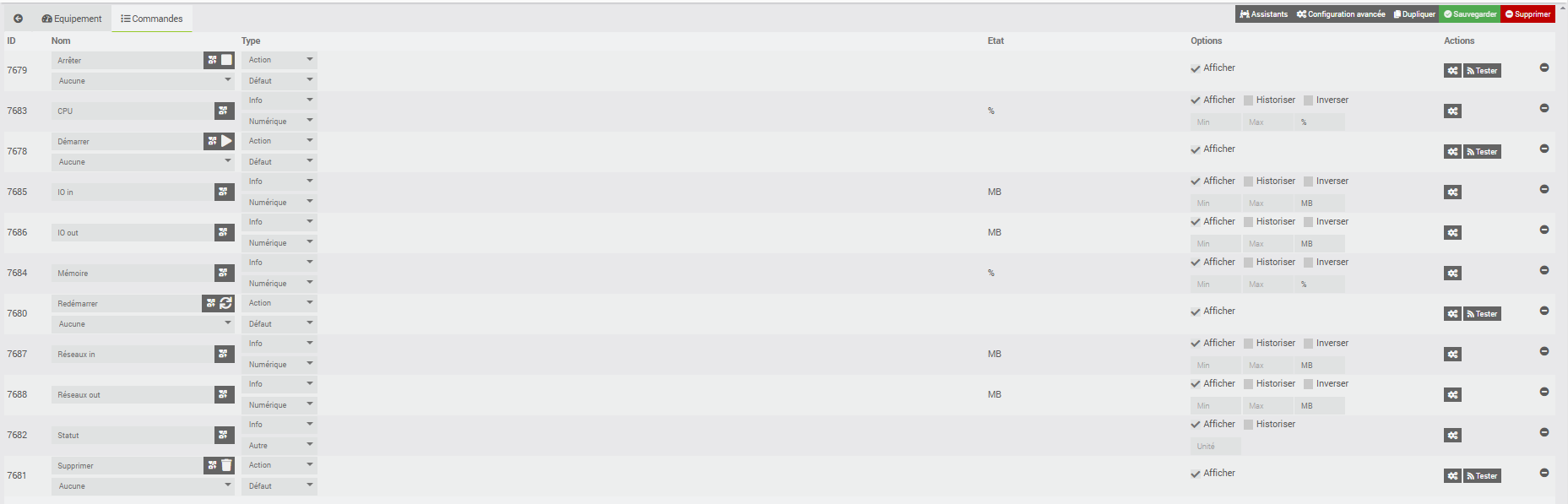
Est il maintenant possible de le réinstaller correctement ?
ca ressemble à ce problème que j’avais pourtant résolu
@jlp035 si tu n’as pas installé ssh essaies ceci:
vas dans reglages > systeme > configuration > OS/DB > administration systeme
et tapes:
sudo docker info
partages tes logs sous forme texte preformaté avec l’outil d’édition </> pluto qu’en image merci
Rootard,
ci dessous le retour de la commande
Client: Docker Engine - Community
 Version:    29.2.1
 Context:    default
 Debug Mode: false
 Plugins:
  buildx: Docker Buildx (Docker Inc.)
    Version:  v0.31.1
    Path:     /usr/libexec/docker/cli-plugins/docker-buildx
  compose: Docker Compose (Docker Inc.)
    Version:  v5.0.2
    Path:     /usr/libexec/docker/cli-plugins/docker-compose

Server:
Cannot connect to the Docker daemon at unix:///var/run/docker.sock. Is the docker daemon running?
d’accord avec @Aurel ton docker est HS.
Essaies de reinstaller le plugin docker et relances cette commande stp
Pour reinstaller le plugin docker correctement, il faut le supprimer dans le module configuration de docker ou aller dans le centre de mise à jour et appuyer sur supprimer ou appuyer sur reinstaller ?
L’un ou l’autre devrait avoir le même effet.
Commence par cliquer sur réinstaller depuis le centre de maj c’est sans doute le plus simple à essayer dans un 1er temps.
Bonjour Aurel,
Je viens de valider la fonction réinstallé, que faut il vérifier et valider maintenant ?