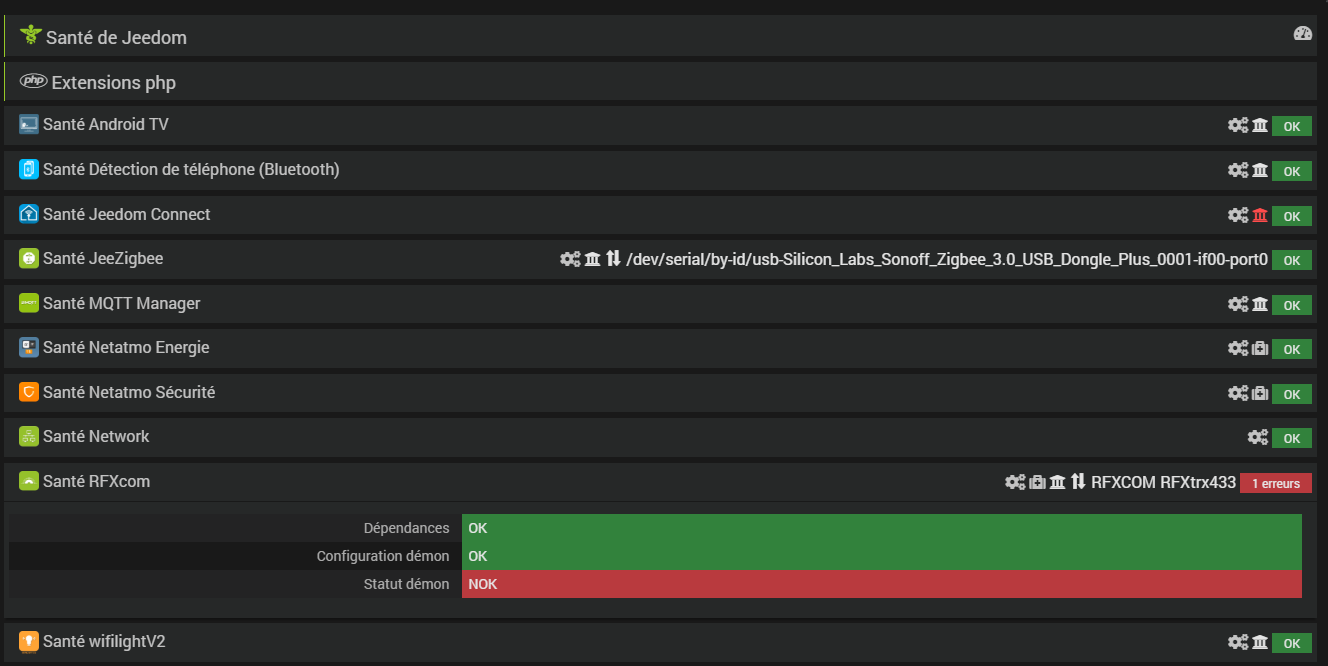
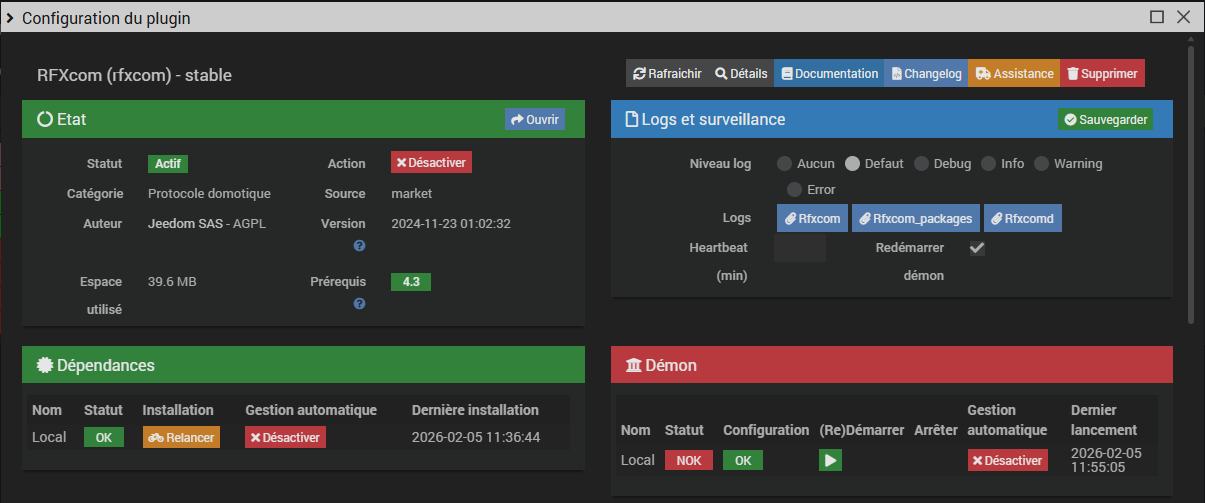
Je n’ai pas vu d’erreur dans le log Rxfcom_Package, uniquement des warnings. Je le poste tout de même.
+ echo '*******************Begin of package installation******************'
*******************Begin of package installation******************
+ touch /tmp/jeedom_install_in_progress_rfxcom
+ echo 1
+ echo 2
+ sudo chmod +x /var/www/html/core/class/../../plugins/rfxcom/resources/pre-install.sh
+ sudo /var/www/html/core/class/../../plugins/rfxcom/resources/pre-install.sh
Launch pre-install of rfxcom dependancy
error: externally-managed-environment
× This environment is externally managed
╰─> To install Python packages system-wide, try apt install
python3-xyz, where xyz is the package you are trying to
install.
If you wish to install a non-Debian-packaged Python package,
create a virtual environment using python3 -m venv path/to/venv.
Then use path/to/venv/bin/python and path/to/venv/bin/pip. Make
sure you have python3-full installed.
For more information visit http://rptl.io/venv
note: If you believe this is a mistake, please contact your Python installation or OS distribution provider. You can override this, at the risk of breaking your Python installation or OS, by passing --break-system-packages.
hint: See PEP 668 for the detailed specification.
WARNING: apt does not have a stable CLI interface. Use with caution in scripts.
Reading package lists...
Building dependency tree...
Reading state information...
Package 'python3-serial' is not installed, so not removed
The following packages were automatically installed and are no longer required:
avahi-utils gir1.2-handy-1 gir1.2-polkit-1.0 libbasicusageenvironment1
libc++1-16 libc++abi1-16 libcamera0.4 libgroupsock8 liblivemedia77
libunwind-16 linux-headers-6.6.51+rpt-common-rpi
linux-headers-6.6.51+rpt-rpi-2712 linux-headers-6.6.51+rpt-rpi-v8
linux-image-6.6.51+rpt-rpi-2712 linux-image-6.6.51+rpt-rpi-v8
linux-kbuild-6.6.51+rpt python3-v4l2
Use 'sudo apt autoremove' to remove them.
0 upgraded, 0 newly installed, 0 to remove and 0 not upgraded.
+ echo 3
+ sudo killall apt apt-get unattended-upgr
apt: no process found
apt-get: no process found
unattended-upgr: no process found
+ sudo rm /var/lib/apt/lists/lock
+ sudo rm /var/cache/apt/archives/lock
+ sudo rm /var/lib/dpkg/lock /var/lib/dpkg/lock-frontend
+ sudo sudo dpkg --configure -a --force-confdef
+ sudo apt update
WARNING: apt does not have a stable CLI interface. Use with caution in scripts.
Hit:1 http://deb.debian.org/debian bookworm InRelease
Hit:2 http://deb.debian.org/debian-security bookworm-security InRelease
Hit:3 http://deb.debian.org/debian bookworm-updates InRelease
Hit:4 http://archive.raspberrypi.com/debian bookworm InRelease
Hit:5 https://deb.nodesource.com/node_22.x nodistro InRelease
Reading package lists...
Building dependency tree...
Reading state information...
All packages are up to date.
+ echo 4
+ sudo apt install -o Dpkg::Options::=--force-confdef -y python3
WARNING: apt does not have a stable CLI interface. Use with caution in scripts.
Reading package lists...
Building dependency tree...
Reading state information...
python3 is already the newest version (3.11.2-1+b1).
The following packages were automatically installed and are no longer required:
avahi-utils gir1.2-handy-1 gir1.2-polkit-1.0 libbasicusageenvironment1
libc++1-16 libc++abi1-16 libcamera0.4 libgroupsock8 liblivemedia77
libunwind-16 linux-headers-6.6.51+rpt-common-rpi
linux-headers-6.6.51+rpt-rpi-2712 linux-headers-6.6.51+rpt-rpi-v8
linux-image-6.6.51+rpt-rpi-2712 linux-image-6.6.51+rpt-rpi-v8
linux-kbuild-6.6.51+rpt python3-v4l2
Use 'sudo apt autoremove' to remove them.
0 upgraded, 0 newly installed, 0 to remove and 0 not upgraded.
+ echo 5
+ sudo apt install -o Dpkg::Options::=--force-confdef -y python3-pip
WARNING: apt does not have a stable CLI interface. Use with caution in scripts.
Reading package lists...
Building dependency tree...
Reading state information...
python3-pip is already the newest version (23.0.1+dfsg-1+rpt1).
The following packages were automatically installed and are no longer required:
avahi-utils gir1.2-handy-1 gir1.2-polkit-1.0 libbasicusageenvironment1
libc++1-16 libc++abi1-16 libcamera0.4 libgroupsock8 liblivemedia77
libunwind-16 linux-headers-6.6.51+rpt-common-rpi
linux-headers-6.6.51+rpt-rpi-2712 linux-headers-6.6.51+rpt-rpi-v8
linux-image-6.6.51+rpt-rpi-2712 linux-image-6.6.51+rpt-rpi-v8
linux-kbuild-6.6.51+rpt python3-v4l2
Use 'sudo apt autoremove' to remove them.
0 upgraded, 0 newly installed, 0 to remove and 0 not upgraded.
+ echo 6
+ sudo apt install -o Dpkg::Options::=--force-confdef -y build-essential
WARNING: apt does not have a stable CLI interface. Use with caution in scripts.
Reading package lists...
Building dependency tree...
Reading state information...
build-essential is already the newest version (12.9).
The following packages were automatically installed and are no longer required:
avahi-utils gir1.2-handy-1 gir1.2-polkit-1.0 libbasicusageenvironment1
libc++1-16 libc++abi1-16 libcamera0.4 libgroupsock8 liblivemedia77
libunwind-16 linux-headers-6.6.51+rpt-common-rpi
linux-headers-6.6.51+rpt-rpi-2712 linux-headers-6.6.51+rpt-rpi-v8
linux-image-6.6.51+rpt-rpi-2712 linux-image-6.6.51+rpt-rpi-v8
linux-kbuild-6.6.51+rpt python3-v4l2
Use 'sudo apt autoremove' to remove them.
0 upgraded, 0 newly installed, 0 to remove and 0 not upgraded.
+ echo 7
+ sudo apt install -o Dpkg::Options::=--force-confdef -y python3-pyudev
WARNING: apt does not have a stable CLI interface. Use with caution in scripts.
Reading package lists...
Building dependency tree...
Reading state information...
python3-pyudev is already the newest version (0.24.0-1).
The following packages were automatically installed and are no longer required:
avahi-utils gir1.2-handy-1 gir1.2-polkit-1.0 libbasicusageenvironment1
libc++1-16 libc++abi1-16 libcamera0.4 libgroupsock8 liblivemedia77
libunwind-16 linux-headers-6.6.51+rpt-common-rpi
linux-headers-6.6.51+rpt-rpi-2712 linux-headers-6.6.51+rpt-rpi-v8
linux-image-6.6.51+rpt-rpi-2712 linux-image-6.6.51+rpt-rpi-v8
linux-kbuild-6.6.51+rpt python3-v4l2
Use 'sudo apt autoremove' to remove them.
0 upgraded, 0 newly installed, 0 to remove and 0 not upgraded.
+ echo 8
+ sudo apt install -o Dpkg::Options::=--force-confdef -y python3-dev
WARNING: apt does not have a stable CLI interface. Use with caution in scripts.
Reading package lists...
Building dependency tree...
Reading state information...
python3-dev is already the newest version (3.11.2-1+b1).
The following packages were automatically installed and are no longer required:
avahi-utils gir1.2-handy-1 gir1.2-polkit-1.0 libbasicusageenvironment1
libc++1-16 libc++abi1-16 libcamera0.4 libgroupsock8 liblivemedia77
libunwind-16 linux-headers-6.6.51+rpt-common-rpi
linux-headers-6.6.51+rpt-rpi-2712 linux-headers-6.6.51+rpt-rpi-v8
linux-image-6.6.51+rpt-rpi-2712 linux-image-6.6.51+rpt-rpi-v8
linux-kbuild-6.6.51+rpt python3-v4l2
Use 'sudo apt autoremove' to remove them.
0 upgraded, 0 newly installed, 0 to remove and 0 not upgraded.
+ echo 9
+ sudo apt install -o Dpkg::Options::=--force-confdef -y python3-requests
WARNING: apt does not have a stable CLI interface. Use with caution in scripts.
Reading package lists...
Building dependency tree...
Reading state information...
python3-requests is already the newest version (2.28.1+dfsg-1).
The following packages were automatically installed and are no longer required:
avahi-utils gir1.2-handy-1 gir1.2-polkit-1.0 libbasicusageenvironment1
libc++1-16 libc++abi1-16 libcamera0.4 libgroupsock8 liblivemedia77
libunwind-16 linux-headers-6.6.51+rpt-common-rpi
linux-headers-6.6.51+rpt-rpi-2712 linux-headers-6.6.51+rpt-rpi-v8
linux-image-6.6.51+rpt-rpi-2712 linux-image-6.6.51+rpt-rpi-v8
linux-kbuild-6.6.51+rpt python3-v4l2
Use 'sudo apt autoremove' to remove them.
0 upgraded, 0 newly installed, 0 to remove and 0 not upgraded.
+ echo 10
+ sudo apt install -o Dpkg::Options::=--force-confdef -y python3-setuptools
WARNING: apt does not have a stable CLI interface. Use with caution in scripts.
Reading package lists...
Building dependency tree...
Reading state information...
python3-setuptools is already the newest version (66.1.1-1+deb12u2).
The following packages were automatically installed and are no longer required:
avahi-utils gir1.2-handy-1 gir1.2-polkit-1.0 libbasicusageenvironment1
libc++1-16 libc++abi1-16 libcamera0.4 libgroupsock8 liblivemedia77
libunwind-16 linux-headers-6.6.51+rpt-common-rpi
linux-headers-6.6.51+rpt-rpi-2712 linux-headers-6.6.51+rpt-rpi-v8
linux-image-6.6.51+rpt-rpi-2712 linux-image-6.6.51+rpt-rpi-v8
linux-kbuild-6.6.51+rpt python3-v4l2
Use 'sudo apt autoremove' to remove them.
0 upgraded, 0 newly installed, 0 to remove and 0 not upgraded.
+ echo 11
+ sudo apt update
WARNING: apt does not have a stable CLI interface. Use with caution in scripts.
Hit:1 http://deb.debian.org/debian bookworm InRelease
Hit:2 http://deb.debian.org/debian-security bookworm-security InRelease
Hit:3 http://deb.debian.org/debian bookworm-updates InRelease
Hit:4 http://archive.raspberrypi.com/debian bookworm InRelease
Hit:5 https://deb.nodesource.com/node_22.x nodistro InRelease
Reading package lists...
Building dependency tree...
Reading state information...
All packages are up to date.
+ sudo apt-get install -y python3 python3-pip python3-dev python3-venv
Reading package lists...
Building dependency tree...
Reading state information...
python3 is already the newest version (3.11.2-1+b1).
python3-pip is already the newest version (23.0.1+dfsg-1+rpt1).
python3-dev is already the newest version (3.11.2-1+b1).
python3-venv is already the newest version (3.11.2-1+b1).
The following packages were automatically installed and are no longer required:
avahi-utils gir1.2-handy-1 gir1.2-polkit-1.0 libbasicusageenvironment1
libc++1-16 libc++abi1-16 libcamera0.4 libgroupsock8 liblivemedia77
libunwind-16 linux-headers-6.6.51+rpt-common-rpi
linux-headers-6.6.51+rpt-rpi-2712 linux-headers-6.6.51+rpt-rpi-v8
linux-image-6.6.51+rpt-rpi-2712 linux-image-6.6.51+rpt-rpi-v8
linux-kbuild-6.6.51+rpt python3-v4l2
Use 'sudo apt autoremove' to remove them.
0 upgraded, 0 newly installed, 0 to remove and 0 not upgraded.
+ echo 12
+ sudo python3 -m venv --upgrade-deps /var/www/html/core/class/../../plugins/rfxcom/resources/python_venv
error: uninstall-no-record-file
× Cannot uninstall setuptools None
╰─> The package's contents are unknown: no RECORD file was found for setuptools.
hint: You might be able to recover from this via: pip install --force-reinstall --no-deps setuptools==76.0.0
Error: Command '['/var/www/html/plugins/rfxcom/resources/python_venv/bin/python3', '-m', 'pip', 'install', '--upgrade', 'pip', 'setuptools']' returned non-zero exit status 1.
+ echo 13
+ sudo /var/www/html/core/class/../../plugins/rfxcom/resources/python_venv/bin/python3 -m pip install --upgrade pip wheel
Looking in indexes: https://pypi.org/simple, https://www.piwheels.org/simple
Requirement already satisfied: pip in /var/www/html/plugins/rfxcom/resources/python_venv/lib/python3.11/site-packages (26.0)
Collecting pip
Using cached pip-26.0.1-py3-none-any.whl.metadata (4.7 kB)
Requirement already satisfied: wheel in /var/www/html/plugins/rfxcom/resources/python_venv/lib/python3.11/site-packages (0.45.1)
Collecting wheel
Using cached wheel-0.46.3-py3-none-any.whl.metadata (2.4 kB)
Requirement already satisfied: packaging>=24.0 in /var/www/html/plugins/rfxcom/resources/python_venv/lib/python3.11/site-packages (from wheel) (26.0)
Using cached pip-26.0.1-py3-none-any.whl (1.8 MB)
Using cached wheel-0.46.3-py3-none-any.whl (30 kB)
Installing collected packages: wheel, pip
Attempting uninstall: wheel
Found existing installation: wheel None
error: uninstall-no-record-file
× Cannot uninstall wheel None
╰─> The package's contents are unknown: no RECORD file was found for wheel.
hint: You might be able to recover from this via: pip install --force-reinstall --no-deps wheel==0.45.1
+ echo 14
+ sudo /var/www/html/core/class/../../plugins/rfxcom/resources/python_venv/bin/python3 -m pip install --force-reinstall --upgrade six
Looking in indexes: https://pypi.org/simple, https://www.piwheels.org/simple
Collecting six
Using cached https://www.piwheels.org/simple/six/six-1.17.0-py2.py3-none-any.whl (11 kB)
Installing collected packages: six
Attempting uninstall: six
Found existing installation: six None
error: uninstall-no-record-file
× Cannot uninstall six None
╰─> The package's contents are unknown: no RECORD file was found for six.
hint: You might be able to recover from this via: pip install --force-reinstall --no-deps six==1.17.0
+ echo 15
+ sudo /var/www/html/core/class/../../plugins/rfxcom/resources/python_venv/bin/python3 -m pip install --force-reinstall --upgrade requests
Looking in indexes: https://pypi.org/simple, https://www.piwheels.org/simple
Collecting requests
Using cached https://www.piwheels.org/simple/requests/requests-2.32.5-py3-none-any.whl (64 kB)
Collecting charset_normalizer<4,>=2 (from requests)
Using cached charset_normalizer-3.4.4-cp311-cp311-manylinux2014_aarch64.manylinux_2_17_aarch64.manylinux_2_28_aarch64.whl.metadata (37 kB)
Collecting idna<4,>=2.5 (from requests)
Using cached https://www.piwheels.org/simple/idna/idna-3.11-py3-none-any.whl (71 kB)
Collecting urllib3<3,>=1.21.1 (from requests)
Using cached https://www.piwheels.org/simple/urllib3/urllib3-2.6.3-py3-none-any.whl (131 kB)
Collecting certifi>=2017.4.17 (from requests)
Using cached https://www.piwheels.org/simple/certifi/certifi-2026.1.4-py3-none-any.whl (152 kB)
Using cached charset_normalizer-3.4.4-cp311-cp311-manylinux2014_aarch64.manylinux_2_17_aarch64.manylinux_2_28_aarch64.whl (147 kB)
Installing collected packages: urllib3, idna, charset_normalizer, certifi, requests
Attempting uninstall: urllib3
Found existing installation: urllib3 None
error: uninstall-no-record-file
× Cannot uninstall urllib3 None
╰─> The package's contents are unknown: no RECORD file was found for urllib3.
hint: You might be able to recover from this via: pip install --force-reinstall --no-deps urllib3==2.3.0
+ echo 16
+ sudo /var/www/html/core/class/../../plugins/rfxcom/resources/python_venv/bin/python3 -m pip install --force-reinstall --upgrade setuptools
Looking in indexes: https://pypi.org/simple, https://www.piwheels.org/simple
Collecting setuptools
Using cached setuptools-80.10.2-py3-none-any.whl.metadata (6.6 kB)
Using cached setuptools-80.10.2-py3-none-any.whl (1.1 MB)
Installing collected packages: setuptools
Attempting uninstall: setuptools
Found existing installation: setuptools None
error: uninstall-no-record-file
× Cannot uninstall setuptools None
╰─> The package's contents are unknown: no RECORD file was found for setuptools.
hint: You might be able to recover from this via: pip install --force-reinstall --no-deps setuptools==76.0.0
+ echo 17
+ sudo /var/www/html/core/class/../../plugins/rfxcom/resources/python_venv/bin/python3 -m pip install --force-reinstall --upgrade pyudev
Looking in indexes: https://pypi.org/simple, https://www.piwheels.org/simple
Collecting pyudev
Using cached https://www.piwheels.org/simple/pyudev/pyudev-0.24.4-py3-none-any.whl (62 kB)
Installing collected packages: pyudev
Attempting uninstall: pyudev
Found existing installation: pyudev None
error: uninstall-no-record-file
× Cannot uninstall pyudev None
╰─> The package's contents are unknown: no RECORD file was found for pyudev.
hint: You might be able to recover from this via: pip install --force-reinstall --no-deps pyudev==0.24.3
+ echo 18
+ sudo /var/www/html/core/class/../../plugins/rfxcom/resources/python_venv/bin/python3 -m pip install --force-reinstall --upgrade pyserial
Looking in indexes: https://pypi.org/simple, https://www.piwheels.org/simple
Collecting pyserial
Using cached https://www.piwheels.org/simple/pyserial/pyserial-3.5-py2.py3-none-any.whl (90 kB)
Installing collected packages: pyserial
Attempting uninstall: pyserial
Found existing installation: pyserial None
error: uninstall-no-record-file
× Cannot uninstall pyserial None
╰─> The package's contents are unknown: no RECORD file was found for pyserial.
hint: You might be able to recover from this via: pip install --force-reinstall --no-deps pyserial==3.5
+ echo 19
+ sudo /var/www/html/core/class/../../plugins/rfxcom/resources/python_venv/bin/python3 -m pip install --force-reinstall --upgrade jeedomdaemon
Looking in indexes: https://pypi.org/simple, https://www.piwheels.org/simple
Collecting jeedomdaemon
Using cached https://www.piwheels.org/simple/jeedomdaemon/jeedomdaemon-1.2.9-py3-none-any.whl (10 kB)
Collecting aiohttp (from jeedomdaemon)
Using cached aiohttp-3.13.3-cp311-cp311-manylinux2014_aarch64.manylinux_2_17_aarch64.manylinux_2_28_aarch64.whl.metadata (8.1 kB)
Collecting aiohappyeyeballs>=2.5.0 (from aiohttp->jeedomdaemon)
Using cached https://www.piwheels.org/simple/aiohappyeyeballs/aiohappyeyeballs-2.6.1-py3-none-any.whl (15 kB)
Collecting aiosignal>=1.4.0 (from aiohttp->jeedomdaemon)
Using cached https://www.piwheels.org/simple/aiosignal/aiosignal-1.4.0-py3-none-any.whl (7.5 kB)
Collecting attrs>=17.3.0 (from aiohttp->jeedomdaemon)
Using cached https://www.piwheels.org/simple/attrs/attrs-25.4.0-py3-none-any.whl (67 kB)
Collecting frozenlist>=1.1.1 (from aiohttp->jeedomdaemon)
Using cached frozenlist-1.8.0-cp311-cp311-manylinux2014_aarch64.manylinux_2_17_aarch64.manylinux_2_28_aarch64.whl.metadata (20 kB)
Collecting multidict<7.0,>=4.5 (from aiohttp->jeedomdaemon)
Using cached multidict-6.7.1-cp311-cp311-manylinux2014_aarch64.manylinux_2_17_aarch64.manylinux_2_28_aarch64.whl.metadata (5.3 kB)
Collecting propcache>=0.2.0 (from aiohttp->jeedomdaemon)
Using cached propcache-0.4.1-cp311-cp311-manylinux2014_aarch64.manylinux_2_17_aarch64.manylinux_2_28_aarch64.whl.metadata (13 kB)
Collecting yarl<2.0,>=1.17.0 (from aiohttp->jeedomdaemon)
Using cached yarl-1.22.0-cp311-cp311-manylinux2014_aarch64.manylinux_2_17_aarch64.manylinux_2_28_aarch64.whl.metadata (75 kB)
Collecting idna>=2.0 (from yarl<2.0,>=1.17.0->aiohttp->jeedomdaemon)
Using cached https://www.piwheels.org/simple/idna/idna-3.11-py3-none-any.whl (71 kB)
Collecting typing-extensions>=4.2 (from aiosignal>=1.4.0->aiohttp->jeedomdaemon)
Using cached https://www.piwheels.org/simple/typing-extensions/typing_extensions-4.15.0-py3-none-any.whl (44 kB)
Using cached aiohttp-3.13.3-cp311-cp311-manylinux2014_aarch64.manylinux_2_17_aarch64.manylinux_2_28_aarch64.whl (1.7 MB)
Using cached multidict-6.7.1-cp311-cp311-manylinux2014_aarch64.manylinux_2_17_aarch64.manylinux_2_28_aarch64.whl (246 kB)
Using cached yarl-1.22.0-cp311-cp311-manylinux2014_aarch64.manylinux_2_17_aarch64.manylinux_2_28_aarch64.whl (368 kB)
Using cached frozenlist-1.8.0-cp311-cp311-manylinux2014_aarch64.manylinux_2_17_aarch64.manylinux_2_28_aarch64.whl (233 kB)
Using cached propcache-0.4.1-cp311-cp311-manylinux2014_aarch64.manylinux_2_17_aarch64.manylinux_2_28_aarch64.whl (214 kB)
Installing collected packages: typing-extensions, propcache, multidict, idna, frozenlist, attrs, aiohappyeyeballs, yarl, aiosignal, aiohttp, jeedomdaemon
Attempting uninstall: typing-extensions
Found existing installation: typing_extensions 4.15.0
Uninstalling typing_extensions-4.15.0:
Successfully uninstalled typing_extensions-4.15.0
Attempting uninstall: propcache
Found existing installation: propcache None
error: uninstall-no-record-file
× Cannot uninstall propcache None
╰─> The package's contents are unknown: no RECORD file was found for propcache.
hint: You might be able to recover from this via: pip install --force-reinstall --no-deps propcache==0.3.0
+ echo 20
+ php /var/www/html/core/class/../php/jeecli.php plugin dependancy_end rfxcom
+ echo 21
+ rm /tmp/jeedom_install_in_progress_rfxcom
+ echo '*******************End of package installation******************'
*******************End of package installation******************
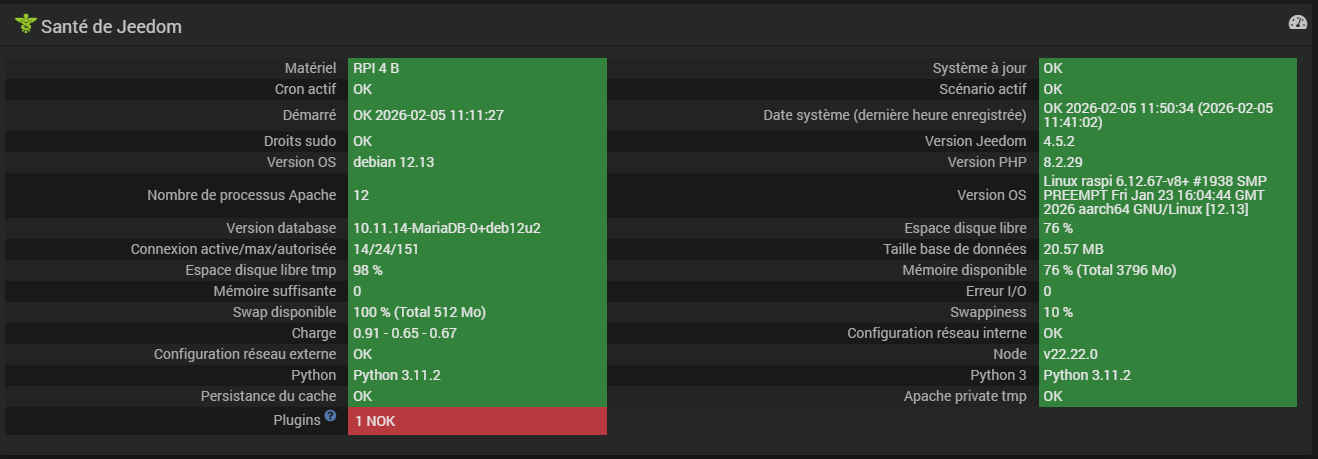
Pour ce qui est de l’installation du debian, ce doit être la même car le SSD était un clone de la carte fait il y a peu de temps.