Bonjour,
j’ai modernisé mon installation, frappée par le blocage des scénarios en version 4.4 depuis début 2026. Depuis, tout fonctionne bien sauf le plugin RFXCOM, avec le firmware préalablement porté à la version 1051 que j’ai lu compatible sur ce forum. Les dépendances d’installent manifestement bien, mais le démon ne se lance pas. J’ai essayé les dernières versions beta, sans plus de succés.
Si vous aves des idées… Merci d’avance!
Olivier
Les éléments de santé / LOG (désolé, en tant que « nouveau », je n’ai droit qu’à 2 media):

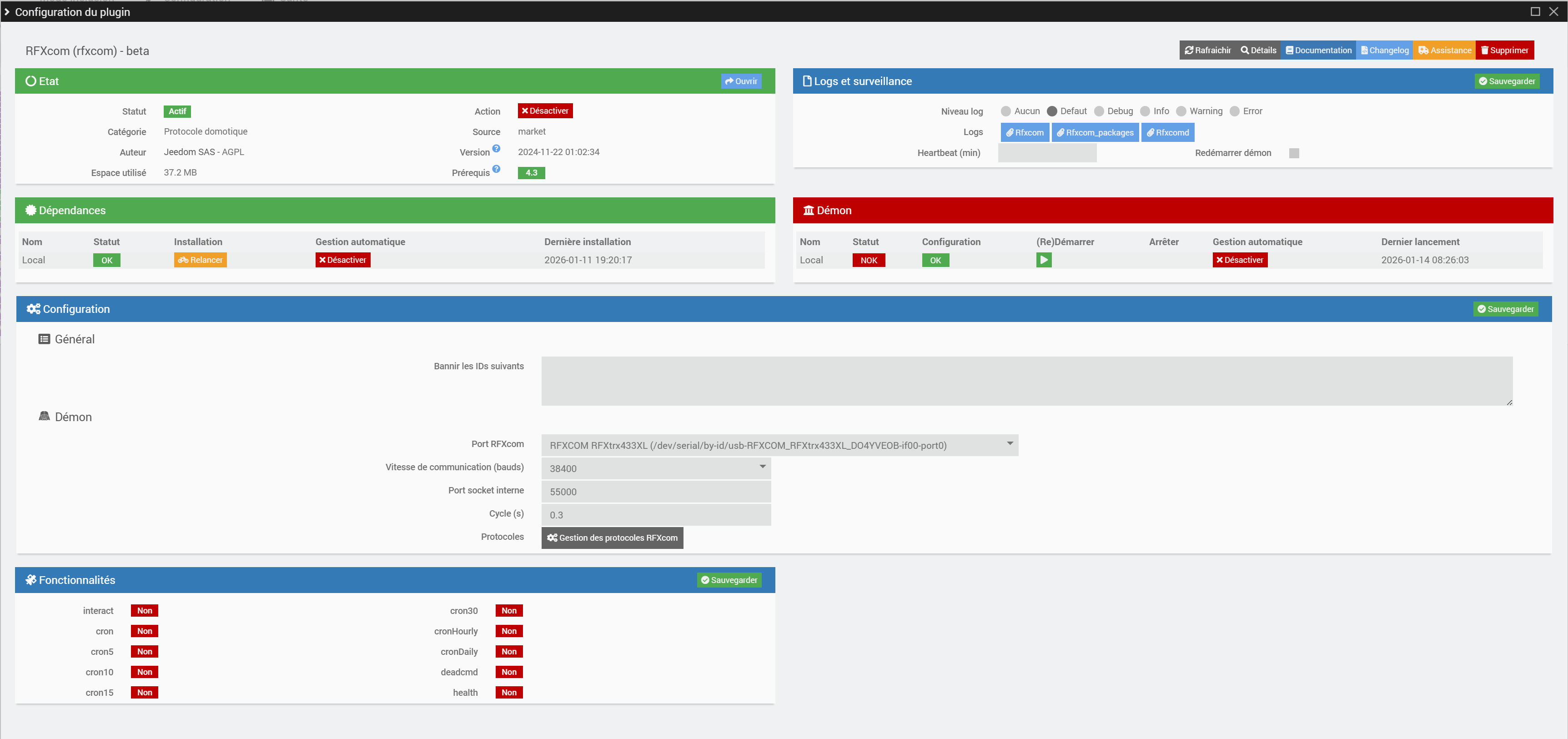
LOG plugin:
[2026-01-14 08:26:03] ERROR  Attention je pense qu'il y a un soucis avec le démon que j'ai relancé plus de 3 fois consécutivement
[2026-01-14 08:26:35] ERROR  Impossible de lancer le démon RFXcom, vérifiez le log rfxcmd
[2026-01-14 08:30:03] ERROR  Attention je pense qu'il y a un soucis avec le démon que j'ai relancé plus de 3 fois consécutivement
[2026-01-14 08:30:35] ERROR  Impossible de lancer le démon RFXcom, vérifiez le log rfxcmd
[2026-01-14 08:35:03] ERROR  Attention je pense qu'il y a un soucis avec le démon que j'ai relancé plus de 3 fois consécutivement
[2026-01-14 08:35:35] ERROR  Impossible de lancer le démon RFXcom, vérifiez le log rfxcmd
LOG RFXCOMD
ModuleNotFoundError: No module named 'jeedomdaemon.base_config'
Traceback (most recent call last):
File "/var/www/html/plugins/rfxcom/resources/rfxcomd/rfxcomd.py", line 23, in <module>
from jeedomdaemon.base_config import BaseConfig
ModuleNotFoundError: No module named 'jeedomdaemon.base_config'
Traceback (most recent call last):
File "/var/www/html/plugins/rfxcom/resources/rfxcomd/rfxcomd.py", line 23, in <module>
from jeedomdaemon.base_config import BaseConfig
ModuleNotFoundError: No module named 'jeedomdaemon.base_config'
+ echo '*******************Begin of package installation******************'
*******************Begin of package installation******************
+ touch /tmp/jeedom_install_in_progress_rfxcom
+ echo 1
+ echo 2
+ sudo chmod +x /var/www/html/core/class/../../plugins/rfxcom/resources/pre-install.sh
+ sudo /var/www/html/core/class/../../plugins/rfxcom/resources/pre-install.sh
Launch pre-install of rfxcom dependancy
error: externally-managed-environment
× This environment is externally managed
╰─> To install Python packages system-wide, try apt install
python3-xyz, where xyz is the package you are trying to
install.
If you wish to install a non-Debian-packaged Python package,
create a virtual environment using python3 -m venv path/to/venv.
Then use path/to/venv/bin/python and path/to/venv/bin/pip. Make
sure you have python3-full installed.
For more information visit http://rptl.io/venv
note: If you believe this is a mistake, please contact your Python installation or OS distribution provider. You can override this, at the risk of breaking your Python installation or OS, by passing --break-system-packages.
hint: See PEP 668 for the detailed specification.
WARNING: apt does not have a stable CLI interface. Use with caution in scripts.
Reading package lists...
Building dependency tree...
Reading state information...
Package 'python3-serial' is not installed, so not removed
0 upgraded, 0 newly installed, 0 to remove and 0 not upgraded.
+ echo 3
+ sudo killall apt apt-get unattended-upgr
apt: no process found
apt-get: no process found
unattended-upgr: no process found
+ sudo rm /var/lib/apt/lists/lock
+ sudo rm /var/cache/apt/archives/lock
+ sudo rm /var/lib/dpkg/lock /var/lib/dpkg/lock-frontend
+ sudo sudo dpkg --configure -a --force-confdef
+ sudo apt update
WARNING: apt does not have a stable CLI interface. Use with caution in scripts.
Hit:1 http://archive.raspberrypi.com/debian bookworm InRelease
Hit:2 https://deb.nodesource.com/node_22.x nodistro InRelease
Hit:3 http://raspbian.raspberrypi.com/raspbian bookworm InRelease
Reading package lists...
Building dependency tree...
Reading state information...
All packages are up to date.
W: http://raspbian.raspberrypi.com/raspbian/dists/bookworm/InRelease: Key is stored in legacy trusted.gpg keyring (/etc/apt/trusted.gpg), see the DEPRECATION section in apt-key(8) for details.
+ echo 4
+ sudo apt install -o Dpkg::Options::=--force-confdef -y python3
WARNING: apt does not have a stable CLI interface. Use with caution in scripts.
Reading package lists...
Building dependency tree...
Reading state information...
python3 is already the newest version (3.11.2-1).
0 upgraded, 0 newly installed, 0 to remove and 0 not upgraded.
+ echo 5
+ sudo apt install -o Dpkg::Options::=--force-confdef -y python3-pip
WARNING: apt does not have a stable CLI interface. Use with caution in scripts.
Reading package lists...
Building dependency tree...
Reading state information...
python3-pip is already the newest version (23.0.1+dfsg-1+rpt1).
0 upgraded, 0 newly installed, 0 to remove and 0 not upgraded.
+ echo 6
+ sudo apt install -o Dpkg::Options::=--force-confdef -y build-essential
WARNING: apt does not have a stable CLI interface. Use with caution in scripts.
Reading package lists...
Building dependency tree...
Reading state information...
build-essential is already the newest version (12.9).
0 upgraded, 0 newly installed, 0 to remove and 0 not upgraded.
+ echo 7
+ sudo apt install -o Dpkg::Options::=--force-confdef -y python3-pyudev
WARNING: apt does not have a stable CLI interface. Use with caution in scripts.
Reading package lists...
Building dependency tree...
Reading state information...
python3-pyudev is already the newest version (0.24.0-1).
0 upgraded, 0 newly installed, 0 to remove and 0 not upgraded.
+ echo 8
+ sudo apt install -o Dpkg::Options::=--force-confdef -y python3-dev
WARNING: apt does not have a stable CLI interface. Use with caution in scripts.
Reading package lists...
Building dependency tree...
Reading state information...
python3-dev is already the newest version (3.11.2-1).
0 upgraded, 0 newly installed, 0 to remove and 0 not upgraded.
+ echo 9
+ sudo apt install -o Dpkg::Options::=--force-confdef -y python3-requests
WARNING: apt does not have a stable CLI interface. Use with caution in scripts.
Reading package lists...
Building dependency tree...
Reading state information...
python3-requests is already the newest version (2.28.1+dfsg-1).
0 upgraded, 0 newly installed, 0 to remove and 0 not upgraded.
+ echo 10
+ sudo apt install -o Dpkg::Options::=--force-confdef -y python3-setuptools
WARNING: apt does not have a stable CLI interface. Use with caution in scripts.
Reading package lists...
Building dependency tree...
Reading state information...
python3-setuptools is already the newest version (66.1.1-1+deb12u2).
0 upgraded, 0 newly installed, 0 to remove and 0 not upgraded.
+ echo 11
+ sudo apt update
WARNING: apt does not have a stable CLI interface. Use with caution in scripts.
Hit:1 http://raspbian.raspberrypi.com/raspbian bookworm InRelease
Hit:2 http://archive.raspberrypi.com/debian bookworm InRelease
Hit:3 https://deb.nodesource.com/node_22.x nodistro InRelease
Reading package lists...
Building dependency tree...
Reading state information...
All packages are up to date.
W: http://raspbian.raspberrypi.com/raspbian/dists/bookworm/InRelease: Key is stored in legacy trusted.gpg keyring (/etc/apt/trusted.gpg), see the DEPRECATION section in apt-key(8) for details.
+ sudo apt-get install -y python3 python3-pip python3-dev python3-venv
Reading package lists...
Building dependency tree...
Reading state information...
python3 is already the newest version (3.11.2-1).
python3-pip is already the newest version (23.0.1+dfsg-1+rpt1).
python3-dev is already the newest version (3.11.2-1).
python3-venv is already the newest version (3.11.2-1).
0 upgraded, 0 newly installed, 0 to remove and 0 not upgraded.
+ echo 12
+ sudo python3 -m venv --upgrade-deps /var/www/html/core/class/../../plugins/rfxcom/resources/python_venv
+ echo 13
+ sudo /var/www/html/core/class/../../plugins/rfxcom/resources/python_venv/bin/python3 -m pip install --upgrade pip wheel
Looking in indexes: https://pypi.org/simple, https://www.piwheels.org/simple
Requirement already satisfied: pip in /var/www/html/plugins/rfxcom/resources/python_venv/lib/python3.11/site-packages (25.3)
Requirement already satisfied: wheel in /var/www/html/plugins/rfxcom/resources/python_venv/lib/python3.11/site-packages (0.45.1)
+ echo 14
+ sudo /var/www/html/core/class/../../plugins/rfxcom/resources/python_venv/bin/python3 -m pip install --force-reinstall --upgrade six
Looking in indexes: https://pypi.org/simple, https://www.piwheels.org/simple
Collecting six
Using cached https://www.piwheels.org/simple/six/six-1.17.0-py2.py3-none-any.whl (11 kB)
Installing collected packages: six
Attempting uninstall: six
Found existing installation: six None
error: uninstall-no-record-file
× Cannot uninstall six None
╰─> The package's contents are unknown: no RECORD file was found for six.
hint: You might be able to recover from this via: pip install --force-reinstall --no-deps six==1.17.0
+ echo 15
+ sudo /var/www/html/core/class/../../plugins/rfxcom/resources/python_venv/bin/python3 -m pip install --force-reinstall --upgrade requests
Looking in indexes: https://pypi.org/simple, https://www.piwheels.org/simple
Collecting requests
Using cached https://www.piwheels.org/simple/requests/requests-2.32.5-py3-none-any.whl (64 kB)
Collecting charset_normalizer<4,>=2 (from requests)
Using cached charset_normalizer-3.4.4-cp311-cp311-manylinux2014_armv7l.manylinux_2_17_armv7l.manylinux_2_31_armv7l.whl.metadata (37 kB)
Collecting idna<4,>=2.5 (from requests)
Using cached https://www.piwheels.org/simple/idna/idna-3.11-py3-none-any.whl (71 kB)
Collecting urllib3<3,>=1.21.1 (from requests)
Using cached https://www.piwheels.org/simple/urllib3/urllib3-2.6.3-py3-none-any.whl (131 kB)
Collecting certifi>=2017.4.17 (from requests)
Using cached https://www.piwheels.org/simple/certifi/certifi-2026.1.4-py3-none-any.whl (152 kB)
Using cached charset_normalizer-3.4.4-cp311-cp311-manylinux2014_armv7l.manylinux_2_17_armv7l.manylinux_2_31_armv7l.whl (142 kB)
Installing collected packages: urllib3, idna, charset_normalizer, certifi, requests
Attempting uninstall: urllib3
Found existing installation: urllib3 None
error: uninstall-no-record-file
× Cannot uninstall urllib3 None
╰─> The package's contents are unknown: no RECORD file was found for urllib3.
hint: You might be able to recover from this via: pip install --force-reinstall --no-deps urllib3==2.6.3
+ echo 16
+ sudo /var/www/html/core/class/../../plugins/rfxcom/resources/python_venv/bin/python3 -m pip install --force-reinstall --upgrade setuptools
Looking in indexes: https://pypi.org/simple, https://www.piwheels.org/simple
Collecting setuptools
Using cached https://www.piwheels.org/simple/setuptools/setuptools-80.9.0-py3-none-any.whl (1.2 MB)
Installing collected packages: setuptools
Attempting uninstall: setuptools
Found existing installation: setuptools 80.9.0
Uninstalling setuptools-80.9.0:
Successfully uninstalled setuptools-80.9.0
Successfully installed setuptools-80.9.0
+ echo 17
+ sudo /var/www/html/core/class/../../plugins/rfxcom/resources/python_venv/bin/python3 -m pip install --force-reinstall --upgrade pyudev
Looking in indexes: https://pypi.org/simple, https://www.piwheels.org/simple
Collecting pyudev
Using cached https://www.piwheels.org/simple/pyudev/pyudev-0.24.4-py3-none-any.whl (62 kB)
Installing collected packages: pyudev
Attempting uninstall: pyudev
Found existing installation: pyudev None
error: uninstall-no-record-file
× Cannot uninstall pyudev None
╰─> The package's contents are unknown: no RECORD file was found for pyudev.
hint: You might be able to recover from this via: pip install --force-reinstall --no-deps pyudev==0.24.4
+ echo 18
+ sudo /var/www/html/core/class/../../plugins/rfxcom/resources/python_venv/bin/python3 -m pip install --force-reinstall --upgrade pyserial
Looking in indexes: https://pypi.org/simple, https://www.piwheels.org/simple
Collecting pyserial
Using cached https://www.piwheels.org/simple/pyserial/pyserial-3.5-py2.py3-none-any.whl (90 kB)
Installing collected packages: pyserial
Attempting uninstall: pyserial
Found existing installation: pyserial None
error: uninstall-no-record-file
× Cannot uninstall pyserial None
╰─> The package's contents are unknown: no RECORD file was found for pyserial.
hint: You might be able to recover from this via: pip install --force-reinstall --no-deps pyserial==3.5
+ echo 19
+ sudo /var/www/html/core/class/../../plugins/rfxcom/resources/python_venv/bin/python3 -m pip install --force-reinstall --upgrade jeedomdaemon
Looking in indexes: https://pypi.org/simple, https://www.piwheels.org/simple
Collecting jeedomdaemon
Using cached https://www.piwheels.org/simple/jeedomdaemon/jeedomdaemon-1.2.9-py3-none-any.whl (10 kB)
Collecting aiohttp (from jeedomdaemon)
Using cached aiohttp-3.13.3-cp311-cp311-manylinux2014_armv7l.manylinux_2_17_armv7l.manylinux_2_31_armv7l.whl.metadata (8.1 kB)
Collecting aiohappyeyeballs>=2.5.0 (from aiohttp->jeedomdaemon)
Using cached https://www.piwheels.org/simple/aiohappyeyeballs/aiohappyeyeballs-2.6.1-py3-none-any.whl (15 kB)
Collecting aiosignal>=1.4.0 (from aiohttp->jeedomdaemon)
Using cached https://www.piwheels.org/simple/aiosignal/aiosignal-1.4.0-py3-none-any.whl (7.5 kB)
Collecting attrs>=17.3.0 (from aiohttp->jeedomdaemon)
Using cached https://www.piwheels.org/simple/attrs/attrs-25.4.0-py3-none-any.whl (67 kB)
Collecting frozenlist>=1.1.1 (from aiohttp->jeedomdaemon)
Using cached frozenlist-1.8.0-cp311-cp311-manylinux2014_armv7l.manylinux_2_17_armv7l.manylinux_2_31_armv7l.whl.metadata (20 kB)
Collecting multidict<7.0,>=4.5 (from aiohttp->jeedomdaemon)
Using cached multidict-6.7.0-cp311-cp311-manylinux2014_armv7l.manylinux_2_17_armv7l.manylinux_2_31_armv7l.whl.metadata (5.3 kB)
Collecting propcache>=0.2.0 (from aiohttp->jeedomdaemon)
Using cached propcache-0.4.1-py3-none-any.whl.metadata (13 kB)
Collecting yarl<2.0,>=1.17.0 (from aiohttp->jeedomdaemon)
Using cached yarl-1.22.0-cp311-cp311-manylinux2014_armv7l.manylinux_2_17_armv7l.manylinux_2_31_armv7l.whl.metadata (75 kB)
Collecting idna>=2.0 (from yarl<2.0,>=1.17.0->aiohttp->jeedomdaemon)
Using cached https://www.piwheels.org/simple/idna/idna-3.11-py3-none-any.whl (71 kB)
Collecting typing-extensions>=4.2 (from aiosignal>=1.4.0->aiohttp->jeedomdaemon)
Using cached https://www.piwheels.org/simple/typing-extensions/typing_extensions-4.15.0-py3-none-any.whl (44 kB)
Using cached aiohttp-3.13.3-cp311-cp311-manylinux2014_armv7l.manylinux_2_17_armv7l.manylinux_2_31_armv7l.whl (1.7 MB)
Using cached multidict-6.7.0-cp311-cp311-manylinux2014_armv7l.manylinux_2_17_armv7l.manylinux_2_31_armv7l.whl (225 kB)
Using cached yarl-1.22.0-cp311-cp311-manylinux2014_armv7l.manylinux_2_17_armv7l.manylinux_2_31_armv7l.whl (336 kB)
Using cached frozenlist-1.8.0-cp311-cp311-manylinux2014_armv7l.manylinux_2_17_armv7l.manylinux_2_31_armv7l.whl (228 kB)
Using cached propcache-0.4.1-py3-none-any.whl (13 kB)
Installing collected packages: typing-extensions, propcache, multidict, idna, frozenlist, attrs, aiohappyeyeballs, yarl, aiosignal, aiohttp, jeedomdaemon
Attempting uninstall: typing-extensions
Found existing installation: typing-extensions None
error: uninstall-no-record-file
× Cannot uninstall typing-extensions None
╰─> The package's contents are unknown: no RECORD file was found for typing-extensions.
hint: You might be able to recover from this via: pip install --force-reinstall --no-deps typing-extensions==4.15.0
+ echo 20
+ php /var/www/html/core/class/../php/jeecli.php plugin dependancy_end rfxcom
+ echo 21
+ rm /tmp/jeedom_install_in_progress_rfxcom
+ echo '*******************End of package installation******************'
*******************End of package installation******************```
Informations Jeedom
Core : 4.5.3 (master)
DNS Jeedom : non

Plugin : RFXcom
Version : 2024-11-22 01:02:34 (beta)
Statut Démon : Stoppé - (2026-01-14 08:15:03)