Bonjour,
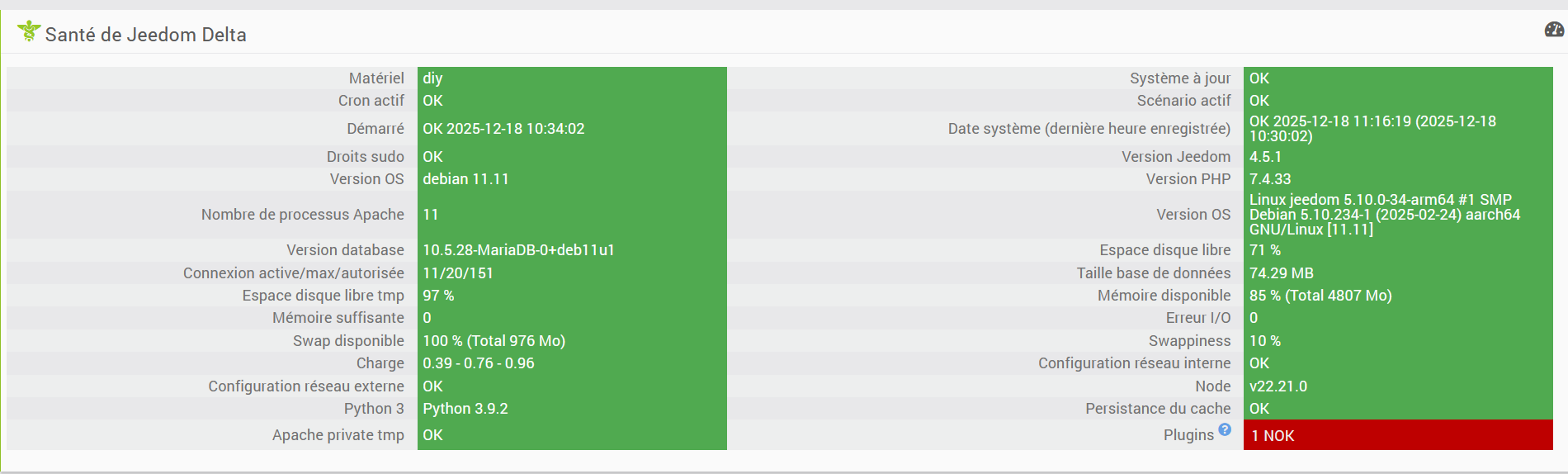
Depuis la MAJ du core Jeedom 4.5.1 effectuée le 17/12/2025 à 17H55 je rencontre plusieurs problèmes :
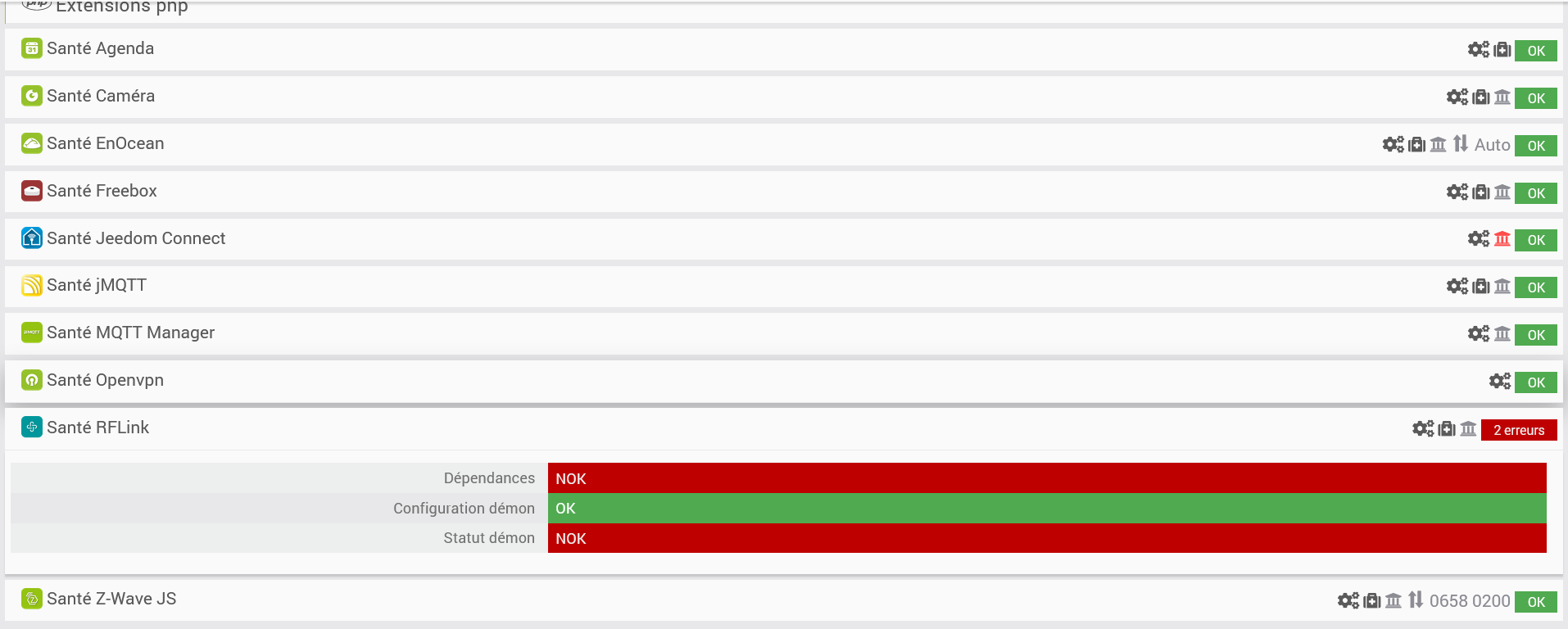
le plugin rflink est NOK et impossible de le redémarrer (j’ai relancé des dépendances sans plus de succès)
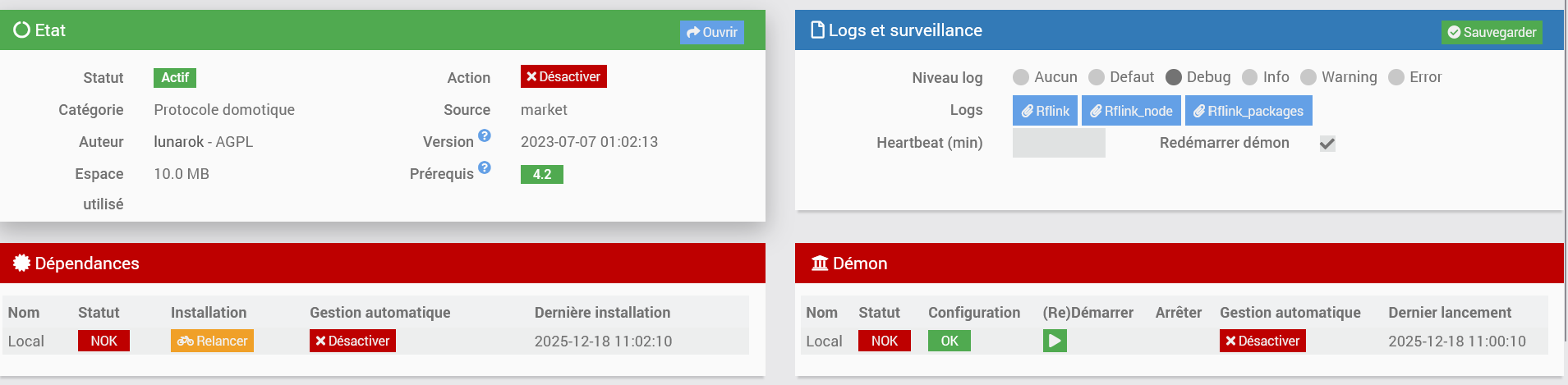
Rflink_node en debug
node:internal/modules/cjs/loader:1386
throw err;
^
Error: Cannot find module 'request'
Require stack:
- /var/www/html/plugins/rflink/resources/rflink.js
at Function._resolveFilename (node:internal/modules/cjs/loader:1383:15)
at defaultResolveImpl (node:internal/modules/cjs/loader:1025:19)
at resolveForCJSWithHooks (node:internal/modules/cjs/loader:1030:22)
at Function._load (node:internal/modules/cjs/loader:1192:37)
at TracingChannel.traceSync (node:diagnostics_channel:328:14)
at wrapModuleLoad (node:internal/modules/cjs/loader:237:24)
at Module.require (node:internal/modules/cjs/loader:1463:12)
at require (node:internal/modules/helpers:147:16)
at Object.<anonymous> (/var/www/html/plugins/rflink/resources/rflink.js:3:15)
at Module._compile (node:internal/modules/cjs/loader:1706:14) {
code: 'MODULE_NOT_FOUND',
requireStack: [ '/var/www/html/plugins/rflink/resources/rflink.js' ]
}
Node.js v22.21.0
Rflink_packages en debug
+ echo '*******************Begin of package installation******************'
*******************Begin of package installation******************
+ touch /tmp/jeedom_install_in_progress_rflink
+ echo 1
+ echo 2
+ sudo chmod +x /var/www/html/core/class/../../resources/install_nodejs.sh
+ sudo /var/www/html/core/class/../../resources/install_nodejs.sh
Hit:1 http://debian.proxad.net/debian bullseye InRelease
Hit:2 http://debian.proxad.net/debian bullseye-updates InRelease
Hit:3 http://security.debian.org/debian-security bullseye-security InRelease
Hit:4 https://deb.nodesource.com/node_22.x nodistro InRelease
Reading package lists...
Reading package lists...
Building dependency tree...
Reading state information...
apt-utils is already the newest version (2.2.4).
build-essential is already the newest version (12.9).
lsb-release is already the newest version (11.1.0).
git is already the newest version (1:2.30.2-1+deb11u5).
0 upgraded, 0 newly installed, 0 to remove and 135 not upgraded.
[Check Version NodeJS actuelle : v22.21.0 : [  OK  ]
[Check Prefix : /usr and sudo prefix : /usr and www-data prefix : /usr : [  OK  ]
Clean npm cache
npm warn using --force Recommended protections disabled.
+ echo 3
+ sudo chmod +x /var/www/html/core/class/../../resources/install_nodejs.sh
+ sudo /var/www/html/core/class/../../resources/install_nodejs.sh
Hit:1 http://security.debian.org/debian-security bullseye-security InRelease
Hit:2 http://debian.proxad.net/debian bullseye InRelease
Hit:3 http://debian.proxad.net/debian bullseye-updates InRelease
Hit:4 https://deb.nodesource.com/node_22.x nodistro InRelease
Reading package lists...
Reading package lists...
Building dependency tree...
Reading state information...
apt-utils is already the newest version (2.2.4).
build-essential is already the newest version (12.9).
lsb-release is already the newest version (11.1.0).
git is already the newest version (1:2.30.2-1+deb11u5).
0 upgraded, 0 newly installed, 0 to remove and 135 not upgraded.
[Check Version NodeJS actuelle : v22.21.0 : [  OK  ]
[Check Prefix : /usr and sudo prefix : /usr and www-data prefix : /usr : [  OK  ]
Clean npm cache
npm warn using --force Recommended protections disabled.
+ echo 4
+ sudo chmod +x /var/www/html/core/class/../../resources/install_composer.sh
+ sudo /var/www/html/core/class/../../resources/install_composer.sh
Begin installation of composer
--2025-12-18 11:05:25--  https://getcomposer.org/installer
Resolving getcomposer.org (getcomposer.org)... 2001:41d0:304:300::18ef, 57.128.19.244
Connecting to getcomposer.org (getcomposer.org)|2001:41d0:304:300::18ef|:443... connected.
HTTP request sent, awaiting response... 200 OK
Length: 59524 (58K) [application/octet-stream]
Saving to: 'composer-setup.php'
0K .......... .......... .......... .......... .......... 86% 4.09M 0s
50K ........                                              100% 61.4M=0.01s
2025-12-18 11:05:26 (4.70 MB/s) - 'composer-setup.php' saved [59524/59524]
All settings correct for using Composer
Downloading...
Composer (version 2.9.2) successfully installed to: /var/www/composer.phar
Use it: php composer.phar
End installation of composer
+ echo 5
+ cd /var/www/html/core/class/../../plugins/rflink/resources
+ rm -rf node_modules
+ sudo NODE_OPTIONS=--dns-result-order=ipv4first npm install
npm warn deprecated har-validator@5.1.5: this library is no longer supported
npm warn deprecated uuid@3.4.0: Please upgrade  to version 7 or higher.  Older versions may use Math.random() in certain circumstances, which is known to be problematic.  See https://v8.dev/blog/math-random for details.
npm warn deprecated request@2.88.2: request has been deprecated, see https://github.com/request/request/issues/3142
npm error code 1
npm error path /var/www/html/plugins/rflink/resources/node_modules/@serialport/bindings
npm error command failed
npm error command sh -c prebuild-install --tag-prefix @serialport/bindings@ || node-gyp rebuild
npm error make: Entering directory '/var/www/html/plugins/rflink/resources/node_modules/@serialport/bindings/build'
npm error   CXX(target) Release/obj.target/bindings/src/serialport.o
npm error make: Leaving directory '/var/www/html/plugins/rflink/resources/node_modules/@serialport/bindings/build'
npm error prebuild-install warn install No prebuilt binaries found (target=22.21.0 runtime=node arch=arm64 libc= platform=linux)
npm error gyp info it worked if it ends with ok
npm error gyp info using node-gyp@11.2.0
npm error gyp info using node@22.21.0 | linux | arm64
npm error gyp info find Python using Python version 3.9.2 found at "/usr/bin/python3"
npm error gyp info spawn /usr/bin/python3
npm error gyp info spawn args [
npm error gyp info spawn args '/usr/lib/node_modules/npm/node_modules/node-gyp/gyp/gyp_main.py',
npm error gyp info spawn args 'binding.gyp',
npm error gyp info spawn args '-f',
npm error gyp info spawn args 'make',
npm error gyp info spawn args '-I',
npm error gyp info spawn args '/var/www/html/plugins/rflink/resources/node_modules/@serialport/bindings/build/config.gypi',
npm error gyp info spawn args '-I',
npm error gyp info spawn args '/usr/lib/node_modules/npm/node_modules/node-gyp/addon.gypi',
npm error gyp info spawn args '-I',
npm error gyp info spawn args '/root/.cache/node-gyp/22.21.0/include/node/common.gypi',
npm error gyp info spawn args '-Dlibrary=shared_library',
npm error gyp info spawn args '-Dvisibility=default',
npm error gyp info spawn args '-Dnode_root_dir=/root/.cache/node-gyp/22.21.0',
npm error gyp info spawn args '-Dnode_gyp_dir=/usr/lib/node_modules/npm/node_modules/node-gyp',
npm error gyp info spawn args '-Dnode_lib_file=/root/.cache/node-gyp/22.21.0/<(target_arch)/node.lib',
npm error gyp info spawn args '-Dmodule_root_dir=/var/www/html/plugins/rflink/resources/node_modules/@serialport/bindings',
npm error gyp info spawn args '-Dnode_engine=v8',
npm error gyp info spawn args '--depth=.',
npm error gyp info spawn args '--no-parallel',
npm error gyp info spawn args '--generator-output',
npm error gyp info spawn args 'build',
npm error gyp info spawn args '-Goutput_dir=.'
npm error gyp info spawn args ]
npm error gyp info spawn make
npm error gyp info spawn args [ 'BUILDTYPE=Release', '-C', 'build' ]
npm error In file included from ../src/./serialport.h:13,
npm error                  from ../src/serialport.cpp:1:
npm error ../../../nan/nan.h: In function 'void Nan::SetAccessor(v8::Local<v8::ObjectTemplate>, v8::Local<v8::String>, Nan::GetterCallback, Nan::SetterCallback, v8::Local<v8::Value>, v8::AccessControl, v8::PropertyAttribute, Nan::imp::Sig)':
npm error ../../../nan/nan.h:2558:3: error: no matching function for call to 'v8::ObjectTemplate::SetAccessor(v8::Local<v8::String>&, void (*&)(v8::Local<v8::Name>, const v8::PropertyCallbackInfo<v8::Value>&), void (*&)(v8::Local<v8::Name>, v8::Local<v8::Value>, const v8::PropertyCallbackInfo<void>&), v8::Local<v8::Object>&, v8::AccessControl&, v8::PropertyAttribute&)'
npm error  2558 |   );
npm error       |   ^
npm error In file included from /root/.cache/node-gyp/22.21.0/include/node/v8-function.h:15,
npm error                  from /root/.cache/node-gyp/22.21.0/include/node/v8.h:33,
npm error                  from /root/.cache/node-gyp/22.21.0/include/node/node.h:74,
npm error                  from ../../../nan/nan.h:62,
npm error                  from ../src/./serialport.h:13,
npm error                  from ../src/serialport.cpp:1:
npm error /root/.cache/node-gyp/22.21.0/include/node/v8-template.h:1049:8: note: candidate: 'void v8::ObjectTemplate::SetAccessor(v8::Local<v8::String>, v8::AccessorGetterCallback, v8::AccessorSetterCallback, v8::Local<v8::Value>, v8::PropertyAttribute, v8::SideEffectType, v8::SideEffectType)'
npm error  1049 |   void SetAccessor(
npm error       |        ^~~~~~~~~~~
npm error /root/.cache/node-gyp/22.21.0/include/node/v8-template.h:1052:61: note:   no known conversion for argument 5 from 'v8::AccessControl' to 'v8::PropertyAttribute'
npm error  1052 |       Local<Value> data = Local<Value>(), PropertyAttribute attribute = None,
npm error       |                                           ~~~~~~~~~~~~~~~~~~^~~~~~~~~~~~~~~~
npm error /root/.cache/node-gyp/22.21.0/include/node/v8-template.h:1055:8: note: candidate: 'void v8::ObjectTemplate::SetAccessor(v8::Local<v8::Name>, v8::AccessorNameGetterCallback, v8::AccessorNameSetterCallback, v8::Local<v8::Value>, v8::PropertyAttribute, v8::SideEffectType, v8::SideEffectType)'
npm error  1055 |   void SetAccessor(
npm error       |        ^~~~~~~~~~~
npm error /root/.cache/node-gyp/22.21.0/include/node/v8-template.h:1058:61: note:   no known conversion for argument 5 from 'v8::AccessControl' to 'v8::PropertyAttribute'
npm error  1058 |       Local<Value> data = Local<Value>(), PropertyAttribute attribute = None,
npm error       |                                           ~~~~~~~~~~~~~~~~~~^~~~~~~~~~~~~~~~
npm error In file included from ../src/./serialport.h:13,
npm error                  from ../src/serialport.cpp:1:
npm error ../../../nan/nan.h: In function 'void Nan::SetAccessor(v8::Local<v8::ObjectTemplate>, v8::Local<v8::String>, Nan::GetterCallback, Nan::SetterCallback, v8::Local<v8::Value>, v8::AccessControl, v8::PropertyAttribute)':
npm error ../../../nan/nan.h:2601:3: error: no matching function for call to 'v8::ObjectTemplate::SetAccessor(v8::Local<v8::String>&, void (*&)(v8::Local<v8::Name>, const v8::PropertyCallbackInfo<v8::Value>&), void (*&)(v8::Local<v8::Name>, v8::Local<v8::Value>, const v8::PropertyCallbackInfo<void>&), v8::Local<v8::Object>&, v8::AccessControl&, v8::PropertyAttribute&)'
npm error  2601 |   );
npm error       |   ^
npm error In file included from /root/.cache/node-gyp/22.21.0/include/node/v8-function.h:15,
npm error                  from /root/.cache/node-gyp/22.21.0/include/node/v8.h:33,
npm error                  from /root/.cache/node-gyp/22.21.0/include/node/node.h:74,
npm error                  from ../../../nan/nan.h:62,
npm error                  from ../src/./serialport.h:13,
npm error                  from ../src/serialport.cpp:1:
npm error /root/.cache/node-gyp/22.21.0/include/node/v8-template.h:1049:8: note: candidate: 'void v8::ObjectTemplate::SetAccessor(v8::Local<v8::String>, v8::AccessorGetterCallback, v8::AccessorSetterCallback, v8::Local<v8::Value>, v8::PropertyAttribute, v8::SideEffectType, v8::SideEffectType)'
npm error  1049 |   void SetAccessor(
npm error       |        ^~~~~~~~~~~
npm error /root/.cache/node-gyp/22.21.0/include/node/v8-template.h:1052:61: note:   no known conversion for argument 5 from 'v8::AccessControl' to 'v8::PropertyAttribute'
npm error  1052 |       Local<Value> data = Local<Value>(), PropertyAttribute attribute = None,
npm error       |                                           ~~~~~~~~~~~~~~~~~~^~~~~~~~~~~~~~~~
npm error /root/.cache/node-gyp/22.21.0/include/node/v8-template.h:1055:8: note: candidate: 'void v8::ObjectTemplate::SetAccessor(v8::Local<v8::Name>, v8::AccessorNameGetterCallback, v8::AccessorNameSetterCallback, v8::Local<v8::Value>, v8::PropertyAttribute, v8::SideEffectType, v8::SideEffectType)'
npm error  1055 |   void SetAccessor(
npm error       |        ^~~~~~~~~~~
npm error /root/.cache/node-gyp/22.21.0/include/node/v8-template.h:1058:61: note:   no known conversion for argument 5 from 'v8::AccessControl' to 'v8::PropertyAttribute'
npm error  1058 |       Local<Value> data = Local<Value>(), PropertyAttribute attribute = None,
npm error       |                                           ~~~~~~~~~~~~~~~~~~^~~~~~~~~~~~~~~~
npm error ../src/serialport.cpp: In function 'Nan::NAN_METHOD_RETURN_TYPE Open(Nan::NAN_METHOD_ARGS_TYPE)':
npm error ../src/serialport.cpp:78:51: warning: cast between incompatible function types from 'void (*)(uv_work_t*)' {aka 'void (*)(uv_work_s*)'} to 'uv_after_work_cb' {aka 'void (*)(uv_work_s*, int)'} [-Wcast-function-type]
npm error    78 |   uv_queue_work(uv_default_loop(), req, EIO_Open, (uv_after_work_cb)EIO_AfterOpen);
npm error       |                                                   ^~~~~~~~~~~~~~~~~~~~~~~~~~~~~~~
npm error ../src/serialport.cpp: In function 'Nan::NAN_METHOD_RETURN_TYPE Update(Nan::NAN_METHOD_ARGS_TYPE)':
npm error ../src/serialport.cpp:135:53: warning: cast between incompatible function types from 'void (*)(uv_work_t*)' {aka 'void (*)(uv_work_s*)'} to 'uv_after_work_cb' {aka 'void (*)(uv_work_s*, int)'} [-Wcast-function-type]
npm error   135 |   uv_queue_work(uv_default_loop(), req, EIO_Update, (uv_after_work_cb)EIO_AfterUpdate);
npm error       |                                                     ^~~~~~~~~~~~~~~~~~~~~~~~~~~~~~~~~
npm error ../src/serialport.cpp: In function 'Nan::NAN_METHOD_RETURN_TYPE Close(Nan::NAN_METHOD_ARGS_TYPE)':
npm error ../src/serialport.cpp:175:52: warning: cast between incompatible function types from 'void (*)(uv_work_t*)' {aka 'void (*)(uv_work_s*)'} to 'uv_after_work_cb' {aka 'void (*)(uv_work_s*, int)'} [-Wcast-function-type]
npm error   175 |   uv_queue_work(uv_default_loop(), req, EIO_Close, (uv_after_work_cb)EIO_AfterClose);
npm error       |                                                    ^~~~~~~~~~~~~~~~~~~~~~~~~~~~~~~~
npm error ../src/serialport.cpp: In function 'Nan::NAN_METHOD_RETURN_TYPE Flush(Nan::NAN_METHOD_ARGS_TYPE)':
npm error ../src/serialport.cpp:215:52: warning: cast between incompatible function types from 'void (*)(uv_work_t*)' {aka 'void (*)(uv_work_s*)'} to 'uv_after_work_cb' {aka 'void (*)(uv_work_s*, int)'} [-Wcast-function-type]
npm error   215 |   uv_queue_work(uv_default_loop(), req, EIO_Flush, (uv_after_work_cb)EIO_AfterFlush);
npm error       |                                                    ^~~~~~~~~~~~~~~~~~~~~~~~~~~~~~~~
npm error ../src/serialport.cpp: In function 'Nan::NAN_METHOD_RETURN_TYPE Set(Nan::NAN_METHOD_ARGS_TYPE)':
npm error ../src/serialport.cpp:271:50: warning: cast between incompatible function types from 'void (*)(uv_work_t*)' {aka 'void (*)(uv_work_s*)'} to 'uv_after_work_cb' {aka 'void (*)(uv_work_s*, int)'} [-Wcast-function-type]
npm error   271 |   uv_queue_work(uv_default_loop(), req, EIO_Set, (uv_after_work_cb)EIO_AfterSet);
npm error       |                                                  ^~~~~~~~~~~~~~~~~~~~~~~~~~~~~~
npm error ../src/serialport.cpp: In function 'Nan::NAN_METHOD_RETURN_TYPE Get(Nan::NAN_METHOD_ARGS_TYPE)':
npm error ../src/serialport.cpp:316:50: warning: cast between incompatible function types from 'void (*)(uv_work_t*)' {aka 'void (*)(uv_work_s*)'} to 'uv_after_work_cb' {aka 'void (*)(uv_work_s*, int)'} [-Wcast-function-type]
npm error   316 |   uv_queue_work(uv_default_loop(), req, EIO_Get, (uv_after_work_cb)EIO_AfterGet);
npm error       |                                                  ^~~~~~~~~~~~~~~~~~~~~~~~~~~~~~
npm error ../src/serialport.cpp: In function 'Nan::NAN_METHOD_RETURN_TYPE GetBaudRate(Nan::NAN_METHOD_ARGS_TYPE)':
npm error ../src/serialport.cpp:366:58: warning: cast between incompatible function types from 'void (*)(uv_work_t*)' {aka 'void (*)(uv_work_s*)'} to 'uv_after_work_cb' {aka 'void (*)(uv_work_s*, int)'} [-Wcast-function-type]
npm error   366 |   uv_queue_work(uv_default_loop(), req, EIO_GetBaudRate, (uv_after_work_cb)EIO_AfterGetBaudRate);
npm error       |                                                          ^~~~~~~~~~~~~~~~~~~~~~~~~~~~~~~~~~~~~~
npm error ../src/serialport.cpp: In function 'Nan::NAN_METHOD_RETURN_TYPE Drain(Nan::NAN_METHOD_ARGS_TYPE)':
npm error ../src/serialport.cpp:412:52: warning: cast between incompatible function types from 'void (*)(uv_work_t*)' {aka 'void (*)(uv_work_s*)'} to 'uv_after_work_cb' {aka 'void (*)(uv_work_s*, int)'} [-Wcast-function-type]
npm error   412 |   uv_queue_work(uv_default_loop(), req, EIO_Drain, (uv_after_work_cb)EIO_AfterDrain);
npm error       |                                                    ^~~~~~~~~~~~~~~~~~~~~~~~~~~~~~~~
npm error ../src/serialport.cpp: At global scope:
npm error ../src/serialport.cpp:433:28: warning: unnecessary parentheses in declaration of 'ToParityEnum' [-Wparentheses]
npm error   433 | SerialPortParity NAN_INLINE(ToParityEnum(const v8::Local<v8::String>& v8str)) {
npm error       |                            ^
npm error ../src/serialport.cpp:452:30: warning: unnecessary parentheses in declaration of 'ToStopBitEnum' [-Wparentheses]
npm error   452 | SerialPortStopBits NAN_INLINE(ToStopBitEnum(double stopBits)) {
npm error       |                              ^
npm error In file included from ../../../nan/nan.h:62,
npm error                  from ../src/./serialport.h:13,
npm error                  from ../src/serialport.cpp:1:
npm error /root/.cache/node-gyp/22.21.0/include/node/node.h:1244:7: warning: cast between incompatible function types from 'void (*)(Nan::ADDON_REGISTER_FUNCTION_ARGS_TYPE)' {aka 'void (*)(v8::Local<v8::Object>)'} to 'node::addon_register_func' {aka 'void (*)(v8::Local<v8::Object>, v8::Local<v8::Value>, void*)'} [-Wcast-function-type]
npm error  1244 |       (node::addon_register_func) (regfunc),                          \
npm error       |       ^~~~~~~~~~~~~~~~~~~~~~~~~~~~~~~~~~~~~
npm error /root/.cache/node-gyp/22.21.0/include/node/node.h:1278:3: note: in expansion of macro 'NODE_MODULE_X'
npm error  1278 |   NODE_MODULE_X(modname, regfunc, NULL, 0)  // NOLINT (readability/null_usage)
npm error       |   ^~~~~~~~~~~~~
npm error ../src/serialport.cpp:486:1: note: in expansion of macro 'NODE_MODULE'
npm error   486 | NODE_MODULE(serialport, init);
npm error       | ^~~~~~~~~~~
npm error make: *** [bindings.target.mk:111: Release/obj.target/bindings/src/serialport.o] Error 1
npm error gyp ERR! build error
npm error gyp ERR! stack Error: `make` failed with exit code: 2
npm error gyp ERR! stack at ChildProcess.<anonymous> (/usr/lib/node_modules/npm/node_modules/node-gyp/lib/build.js:219:23)
npm error gyp ERR! System Linux 5.10.0-34-arm64
npm error gyp ERR! command "/usr/bin/node" "/usr/lib/node_modules/npm/node_modules/node-gyp/bin/node-gyp.js" "rebuild"
npm error gyp ERR! cwd /var/www/html/plugins/rflink/resources/node_modules/@serialport/bindings
npm error gyp ERR! node -v v22.21.0
npm error gyp ERR! node-gyp -v v11.2.0
npm error gyp ERR! not ok
npm error A complete log of this run can be found in: /root/.npm/_logs/2025-12-18T10_05_27_394Z-debug-0.log
+ sudo chown -R www-data:www-data nodejs.sh package-lock.json package.json rflink rflink.js update_firmware.sh
+ echo 6
+ php /var/www/html/core/class/../php/jeecli.php plugin dependancy_end rflink
+ echo 7
+ rm /tmp/jeedom_install_in_progress_rflink
+ echo '*******************End of package installation******************'
*******************End of package installation******************