Bonjour,
J’ai installé pour test le plugin sur VM Debian, tout s’est bien passé.
Par contre, en voulant l’installé en prod sur mon rpi4b, impossible d’installer les dépendances.
Ci-dessous le log d’erreur initial :
Début de l'installation
Installation des dépendances apt
Reading package lists...
Building dependency tree...
Reading state information...
python3-pip is already the newest version (23.0.1+dfsg-1+rpt1).
0 upgraded, 0 newly installed, 0 to remove and 11 not upgraded.
Installation du module websocket-client pour python
error: externally-managed-environment
× This environment is externally managed
╰─> To install Python packages system-wide, try apt install
python3-xyz, where xyz is the package you are trying to
install.
If you wish to install a non-Debian-packaged Python package,
create a virtual environment using python3 -m venv path/to/venv.
Then use path/to/venv/bin/python and path/to/venv/bin/pip. Make
sure you have python3-full installed.
For more information visit http://rptl.io/venv
note: If you believe this is a mistake, please contact your Python installation or OS distribution provider. You can override this, at the risk of breaking your Python installation or OS, by passing --break-system-packages.
hint: See PEP 668 for the detailed specification.
Installation du module packaging pour python
error: externally-managed-environment
× This environment is externally managed
╰─> To install Python packages system-wide, try apt install
python3-xyz, where xyz is the package you are trying to
install.
If you wish to install a non-Debian-packaged Python package,
create a virtual environment using python3 -m venv path/to/venv.
Then use path/to/venv/bin/python and path/to/venv/bin/pip. Make
sure you have python3-full installed.
For more information visit http://rptl.io/venv
note: If you believe this is a mistake, please contact your Python installation or OS distribution provider. You can override this, at the risk of breaking your Python installation or OS, by passing --break-system-packages.
hint: See PEP 668 for the detailed specification.
Fin de l'installation
J’ai tenté de bypasser le problème avec la commande :
sudo pip install websocket-client --break-system-packages
Le websocket-client est bien installé (pip list), mais maintenant je tourne en boucle sur cette erreur sans plus de détail…
error: externally-managed-environment
× This environment is externally managed
╰─> To install Python packages system-wide, try apt install
python3-xyz, where xyz is the package you are trying to
install.
If you wish to install a non-Debian-packaged Python package,
create a virtual environment using python3 -m venv path/to/venv.
Then use path/to/venv/bin/python and path/to/venv/bin/pip. Make
sure you have python3-full installed.
For more information visit http://rptl.io/venv
note: If you believe this is a mistake, please contact your Python installation or OS distribution provider. You can override this, at the risk of breaking your Python installation or OS, by passing --break-system-packages.
hint: See PEP 668 for the detailed specification.
Une idée ?
Merci
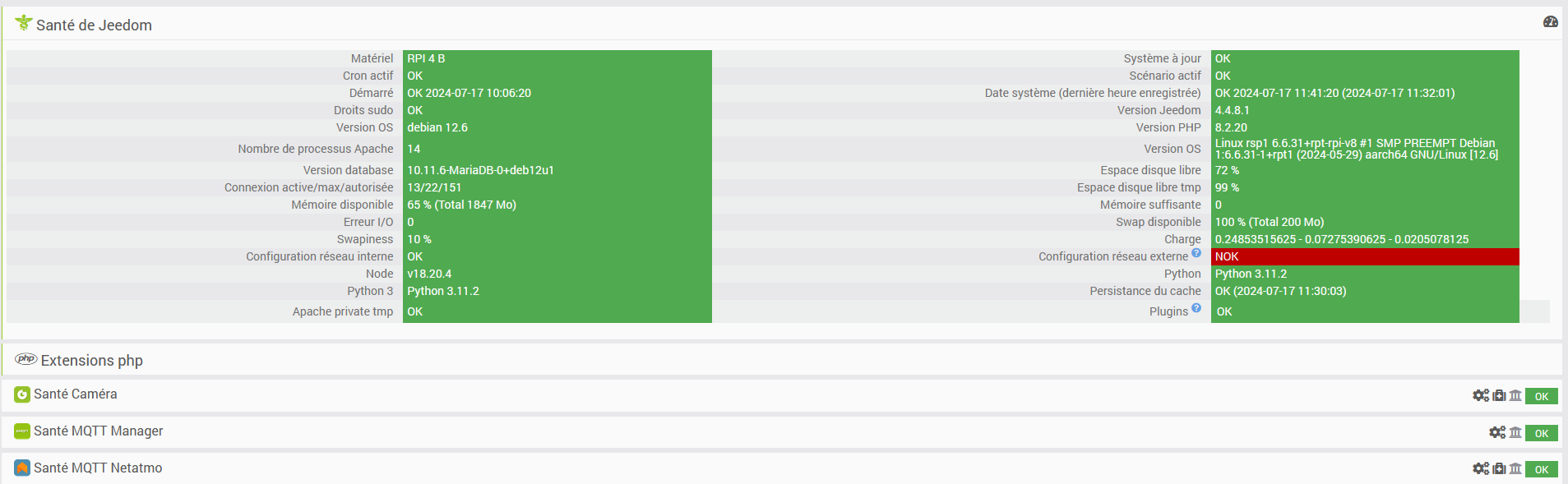
Informations Jeedom
Core : 4.4.8.1 (V4-stable)
DNS Jeedom : non

Plugin : Somfy Home Alarme
Version : 2024-04-26 01:23:14 (stable)
Statut Démon : Stoppé - (Inconnue)
 )
)