Salut @Aldarande
Le sujet sur la Relance du projet Pronote pour Jeedom ayant été fermé, j’ouvre un nouveau fil pour un problème d’installation des dépendances suite à ta dernière grosse mise à jour.
Je n’avais pas encore eu le temps de faire la mise à jour sur mon Jeedom depuis que tu l’as publiée et n’ai donc pu répondre à tes questions pour savoir si tout se passait bien.
De mon côté, après l’installation de la mise à jour, les dépendances ne s’installent pas correctement et le demon ne se lance pas:

+ echo '*******************Begin of package installation******************'
*******************Begin of package installation******************
+ touch /tmp/jeedom_install_in_progress_ProJote
+ echo 1
+ echo 2
+ sudo killall apt apt-get unattended-upgr
apt: no process found
apt-get: no process found
+ sudo rm /var/lib/apt/lists/lock
+ sudo rm /var/cache/apt/archives/lock
+ sudo rm /var/lib/dpkg/lock /var/lib/dpkg/lock-frontend
+ sudo sudo dpkg --configure -a --force-confdef
+ sudo apt update
WARNING: apt does not have a stable CLI interface. Use with caution in scripts.
Hit:1 http://security.debian.org/debian-security bullseye-security InRelease
Hit:2 http://deb.debian.org/debian bullseye InRelease
Hit:3 http://deb.debian.org/debian bullseye-updates InRelease
Hit:4 https://deb.nodesource.com/node_20.x nodistro InRelease
Reading package lists...
Building dependency tree...
Reading state information...
All packages are up to date.
+ echo 3
+ sudo apt install -o Dpkg::Options::=--force-confdef -y python3-dev
WARNING: apt does not have a stable CLI interface. Use with caution in scripts.
Reading package lists...
Building dependency tree...
Reading state information...
python3-dev is already the newest version (3.9.2-3).
The following packages were automatically installed and are no longer required:
linux-image-5.10.0-28-amd64 python3-cffi-backend
Use 'sudo apt autoremove' to remove them.
0 upgraded, 0 newly installed, 0 to remove and 0 not upgraded.
+ echo 4
+ sudo apt install -o Dpkg::Options::=--force-confdef -y python3-venv
WARNING: apt does not have a stable CLI interface. Use with caution in scripts.
Reading package lists...
Building dependency tree...
Reading state information...
python3-venv is already the newest version (3.9.2-3).
The following packages were automatically installed and are no longer required:
linux-image-5.10.0-28-amd64 python3-cffi-backend
Use 'sudo apt autoremove' to remove them.
0 upgraded, 0 newly installed, 0 to remove and 0 not upgraded.
+ echo 5
+ sudo apt install -o Dpkg::Options::=--force-confdef -y python3-requests
WARNING: apt does not have a stable CLI interface. Use with caution in scripts.
Reading package lists...
Building dependency tree...
Reading state information...
python3-requests is already the newest version (2.25.1+dfsg-2).
The following packages were automatically installed and are no longer required:
linux-image-5.10.0-28-amd64 python3-cffi-backend
Use 'sudo apt autoremove' to remove them.
0 upgraded, 0 newly installed, 0 to remove and 0 not upgraded.
+ echo 6
+ sudo apt install -o Dpkg::Options::=--force-confdef -y python3-pyudev
WARNING: apt does not have a stable CLI interface. Use with caution in scripts.
Reading package lists...
Building dependency tree...
Reading state information...
python3-pyudev is already the newest version (0.22.0-2).
The following packages were automatically installed and are no longer required:
linux-image-5.10.0-28-amd64 python3-cffi-backend
Use 'sudo apt autoremove' to remove them.
0 upgraded, 0 newly installed, 0 to remove and 0 not upgraded.
+ echo 7
+ sudo chmod +x /var/www/html/core/class/../../plugins/ProJote/resources/post-install.sh
+ sudo /var/www/html/core/class/../../plugins/ProJote/resources/post-install.sh
[ProJote] Répertoire resources : /var/www/html/plugins/ProJote/resources
[ProJote] Venv cible           : /var/www/html/plugins/ProJote/resources/python_venv/bin/python3
[ProJote] Python système : Python 3.9.2
[ProJote] Le venv existe déjà, passage à la mise à jour des paquets.
[ProJote] Venv créé : /var/www/html/plugins/ProJote/resources/python_venv/bin/python3
[ProJote] Mise à jour de pip...
/var/www/html/core/class/../../plugins/ProJote/resources/post-install.sh: /var/www/html/plugins/ProJote/resources/python_venv/bin/pip: /var/www/html/plugins/ProJote/resources/python_venv/bin/python3: bad interpreter: No such file or directory
[ProJote] Installation des paquets Python...
/var/www/html/core/class/../../plugins/ProJote/resources/post-install.sh: /var/www/html/plugins/ProJote/resources/python_venv/bin/pip: /var/www/html/plugins/ProJote/resources/python_venv/bin/python3: bad interpreter: No such file or directory
[ProJote] ERREUR : Installation des paquets échouée.
+ echo 8
+ php /var/www/html/core/class/../php/jeecli.php plugin dependancy_end ProJote
+ echo 9
+ rm /tmp/jeedom_install_in_progress_ProJote
+ echo '*******************End of package installation******************'
*******************End of package installation******************
J’ai une erreur avec l’installation des paquets Python…
Voilà les infos de ma config:
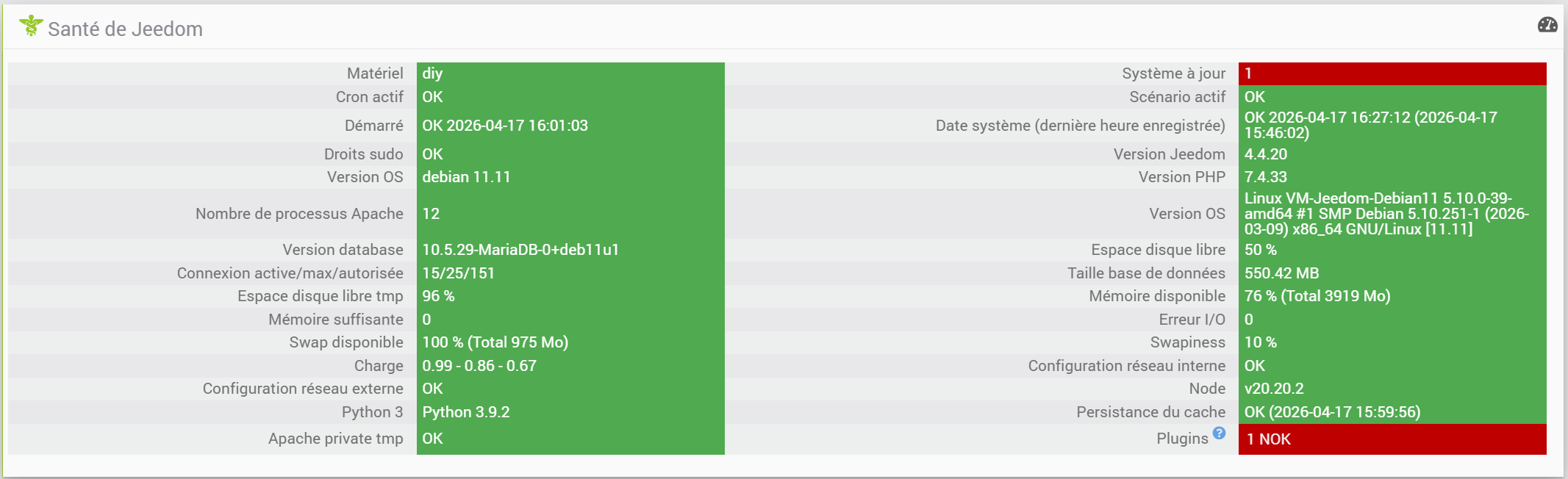
Tous les paquets linux sont à jour sauf ces 3 là qui ne veulent pas se mettre à jour:

+ echo '*******************Begin of package upgrade type pip3******************'
*******************Begin of package upgrade type pip3******************
+ sudo python3 -m pip install --force-reinstall --upgrade pycups
Collecting pycups
Using cached pycups-2.0.4.tar.gz (65 kB)
Installing build dependencies: started
Installing build dependencies: finished with status 'done'
Getting requirements to build wheel: started
Getting requirements to build wheel: finished with status 'done'
Preparing metadata (pyproject.toml): started
Preparing metadata (pyproject.toml): finished with status 'done'
Building wheels for collected packages: pycups
Building wheel for pycups (pyproject.toml): started
Building wheel for pycups (pyproject.toml): finished with status 'error'
error: subprocess-exited-with-error
× Building wheel for pycups (pyproject.toml) did not run successfully.
│ exit code: 1
╰─> [19 lines of output]
/tmp/pip-build-env-eeh585xp/overlay/lib/python3.9/site-packages/setuptools/dist.py:765: SetuptoolsDeprecationWarning: License classifiers are deprecated.
!!
********************************************************************************
Please consider removing the following classifiers in favor of a SPDX license expression:
License :: OSI Approved :: GNU General Public License (GPL)
See https://packaging.python.org/en/latest/guides/writing-pyproject-toml/#license for details.
********************************************************************************
!!
self._finalize_license_expression()
In file included from cupsconnection.c:22:
cupsconnection.h:26:10: fatal error: cups/http.h: No such file or directory
26 | #include <cups/http.h>
|          ^~~~~~~~~~~~~
compilation terminated.
error: command '/usr/bin/x86_64-linux-gnu-gcc' failed with exit code 1
[end of output]
note: This error originates from a subprocess, and is likely not a problem with pip.
ERROR: Failed building wheel for pycups
Failed to build pycups
error: failed-wheel-build-for-install
× Failed to build installable wheels for some pyproject.toml based projects
╰─> pycups
+ sudo python3 -m pip install --force-reinstall --upgrade pysmbc
Collecting pysmbc
Using cached pysmbc-1.0.25.1.tar.gz (33 kB)
Installing build dependencies: started
Installing build dependencies: finished with status 'done'
Getting requirements to build wheel: started
Getting requirements to build wheel: finished with status 'error'
error: subprocess-exited-with-error
× Getting requirements to build wheel did not run successfully.
│ exit code: 1
╰─> [30 lines of output]
Package smbclient was not found in the pkg-config search path.
Perhaps you should add the directory containing `smbclient.pc'
to the PKG_CONFIG_PATH environment variable
No package 'smbclient' found
Package smbclient was not found in the pkg-config search path.
Perhaps you should add the directory containing `smbclient.pc'
to the PKG_CONFIG_PATH environment variable
No package 'smbclient' found
Package smbclient was not found in the pkg-config search path.
Perhaps you should add the directory containing `smbclient.pc'
to the PKG_CONFIG_PATH environment variable
No package 'smbclient' found
Traceback (most recent call last):
File "/usr/local/lib/python3.9/dist-packages/pip/_vendor/pyproject_hooks/_in_process/_in_process.py", line 389, in <module>
main()
File "/usr/local/lib/python3.9/dist-packages/pip/_vendor/pyproject_hooks/_in_process/_in_process.py", line 373, in main
json_out["return_val"] = hook(**hook_input["kwargs"])
File "/usr/local/lib/python3.9/dist-packages/pip/_vendor/pyproject_hooks/_in_process/_in_process.py", line 143, in get_requires_for_build_wheel
return hook(config_settings)
File "/tmp/pip-build-env-rb_jg58o/overlay/lib/python3.9/site-packages/setuptools/build_meta.py", line 333, in get_requires_for_build_wheel
return self._get_build_requires(config_settings, requirements=[])
File "/tmp/pip-build-env-rb_jg58o/overlay/lib/python3.9/site-packages/setuptools/build_meta.py", line 301, in _get_build_requires
self.run_setup()
File "/tmp/pip-build-env-rb_jg58o/overlay/lib/python3.9/site-packages/setuptools/build_meta.py", line 520, in run_setup
super().run_setup(setup_script=setup_script)
File "/tmp/pip-build-env-rb_jg58o/overlay/lib/python3.9/site-packages/setuptools/build_meta.py", line 317, in run_setup
exec(code, locals())
File "<string>", line 120, in <module>
File "<string>", line 85, in pkgconfig_Dversion
ValueError: invalid literal for int() with base 10: ''
[end of output]
note: This error originates from a subprocess, and is likely not a problem with pip.
ERROR: Failed to build 'pysmbc' when getting requirements to build wheel
+ sudo python3 -m pip install --force-reinstall --upgrade systemd-python
Collecting systemd-python
Using cached systemd-python-235.tar.gz (61 kB)
Installing build dependencies: started
Installing build dependencies: finished with status 'done'
Getting requirements to build wheel: started
Getting requirements to build wheel: finished with status 'error'
error: subprocess-exited-with-error
× Getting requirements to build wheel did not run successfully.
│ exit code: 1
╰─> [12 lines of output]
Cannot find libsystemd or libsystemd-journal:
Package libsystemd was not found in the pkg-config search path.
Perhaps you should add the directory containing `libsystemd.pc'
to the PKG_CONFIG_PATH environment variable
No package 'libsystemd' found
Package libsystemd-journal was not found in the pkg-config search path.
Perhaps you should add the directory containing `libsystemd-journal.pc'
to the PKG_CONFIG_PATH environment variable
No package 'libsystemd-journal' found
[end of output]
note: This error originates from a subprocess, and is likely not a problem with pip.
ERROR: Failed to build 'systemd-python' when getting requirements to build wheel
+ echo '*******************End of package installation******************'
*******************End of package installation******************
Une aide serait la bienvenue.
Merci.
Julien
