Bonjour,
Je suis en train de faire un composant texte avec du html (avec un éditeur en ligne) pour afficher les informations sur ma voiture.
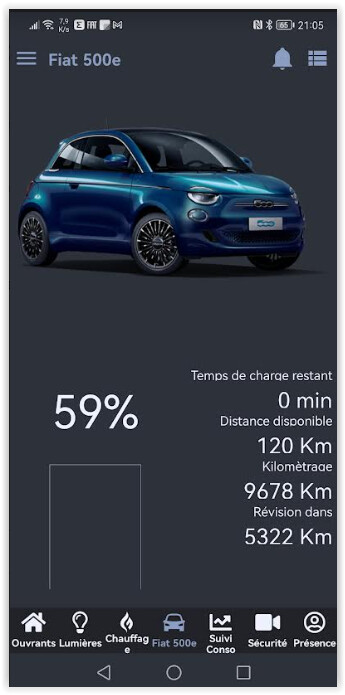
Je bute pour le chargement l’image du niveau de la batterie en fonction du %age. Je pense que le lien pour chercher l’image n’est pas correct, mais je n’arrive pas à trouver. Une idée ? Voici le code :
<table style="width: 100%; border-collapse: collapse; height: 200px;" border="0">
<tbody>
<tr style="height: 20px;">
<td style="width: 50%; height: 200px; text-align: center; vertical-align: middle;" rowspan="8">
<p><span style="font-size: 50px;">#15729#</span><span style="font-size: 50px;">%</span></p>
<p><span style="font-size: 50px;"><img class="responsive" src="html/plugins/JeedomConnect/data/img/user_files/batterie-"㵱#&".png" alt="" width="150" height="287" /></span></p>
</td>
<td style="width: 50%; height: 20px; text-align: right;"><span style="font-size: 14px; text-align: right !important; font-family: Montserrat, Arial; font-variant: small-caps; font-weight: normal;">Temps de charge restant</span></td>
</tr>
<tr style="height: 30px;">
<td style="width: 50%; height: 30px; text-align: right;"><span style="font-size: 24px; text-align: right !important;">#15745# min</span></td>
</tr>
<tr style="height: 20px;">
<td style="width: 50%; height: 20px; text-align: right;"><span style="font-size: 14px;">Distance disponible</span></td>
</tr>
<tr style="height: 30px;">
<td style="width: 50%; height: 30px; text-align: right;"><span style="font-size: 24px;">#15731# Km</span></td>
</tr>
<tr style="height: 20px;">
<td style="width: 50%; height: 20px; text-align: right;"><span style="font-size: 14px;">Kilomètrage</span></td>
</tr>
<tr style="height: 30px;">
<td style="width: 50%; height: 30px; text-align: right;"><span style="font-size: 24px;">#15732# Km</span></td>
</tr>
<tr style="height: 20px;">
<td style="width: 50%; height: 20px; text-align: right;"><span style="font-size: 14px;">Révision dans</span></td>
</tr>
<tr style="height: 30px;">
<td style="width: 50%; height: 30px; text-align: right;"><span style="font-size: 24px;">#15740# Km</span></td>
</tr>
</tbody>
</table>
<p> </p>
J’en profite, autre point.
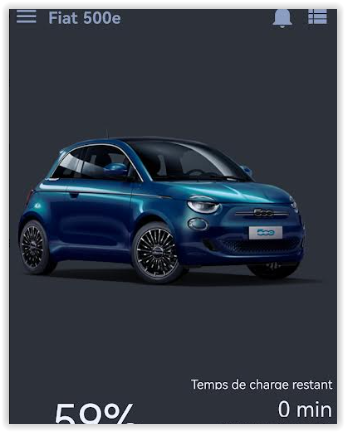
j’ai un composant image en haut (la voiture), mais je ne comprends pas pourquoi je perds autant de place en haut en bas de l’image alors que celle-ci va bien des pneus au toit et pas plus. Y a t’il un moyen ajuster cela ?
Jeedom Core : 4.3.15
Version JC : 1.7.0+ stable
DNS Jeedom : oui
Statut Démon : Stoppé - ()

Equipements :
  Tablette de Noé : v1.6.0 stable sur android [os : 30] (polling)
  P20 : v1.7.0 stable sur android [os : 29] (polling)
  Poco M4 Pro alex : v1.7.0 stable sur android [os : 31]
  Poco M4 Pro Baptiste : v1.7.0 stable sur android [os : 31] (polling)
Merci pour votre aide.
Frédéric
