Bonjour
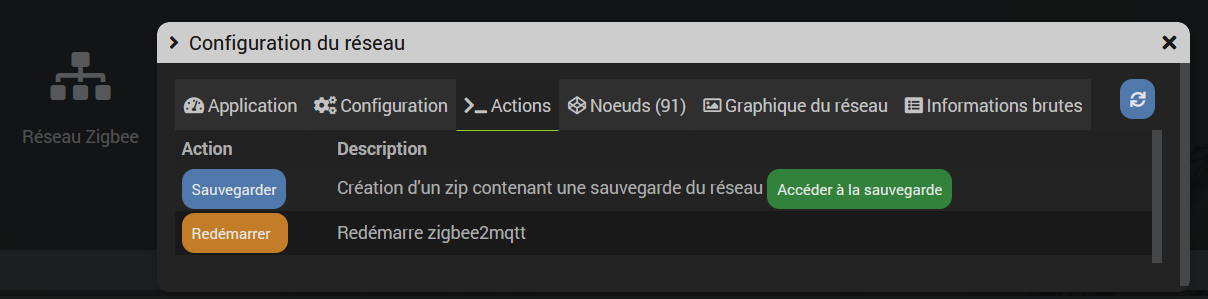
j’obtiens le plantage du demon jeezigbee, l’erreur log en debug et pas de fichier d’archive de créé.
<--- Last few GCs --->
[377856:0xffffac490000]   489610 ms: Scavenge (interleaved) 1530.6 (1550.6) -> 1529.6 (1555.1) MB, pooled: 0 MB, 13.75 / 0.00 ms  (average mu = 0.119, current mu = 0.081) allocation failure;
[377856:0xffffac490000]   492283 ms: Mark-Compact (reduce) 1529.6 (1555.1) -> 1529.6 (1548.6) MB, pooled: 0 MB, 2251.55 / 0.00 ms  (+ 1.2 ms in 0 steps since start of marking, biggest step 0.0 ms, walltime since start of marking 2261 ms) (average mu = 0.1
<--- JS stacktrace --->
FATAL ERROR: Ineffective mark-compacts near heap limit Allocation failed - JavaScript heap out of memory
----- Native stack trace -----
1: 0xe0c614 node::OOMErrorHandler(char const*, v8::OOMDetails const&) [node]
2: 0x119c38c v8::Utils::ReportOOMFailure(v8::internal::Isolate*, char const*, v8::OOMDetails const&) [node]
3: 0x119c53c v8::internal::V8::FatalProcessOutOfMemory(v8::internal::Isolate*, char const*, v8::OOMDetails const&) [node]
4: 0x13c0e0c  [node]
5: 0x13c0e3c  [node]
6: 0x13d8820  [node]
7: 0x13db40c  [node]
8: 0x1bbffd4  [node]
Aborted
Cela fonctionnait il y a 6 mois mais plus maintenant.
Que faut-il sauvegarder pour avoir une sauvegarde du réseau Zigbee séparée de Jeedom?
Contrôleur Zigbee : SLZB-06P7
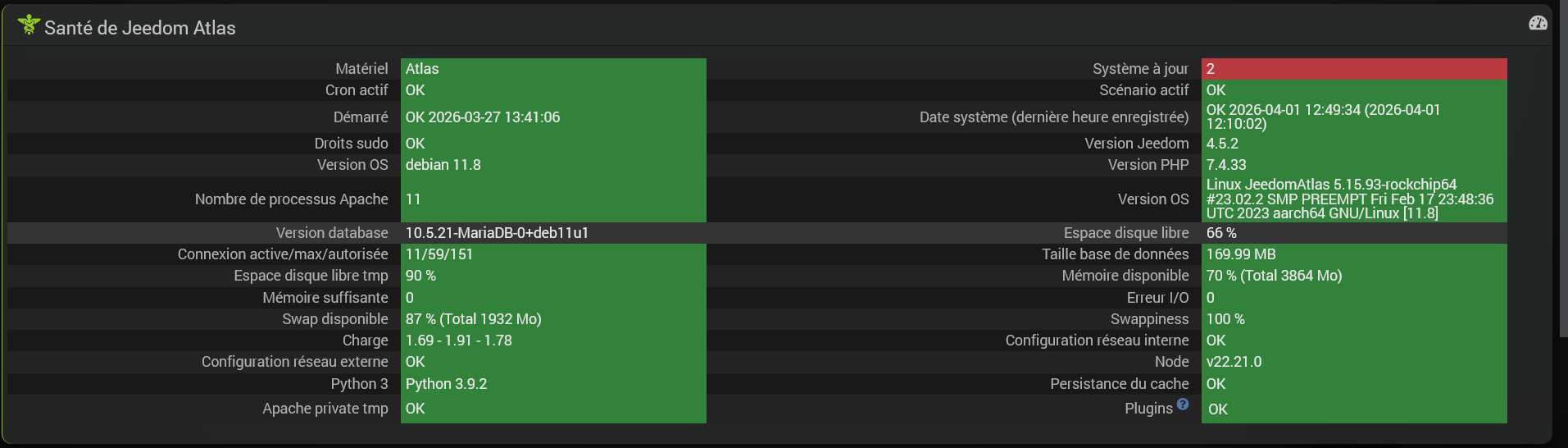
Informations Jeedom Atlas
Core : 4.5.2 (master)
DNS Jeedom Atlas : non

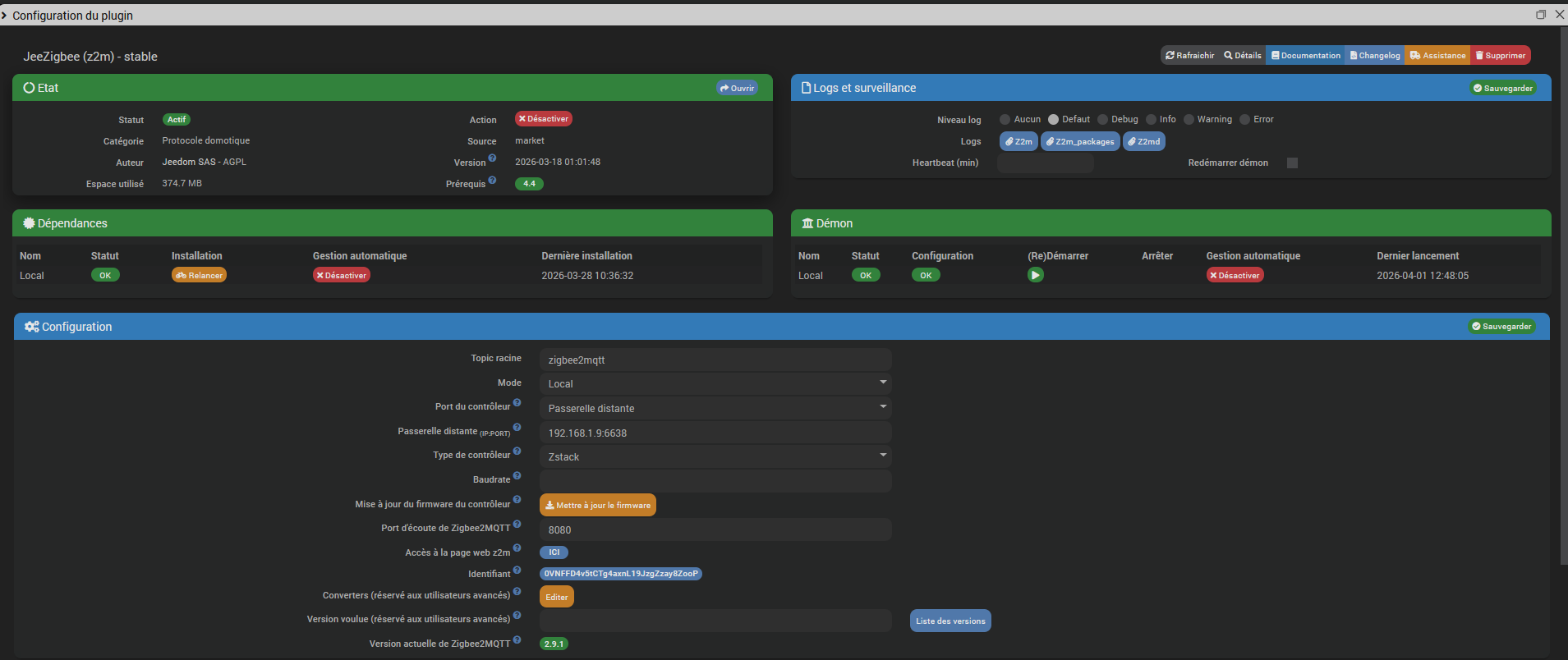
Plugin : JeeZigbee
Version : 2026-03-18 01:01:48 (stable)
Statut Démon : Démarré - (2026-04-01 12:19:15)
Bonjour
Et en passant directement depuis l’interface de zigbee2mqtt ?
Antoine
Bien vu!
FATAL ERROR: Reached heap limit Allocation failed - JavaScript heap out of memory
<--- Last few GCs --->
[387680:0xffff800c0000]  4325628 ms: Mark-Compact 1541.6 (1576.1) -> 1531.1 (1581.4) MB, pooled: 0 MB, 6517.68 / 0.00 ms  (average mu = 0.204, current mu = 0.020) allocation failure; scavenge might not succeed
[387680:0xffff800c0000]  4331819 ms: Mark-Compact 1546.8 (1581.4) -> 1536.3 (1586.9) MB, pooled: 0 MB, 6138.25 / 0.00 ms  (average mu = 0.115, current mu = 0.008) allocation failure; scavenge might not succeed
<--- JS stacktrace --->
FATAL ERROR: Reached heap limit Allocation failed - JavaScript heap out of memory
----- Native stack trace -----
1: 0xe0c614 node::OOMErrorHandler(char const*, v8::OOMDetails const&) [node]
2: 0x119c38c v8::Utils::ReportOOMFailure(v8::internal::Isolate*, char const*, v8::OOMDetails const&) [node]
3: 0x119c53c v8::internal::V8::FatalProcessOutOfMemory(v8::internal::Isolate*, char const*, v8::OOMDetails const&) [node]
4: 0x13c0e0c  [node]
5: 0x13d8d80 v8::internal::Heap::CollectGarbage(v8::internal::AllocationSpace, v8::internal::GarbageCollectionReason, v8::GCCallbackFlags) [node]
6: 0x13af6a8 v8::internal::HeapAllocator::AllocateRawWithLightRetrySlowPath(int, v8::internal::AllocationType, v8::internal::AllocationOrigin, v8::internal::AllocationAlignment) [node]
7: 0x13b04e0 v8::internal::HeapAllocator::AllocateRawWithRetryOrFailSlowPath(int, v8::internal::AllocationType, v8::internal::AllocationOrigin, v8::internal::AllocationAlignment) [node]
8: 0x138b600 v8::internal::Factory::NewFillerObject(int, v8::internal::AllocationAlignment, v8::internal::AllocationType, v8::internal::AllocationOrigin) [node]
9: 0x17a4e8c v8::internal::Runtime_AllocateInYoungGeneration(int, unsigned long*, v8::internal::Isolate*) [node]
10: 0x1cb5d7c  [node]
Aborted
La charge et de l’ordre du normal même si je suis d’avis que cela devrait être plus faible.
Même coordinateur zigbee?
Pour le coordinateur, je ne sais plus si je l’ai changé avant ou après les essais de sauvegardes.SONOFF ZBDongle-E control via MQTT | Zigbee2MQTT sur l’usb de l’Atlas.
Charge 1.69 - 1.52 - 1.56
    PID    PPID %MEM %CPU CMD
   1160       1  9.3 50.0 /usr/sbin/mariadbd
 453895  453894  4.1  6.0 node index.js
 468770  768066  0.5  4.4 /usr/sbin/apache2 -k start
 427874  768066  1.1  4.0 /usr/sbin/apache2 -k start
 430397  768066  0.9  4.0 /usr/sbin/apache2 -k start
 463347  768066  0.6  4.0 /usr/sbin/apache2 -k start
 467607  768066  0.6  4.0 /usr/sbin/apache2 -k start
 460316  768066  0.9  3.9 /usr/sbin/apache2 -k start
 430396  768066  1.1  3.8 /usr/sbin/apache2 -k start
 431341  768066  0.9  3.7 /usr/sbin/apache2 -k start
 444151  768066  0.9  3.7 /usr/sbin/apache2 -k start
 466566  768066  0.5  3.5 /usr/sbin/apache2 -k start
 770238  770232  2.3  2.7 /usr/bin/node /var/www/html/plugins/mqtt2/resources/mqtt2d/mqtt2d.js --loglevel error --socketport 55035 --mqtt_server mqtts://127.0.0.1:8883 --client_key /var/www/html/plugins/mqtt2/data/ssl/client.key --client_crt /var/www/html/plugins/mqtt2/data/ssl/client.crt --ca /var/www/html/plugins/mqtt2/data/ssl/ca.crt --username jeedom --password GQDNoiiFqrHnrKZEYEtrq3XxE5GPRa7Uw0UlkvCpLz2Q9B67hrteiU5EuSQBfSgF --callback http://127.0.0.1:80/plugins/mqtt2/core/php/jeeMqtt2.php --apikey nYxFiWrtv8LSmn7EpcNbLhSoYnFuL0RGydYebVEnv8gs2ZZZ5K8h3E937F6X2P0D --cycle 0.3 --root_topic jeedom --pid /tmp/jeedom/mqtt2/deamon.pid
   2425       1  0.4  0.8 /var/www/html/plugins/JeedomConnect/core/class/../../resources/venv/bin/python3 -m resources.JeedomConnectd.JeedomConnectd --loglevel error --socketport 58090 --websocketport 8090 --callback http://127.0.0.1:80/plugins/JeedomConnect/core/api/JeedomConnect.api.php --apikey WFt5HQAwsyZENg0UbPgXUTaAv343bs6k03N2KIFsvulGfI76dw43G52js2EgaaQI --pid /tmp/jeedom/JeedomConnect/deamon.pid --trace 0
    844       1  0.3  0.5 /usr/bin/python3 /usr/bin/fail2ban-server -xf start
 694880       1  1.0  0.4 /usr/sbin/mosquitto -c /var/www/html/plugins/mqtt2/core/class/../../data/mosquitto.conf
    590       1  0.3  0.3 /lib/systemd/systemd-journald
   2352       1  1.5  0.3 /var/www/html/plugins/enphasesecur/resources/venv/bin/python3 /var/www/html/plugins/enphasesecur/resources/enphasesecurd/enphasesecurd.py --renew auto --loglevel error --socketport 3357 --callback http://127.0.0.1:80/plugins/enphasesecur/core/php/jeeenphasesecur.php --user stephane.bertrand@univ-smb.fr --password Mjfets137# --serie 122326109999 --token  --ip 192.168.1.104 --apikey gAdcSCPpXXFpEMTd2anCcQ4HMKkYN3GTmPzMYqCxzwqY656NKgB9nb7tjU9dd7ah --pid /tmp/jeedom/enphasesecur/deamon.pid --delais 60 --batt non
     15       2  0.0  0.2 [rcu_preempt]
    661       1  0.3  0.2 /usr/sbin/NetworkManager --no-daemon
    224       2  0.0  0.1 [kworker/u13:0-brcmf_wq/mmc2:0001:1]
    496       2  0.0  0.1 [kworker/u13:1-brcmf_wq/mmc2:0001:1]
    658       1  0.0  0.1 /usr/bin/dbus-daemon --system --address=systemd: --nofork --nopidfile --systemd-activation --syslog-only
   2502       1  0.2  0.1 /var/www/html/plugins/Nut_free/core/class/../../resources/venv/bin/python3 /var/www/html/plugins/Nut_free/resources/nutfreed/nutfreed.py --socketport 55113 --callback http://127.0.0.1:80/plugins/Nut_free/core/php/jeeNut_free.php --apikey KItYIM7fq9QVQUCnLRRSc3WAJtcxekqSk7M5YMzMlEeXQYIgZ5yh2Aoc9Lk1k24u --loglevel error --pluginversion 2.2.1 --cyclepolling 60 --cyclewatcher 5 --cyclefactor 1 --pid /tmp/jeedom/Nut_free/deamon.pid
      1       0  0.2  0.0 /sbin/init
      2       0  0.0  0.0 [kthreadd]
      3       2  0.0  0.0 [rcu_gp]
      4       2  0.0  0.0 [rcu_par_gp]
      5       2  0.0  0.0 [slub_flushwq]
      6       2  0.0  0.0 [netns]
     10       2  0.0  0.0 [mm_percpu_wq]
     11       2  0.0  0.0 [rcu_tasks_kthre]
     12       2  0.0  0.0 [rcu_tasks_rude_]
     13       2  0.0  0.0 [rcu_tasks_trace]
     14       2  0.0  0.0 [ksoftirqd/0]
     16       2  0.0  0.0 [migration/0]
     17       2  0.0  0.0 [cpuhp/0]
     18       2  0.0  0.0 [cpuhp/1]
     19       2  0.0  0.0 [migration/1]
     20       2  0.0  0.0 [ksoftirqd/1]
     23       2  0.0  0.0 [cpuhp/2]
     24       2  0.0  0.0 [migration/2]
     25       2  0.0  0.0 [ksoftirqd/2]
     28       2  0.0  0.0 [cpuhp/3]
     29       2  0.0  0.0 [migration/3]
     30       2  0.0  0.0 [ksoftirqd/3]
     33       2  0.0  0.0 [cpuhp/4]
     34       2  0.0  0.0 [migration/4]
     35       2  0.0  0.0 [ksoftirqd/4]
     38       2  0.0  0.0 [cpuhp/5]
     39       2  0.0  0.0 [migration/5]
     40       2  0.0  0.0 [ksoftirqd/5]
     43       2  0.0  0.0 [kdevtmpfs]
     44       2  0.0  0.0 [inet_frag_wq]
     51       2  0.0  0.0 [kauditd]
     52       2  0.0  0.0 [oom_reaper]
     53       2  0.0  0.0 [writeback]
     54       2  0.0  0.0 [kcompactd0]
     55       2  0.0  0.0 [ksmd]
     56       2  0.0  0.0 [khugepaged]
     82       2  0.0  0.0 [cryptd]
    143       2  0.0  0.0 [kintegrityd]
    144       2  0.0  0.0 [kblockd]
    145       2  0.0  0.0 [blkcg_punt_bio]
    146       2  0.0  0.0 [ata_sff]
    147       2  0.0  0.0 [edac-poller]
    148       2  0.0  0.0 [devfreq_wq]
    149       2  0.0  0.0 [watchdogd]
    201       2  0.0  0.0 [kswapd0]
    202       2  0.0  0.0 [ecryptfs-kthrea]
    205       2  0.0  0.0 [kthrotld]
    207       2  0.0  0.0 [irq/74-rockchip]
    209       2  0.0  0.0 [irq/75-rockchip]
    210       2  0.0  0.0 [nvme-wq]
    211       2  0.0  0.0 [nvme-reset-wq]
    212       2  0.0  0.0 [nvme-delete-wq]
    213       2  0.0  0.0 [vfio-irqfd-clea]
    215       2  0.0  0.0 [irq/78-rk808]
    218       2  0.0  0.0 [irq/44-rockchip]
    219       2  0.0  0.0 [bch_btree_io]
    220       2  0.0  0.0 [bcache]
    221       2  0.0  0.0 [bch_journal]
    225       2  0.0  0.0 [sdhci]
    227       2  0.0  0.0 [irq/34-mmc1]
    228       2  0.0  0.0 [irq/88-fe320000]
    230       2  0.0  0.0 [mld]
    232       2  0.0  0.0 [ipv6_addrconf]
    235       2  0.0  0.0 [mmc_complete]
    243       2  0.0  0.0 [kstrp]
    246       2  0.0  0.0 [zswap1]
    247       2  0.0  0.0 [zswap1]
    248       2  0.0  0.0 [zswap-shrink]
    253       2  0.0  0.0 [irq/65-ff940000]
    254       2  0.0  0.0 [card0-crtc0]
    255       2  0.0  0.0 [card0-crtc1]
    309       2  0.0  0.0 [stmmac_wq]
    330       2  0.0  0.0 [jbd2/mmcblk1p1-]
    331       2  0.0  0.0 [ext4-rsv-conver]
    405       1  0.0  0.0 /lib/systemd/systemd-udevd
    475       2  0.0  0.0 [cfg80211]
    477       2  0.0  0.0 [cec-dw_hdmi]
    478       2  0.0  0.0 [irq/65-dw-hdmi-]
    479       2  0.0  0.0 [brcmf_wq/mmc2:0]
    480       2  0.0  0.0 [brcmf_wdog/mmc2]
    484       2  0.0  0.0 [irq/50-ff660000]
    488       2  0.0  0.0 [irq/67-panfrost]
    490       2  0.0  0.0 [irq/66-panfrost]
    491       2  0.0  0.0 [pan_js]
    492       2  0.0  0.0 [pan_js]
    494       2  0.0  0.0 [pan_js]
    557       2  0.0  0.0 [ext4-rsv-conver]
    595       1  0.0  0.0 /usr/sbin/haveged --Foreground --verbose=1
    596       1  0.1  0.0 /lib/systemd/systemd-resolved
    652       1  0.0  0.0 avahi-daemon: running [JeedomAtlas.local]
    655       1  0.1  0.0 /usr/libexec/bluetooth/bluetoothd
    656       1  0.0  0.0 /usr/sbin/cron -f
    665     652  0.0  0.0 avahi-daemon: chroot helper
    674       1  0.1  0.0 /usr/bin/python3 /usr/bin/networkd-dispatcher --run-startup-triggers
    689       1  0.0  0.0 /usr/sbin/rsyslogd -n -iNONE
    693       1  0.0  0.0 /usr/sbin/smartd -n
    702       1  0.1  0.0 /lib/systemd/systemd-logind
    705       1  0.1  0.0 /sbin/wpa_supplicant -u -s -O /run/wpa_supplicant
    726       1  0.0  0.0 /usr/sbin/atd -f
    768       1  0.0  0.0 /usr/sbin/rngd -r /dev/urandom
    836       1  0.0  0.0 /usr/sbin/vnstatd -n
    851       1  0.0  0.0 /usr/sbin/ntpd -p /var/run/ntpd.pid -g -u 110:119
    881       1  0.1  0.0 sshd: /usr/sbin/sshd -D [listener] 0 of 10-100 startups
    945       1  0.0  0.0 /sbin/agetty -o -p -- \u --noclear tty1 linux
   1561     661  0.0  0.0 /usr/sbin/dnsmasq --no-resolv --keep-in-foreground --no-hosts --bind-interfaces --pid-file=/run/NetworkManager/dnsmasq.pid --listen-address=127.0.0.1 --cache-size=400 --clear-on-reload --conf-file=/dev/null --proxy-dnssec --enable-dbus=org.freedesktop.NetworkManager.dnsmasq --conf-dir=/etc/NetworkManager/dnsmasq.d
   4815       1  1.8  0.0 node --preserve-symlinks daikinToMQTT.js
   5021       1  0.1  0.0 /usr/libexec/polkitd --no-debug
 152983       2  0.0  0.0 [kworker/2:0H-kblockd]
 152987       2  0.0  0.0 [kworker/0:0H-kblockd]
 237669       2  0.0  0.0 [kworker/3:2H-kblockd]
 326621       1  0.0  0.0 sudo php /var/www/html/plugins/homeconnect/resources/homeconnectd.php
 326622  326621  0.8  0.0 php /var/www/html/plugins/homeconnect/resources/homeconnectd.php
 338649       2  0.0  0.0 [kworker/5:2H]
 344844       2  0.0  0.0 [kworker/1:0-cgroup_destroy]
 350397       2  0.0  0.0 [kworker/5:0-events]
 357781       2  0.0  0.0 [kworker/4:0H-kblockd]
 362076       2  0.0  0.0 [kworker/1:2H]
 363721       2  0.0  0.0 [kworker/4:1H]
 363810       2  0.0  0.0 [kworker/0:1H]
 387178       2  0.0  0.0 [kworker/3:0H]
 410449       2  0.0  0.0 [kworker/2:2H]
 421183       2  0.0  0.0 [kworker/4:0-mm_percpu_wq]
 424115       2  0.0  0.0 [kworker/3:2-events]
 438268       2  0.0  0.0 [kworker/0:1-events]
 442336       2  0.0  0.0 [kworker/2:2-events]
 446318       2  0.0  0.0 [kworker/u12:2-writeback]
 453861       1  0.1  0.0 sudo ZIGBEE2MQTT_DATA=/var/www/html/plugins/z2m/core/class/../../data NODE_OPTIONS=--max_old_space_size=1536 npm start --prefix /var/www/html/plugins/z2m/resources/zigbee2mqtt
 453868  453861  1.4  0.0 npm start
 453894  453868  0.0  0.0 sh -c node index.js
 457980       2  0.0  0.0 [kworker/4:1-mm_percpu_wq]
 459319       2  0.0  0.0 [kworker/2:1-events_freezable_power_]
 460549       2  0.0  0.0 [kworker/5:2-mm_percpu_wq]
 461218       2  0.0  0.0 [kworker/1:2-mm_percpu_wq]
 463798       2  0.0  0.0 [kworker/3:0-mm_percpu_wq]
 464557       2  0.0  0.0 [kworker/0:0-events]
 464898       2  0.0  0.0 [kworker/u12:0-events_unbound]
 465970       2  0.0  0.0 [kworker/5:1]
 467279       2  0.0  0.0 [kworker/1:1-events]
 468870       2  0.0  0.0 [kworker/0:2-mm_percpu_wq]
 469033  431341  0.0  0.0 sh -c ps -eo pid,ppid,%mem,%cpu,cmd --sort=-%cpu 2>&1
 469034  469033  0.0  0.0 ps -eo pid,ppid,%mem,%cpu,cmd --sort=-%cpu
 482555       2  0.0  0.0 [dio/mmcblk1p1]
 764689       1  0.5  0.0 php /var/www/html/core/class/../php/jeeCron.php cron_id=83603
 768066       1  0.6  0.0 /usr/sbin/apache2 -k start
 770232       1  0.0  0.0 sudo /usr/bin/node /var/www/html/plugins/mqtt2/resources/mqtt2d/mqtt2d.js --loglevel error --socketport 55035 --mqtt_server mqtts://127.0.0.1:8883 --client_key /var/www/html/plugins/mqtt2/data/ssl/client.key --client_crt /var/www/html/plugins/mqtt2/data/ssl/client.crt --ca /var/www/html/plugins/mqtt2/data/ssl/ca.crt --username jeedom --password GQDNoiiFqrHnrKZEYEtrq3XxE5GPRa7Uw0UlkvCpLz2Q9B67hrteiU5EuSQBfSgF --callback http://127.0.0.1:80/plugins/mqtt2/core/php/jeeMqtt2.php --apikey nYxFiWrtv8LSmn7EpcNbLhSoYnFuL0RGydYebVEnv8gs2ZZZ5K8h3E937F6X2P0D --cycle 0.3 --root_topic jeedom --pid /tmp/jeedom/mqtt2/deamon.pid
4162802       2  0.0  0.0 [kworker/1:1H-kblockd]
4186531       2  0.0  0.0 [kworker/5:1H-kblockd]
Edit :
 PID    PPID %MEM %CPU CMD
   1160       1  9.3 49.9 /usr/sbin/mariadbd
 453895  453894  4.1  5.5 node index.js
 469100  768066  0.9  4.3 /usr/sbin/apache2 -k start
 427874  768066  1.1  4.0 /usr/sbin/apache2 -k start
 430396  768066  1.1  3.9 /usr/sbin/apache2 -k start
 467607  768066  0.9  3.9 /usr/sbin/apache2 -k start
 460316  768066  0.9  3.8 /usr/sbin/apache2 -k start
 466566  768066  0.9  3.8 /usr/sbin/apache2 -k start
 470135  768066  0.9  3.8 /usr/sbin/apache2 -k start
 471161  768066  0.9  3.8 /usr/sbin/apache2 -k start
 431341  768066  0.9  3.7 /usr/sbin/apache2 -k start
 444151  768066  0.9  3.7 /usr/sbin/apache2 -k start
 770238  770232  2.3  2.7 /usr/bin/node /var/www/html/plugins/mqtt2/resources/mqtt2d/mqtt2d.js --loglevel error --socketport 55035 --mqtt_server mqtts://127.0.0.1:8883 --client_key /var/www/html/plugins/mqtt2/data/ssl/client.key --client_crt /var/www/html/plugins/mqtt2/data/ssl/client.crt --ca /var/www/html/plugins/mqtt2/data/ssl/ca.crt --username jeedom --password GQDNoiiFqrHnrKZEYEtrq3XxE5GPRa7Uw0UlkvCpLz2Q9B67hrteiU5EuSQBfSgF --callback http://127.0.0.1:80/plugins/mqtt2/core/php/jeeMqtt2.php --apikey nYxFiWrtv8LSmn7EpcNbLhSoYnFuL0RGydYebVEnv8gs2ZZZ5K8h3E937F6X2P0D --cycle 0.3 --root_topic jeedom --pid /tmp/jeedom/mqtt2/deamon.pid
   2425       1  0.4  0.8 /var/www/html/plugins/JeedomConnect/core/class/../../resources/venv/bin/python3 -m resources.JeedomConnectd.JeedomConnectd --loglevel error --socketport 58090 --websocketport 8090 --callback http://127.0.0.1:80/plugins/JeedomConnect/core/api/JeedomConnect.api.php --apikey WFt5HQAwsyZENg0UbPgXUTaAv343bs6k03N2KIFsvulGfI76dw43G52js2EgaaQI --pid /tmp/jeedom/JeedomConnect/deamon.pid --trace 0
    844       1  0.3  0.5 /usr/bin/python3 /usr/bin/fail2ban-server -xf start
 694880       1  1.0  0.4 /usr/sbin/mosquitto -c /var/www/html/plugins/mqtt2/core/class/../../data/mosquitto.conf
    590       1  0.1  0.3 /lib/systemd/systemd-journald
   2352       1  1.5  0.3 /var/www/html/plugins/enphasesecur/resources/venv/bin/python3 /var/www/html/plugins/enphasesecur/resources/enphasesecurd/enphasesecurd.py --renew auto --loglevel error --socketport 3357 --callback http://127.0.0.1:80/plugins/enphasesecur/core/php/jeeenphasesecur.php --user stephane.bertrand@univ-smb.fr --password Mjfets137# --serie 122326109999 --token  --ip 192.168.1.104 --apikey gAdcSCPpXXFpEMTd2anCcQ4HMKkYN3GTmPzMYqCxzwqY656NKgB9nb7tjU9dd7ah --pid /tmp/jeedom/enphasesecur/deamon.pid --delais 60 --batt non
     15       2  0.0  0.2 [rcu_preempt]
    661       1  0.3  0.2 /usr/sbin/NetworkManager --no-daemon
    224       2  0.0  0.1 [kworker/u13:0-brcmf_wq/mmc2:0001:1]
    496       2  0.0  0.1 [kworker/u13:1-brcmf_wq/mmc2:0001:1]
    658       1  0.0  0.1 /usr/bin/dbus-daemon --system --address=systemd: --nofork --nopidfile --systemd-activation --syslog-only
   2502       1  0.2  0.1 /var/www/html/plugins/Nut_free/core/class/../../resources/venv/bin/python3 /var/www/html/plugins/Nut_free/resources/nutfreed/nutfreed.py --socketport 55113 --callback http://127.0.0.1:80/plugins/Nut_free/core/php/jeeNut_free.php --apikey KItYIM7fq9QVQUCnLRRSc3WAJtcxekqSk7M5YMzMlEeXQYIgZ5yh2Aoc9Lk1k24u --loglevel error --pluginversion 2.2.1 --cyclepolling 60 --cyclewatcher 5 --cyclefactor 1 --pid /tmp/jeedom/Nut_free/deamon.pid
      1       0  0.2  0.0 /sbin/init
Et rien de particulier sur la charge au moment du crash du demon.
Je ne crois pas que la charge indique un problème sur le plugin. Votre retour ferait plus pencher pour des scénarios mal conçus: pauses, lancement trop regulier, etc.
Pour le problème original, je n’ai rien à proposer hormis de reinstaller les dépendances
Je n’utilise quasi jamais d’attente active (sleep), mais c’est vrai que je surveille mes périphériques zigbee comme le lait sur le feu.
Je les ai réinstallées tout récemment suite à une restauration Jeedom.
Pour sauvegarder le réseau Zigbee z2m, la sauvegarde de z2m/data suffit-elle?
Pour être sûr, j’ai réinstallé les dépendances de z2m : même erreur lors de la sauvegarde.
A priori, z2m s’installe correctement.
+ echo '*******************Begin of package installation******************'
*******************Begin of package installation******************
+ touch /tmp/jeedom_install_in_progress_z2m
+ echo 1
+ echo 2
+ sudo chmod +x /var/www/html/core/class/../../plugins/z2m/resources/pre-install.sh
+ sudo /var/www/html/core/class/../../plugins/z2m/resources/pre-install.sh
Launch pre-install of z2m dependancy
+ echo 3
+ php /var/www/html/core/class/../php/jeecli.php plugin install mqtt2
PHP Fatal error:  Uncaught Exception: Erreur curl sur : https://market.jeedom.com/core/api/api.php. Détail :Operation timed out after 10003 milliseconds with 0 out of 0 bytes received in /var/www/html/core/repo/market.repo.php:864
Stack trace:
#0 /var/www/html/core/repo/market.repo.php(193): repo_market::byLogicalIdAndType()
#1 /var/www/html/core/class/update.class.php(305): repo_market::downloadObject()
#2 /var/www/html/core/php/jeecli.php(61): update->doUpdate()
#3 {main}
thrown in /var/www/html/core/repo/market.repo.php on line 864
+ echo 4
+ sudo killall apt apt-get unattended-upgr
apt: no process found
apt-get: no process found
unattended-upgr: no process found
+ sudo rm /var/lib/apt/lists/lock
+ sudo rm /var/cache/apt/archives/lock
+ sudo rm /var/lib/dpkg/lock /var/lib/dpkg/lock-frontend
+ sudo sudo dpkg --configure -a --force-confdef
+ sudo apt update
WARNING: apt does not have a stable CLI interface. Use with caution in scripts.
Hit:1 http://archive.debian.org/debian bullseye-backports InRelease
Hit:2 http://deb.debian.org/debian bullseye InRelease
Get:3 http://security.debian.org bullseye-security InRelease [27.2 kB]
Hit:4 http://deb.debian.org/debian bullseye-updates InRelease
Hit:6 https://deb.nodesource.com/node_22.x nodistro InRelease
Get:8 http://security.debian.org bullseye-security/main arm64 Packages [578 kB]
Get:9 http://security.debian.org bullseye-security/main armhf Packages [574 kB]
Hit:7 https://packagecloud.io/ookla/speedtest-cli/debian bullseye InRelease
Hit:5 http://fi.mirror.armbian.de/apt buster InRelease
Fetched 1179 kB in 4s (289 kB/s)
Reading package lists...
Building dependency tree...
Reading state information...
219 packages can be upgraded. Run 'apt list --upgradable' to see them.
+ echo 5
+ sudo chmod +x /var/www/html/core/class/../../resources/install_nodejs.sh
+ sudo /var/www/html/core/class/../../resources/install_nodejs.sh
Hit:1 http://archive.debian.org/debian bullseye-backports InRelease
Hit:2 http://security.debian.org bullseye-security InRelease
Hit:3 http://deb.debian.org/debian bullseye InRelease
Hit:4 http://deb.debian.org/debian bullseye-updates InRelease
Hit:5 https://deb.nodesource.com/node_22.x nodistro InRelease
Hit:6 http://fi.mirror.armbian.de/apt buster InRelease
Hit:7 https://packagecloud.io/ookla/speedtest-cli/debian bullseye InRelease
Reading package lists...
Reading package lists...
Building dependency tree...
Reading state information...
apt-utils is already the newest version (2.2.4).
build-essential is already the newest version (12.9).
lsb-release is already the newest version (11.1.0).
git is already the newest version (1:2.30.2-1+deb11u5).
0 upgraded, 0 newly installed, 0 to remove and 219 not upgraded.
[Check Version NodeJS actuelle : v22.21.0 : [  OK  ]
[Check Prefix : /usr and sudo prefix : /usr and www-data prefix : /usr : [  OK  ]
Clean npm cache
npm warn using --force Recommended protections disabled.
+ echo 6
+ sudo apt install -o Dpkg::Options::=--force-confdef -y php-yaml
WARNING: apt does not have a stable CLI interface. Use with caution in scripts.
Reading package lists...
Building dependency tree...
Reading state information...
php-yaml is already the newest version (2.2.1+2.1.0+2.0.4+1.3.2-2).
0 upgraded, 0 newly installed, 0 to remove and 219 not upgraded.
+ echo 7
+ sudo systemctl restart apache2
+ echo 8
+ sudo chmod +x /var/www/html/core/class/../../plugins/z2m/resources/post-install.sh
+ sudo /var/www/html/core/class/../../plugins/z2m/resources/post-install.sh
+ echo Launch post-install of z2m dependancy
Launch post-install of z2m dependancy
+ realpath /var/www/html/core/class/../../plugins/z2m/resources/post-install.sh
+ dirname /var/www/html/plugins/z2m/resources/post-install.sh
+ BASEDIR=/var/www/html/plugins/z2m/resources
+ [ -d /var/www/html/plugins/z2m/resources/zigbee2mqtt ]
+ rm -rf /var/www/html/plugins/z2m/resources/zigbee2mqtt
+ mkdir /var/www/html/plugins/z2m/resources/zigbee2mqtt
+ git clone --depth 1 https://github.com/Koenkk/zigbee2mqtt.git /var/www/html/plugins/z2m/resources/zigbee2mqtt
Cloning into '/var/www/html/plugins/z2m/resources/zigbee2mqtt'...
+ cd /var/www/html/plugins/z2m/resources/zigbee2mqtt
+ [ -f /var/www/html/plugins/z2m/resources/../data/wanted_z2m_version ]
+ [ -n  ]
+ npm install -g pnpm
changed 1 package in 3s
1 package is looking for funding
run `npm fund` for details
+ pnpm i --frozen-lockfile
Lockfile is up to date, resolution step is skipped
Progress: resolved 1, reused 0, downloaded 0, added 0
Packages: +270
++++++++++++++++++++++++++++++++++++++++++++++++++++++++++++++++++++++++++++++++
Progress: resolved 270, reused 106, downloaded 0, added 0
╭──────────────────────────────────────────╮
│                                          │
│   Update available! 10.18.3 → 10.33.0.   │
│   Changelog: https://pnpm.io/v/10.33.0   │
│     To update, run: pnpm add -g pnpm     │
│                                          │
╰──────────────────────────────────────────╯
Progress: resolved 270, reused 270, downloaded 0, added 41
Progress: resolved 270, reused 270, downloaded 0, added 270, done
dependencies:
+ ajv 8.18.0
+ bind-decorator 1.0.11
+ debounce 3.0.0
+ express-static-gzip 3.0.0
+ fast-deep-equal 3.1.3
+ finalhandler 2.1.1
+ humanize-duration 3.33.2
+ js-yaml 4.1.1
+ json-stable-stringify-without-jsonify 1.0.1
+ jszip 3.10.1
+ mqtt 5.15.0
+ object-assign-deep 0.4.0
+ rimraf 6.1.3
+ semver 7.7.4
+ source-map-support 0.5.21
+ throttleit 2.1.0
+ winston 3.19.0
+ winston-syslog 2.7.1
+ winston-transport 4.9.0
+ ws 8.19.0
+ zigbee-herdsman 9.0.9
+ zigbee-herdsman-converters 26.12.0
+ zigbee2mqtt-frontend 0.9.21
+ zigbee2mqtt-windfront 2.9.2
optionalDependencies:
+ unix-dgram 2.0.7
devDependencies:
+ @biomejs/biome 2.4.4
+ @types/finalhandler 1.2.4
+ @types/humanize-duration 3.27.4
+ @types/js-yaml 4.0.9
+ @types/node 24.11.0
+ @types/object-assign-deep 0.4.3
+ @types/readable-stream 4.0.23
+ @types/serve-static 2.2.0
+ @types/ws 8.18.1
+ @vitest/coverage-v8 3.2.4
+ tmp 0.2.5
+ typescript 5.9.3
+ vitest 3.2.4
Done in 5.9s using pnpm v10.18.3
+ pnpm run build
> zigbee2mqtt@2.9.1 build /var/www/html/plugins/z2m/resources/zigbee2mqtt
> tsc && node index.js writehash
+ chown www-data:www-data -R /var/www/html/plugins/z2m/resources/zigbee2mqtt
+ echo 9
+ php /var/www/html/core/class/../php/jeecli.php plugin dependancy_end z2m
rm: invalid option -- '/'
Try 'rm --help' for more information.
+ echo 10
+ rm /tmp/jeedom_install_in_progress_z2m
+ echo '*******************End of package installation******************'
*******************End of package installation******************
J’ai bien le fichier backup dans le dossier data.
Bonjour
J’ai été regardé le firmwares installés sur le SLZB-06P7.
Type de micrologiciel: Coordinateur Zigbee

micrologiciel de développement
Revision: 20250325
Release notes

IF YOU HAVE PAN ID ISSUE READ HERE..

This firmware is for testing purposes.
Some users have reported a change in the PAN ID setting or networking commissioning time out after flashing this firmware. A PAN ID change may require re-pairing your Zigbee end devices to restore functionality. Please take this into account before flashing it to your working setup. Use this firmware only if you are okay with potentially having to re-pair your Zigbee devices (more info here).

- SMLIGHT latest Zigbee Coordinator TEST/DEV release for CC2652P7 chips [30-May-2025];
- Please update to SLZB-OS v2.8.5.dev12 or higher to flash this firmware!
- Default Firmware Settings:
-- Adapter type: zstack;
-- Baudrate: 115200;
- SDK 8.30 based (latest);

Terms of use - by downloading and installing this firmware, you agree to the aforementioned terms.
et pour logiciel
Release notes:
🚀 SLZB-OS v3.2.0 - Release Notes

We’re happy to announce the release of SLZB-OS v3.2.0 - a stability-focused update with new device    support, major improvements for U-series USB functionality, and Zigbee Hub reliability enhancements.
✨ Highlights


    ✅ FULL support of SLZB-Ultima added -        SLZB‑Ultima

    ✅ Improved USB capabilities for U series (new alternative driver)

    ✅ Better stability during OTA updates and Zigbee Hub operation

    ✅ Updated dashboard layout

🆕 New Features


    ✅ Added Full support for the new SLZB-Ultima device -        Learn more

    ✅ New alternative USB driver can be selected on the "USB" page (U series)

        Provides advanced USB capabilities


    ✅ USB passthrough now supports 1200 baud

📡 Zigbee Hub Improvements


    ✅ Zigbee Hub now includes a Reset option if startup fails

    ✅ Zigbee Hub now stops automatically when an OTA update is in progress

    ✅ Added missing Zigbee Hub device configurations after reboot

    ✅ Added Zigbee Hub reset option for recovery when startup fails

    ✅ Fixed a Zigbee Hub crash that could occur in some situations on the U series

🔌 USB & Passthrough


    ✅ Added selectable new alternative USB driver on the USB settings page (U series)

    ✅ USB passthrough now supports 1200 baud

    ✅ Zigbee OTA now working in USB mode on U series devices

🌐 Wi‑Fi & Network


    ✅ Wi‑Fi connection now checks hidden SSIDs when connecting

    ✅ Fixed rare crash when using Wi‑Fi in some cases

⚙️ OTA & System Stability


    ✅ Reboot confirmation modal is now shown only when reboot is actually required

    ✅ Dashboard layout updated for improved usability

    ✅ Fixed WDT (watchdog timer) triggering during OTA updates in some cases

🛠️ Other Fixes and Improvements


    ✅ Fixed scripting manager free logic

    ✅ Fixed language cache issues

    ✅ Fixed MR3U EFR32 bootloader issues

    ✅ Fixed wrong IEEE writes after reboot for CC radio modules

    ✅ SLZB‑06Mg26U now uses a separate Zigbee OTA firmware
La version SLZB-OS 3.2.8 vient de sortir, je vais regarder.
Sinon, pour la sauvegarde du réseau Zigbee, mettre au chaud les fichiers de plugins/z2m/data/ suffit-il?
Oliflo
Avril 12, 2026, 10:34
13
Oui mais… !
Le process est assez simple. Tu arrêtes le demon de Jeezigbee, tu supprimes les fichiers existants et tu remplaces par la sauvegarde. (il faut à minima configuration.yaml et database.db et au mximun ajoute coordinator_backup.json…les autres tu ne les mets pas) et tu redémarres le demon. normalement pas besoin de relancer les dependances
Ces données sont présentes dans les sauvegardes de Jeedom pour info. il faut juste penser à l’externaliser de la box ou d’en copier une de temps en temps sur un support autre.
Stefjm
Avril 12, 2026, 12:57
14
Merci beaucoup.
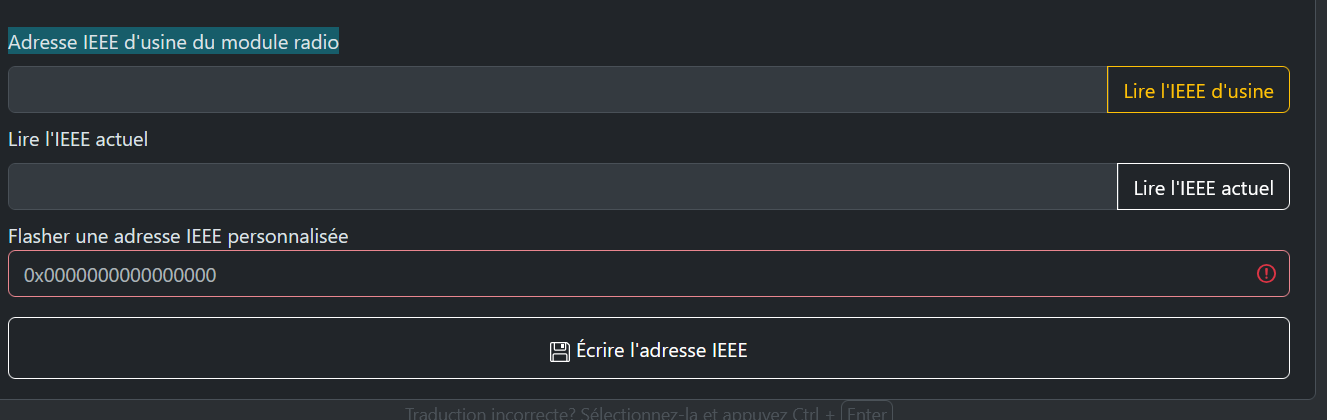
Pour le hash, s’agit-il de l’Adresse IEEE d’usine du module radio?
En cas de malheur sur le réseau zigbee (ou d’évolution de matériels ou de versions logicielles), j’aimerais bien comprendre comment cela marche pour pouvoir restaurer le réseau sans pour autant restaurer tout Jeedom.
Et vu que j’ai cette erreur sur la sauvegarde, ce n’est pas rassurant.
D’ailleurs, je n’ai pas trouvé l’équivalent Restore à ce Save.
Stefjm
Avril 12, 2026, 1:27
15
De ce que je comprend du message d’erreur, node n’a pas assez de mémoire (1.5Go) sur le 4Go de l’Atlas?
Oliflo
Avril 12, 2026, 3:14
16
Stefjm:
Et vu que j’ai cette erreur sur la sauvegarde, ce n’est pas rassurant.
D’ailleurs, je n’ai pas trouvé l’équivalent Restore à ce Save.
Sauf erreur de ma part il n’y en a pas de restore. Mais ne me demande pas à quoi sert le backup !
Pour la sauvegarde ce n’est pas « important » car in fine il créé seulement le fichier coordinator_backup.json. Et par expérience, si tu es à iso configuration tu n’en as pas besoins; la database et le fichier configuration suffisent !
Quoiqu’il en soit à propos de tes question et plutôt que de ressaisir la FAQ https://www.zigbee2mqtt.io/guide/faq/ , parcours là , au moins le 6eme point te donneras plus d’éclairage.
Oui si tu change l’IEEE tu dois tout réappareillé aussi (l’iEEE est un identifiant « unique » associé à ta clé)
"metadata": {
    "format": "zigpy/open-coordinator-backup",
    "version": 1,
    "source": "zigbee-herdsman@9.0.9",
    "internal": {
      "date": "2026-04-11T21:08:07.539Z"
    }
  },
  "stack_specific": {},
  "coordinator_ieee": "00212effff098cba",
  "pan_id": "21d1",
  "extended_pan_id": "dddddddddddddddd",
  "nwk_update_id": 8,
  "security_level": 5,
  "channel": 20,
  "channel_mask": [
    20
  ],
  "network_key": {
    "key": "2ce4bdee3f52d3299e1027zzzzzzzzzzz",
    "sequence_number": 0,
    "frame_counter": 183259230
1 « J'aime »
Stefjm
Avril 12, 2026, 3:30
17
Merci beaucoup.
Oliflo
Avril 12, 2026, 8:13
18
j’en ai une tous les jours via la sauvegarde de Jeedom qui est sur un disque externalisé de la box. Soit je réinjecte toute la sauvegarde , soit je l’ouvre et n’extrait que les données attendus. Dernièrement j’ai ouvert la sauvegarde pour récupérer les tables du plugin suivi_conso …bien pratique !!
Stefjm
Avril 13, 2026, 5:29
19
J’ai aussi une sauvegarde journalière de Jeedom sur mon NAS.Jeezigbee (z2m)
system
Avril 14, 2026, 5:29
20
Ce sujet a été automatiquement fermé après 24 heures suivant le dernier commentaire. Aucune réponse n’est permise dorénavant.