Probleme Deamon Z2m

Bonjour,
Je suis au bout du rouleau je n’arrive pas à comprendre pourquoi mon deamon refuse de démarrer !
Tout fonctionnait normalement depuis plusieurs mois.
J’ai lancé des sauvegarde mais le problème persiste!
Je suis sous proxmox ave une clé sonoff Zigbee


> zigbee2mqtt@2.0.0 start
> node index.js
Starting Zigbee2MQTT without watchdog.
!!!!!!!!!!!!!!!!!!!!!!!!!!!!!!!!!!!!!!!!!!!!!!!!!
READ THIS CAREFULLY
Refusing to start because configuration is not valid, found the following errors:
- device_options must be object
If you don't know how to solve this, read https://www.zigbee2mqtt.io/guide/configuration
!!!!!!!!!!!!!!!!!!!!!!!!!!!!!!!!!!!!!!!!!!!!!!!!!
> zigbee2mqtt@1.42.0 start
> node index.js
Starting Zigbee2MQTT without watchdog.
!!!!!!!!!!!!!!!!!!!!!!!!!!!!!!!!!!!!!!!!!!!!!!!!!
READ THIS CAREFULLY
Refusing to start because configuration is not valid, found the following errors:
- device_options must be object
If you don't know how to solve this, read https://www.zigbee2mqtt.io/guide/configuration
!!!!!!!!!!!!!!!!!!!!!!!!!!!!!!!!!!!!!!!!!!!!!!!!!
> zigbee2mqtt@1.42.0 start
> node index.js
Starting Zigbee2MQTT without watchdog.
!!!!!!!!!!!!!!!!!!!!!!!!!!!!!!!!!!!!!!!!!!!!!!!!!
READ THIS CAREFULLY
Refusing to start because configuration is not valid, found the following errors:
- device_options must be object
If you don't know how to solve this, read https://www.zigbee2mqtt.io/guide/configuration
!!!!!!!!!!!!!!!!!!!!!!!!!!!!!!!!!!!!!!!!!!!!!!!!!

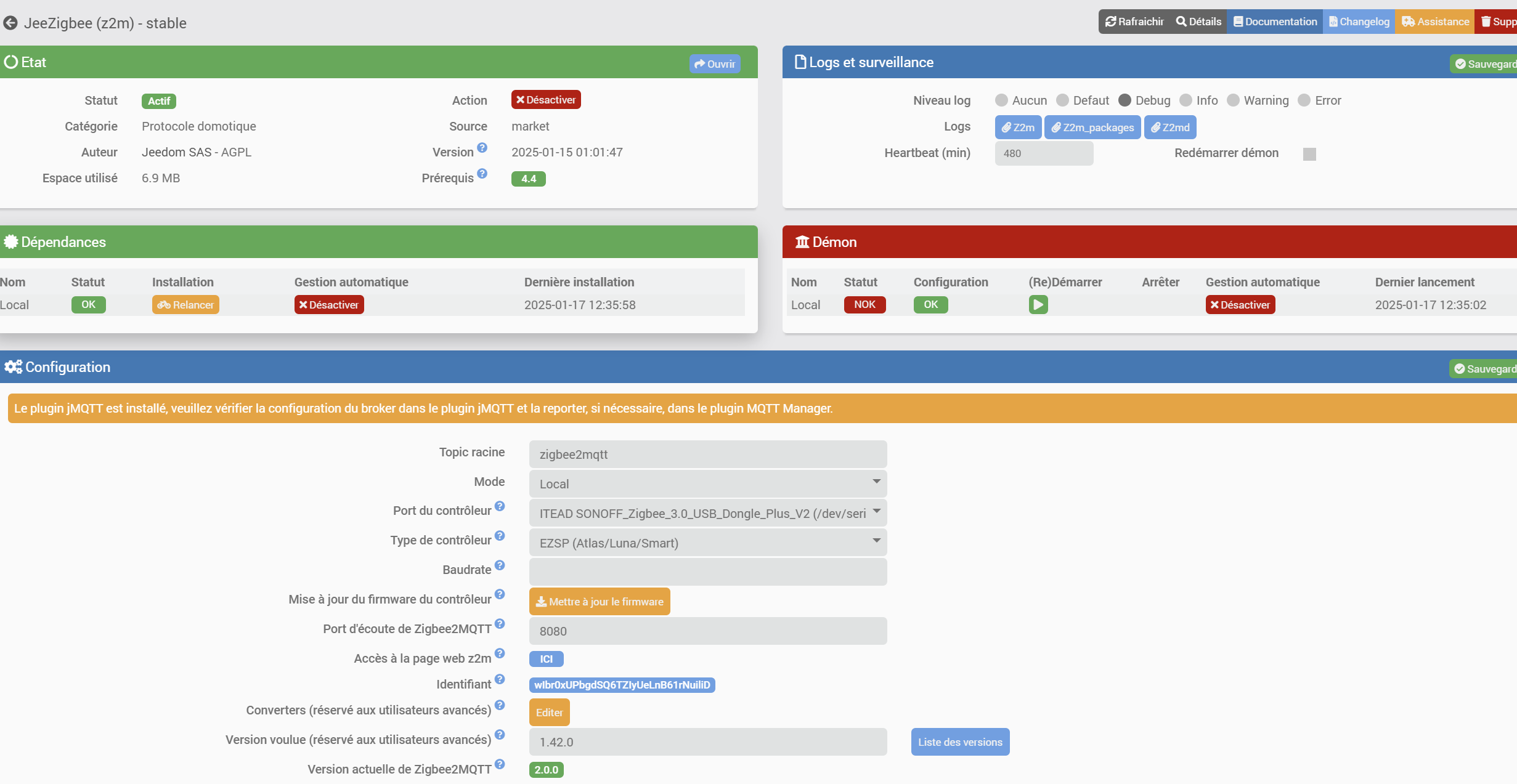
Informations Jeedom

Core : 4.4.19 (master)
DNS Jeedom : non

Plugin : JeeZigbee
Version : 2025-01-15 01:01:47 (stable)
Statut Démon : Démarré - (2025-01-17 12:35:02)
+ echo '*******************Begin of package installation******************'
*******************Begin of package installation******************
+ touch /tmp/jeedom_install_in_progress_z2m
+ echo 1
+ echo 2
+ sudo chmod +x /var/www/html/core/class/../../plugins/z2m/resources/pre-install.sh
+ sudo /var/www/html/core/class/../../plugins/z2m/resources/pre-install.sh
Launch pre-install of z2m dependancy
+ echo 3
+ php /var/www/html/core/class/../php/jeecli.php plugin install mqtt2
+ echo 4
+ sudo killall apt apt-get unattended-upgr
apt: no process found
apt-get: no process found
unattended-upgr: no process found
+ sudo rm /var/lib/apt/lists/lock
+ sudo rm /var/cache/apt/archives/lock
+ sudo rm /var/lib/dpkg/lock /var/lib/dpkg/lock-frontend
+ sudo sudo dpkg --configure -a --force-confdef
+ sudo apt update
WARNING: apt does not have a stable CLI interface. Use with caution in scripts.
Hit:1 http://security.debian.org/debian-security bullseye-security InRelease
Hit:2 http://deb.debian.org/debian bullseye InRelease
Hit:3 http://deb.debian.org/debian bullseye-updates InRelease
Hit:4 https://deb.nodesource.com/node_20.x nodistro InRelease
Hit:5 https://packagecloud.io/ookla/speedtest-cli/debian bullseye InRelease
Reading package lists...
Building dependency tree...
Reading state information...
14 packages can be upgraded. Run 'apt list --upgradable' to see them.
+ echo 5
+ sudo chmod +x /var/www/html/core/class/../../resources/install_nodejs.sh
+ sudo /var/www/html/core/class/../../resources/install_nodejs.sh
Hit:1 http://deb.debian.org/debian bullseye InRelease
Hit:2 http://security.debian.org/debian-security bullseye-security InRelease
Hit:3 http://deb.debian.org/debian bullseye-updates InRelease
Hit:4 https://deb.nodesource.com/node_20.x nodistro InRelease
Hit:5 https://packagecloud.io/ookla/speedtest-cli/debian bullseye InRelease
Reading package lists...
Building dependency tree...
Reading state information...
apt-utils is already the newest version (2.2.4).
build-essential is already the newest version (12.9).
lsb-release is already the newest version (11.1.0).
git is already the newest version (1:2.30.2-1+deb11u3).
The following package was automatically installed and is no longer required:
python3-cffi-backend
Use 'sudo apt autoremove' to remove it.
0 upgraded, 0 newly installed, 0 to remove and 14 not upgraded.
[Check Version NodeJS actuelle : v20.18.1 : [  OK  ]
[Check Prefix : /usr and sudo prefix : /usr and www-data prefix : /usr : [  OK  ]
Clean npm cache
npm warn using --force Recommended protections disabled.
+ echo 6
+ sudo apt install -o Dpkg::Options::=--force-confdef -y php-yaml
WARNING: apt does not have a stable CLI interface. Use with caution in scripts.
Reading package lists...
Building dependency tree...
Reading state information...
php-yaml is already the newest version (2.2.1+2.1.0+2.0.4+1.3.2-2).
The following package was automatically installed and is no longer required:
python3-cffi-backend
Use 'sudo apt autoremove' to remove it.
0 upgraded, 0 newly installed, 0 to remove and 14 not upgraded.
+ echo 7
+ sudo systemctl restart apache2
+ echo 8
+ sudo chmod +x /var/www/html/core/class/../../plugins/z2m/resources/post-install.sh
+ sudo /var/www/html/core/class/../../plugins/z2m/resources/post-install.sh
+ echo Launch post-install of z2m dependancy
Launch post-install of z2m dependancy
+ realpath /var/www/html/core/class/../../plugins/z2m/resources/post-install.sh
+ dirname /var/www/html/plugins/z2m/resources/post-install.sh
+ BASEDIR=/var/www/html/plugins/z2m/resources
+ [ -d /var/www/html/plugins/z2m/resources/zigbee2mqtt ]
+ rm -rf /var/www/html/plugins/z2m/resources/zigbee2mqtt
+ mkdir /var/www/html/plugins/z2m/resources/zigbee2mqtt
+ git clone --depth 1 https://github.com/Koenkk/zigbee2mqtt.git /var/www/html/plugins/z2m/resources/zigbee2mqtt
Cloning into '/var/www/html/plugins/z2m/resources/zigbee2mqtt'...
+ cd /var/www/html/plugins/z2m/resources/zigbee2mqtt
+ [ -f /var/www/html/plugins/z2m/resources/../data/wanted_z2m_version ]
+ cat /var/www/html/plugins/z2m/resources/../data/wanted_z2m_version
+ wanted_z2m_version=1.42.0
+ [ -n 1.42.0 ]
+ echo Need version : 1.42.0
Need version : 1.42.0
+ git fetch --all --tags
Fetching origin
From https://github.com/Koenkk/zigbee2mqtt
* [new tag]           0.1.0      -> 0.1.0
* [new tag]           0.1.1      -> 0.1.1
* [new tag]           0.1.2      -> 0.1.2
* [new tag]           0.1.3      -> 0.1.3
* [new tag]           0.1.4      -> 0.1.4
* [new tag]           0.1.5      -> 0.1.5
* [new tag]           0.1.6      -> 0.1.6
* [new tag]           0.1.7      -> 0.1.7
* [new tag]           0.1.8      -> 0.1.8
* [new tag]           0.2.0      -> 0.2.0
* [new tag]           1.0.0      -> 1.0.0
* [new tag]           1.0.1      -> 1.0.1
* [new tag]           1.1.0      -> 1.1.0
* [new tag]           1.1.1      -> 1.1.1
* [new tag]           1.10.0     -> 1.10.0
* [new tag]           1.11.0     -> 1.11.0
* [new tag]           1.12.0     -> 1.12.0
* [new tag]           1.12.1     -> 1.12.1
* [new tag]           1.12.2     -> 1.12.2
* [new tag]           1.13.0     -> 1.13.0
* [new tag]           1.13.1     -> 1.13.1
* [new tag]           1.14.0     -> 1.14.0
* [new tag]           1.14.1     -> 1.14.1
* [new tag]           1.14.2     -> 1.14.2
* [new tag]           1.14.3     -> 1.14.3
* [new tag]           1.14.4     -> 1.14.4
* [new tag]           1.15.0     -> 1.15.0
* [new tag]           1.16.0     -> 1.16.0
* [new tag]           1.16.1     -> 1.16.1
* [new tag]           1.16.2     -> 1.16.2
* [new tag]           1.17.0     -> 1.17.0
* [new tag]           1.17.1     -> 1.17.1
* [new tag]           1.18.0     -> 1.18.0
* [new tag]           1.18.1     -> 1.18.1
* [new tag]           1.18.2     -> 1.18.2
* [new tag]           1.18.3     -> 1.18.3
* [new tag]           1.19.0     -> 1.19.0
* [new tag]           1.19.1     -> 1.19.1
* [new tag]           1.2.0      -> 1.2.0
* [new tag]           1.2.1      -> 1.2.1
* [new tag]           1.20.0     -> 1.20.0
* [new tag]           1.21.0     -> 1.21.0
* [new tag]           1.21.1     -> 1.21.1
* [new tag]           1.21.2     -> 1.21.2
* [new tag]           1.22.0     -> 1.22.0
* [new tag]           1.22.1     -> 1.22.1
* [new tag]           1.22.2     -> 1.22.2
* [new tag]           1.23.0     -> 1.23.0
* [new tag]           1.24.0     -> 1.24.0
* [new tag]           1.25.0     -> 1.25.0
* [new tag]           1.25.1     -> 1.25.1
* [new tag]           1.25.2     -> 1.25.2
* [new tag]           1.26.0     -> 1.26.0
* [new tag]           1.27.0     -> 1.27.0
* [new tag]           1.27.1     -> 1.27.1
* [new tag]           1.27.2     -> 1.27.2
* [new tag]           1.28.0     -> 1.28.0
* [new tag]           1.28.1     -> 1.28.1
* [new tag]           1.28.2     -> 1.28.2
* [new tag]           1.28.3     -> 1.28.3
* [new tag]           1.28.4     -> 1.28.4
* [new tag]           1.29.0     -> 1.29.0
* [new tag]           1.29.1     -> 1.29.1
* [new tag]           1.29.2     -> 1.29.2
* [new tag]           1.3.0      -> 1.3.0
* [new tag]           1.3.1      -> 1.3.1
* [new tag]           1.30.0     -> 1.30.0
* [new tag]           1.30.1     -> 1.30.1
* [new tag]           1.30.2     -> 1.30.2
* [new tag]           1.30.3     -> 1.30.3
* [new tag]           1.30.4     -> 1.30.4
* [new tag]           1.31.0     -> 1.31.0
* [new tag]           1.31.1     -> 1.31.1
* [new tag]           1.31.2     -> 1.31.2
* [new tag]           1.32.0     -> 1.32.0
* [new tag]           1.32.1     -> 1.32.1
* [new tag]           1.32.2     -> 1.32.2
* [new tag]           1.33.0     -> 1.33.0
* [new tag]           1.33.1     -> 1.33.1
* [new tag]           1.33.2     -> 1.33.2
* [new tag]           1.34.0     -> 1.34.0
* [new tag]           1.35.0     -> 1.35.0
* [new tag]           1.35.1     -> 1.35.1
* [new tag]           1.35.2     -> 1.35.2
* [new tag]           1.35.3     -> 1.35.3
* [new tag]           1.36.0     -> 1.36.0
* [new tag]           1.36.1     -> 1.36.1
* [new tag]           1.37.0     -> 1.37.0
* [new tag]           1.37.1     -> 1.37.1
* [new tag]           1.38.0     -> 1.38.0
* [new tag]           1.39.0     -> 1.39.0
* [new tag]           1.39.1     -> 1.39.1
* [new tag]           1.4.0      -> 1.4.0
* [new tag]           1.40.0     -> 1.40.0
* [new tag]           1.40.1     -> 1.40.1
* [new tag]           1.40.2     -> 1.40.2
* [new tag]           1.41.0     -> 1.41.0
* [new tag]           1.42.0     -> 1.42.0
* [new tag]           1.5.0      -> 1.5.0
* [new tag]           1.5.1      -> 1.5.1
* [new tag]           1.6.0      -> 1.6.0
* [new tag]           1.7.0      -> 1.7.0
* [new tag]           1.7.1      -> 1.7.1
* [new tag]           1.8.0      -> 1.8.0
* [new tag]           1.9.0      -> 1.9.0
+ git checkout tags/1.42.0
Note: switching to 'tags/1.42.0'.
You are in 'detached HEAD' state. You can look around, make experimental
changes and commit them, and you can discard any commits you make in this
state without impacting any branches by switching back to a branch.
If you want to create a new branch to retain commits you create, you may
do so (now or later) by using -c with the switch command. Example:
git switch -c <new-branch-name>
Or undo this operation with:
git switch -
Turn off this advice by setting config variable advice.detachedHead to false
HEAD is now at 861cba63 chore(dev): release 1.42.0 (#24569)
+ [ -n 1.42.0 ]
+ echo 1.42.0
+ head -c 1
+ [ 1 -lt 2 ]
+ npm ci
npm warn deprecated inflight@1.0.6: This module is not supported, and leaks memory. Do not use it. Check out lru-cache if you want a good and tested way to coalesce async requests by a key value, which is much more comprehensive and powerful.
npm warn deprecated glob@7.2.3: Glob versions prior to v9 are no longer supported
added 646 packages, and audited 647 packages in 11s
90 packages are looking for funding
run `npm fund` for details
found 0 vulnerabilities
+ npm run build
> zigbee2mqtt@1.42.0 build
> tsc && node index.js writehash
+ chown www-data:www-data -R /var/www/html/plugins/z2m/resources/zigbee2mqtt
+ echo 9
+ php /var/www/html/core/class/../php/jeecli.php plugin dependancy_end z2m
rm: invalid option -- '/'
Try 'rm --help' for more information.
+ echo 10
+ rm /tmp/jeedom_install_in_progress_z2m
+ echo '*******************End of package installation******************'
*******************End of package installation******************

Bonjour

Vous avez demandé quelle version de zigbee2mqtt pour l’installation ?
Avez-vous lu tous lea derniers posts concernant jeezigbee ?
Une copie de votre fichier de configuration? (Pas sur qu’il soit disponible sous jeezigbee )

Antoine

Salut Tonio,

Je suis repassé en 1.42.0

Nouveaux logs du demon.

Antoine

Je n’ai pas accès à mes Jeedom et ne peut donc pas être précis.

le message - device_options must be object me fait penser à quelque chose que j’ai déjà rencontré.

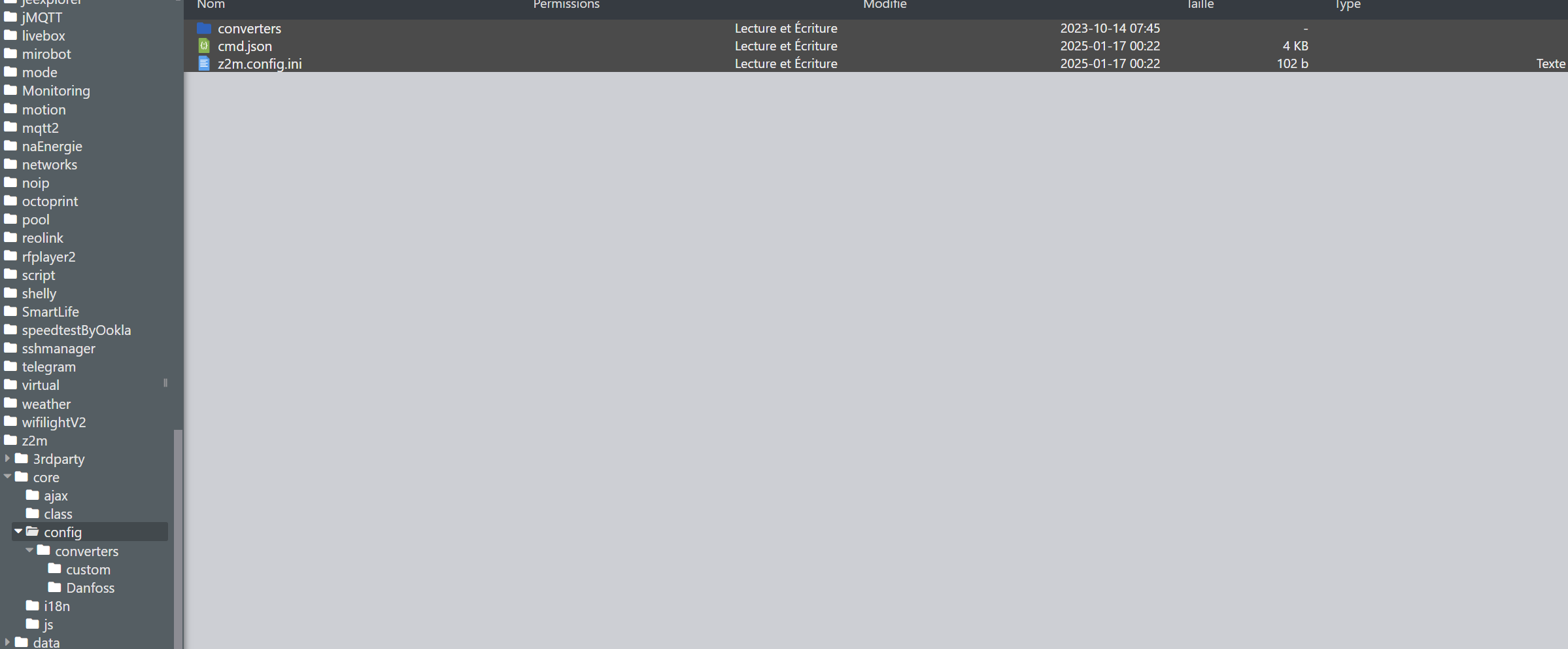
De mémoire, il doit y avoir un fichier de configuration dans le répertoire core/configdu plugin. Ce fichier doit s’appeler configuration.yaml ou config.yaml il contient probablement une ligne du genre

    device: <un texte>

il faudrai tenter de remplacer cette ligne par

   device: [
   ]

Je crois que cette erreur est un reste d’un installation de la version 2 de zigbee2mqtt.

[2025-01-17 12:47:18] INFO  : Démarrage du démon Z2M : ZIGBEE2MQTT_DATA=/var/www/html/plugins/z2m/core/class/../../data npm start --prefix /var/www/html/plugins/z2m/resources/zigbee2mqtt
[2025-01-17 12:50:19] INFO  : Arrêt du démon z2m
[2025-01-17 12:50:20] INFO  : Démarrage du démon Z2M : ZIGBEE2MQTT_DATA=/var/www/html/plugins/z2m/core/class/../../data npm start --prefix /var/www/html/plugins/z2m/resources/zigbee2mqtt
[2025-01-17 12:51:05] INFO  : Arrêt du démon z2m
[2025-01-17 12:51:06] INFO  : Démarrage du démon Z2M : ZIGBEE2MQTT_DATA=/var/www/html/plugins/z2m/core/class/../../data npm start --prefix /var/www/html/plugins/z2m/resources/zigbee2mqtt
[2025-01-17 12:52:10] INFO  : Arrêt du démon z2m
[2025-01-17 12:52:11] INFO  : Démarrage du démon Z2M : ZIGBEE2MQTT_DATA=/var/www/html/plugins/z2m/core/class/../../data npm start --prefix /var/www/html/plugins/z2m/resources/zigbee2mqtt
[2025-01-17 12:52:22] ERROR  : Erreur sur la fonction deamon_start du plugin : Vous devez attendre au moins 45 secondes entre deux lancements du démon. Dernier lancement : 2025-01-17 12:52:10
[2025-01-17 12:52:46] ERROR  : Erreur sur la fonction deamon_start du plugin : Vous devez attendre au moins 45 secondes entre deux lancements du démon. Dernier lancement : 2025-01-17 12:52:10
[2025-01-17 12:53:05] INFO  : Arrêt du démon z2m
[2025-01-17 12:53:06] INFO  : Démarrage du démon Z2M : ZIGBEE2MQTT_DATA=/var/www/html/plugins/z2m/core/class/../../data npm start --prefix /var/www/html/plugins/z2m/resources/zigbee2mqtt
[2025-01-17 12:55:03] INFO  : Arrêt du démon z2m
[2025-01-17 12:55:04] INFO  : Démarrage du démon Z2M : ZIGBEE2MQTT_DATA=/var/www/html/plugins/z2m/core/class/../../data npm start --prefix /var/www/html/plugins/z2m/resources/zigbee2mqtt
[2025-01-17 12:57:02] ERROR  : Attention je pense qu'il y a un soucis avec le démon que j'ai relancé plus de 3 fois consécutivement
[2025-01-17 12:57:02] INFO  : Arrêt du démon z2m
[2025-01-17 12:57:03] INFO  : Démarrage du démon Z2M : ZIGBEE2MQTT_DATA=/var/www/html/plugins/z2m/core/class/../../data npm start --prefix /var/www/html/plugins/z2m/resources/zigbee2mqtt
[2025-01-17 12:57:22] ERROR  : Erreur sur la fonction deamon_start du plugin : Vous devez attendre au moins 45 secondes entre deux lancements du démon. Dernier lancement : 2025-01-17 12:57:02
[2025-01-17 13:00:03] ERROR  : Attention je pense qu'il y a un soucis avec le démon que j'ai relancé plus de 3 fois consécutivement
[2025-01-17 13:00:03] INFO  : Arrêt du démon z2m
[2025-01-17 13:00:05] INFO  : Démarrage du démon Z2M : ZIGBEE2MQTT_DATA=/var/www/html/plugins/z2m/core/class/../../data npm start --prefix /var/www/html/plugins/z2m/resources/zigbee2mqtt
[2025-01-17 13:00:36] ERROR  : Erreur sur la fonction deamon_start du plugin : Vous devez attendre au moins 45 secondes entre deux lancements du démon. Dernier lancement : 2025-01-17 13:00:03
[2025-01-17 13:00:48] ERROR  : Attention je pense qu'il y a un soucis avec le démon que j'ai relancé plus de 3 fois consécutivement
[2025-01-17 13:00:48] INFO  : Arrêt du démon z2m
[2025-01-17 13:00:49] INFO  : Démarrage du démon Z2M : ZIGBEE2MQTT_DATA=/var/www/html/plugins/z2m/core/class/../../data npm start --prefix /var/www/html/plugins/z2m/resources/zigbee2mqtt
[2025-01-17 13:05:02] ERROR  : Attention je pense qu'il y a un soucis avec le démon que j'ai relancé plus de 3 fois consécutivement
[2025-01-17 13:05:03] INFO  : Arrêt du démon z2m
[2025-01-17 13:05:04] INFO  : Démarrage du démon Z2M : ZIGBEE2MQTT_DATA=/var/www/html/plugins/z2m/core/class/../../data npm start --prefix /var/www/html/plugins/z2m/resources/zigbee2mqtt
[2025-01-17 13:10:03] ERROR  : Attention je pense qu'il y a un soucis avec le démon que j'ai relancé plus de 3 fois consécutivement
[2025-01-17 13:10:03] INFO  : Arrêt du démon z2m
[2025-01-17 13:10:04] INFO  : Démarrage du démon Z2M : ZIGBEE2MQTT_DATA=/var/www/html/plugins/z2m/core/class/../../data npm start --prefix /var/www/html/plugins/z2m/resources/zigbee2mqtt

Salut Ktn,
Je regarde ça de suite

Je ne trouve pas

Peut-être dans data… fouille un peu dans l’arborescsnce du plugin et regarde à quoi ressemble le contenu du fichier z2m.config.ini je ne pense pas que ce soit celui là qu’il faut éditer mais vérifie tout de même.

Je ne pourrai pas être plus précis avant ce soir…

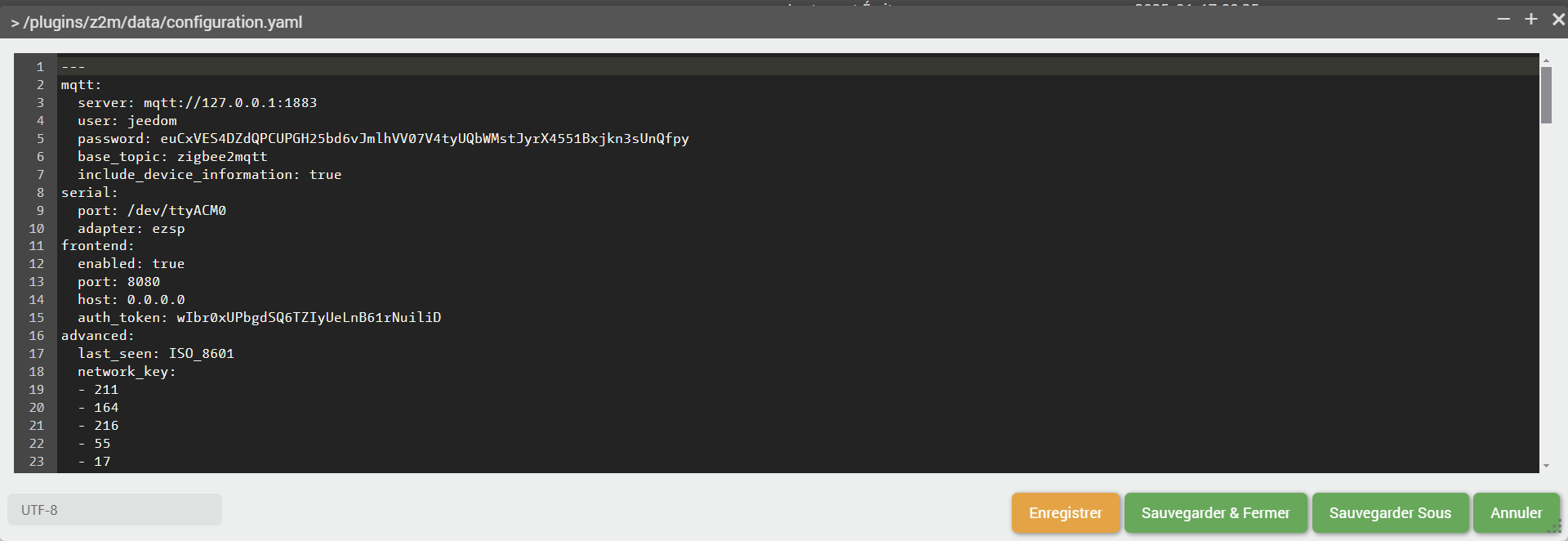
Ok j’ai trouvé sous data

Vu que je te parle d’un fichier configuration.yaml une recherche de z2m configuration.yaml te permet de trouvé ce sujet:

Est ce que tout te semble correct ?Et les crochets y étaient déjà

---
mqtt:
  server: mqtt://127.0.0.1:1883
  user: jeedom
  password: euCxVES4DZdQPCUPGH25bd6vJmlhVV07V4tyUQbWMstJyrX4551Bxjkn3sUnQfpy
  base_topic: zigbee2mqtt
  include_device_information: true
serial:
  port: /dev/ttyACM0
  adapter: ezsp
frontend:
  enabled: true
  port: 8080
  host: 0.0.0.0
  auth_token: wIbr0xUPbgdSQ6TZIyUeLnB61rNuiliD
advanced:
  last_seen: ISO_8601
  network_key:
  - 211
  - 164
  - 216
  - 55
  - 17
  - 147
  - 84
  - 170
  - 98
  - 240
  - 27
  - 217
  - 0
  - 142
  - 197
  - 192
  log_level: debug
device_options: []
devices:
  "0xa4c138fb4c776634":
    friendly_name: "0xa4c138fb4c776634"
  "0xa4c1387db62adcf2":
    friendly_name: "0xa4c1387db62adcf2"
  "0xa4c138a3663e25d8":
    friendly_name: "0xa4c138a3663e25d8"
  "0xa4c138b113c0fa6e":
    friendly_name: "0xa4c138b113c0fa6e"
  "0xa4c138e4e72f08cf":
    friendly_name: "0xa4c138e4e72f08cf"
  "0xa4c138c6210c1940":
    friendly_name: "0xa4c138c6210c1940"
  "0xa4c13810470deb6c":
    friendly_name: "0xa4c13810470deb6c"
  "0xa4c138c204eb0b73":
    friendly_name: "0xa4c138c204eb0b73"
  "0xa4c1381de66767c7":
    friendly_name: "0xa4c1381de66767c7"
  "0x00158d0005402b4a":
    friendly_name: "0x00158d0005402b4a"
  "0x00158d000753b984":
    friendly_name: "0x00158d000753b984"
  "0x001788010b994065":
    friendly_name: "0x001788010b994065"
  "0x842e14fffef51b8d":
    friendly_name: "0x842e14fffef51b8d"
  "0x00158d000689af22":
    friendly_name: "0x00158d000689af22"
  "0x00158d0004521ed0":
    friendly_name: "0x00158d0004521ed0"
  "0x00158d0006c5d7b6":
    friendly_name: "0x00158d0006c5d7b6"
  "0x00158d0009ea4148":
    friendly_name: "0x00158d0009ea4148"
  "0x00158d0004772590":
    friendly_name: "0x00158d0004772590"
  "0x00158d0006c5085e":
    friendly_name: "0x00158d0006c5085e"
  "0x00158d00047d23c7":
    friendly_name: "0x00158d00047d23c7"
  "0x54ef4410002c0989":
    friendly_name: "0x54ef4410002c0989"
  "0x54ef4410002b79e3":
    friendly_name: "0x54ef4410002b79e3"
  "0x54ef4410002c0a07":
    friendly_name: "0x54ef4410002c0a07"
  "0x54ef4410002b783a":
    friendly_name: "0x54ef4410002b783a"
  "0x00124b0026b6cfa5":
    friendly_name: "0x00124b0026b6cfa5"
  "0xa4c13840850d1fd6":
    friendly_name: "0xa4c13840850d1fd6"
  "0x00158d00047de081":
    friendly_name: "0x00158d00047de081"
  "0x00158d0001dd0d13":
    friendly_name: "0x00158d0001dd0d13"
  "0x54ef4410002c173a":
    friendly_name: "0x54ef4410002c173a"
  "0x54ef441000298460":
    friendly_name: "0x54ef441000298460"
  "0x54ef4410002c0572":
    friendly_name: "0x54ef4410002c0572"
  "0x00158d0006c5087b":
    friendly_name: "0x00158d0006c5087b"
  "0x00158d0001dcfdb7":
    friendly_name: "0x00158d0001dcfdb7"
  "0x00158d00047723e2":
    friendly_name: "0x00158d00047723e2"
  "0x00158d0004610995":
    friendly_name: "0x00158d0004610995"
  "0x00158d00073a39cd":
    friendly_name: "0x00158d00073a39cd"
  "0x00158d00073a4154":
    friendly_name: "0x00158d00073a4154"
  "0x00158d0002f2b0a0":
    friendly_name: "0x00158d0002f2b0a0"
  "0x00124b0023435a3c":
    friendly_name: "0x00124b0023435a3c"
  "0x00158d0001e0032b":
    friendly_name: "0x00158d0001e0032b"
  "0xa4c138c8ce988919":
    friendly_name: "0xa4c138c8ce988919"
  "0x00124b0023437470":
    friendly_name: "0x00124b0023437470"
  "0x00158d00047e040d":
    friendly_name: "0x00158d00047e040d"
  "0x00158d000486dcce":
    friendly_name: "0x00158d000486dcce"
  "0x00158d000755c7ac":
    friendly_name: "0x00158d000755c7ac"
  "0x001788010b98df50":
    friendly_name: "0x001788010b98df50"
  "0x00158d00075bdee6":
    friendly_name: "0x00158d00075bdee6"
  "0x00158d00067229fd":
    friendly_name: "0x00158d00067229fd"
  "0x00158d000775b533":
    friendly_name: "0x00158d000775b533"
  "0xa4c13876789267f5":
    friendly_name: "0xa4c13876789267f5"
  "0x00158d00044d15b2":
    friendly_name: "0x00158d00044d15b2"
  "0x00124b0026b6ff61":
    friendly_name: "0x00124b0026b6ff61"
  "0x00124b0026b707e3":
    friendly_name: "0x00124b0026b707e3"
  "0x00124b0026b70719":
    friendly_name: "0x00124b0026b70719"
  "0x00158d000757fdc3":
    friendly_name: "0x00158d000757fdc3"
  "0x00158d00057b3f22":
    friendly_name: "0x00158d00057b3f22"
  "0x00158d00053f7a2f":
    friendly_name: "0x00158d00053f7a2f"
  "0x00158d0004aca4cc":
    friendly_name: "0x00158d0004aca4cc"
  "0x00158d000460d92e":
    friendly_name: "0x00158d000460d92e"
  "0x00124b0023435bd9":
    friendly_name: "0x00124b0023435bd9"
groups: []
version: 4
permit_join: false
external_converters:
- /var/www/html/plugins/z2m/core/class/../config/converters/Danfoss/icon.js
...

Oui, c’est bien ce fichier.

Je ne peux pas voir à quoi il ressemble chez moi mais tente de mettre la ligne device_options: []en commentaire comme indiqué dans le poste que j’ai mis en lien…

Au top tout est rentré dans l’ordre

2 « J'aime »

C’est cool de pouvoir compter sur des personnes qui prennent de leur temps pour aider les newbies comme moi . La prochaine fois je chercherai à partir de l’erreur du log …
Encore un grand merci à tous ceux qui se sont donné la peine de me répondre !!
1 « J'aime »

Avec le temps, c’est toi qui aidera les newbies.

Comme j’ai été aidé à mes débuts avec Jeedom (et c’est pas fini…)

Bonsoir.
Même problème … également résolu par la mise en commentaire du device_options.
Merci !

Ce sujet a été automatiquement fermé après 24 heures suivant le dernier commentaire. Aucune réponse n’est permise dorénavant.