Bonjour,
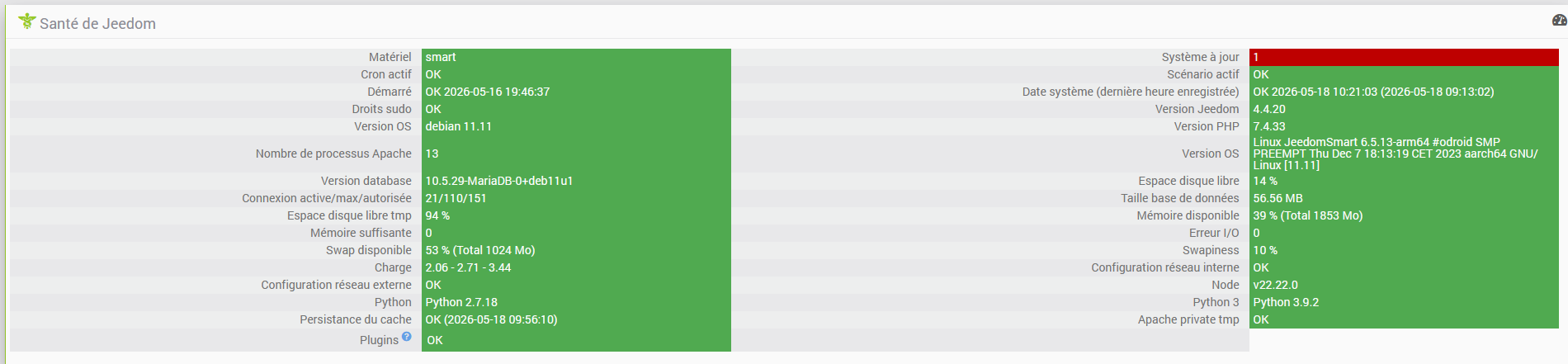
J’ai donc relancé une mise à jour ce matin et avant, j’ai examiné le cache:
root@JeedomSmart:/tmp/jeedom/cache# du
72      ./ff
48      ./fe
20      ./fd
24      ./fc
44      ./fb
36      ./fa
16      ./f9
36      ./f8
56      ./f7
28      ./f6
36      ./f5
40      ./f4
24      ./f3
32      ./f2
36      ./f1
48      ./f0
36      ./ef
12      ./ee
24      ./ed
28      ./ec
40      ./eb
72      ./ea
24      ./e9
36      ./e8
40      ./e7
16      ./e6
44      ./e5
52      ./e4
44      ./e3
36      ./e2
452     ./e1
48      ./e0
48      ./de
68      ./dd
148     ./dc
68      ./db
32      ./da
68      ./d9
52      ./d8
52      ./d7
32      ./d6
28      ./d5
52      ./d4
56      ./d3
104     ./d2
72      ./d1
52      ./d0
16      ./cf
48      ./ce
36      ./cd
44      ./cc
44      ./cb
40      ./ca
36      ./c9
68      ./c8
56      ./c7
68      ./c6
72      ./c5
32      ./c4
52      ./c3
60      ./c2
36      ./c1
60      ./c0
36      ./bf
48      ./be
28      ./bd
60      ./bc
60      ./bb
44      ./ba
24      ./b9
36      ./df
872     ./b8
48      ./b7
84      ./b6
60      ./b5
64      ./b4
64      ./b3
44      ./b2
92      ./b1
52      ./b0
48      ./af
60      ./ae
64      ./ad
64      ./ac
96      ./ab
44      ./aa
36      ./a9
84      ./a8
44      ./a7
52      ./a6
36      ./a5
40      ./a4
56      ./a3
64      ./a2
36      ./a1
64      ./a0
32      ./9f
40      ./9e
60      ./9d
52      ./9c
56      ./9b
52      ./9a
40      ./99
32      ./98
64      ./97
56      ./96
56      ./95
56      ./94
68      ./93
88      ./92
32      ./91
48      ./90
48      ./8f
44      ./8e
24      ./8d
28      ./8c
48      ./8b
44      ./8a
44      ./89
48      ./88
36      ./87
36      ./86
60      ./85
48      ./84
48      ./83
36      ./82
100     ./81
40      ./80
44      ./7f
32      ./7e
52      ./7d
32      ./7c
52      ./7b
72      ./7a
64      ./79
68      ./78
28      ./77
64      ./76
32      ./75
56      ./74
52      ./73
52      ./72
56      ./71
56      ./70
24      ./6f
24      ./6e
64      ./6d
32      ./6c
36      ./6b
88      ./6a
52      ./69
44      ./68
44      ./67
64      ./66
64      ./65
44      ./64
260     ./63
52      ./62
88      ./61
80      ./60
64      ./5f
44      ./5e
44      ./5d
48      ./5c
24      ./5b
28      ./5a
28      ./59
36      ./58
56      ./57
36      ./56
56      ./55
60      ./54
48      ./53
48      ./52
52      ./51
36      ./50
52      ./4f
44      ./4e
60      ./4d
72      ./4c
68      ./4b
44      ./4a
32      ./48
64      ./47
56      ./46
68      ./45
36      ./44
68      ./43
56      ./42
200     ./41
60      ./40
24      ./3f
36      ./3e
44      ./3d
40      ./3c
68      ./3b
44      ./3a
56      ./39
36      ./38
32      ./37
32      ./36
92      ./35
36      ./34
76      ./33
56      ./32
44      ./31
72      ./30
44      ./2f
44      ./2e
80      ./2d
52      ./2c
52      ./2b
60      ./2a
44      ./29
72      ./28
76      ./27
56      ./26
60      ./49
44      ./25
48      ./24
32      ./23
44      ./22
56      ./21
24      ./20
40      ./1f
52      ./1e
56      ./1d
32      ./1c
44      ./1b
40      ./1a
48      ./19
44      ./18
88      ./17
48      ./16
68      ./15
48      ./14
24      ./13
36      ./12
48      ./11
48      ./10
24      ./0f
532     ./0e
76      ./0d
48      ./0c
28      ./0b
76      ./0a
84      ./09
72      ./08
32      ./07
48      ./06
56      ./05
48      ./04
80      ./03
48      ./02
48      ./01
44      ./00
14960   .
root@JeedomSmart:/tmp/jeedom/cache# du
0       .
root@JeedomSmart:/tmp/jeedom/cache# du
0       .
root@JeedomSmart:/tmp/jeedom/cache# ls
root@JeedomSmart:/tmp/jeedom/cache#
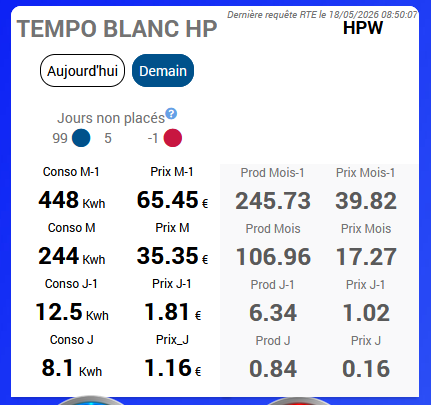
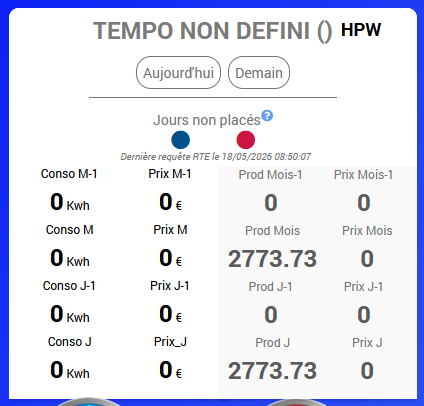
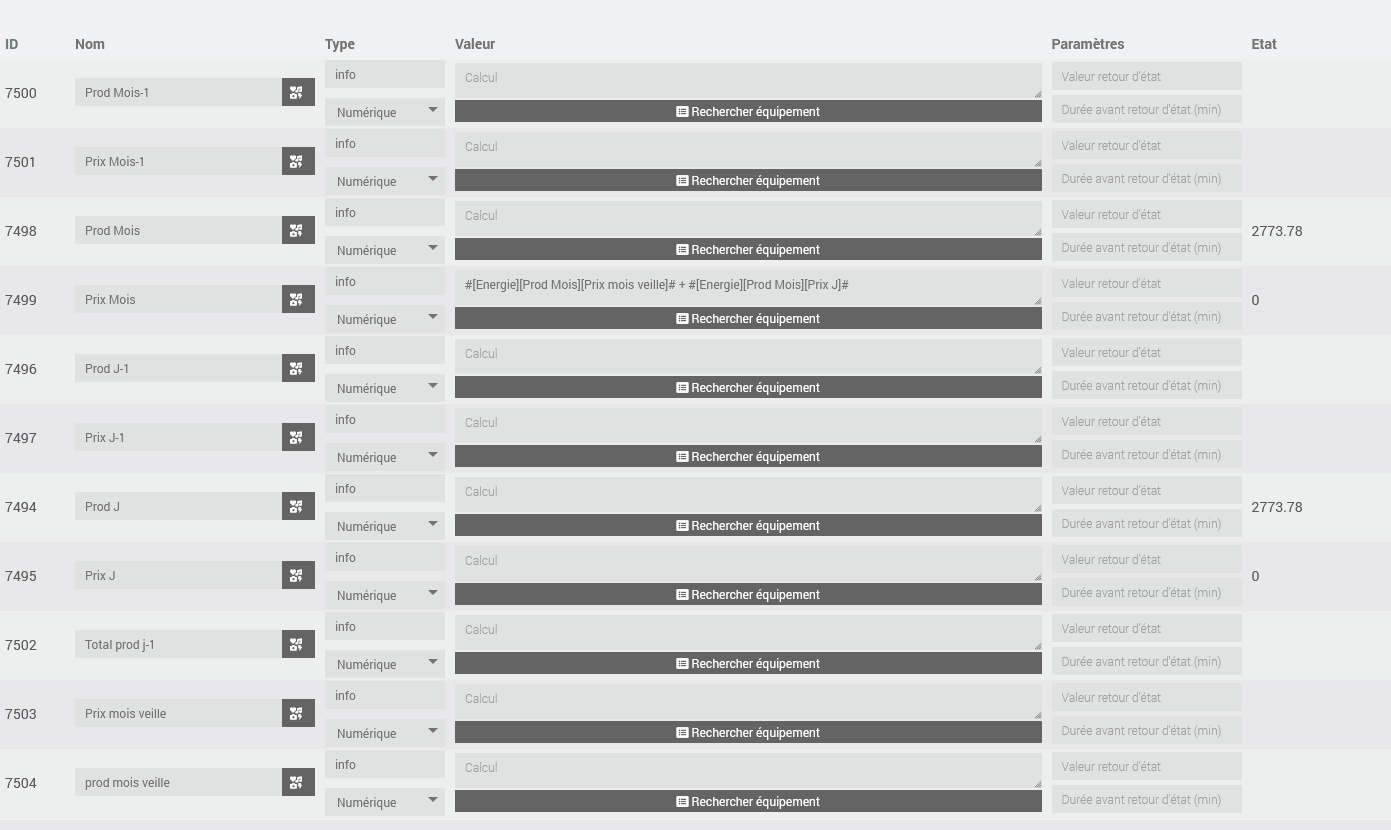
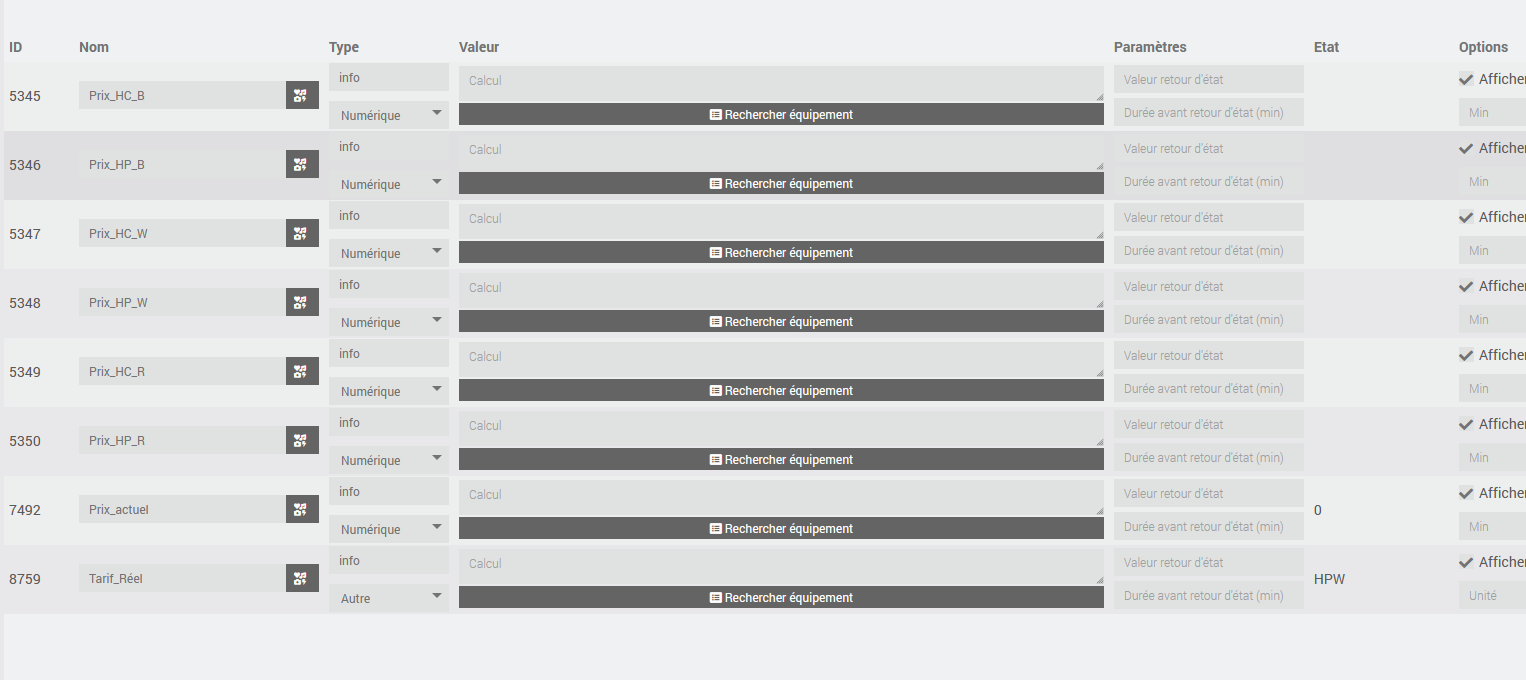
On voit bien qu’il a été complétement vide lors de la mise à jour.
J’ai resauvegardé des virtuels, mais ça n’a rien changé.
Le log de la mise à jour:
[START UPDATE]
****Update from 4.4.20 (2026-05-22 09:02:25)****
Parameters : {"preUpdate":"0","backup::before":"1","core":"1","force":"0","plugins":"1","update::reapply":""}
Send begin of update event | OK
Check update | OK
Check rights | OK
[START BACKUP]
***************Start of Jeedom backup at 2026-05-22 09:02:46***************
Send begin backup event | OK
Checking files rights | OK
Checking  database
jeedom.event
note     : The storage engine for the table doesn't support check | OK
Backing up database | OK
Cache persistence: | OK
Creating archive | OK
Cleaning old backup | OK
Limiting backup size to 10000 Mb | OK
Backup name: /var/www/html/core/php///backup/backup-JEEDOM_EV-4.4.20-2026-05-22-09h02.tar.gz
Checking files rights | OK
Send end backup event | OK
Backup operation duration: 114s
***************Jeedom backup end***************
[END BACKUP SUCCESS]
Save cache state of cmd and eqLogic
OK[PROGRESS][12]
Download url : https://github.com/jeedom/core/archive/master.zip
Download in progress--2026-05-22 09:04:42--  https://github.com/jeedom/core/archive/master.zip
Resolving github.com (github.com) 140.82.121.4
Connecting to github.com (github.com)|140.82.121.4|:443 connected.
HTTP request sent, awaiting response 302 Found
Location: https://codeload.github.com/jeedom/core/zip/refs/heads/master [following]
--2026-05-22 09:04:43--  https://codeload.github.com/jeedom/core/zip/refs/heads/master
Resolving codeload.github.com (codeload.github.com) 140.82.121.9
Connecting to codeload.github.com (codeload.github.com)|140.82.121.9|:443 connected.
HTTP request sent, awaiting response 200 | OK
Length: 83996682 (80M) [application/zip]
Saving to: '/tmp/jeedom/install/jeedom_update.zip'
0K        3% 11.0M 7s
3072K        7% 19.8M 5s
6144K       11% 19.8M 5s
9216K
.    14% 11.6M 5s
12288K       18% 17.7M 4s
15360K       22% 19.7M 4s
18432K       26% 20.0M 4s
21504K       29% 19.6M 3s
24576K       33% 20.0M 3s
27648K       37% 20.3M 3s
30720K   .
41% 12.7M 3s
33792K       44% 8.08M 3s
36864K       48% 7.22M 3s
39936K
52% 5.90M 3s
43008K       56% 4.51M 3s
46080K
59% 5.25M 3s
49152K       63% 6.13M 3s
52224K
67% 4.41M 3s
55296K       71% 5.32M 3s
58368K .
74% 6.55M 2s
61440K       78% 7.58M 2s
64512K
82% 8.16M 2s
67584K       86% 5.38M 1s
70656K      .
89% 5.73M 1s
73728K       93% 5.33M 1s
76800K
97% 6.54M 0s
79872K     .                100% 7.40M=9.9s
2026-05-22 09:04:53 (8.12 MB/s) - '/tmp/jeedom/install/jeedom_update.zip' saved [83996682/83996682] | OK
Cleaning folders | OK
Create temporary folder | OK
Unzip in progress | OK
Clean temporary files (tmp) | OK
Disable all task
kill: (3895): No such process
.
 | OK
Disable all scenario
 | OK
Update modification date of unzip file | OK
Moving files
Ignore file /tmp/jeedom_unzip/core-master///docs/de_DE/noteVersion.md because size is 0
Ignore file /tmp/jeedom_unzip/core-master///docs/en_US/noteVersion.md because size is 0
Ignore file /tmp/jeedom_unzip/core-master///docs/es_ES/noteVersion.md because size is 0
Ignore file /tmp/jeedom_unzip/core-master///docs/fr_FR/noteVersion.md because size is 0
Ignore file /tmp/jeedom_unzip/core-master///docs/pt_PT/noteVersion.md because size is 0 | OK
Remove temporary files | OK
Remove useless files
Cleaning 3rdparty
Cleaning desktop
Cleaning mobile
Cleaning core
Cleaning docs
Cleaning install
Cleaning script
find: '/var/www/html/install//script/*': No such file or directory | OK
Update jeedom information date | OK
Update system into : 4.5.0
Save state cache found, load itOK | OK
Update system into : 4.5.3 | OK
Check jeedom consistency
[START CONSISTENCY]
[START CHECK AND FIX DB]
Fix : ALTER TABLE `cache` ADD `timestamp` int(11) NULL
Fix : ALTER TABLE `cache` DROP `datetime`
Fix : CREATE TABLE IF NOT EXISTS `queue` (
`id` int(11) NOT NULL AUTO_INCREMENT,
`queueId` varchar(255) NULL,
`class` varchar(255) NULL,
`function` varchar(255) NOT NULL,
`arguments` text NULL,
`createTime` datetime NOT NULL,
`options` text NULL,
`timeout` int(11) NULL,
primary key(`id`))
ENGINE InnoDB;
[END CHECK AND FIX DB]
Check jeedom package | OK
Check jeedom database | OK
Check crons
Create queue::cron
Create network::cron10
Check filesystem right | OK
Check jeedom object | OK
Check jeedom cmd | OK
Set cache hour | OK
Check composer | OK
Check nodejs
npm warn using --force Recommended protections disabled.
Vérification si la source deb-multimedia existe (bug lors du apt-get update si c'est le cas)
deb-multimedia existe !
Désactivation de la source deb-multimedia !
Get:1 http://security.debian.org bullseye-security InRelease [27.2 kB]
Hit:2 http://deb.debian.org/debian bullseye InRelease
Hit:3 http://deb.debian.org/debian bullseye-updates InRelease
Hit:4 http://archive.debian.org/debian bullseye-backports InRelease
Hit:5 https://deb.nodesource.com/node_22.x nodistro InRelease
Hit:6 https://oph.mdrjr.net/meveric all InRelease
Hit:7 https://oph.mdrjr.net/meveric bullseye InRelease
Get:8 http://security.debian.org bullseye-security/main arm64 Packages [452 kB]
Fetched 479 kB in 4s (117 kB/s)
Reading package lists
Reading package lists
Building dependency tree
Reading state information
apt-utils is already the newest version (2.2.4).
build-essential is already the newest version (12.9).
lsb-release is already the newest version (11.1.0).
git is already the newest version (1:2.30.2-1+deb11u5).
0 upgraded, 0 newly installed, 0 to remove and 7 not upgraded.
[Check Version NodeJS actuelle : v22.22.0 : [  OK  ]
[Check Prefix : /usr and sudo prefix : /usr and www-data prefix : /usr : [  OK  ]
Réactivation de la source deb-multimedia qu'on avait désactivé !
Clean npm cache | OK
Check apache security file[END CONSISTENCY] | OK
Check update | OK
***************Jeedom is up to date in 4.5.3***************
***************Update plugins***************
***************Update plugin successfully***************
Check update | OK
Enable scenario : | OK
Enable task : | OK
Check Network Conf : | OK
Launch cron dependancy plugins | OK
Send end of update event | OK
Update duration : 211s
[END UPDATE SUCCESS]
Et dans le log cron_execution, j’ai vu cette erreur:
0000|rm : option invalide -- '/'
0001|Saisissez « rm --help » pour plus d'informations.
0002|[START BACKUP]
0003|***************Start of Jeedom backup at 2026-05-22 05:12:02***************
0004|Send begin backup event...OK
0005|Checking files rights... OK
0006|Checking  database...jeedom.event
0007|note     : The storage engine for the table doesn't support check
0008|OK
0009|Backing up database...OK
0010|Cache persistence:
0011|OK
0012|Creating archive...
0013|Plugin kroomba - Following subfolder will be excluded from the backup: resources/venv
0014|Plugin jMQTT - Following subfolder will be excluded from the backup: resources/jmqttd/venv
0015|Plugin MQTTDiscovery - Following subfolder will be excluded from the backup: resources/venv
0016|Plugin myBMW - Following subfolder will be excluded from the backup: resources/venv
0017|Plugin ttscast - Following subfolder will be excluded from the backup: resources/venv
0018|Plugin ttscast - Following subfolder will be excluded from the backup: resources/pyenv
0019|OK
0020|Cleaning old backup...OK
0021|Send backup Samba...OK
0022|Limiting backup size to 10000 Mb...
0023|OK
0024|Backup name: /var/www/html/core/php/../../backup/backup-JEEDOM_EV-4.4.20-2026-05-22-05h12.tar.gz
0025|Checking files rights...OK
0026|Send end backup event...OK
0027|Backup operation duration: 109s
0028|***************Jeedom backup end***************
0029|[END BACKUP SUCCESS]
0030|WARNING: The directory '/var/www/.cache/pip' or its parent directory is not owned or is not writable by the current user. The cache has been disabled. Check the permissions and owner of that directory. If executing pip with sudo, you should use sudo's -H flag.
0031|WARNING: The directory '/var/www/.cache/pip' or its parent directory is not owned or is not writable by the current user. The cache has been disabled. Check the permissions and owner of that directory. If executing pip with sudo, you should use sudo's -H flag.
0032|WARNING: The directory '/var/www/.cache/pip' or its parent directory is not owned or is not writable by the current user. The cache has been disabled. Check the permissions and owner of that directory. If executing pip with sudo, you may want sudo's -H flag.
0033|WARNING: The directory '/var/www/.cache/pip' or its parent directory is not owned or is not writable by the current user. The cache has been disabled. Check the permissions and owner of that directory. If executing pip with sudo, you may want sudo's -H flag.
0034|WARNING: The directory '/var/www/.cache/pip' or its parent directory is not owned or is not writable by the current user. The cache has been disabled. Check the permissions and owner of that directory. If executing pip with sudo, you should use sudo's -H flag.
0035|WARNING: The directory '/var/www/.cache/pip' or its parent directory is not owned or is not writable by the current user. The cache has been disabled. Check the permissions and owner of that directory. If executing pip with sudo, you should use sudo's -H flag.
0036|WARNING: The directory '/var/www/.cache/pip' or its parent directory is not owned or is not writable by the current user. The cache has been disabled. Check the permissions and owner of that directory. If executing pip with sudo, you may want sudo's -H flag.
0037|WARNING: The directory '/var/www/.cache/pip' or its parent directory is not owned or is not writable by the current user. The cache has been disabled. Check the permissions and owner of that directory. If executing pip with sudo, you should use sudo's -H flag.
0038|sh: 1: sudo: Argument list too long
J’ai donc restauré à nouveau et j’ai vérifié le cache et il est toujours vide, cela ne vient donc pas du cache.
Eric