Bonjour à tous,
J’ai tenté d’installer le mise à jour du plugin RFXCOM et depuis j’ai un comportement pas normal.
Tout semble se passer correctement mais pourtant plus aucun device ne remonte de valeur (j’ai exclusivement des sondes Oregon)
La page santé
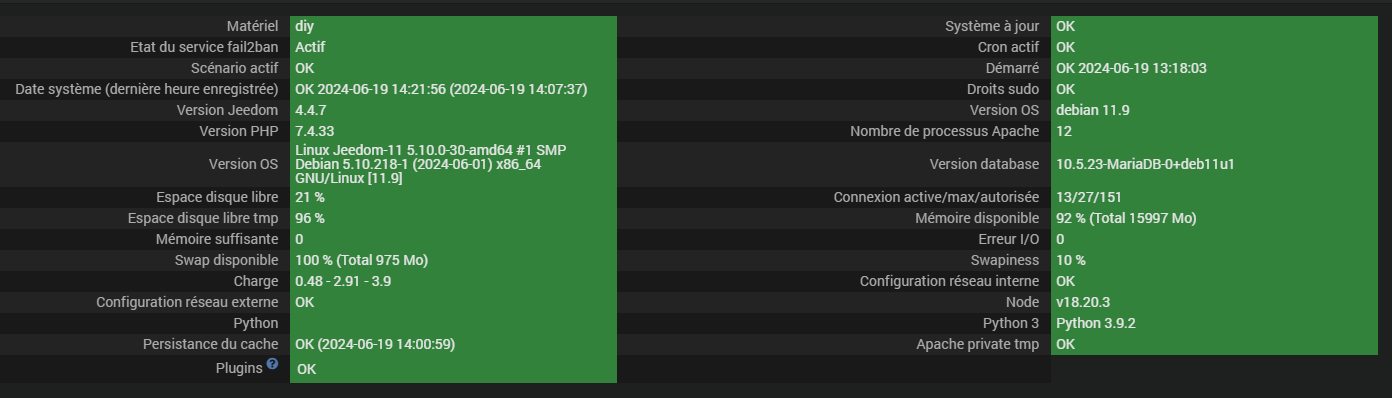
J’ai alors activé le mode débug et relancer l’instalaltion des dépendances qui semblent de jamais dépasser 19%. Voici le log
0000|+ echo '*******************Begin of package installation******************'
0001|*******************Begin of package installation******************
0002|+ touch /tmp/jeedom_install_in_progress_rfxcom
0003|+ echo 1
0004|+ echo 2
0005|+ sudo chmod +x /var/www/html/core/class/../../plugins/rfxcom/resources/pre-install.sh
0006|+ sudo /var/www/html/core/class/../../plugins/rfxcom/resources/pre-install.sh
0007|Launch pre-install of rfxcom dependancy
0008|WARNING: Skipping serial as it is not installed.
0009|WARNING: Running pip as the 'root' user can result in broken permissions and conflicting behaviour with the system package manager. It is recommended to use a virtual environment instead: https://pip.pypa.io/warnings/venv
0010|WARNING: apt does not have a stable CLI interface. Use with caution in scripts.
0011|Reading package lists...
0012|Building dependency tree...
0013|Reading state information...
0014|Package 'python3-serial' is not installed, so not removed
0015|The following package was automatically installed and is no longer required:
0016|linux-image-5.10.0-18-amd64
0017|Use 'sudo apt autoremove' to remove it.
0018|0 upgraded, 0 newly installed, 0 to remove and 0 not upgraded.
0019|+ echo 3
0020|+ sudo killall apt apt-get unattended-upgr
0021|apt: no process found
0022|apt-get: no process found
0023|unattended-upgr: no process found
0024|+ sudo rm /var/lib/apt/lists/lock
0025|+ sudo rm /var/cache/apt/archives/lock
0026|+ sudo rm /var/lib/dpkg/lock /var/lib/dpkg/lock-frontend
0027|+ sudo sudo dpkg --configure -a --force-confdef
0028|+ sudo apt update
0029|WARNING: apt does not have a stable CLI interface. Use with caution in scripts.
0030|Hit:1 http://security.debian.org/debian-security bullseye-security InRelease
0031|Hit:2 http://ftp.fr.debian.org/debian bullseye InRelease
0032|Hit:3 http://ftp.fr.debian.org/debian bullseye-updates InRelease
0033|Hit:4 https://deb.nodesource.com/node_18.x nodistro InRelease
0034|Reading package lists...
0035|Building dependency tree...
0036|Reading state information...
0037|All packages are up to date.
0038|+ echo 4
0039|+ sudo apt install -o Dpkg::Options::=--force-confdef -y python3
0040|WARNING: apt does not have a stable CLI interface. Use with caution in scripts.
0041|Reading package lists...
0042|Building dependency tree...
0043|Reading state information...
0044|python3 is already the newest version (3.9.2-3).
0045|The following package was automatically installed and is no longer required:
0046|linux-image-5.10.0-18-amd64
0047|Use 'sudo apt autoremove' to remove it.
0048|0 upgraded, 0 newly installed, 0 to remove and 0 not upgraded.
0049|+ echo 5
0050|+ sudo apt install -o Dpkg::Options::=--force-confdef -y python3-pip
0051|WARNING: apt does not have a stable CLI interface. Use with caution in scripts.
0052|Reading package lists...
0053|Building dependency tree...
0054|Reading state information...
0055|python3-pip is already the newest version (20.3.4-4+deb11u1).
0056|The following package was automatically installed and is no longer required:
0057|linux-image-5.10.0-18-amd64
0058|Use 'sudo apt autoremove' to remove it.
0059|0 upgraded, 0 newly installed, 0 to remove and 0 not upgraded.
0060|+ echo 6
0061|+ sudo apt install -o Dpkg::Options::=--force-confdef -y build-essential
0062|WARNING: apt does not have a stable CLI interface. Use with caution in scripts.
0063|Reading package lists...
0064|Building dependency tree...
0065|Reading state information...
0066|build-essential is already the newest version (12.9).
0067|The following package was automatically installed and is no longer required:
0068|linux-image-5.10.0-18-amd64
0069|Use 'sudo apt autoremove' to remove it.
0070|0 upgraded, 0 newly installed, 0 to remove and 0 not upgraded.
0071|+ echo 7
0072|+ sudo apt install -o Dpkg::Options::=--force-confdef -y python3-pyudev
0073|WARNING: apt does not have a stable CLI interface. Use with caution in scripts.
0074|Reading package lists...
0075|Building dependency tree...
0076|Reading state information...
0077|python3-pyudev is already the newest version (0.22.0-2).
0078|The following package was automatically installed and is no longer required:
0079|linux-image-5.10.0-18-amd64
0080|Use 'sudo apt autoremove' to remove it.
0081|0 upgraded, 0 newly installed, 0 to remove and 0 not upgraded.
0082|+ echo 8
0083|+ sudo apt install -o Dpkg::Options::=--force-confdef -y python3-dev
0084|WARNING: apt does not have a stable CLI interface. Use with caution in scripts.
0085|Reading package lists...
0086|Building dependency tree...
0087|Reading state information...
0088|python3-dev is already the newest version (3.9.2-3).
0089|The following package was automatically installed and is no longer required:
0090|linux-image-5.10.0-18-amd64
0091|Use 'sudo apt autoremove' to remove it.
0092|0 upgraded, 0 newly installed, 0 to remove and 0 not upgraded.
0093|+ echo 9
0094|+ sudo apt install -o Dpkg::Options::=--force-confdef -y python3-requests
0095|WARNING: apt does not have a stable CLI interface. Use with caution in scripts.
0096|Reading package lists...
0097|Building dependency tree...
0098|Reading state information...
0099|python3-requests is already the newest version (2.25.1+dfsg-2).
0100|The following package was automatically installed and is no longer required:
0101|linux-image-5.10.0-18-amd64
0102|Use 'sudo apt autoremove' to remove it.
0103|0 upgraded, 0 newly installed, 0 to remove and 0 not upgraded.
0104|+ echo 10
0105|+ sudo apt install -o Dpkg::Options::=--force-confdef -y python3-setuptools
0106|WARNING: apt does not have a stable CLI interface. Use with caution in scripts.
0107|Reading package lists...
0108|Building dependency tree...
0109|Reading state information...
0110|python3-setuptools is already the newest version (52.0.0-4).
0111|The following package was automatically installed and is no longer required:
0112|linux-image-5.10.0-18-amd64
0113|Use 'sudo apt autoremove' to remove it.
0114|0 upgraded, 0 newly installed, 0 to remove and 0 not upgraded.
0115|+ echo 11
0116|++ find /usr/local/lib/python2.7/dist-packages/ /usr/local/lib/python3.9/dist-packages/ -mindepth 1 -maxdepth 1 -type d -exec du -ks '{}' +
0117|++ cut -f 2-
0118|++ awk '$1 <= 4'
0119|+ RESULTTODELETE=
0120|++ echo ''
0121|++ sed 's, ,\ ,g'
0122|+ RESULTTODELETE2=
0123|+ echo ''
0124|+ xargs rm -rf
0125|+ echo 12
0126|+ sudo pip3 cache purge
0127|Files removed: 104
0128|+ echo 13
0129|+ sudo pip3 install --upgrade pip
0130|Requirement already satisfied: pip in /usr/local/lib/python3.9/dist-packages (24.0)
0131|DEPRECATION: gpg 1.14.0-unknown has a non-standard version number. pip 24.1 will enforce this behaviour change. A possible replacement is to upgrade to a newer version of gpg or contact the author to suggest that they release a version with a conforming version number. Discussion can be found at https://github.com/pypa/pip/issues/12063
0132|WARNING: Running pip as the 'root' user can result in broken permissions and conflicting behaviour with the system package manager. It is recommended to use a virtual environment instead: https://pip.pypa.io/warnings/venv
0133|+ echo 14
0134|+ sudo python3 -m pip install --force-reinstall --upgrade six
0135|Collecting six
0136|Downloading six-1.16.0-py2.py3-none-any.whl.metadata (1.8 kB)
0137|Downloading six-1.16.0-py2.py3-none-any.whl (11 kB)
0138|DEPRECATION: gpg 1.14.0-unknown has a non-standard version number. pip 24.1 will enforce this behaviour change. A possible replacement is to upgrade to a newer version of gpg or contact the author to suggest that they release a version with a conforming version number. Discussion can be found at https://github.com/pypa/pip/issues/12063
0139|Installing collected packages: six
0140|Attempting uninstall: six
0141|Found existing installation: six 1.16.0
0142|Uninstalling six-1.16.0:
0143|Successfully uninstalled six-1.16.0
0144|Successfully installed six-1.16.0
0145|WARNING: Running pip as the 'root' user can result in broken permissions and conflicting behaviour with the system package manager. It is recommended to use a virtual environment instead: https://pip.pypa.io/warnings/venv
0146|+ echo 15
0147|+ sudo python3 -m pip install --force-reinstall --upgrade requests
0148|Collecting requests
0149|Downloading requests-2.32.3-py3-none-any.whl.metadata (4.6 kB)
0150|Collecting charset-normalizer<4,>=2 (from requests)
0151|Downloading charset_normalizer-3.3.2-cp39-cp39-manylinux_2_17_x86_64.manylinux2014_x86_64.whl.metadata (33 kB)
0152|Collecting idna<4,>=2.5 (from requests)
0153|Downloading idna-3.7-py3-none-any.whl.metadata (9.9 kB)
0154|Collecting urllib3<3,>=1.21.1 (from requests)
0155|Downloading urllib3-2.2.2-py3-none-any.whl.metadata (6.4 kB)
0156|Collecting certifi>=2017.4.17 (from requests)
0157|Downloading certifi-2024.6.2-py3-none-any.whl.metadata (2.2 kB)
0158|Downloading requests-2.32.3-py3-none-any.whl (64 kB)
0159|━━━━━━━━━━━━━━━━━━━━━━━━━━━━━━━━━━━━━━━━ 64.9/64.9 kB 2.0 MB/s eta 0:00:00
0160|Downloading certifi-2024.6.2-py3-none-any.whl (164 kB)
0161|━━━━━━━━━━━━━━━━━━━━━━━━━━━━━━━━━━━━━━━━ 164.4/164.4 kB 6.3 MB/s eta 0:00:00
0162|Downloading charset_normalizer-3.3.2-cp39-cp39-manylinux_2_17_x86_64.manylinux2014_x86_64.whl (142 kB)
0163|━━━━━━━━━━━━━━━━━━━━━━━━━━━━━━━━━━━━━━━━ 142.3/142.3 kB 12.9 MB/s eta 0:00:00
0164|Downloading idna-3.7-py3-none-any.whl (66 kB)
0165|━━━━━━━━━━━━━━━━━━━━━━━━━━━━━━━━━━━━━━━━ 66.8/66.8 kB 2.7 MB/s eta 0:00:00
0166|Downloading urllib3-2.2.2-py3-none-any.whl (121 kB)
0167|━━━━━━━━━━━━━━━━━━━━━━━━━━━━━━━━━━━━━━━━ 121.4/121.4 kB 7.3 MB/s eta 0:00:00
0168|DEPRECATION: gpg 1.14.0-unknown has a non-standard version number. pip 24.1 will enforce this behaviour change. A possible replacement is to upgrade to a newer version of gpg or contact the author to suggest that they release a version with a conforming version number. Discussion can be found at https://github.com/pypa/pip/issues/12063
0169|Installing collected packages: urllib3, idna, charset-normalizer, certifi, requests
0170|Attempting uninstall: urllib3
0171|Found existing installation: urllib3 2.2.2
0172|Uninstalling urllib3-2.2.2:
0173|Successfully uninstalled urllib3-2.2.2
0174|Attempting uninstall: idna
0175|Found existing installation: idna 3.7
0176|Uninstalling idna-3.7:
0177|Successfully uninstalled idna-3.7
0178|Attempting uninstall: charset-normalizer
0179|Found existing installation: charset-normalizer 3.3.2
0180|Uninstalling charset-normalizer-3.3.2:
0181|Successfully uninstalled charset-normalizer-3.3.2
0182|Attempting uninstall: certifi
0183|Found existing installation: certifi 2024.6.2
0184|Uninstalling certifi-2024.6.2:
0185|Successfully uninstalled certifi-2024.6.2
0186|Attempting uninstall: requests
0187|Found existing installation: requests 2.32.3
0188|Uninstalling requests-2.32.3:
0189|Successfully uninstalled requests-2.32.3
0190|Successfully installed certifi-2024.6.2 charset-normalizer-3.3.2 idna-3.7 requests-2.32.3 urllib3-2.2.2
0191|WARNING: Running pip as the 'root' user can result in broken permissions and conflicting behaviour with the system package manager. It is recommended to use a virtual environment instead: https://pip.pypa.io/warnings/venv
0192|+ echo 16
0193|+ sudo python3 -m pip install --force-reinstall --upgrade setuptools
0194|Collecting setuptools
0195|Downloading setuptools-70.0.0-py3-none-any.whl.metadata (5.9 kB)
0196|Downloading setuptools-70.0.0-py3-none-any.whl (863 kB)
0197|━━━━━━━━━━━━━━━━━━━━━━━━━━━━━━━━━━━━━━━━ 863.4/863.4 kB 5.1 MB/s eta 0:00:00
0198|DEPRECATION: gpg 1.14.0-unknown has a non-standard version number. pip 24.1 will enforce this behaviour change. A possible replacement is to upgrade to a newer version of gpg or contact the author to suggest that they release a version with a conforming version number. Discussion can be found at https://github.com/pypa/pip/issues/12063
0199|Installing collected packages: setuptools
0200|Attempting uninstall: setuptools
0201|Found existing installation: setuptools 70.0.0
0202|Uninstalling setuptools-70.0.0:
0203|Successfully uninstalled setuptools-70.0.0
0204|Successfully installed setuptools-70.0.0
0205|WARNING: Running pip as the 'root' user can result in broken permissions and conflicting behaviour with the system package manager. It is recommended to use a virtual environment instead: https://pip.pypa.io/warnings/venv
0206|+ echo 17
0207|+ sudo python3 -m pip install --force-reinstall --upgrade pyudev
0208|Collecting pyudev
0209|Downloading pyudev-0.24.3-py3-none-any.whl.metadata (4.6 kB)
0210|Downloading pyudev-0.24.3-py3-none-any.whl (62 kB)
0211|━━━━━━━━━━━━━━━━━━━━━━━━━━━━━━━━━━━━━━━━ 62.7/62.7 kB 3.0 MB/s eta 0:00:00
0212|DEPRECATION: gpg 1.14.0-unknown has a non-standard version number. pip 24.1 will enforce this behaviour change. A possible replacement is to upgrade to a newer version of gpg or contact the author to suggest that they release a version with a conforming version number. Discussion can be found at https://github.com/pypa/pip/issues/12063
0213|Installing collected packages: pyudev
0214|Attempting uninstall: pyudev
0215|Found existing installation: pyudev 0.24.3
0216|Uninstalling pyudev-0.24.3:
0217|Successfully uninstalled pyudev-0.24.3
0218|Successfully installed pyudev-0.24.3
0219|WARNING: Running pip as the 'root' user can result in broken permissions and conflicting behaviour with the system package manager. It is recommended to use a virtual environment instead: https://pip.pypa.io/warnings/venv
0220|+ echo 18
0221|+ sudo python3 -m pip install --force-reinstall --upgrade pyserial
0222|Collecting pyserial
0223|Downloading pyserial-3.5-py2.py3-none-any.whl.metadata (1.6 kB)
0224|Downloading pyserial-3.5-py2.py3-none-any.whl (90 kB)
0225|━━━━━━━━━━━━━━━━━━━━━━━━━━━━━━━━━━━━━━━━ 90.6/90.6 kB 226.0 kB/s eta 0:00:00
0226|DEPRECATION: gpg 1.14.0-unknown has a non-standard version number. pip 24.1 will enforce this behaviour change. A possible replacement is to upgrade to a newer version of gpg or contact the author to suggest that they release a version with a conforming version number. Discussion can be found at https://github.com/pypa/pip/issues/12063
0227|Installing collected packages: pyserial
0228|Attempting uninstall: pyserial
0229|Found existing installation: pyserial 3.5
0230|Uninstalling pyserial-3.5:
0231|Successfully uninstalled pyserial-3.5
0232|Successfully installed pyserial-3.5
0233|WARNING: Running pip as the 'root' user can result in broken permissions and conflicting behaviour with the system package manager. It is recommended to use a virtual environment instead: https://pip.pypa.io/warnings/venv
0234|+ echo 19
0235|+ sudo python3 -m pip install --force-reinstall --upgrade jeedomdaemon
0236|Collecting jeedomdaemon
0237|Downloading jeedomdaemon-0.9.8-py3-none-any.whl.metadata (5.0 kB)
0238|Collecting aiohttp (from jeedomdaemon)
0239|Downloading aiohttp-3.9.5-cp39-cp39-manylinux_2_17_x86_64.manylinux2014_x86_64.whl.metadata (7.5 kB)
0240|Collecting aiosignal>=1.1.2 (from aiohttp->jeedomdaemon)
0241|Downloading aiosignal-1.3.1-py3-none-any.whl.metadata (4.0 kB)
0242|Collecting attrs>=17.3.0 (from aiohttp->jeedomdaemon)
0243|Downloading attrs-23.2.0-py3-none-any.whl.metadata (9.5 kB)
0244|Collecting frozenlist>=1.1.1 (from aiohttp->jeedomdaemon)
0245|Downloading frozenlist-1.4.1-cp39-cp39-manylinux_2_5_x86_64.manylinux1_x86_64.manylinux_2_17_x86_64.manylinux2014_x86_64.whl.metadata (12 kB)
0246|Collecting multidict<7.0,>=4.5 (from aiohttp->jeedomdaemon)
0247|Downloading multidict-6.0.5-cp39-cp39-manylinux_2_17_x86_64.manylinux2014_x86_64.whl.metadata (4.2 kB)
0248|Collecting yarl<2.0,>=1.0 (from aiohttp->jeedomdaemon)
0249|Downloading yarl-1.9.4-cp39-cp39-manylinux_2_17_x86_64.manylinux2014_x86_64.whl.metadata (31 kB)
0250|Collecting async-timeout<5.0,>=4.0 (from aiohttp->jeedomdaemon)
0251|Downloading async_timeout-4.0.3-py3-none-any.whl.metadata (4.2 kB)
0252|Collecting idna>=2.0 (from yarl<2.0,>=1.0->aiohttp->jeedomdaemon)
0253|Using cached idna-3.7-py3-none-any.whl.metadata (9.9 kB)
0254|Downloading jeedomdaemon-0.9.8-py3-none-any.whl (12 kB)
0255|Downloading aiohttp-3.9.5-cp39-cp39-manylinux_2_17_x86_64.manylinux2014_x86_64.whl (1.2 MB)
0256|━━━━━━━━━━━━━━━━━━━━━━━━━━━━━━━━━━━━━━━━ 1.2/1.2 MB 25.0 MB/s eta 0:00:00
0257|Downloading aiosignal-1.3.1-py3-none-any.whl (7.6 kB)
0258|Downloading async_timeout-4.0.3-py3-none-any.whl (5.7 kB)
0259|Downloading attrs-23.2.0-py3-none-any.whl (60 kB)
0260|━━━━━━━━━━━━━━━━━━━━━━━━━━━━━━━━━━━━━━━━ 60.8/60.8 kB 2.1 MB/s eta 0:00:00
0261|Downloading frozenlist-1.4.1-cp39-cp39-manylinux_2_5_x86_64.manylinux1_x86_64.manylinux_2_17_x86_64.manylinux2014_x86_64.whl (240 kB)
0262|━━━━━━━━━━━━━━━━━━━━━━━━━━━━━━━━━━━━━━━━ 240.7/240.7 kB 8.5 MB/s eta 0:00:00
0263|Downloading multidict-6.0.5-cp39-cp39-manylinux_2_17_x86_64.manylinux2014_x86_64.whl (123 kB)
0264|━━━━━━━━━━━━━━━━━━━━━━━━━━━━━━━━━━━━━━━━ 123.8/123.8 kB 19.1 MB/s eta 0:00:00
0265|Downloading yarl-1.9.4-cp39-cp39-manylinux_2_17_x86_64.manylinux2014_x86_64.whl (304 kB)
0266|━━━━━━━━━━━━━━━━━━━━━━━━━━━━━━━━━━━━━━━━ 304.3/304.3 kB 29.4 MB/s eta 0:00:00
0267|Using cached idna-3.7-py3-none-any.whl (66 kB)
0268|DEPRECATION: gpg 1.14.0-unknown has a non-standard version number. pip 24.1 will enforce this behaviour change. A possible replacement is to upgrade to a newer version of gpg or contact the author to suggest that they release a version with a conforming version number. Discussion can be found at https://github.com/pypa/pip/issues/12063
0269|Installing collected packages: multidict, idna, frozenlist, attrs, async-timeout, yarl, aiosignal, aiohttp, jeedomdaemon
0270|Attempting uninstall: multidict
0271|Found existing installation: multidict 6.0.5
0272|Uninstalling multidict-6.0.5:
0273|Successfully uninstalled multidict-6.0.5
0274|Attempting uninstall: idna
0275|Found existing installation: idna 3.7
0276|Uninstalling idna-3.7:
0277|Successfully uninstalled idna-3.7
0278|Attempting uninstall: frozenlist
0279|Found existing installation: frozenlist 1.4.1
0280|Uninstalling frozenlist-1.4.1:
0281|Successfully uninstalled frozenlist-1.4.1
0282|Attempting uninstall: attrs
0283|Found existing installation: attrs 23.2.0
0284|Uninstalling attrs-23.2.0:
0285|Successfully uninstalled attrs-23.2.0
0286|Attempting uninstall: async-timeout
0287|Found existing installation: async-timeout 4.0.3
0288|Uninstalling async-timeout-4.0.3:
0289|Successfully uninstalled async-timeout-4.0.3
0290|Attempting uninstall: yarl
0291|Found existing installation: yarl 1.9.4
0292|Uninstalling yarl-1.9.4:
0293|Successfully uninstalled yarl-1.9.4
0294|Attempting uninstall: aiosignal
0295|Found existing installation: aiosignal 1.3.1
0296|Uninstalling aiosignal-1.3.1:
0297|Successfully uninstalled aiosignal-1.3.1
0298|Attempting uninstall: aiohttp
0299|Found existing installation: aiohttp 3.9.5
0300|Uninstalling aiohttp-3.9.5:
0301|Successfully uninstalled aiohttp-3.9.5
0302|Attempting uninstall: jeedomdaemon
0303|Found existing installation: jeedomdaemon 0.9.8
0304|Uninstalling jeedomdaemon-0.9.8:
0305|Successfully uninstalled jeedomdaemon-0.9.8
0306|Successfully installed aiohttp-3.9.5 aiosignal-1.3.1 async-timeout-4.0.3 attrs-23.2.0 frozenlist-1.4.1 idna-3.7 jeedomdaemon-0.9.8 multidict-6.0.5 yarl-1.9.4
0307|WARNING: Running pip as the 'root' user can result in broken permissions and conflicting behaviour with the system package manager. It is recommended to use a virtual environment instead: https://pip.pypa.io/warnings/venv
0308|+ echo 20
0309|+ php /var/www/html/core/class/../php/jeecli.php plugin dependancy_end rfxcom
0310|+ echo 21
0311|+ rm /tmp/jeedom_install_in_progress_rfxcom
0312|+ echo '*******************End of package installation******************'
0313|*******************End of package installation******************
Il ne me semble pas donner d’erreur particulière mais le démon ne se relance pas tout seul. Par contre si je force le lancement il devient vert.

Mais il n’est pas fonctionnel car je n’ai aucune mise à jour de mes devices.
Dans mon centre de message j’ai ceci

Et le nombre d’occurrences semble s’incrémenter à chaque fois qu’un capteur émet !
J’ai un fichier log rfxcom qui semble confirmer celà
0000|[2024-06-19 14:15:15] INFO  : Lancement démon rfxcomd : /usr/bin/python3 /var/www/html/plugins/rfxcom/resources/rfxcomd/rfxcomd.py --device /dev/serial/by-id/usb-RFXCOM_RFXtrx433XL_DO5NZ1XB-if00-port0 --loglevel debug --socketport 55000 --serialrate 38400 --protocol 6,18 --callback http://127.0.0.1:80/plugins/rfxcom/core/php/jeeRfxcom.php --apikey y5HJlx6nrFIueLNfARXSdPDOnvBAeMN2 --cycle 0.3 --pid /tmp/jeedom/rfxcom/deamon.pid
0001|[2024-06-19 14:15:18] INFO  : Démon RFXcom lancé
0002|[2024-06-19 14:20:05] INFO  : Lancement démon rfxcomd : /usr/bin/python3 /var/www/html/plugins/rfxcom/resources/rfxcomd/rfxcomd.py --device /dev/serial/by-id/usb-RFXCOM_RFXtrx433XL_DO5NZ1XB-if00-port0 --loglevel debug --socketport 55000 --serialrate 38400 --protocol 6,18 --callback http://127.0.0.1:80/plugins/rfxcom/core/php/jeeRfxcom.php --apikey y5HJlx6nrFIueLNfARXSdPDOnvBAeMN2 --cycle 0.3 --pid /tmp/jeedom/rfxcom/deamon.pid
0003|[2024-06-19 14:20:08] INFO  : Démon RFXcom lancé
0004|[2024-06-19 14:25:06] INFO  : Lancement démon rfxcomd : /usr/bin/python3 /var/www/html/plugins/rfxcom/resources/rfxcomd/rfxcomd.py --device /dev/serial/by-id/usb-RFXCOM_RFXtrx433XL_DO5NZ1XB-if00-port0 --loglevel debug --socketport 55000 --serialrate 38400 --protocol 6,18 --callback http://127.0.0.1:80/plugins/rfxcom/core/php/jeeRfxcom.php --apikey y5HJlx6nrFIueLNfARXSdPDOnvBAeMN2 --cycle 0.3 --pid /tmp/jeedom/rfxcom/deamon.pid
0005|[2024-06-19 14:25:09] INFO  : Démon RFXcom lancé
0006|[2024-06-19 14:30:08] INFO  : Lancement démon rfxcomd : /usr/bin/python3 /var/www/html/plugins/rfxcom/resources/rfxcomd/rfxcomd.py --device /dev/serial/by-id/usb-RFXCOM_RFXtrx433XL_DO5NZ1XB-if00-port0 --loglevel debug --socketport 55000 --serialrate 38400 --protocol 6,18 --callback http://127.0.0.1:80/plugins/rfxcom/core/php/jeeRfxcom.php --apikey y5HJlx6nrFIueLNfARXSdPDOnvBAeMN2 --cycle 0.3 --pid /tmp/jeedom/rfxcom/deamon.pid
0007|[2024-06-19 14:30:11] INFO  : Démon RFXcom lancé
J’ai parcouru le forum pour voir si des comportements similaires existaient mais j’ai rien trouvé !
J’en ai quand même profité pour mettre à jour mon RFXTRX433XL et rétablir les droits des dossiers et fichiers mais rien n’y fait.
J’en appelle donc à la communauté pour avoir de l’aide. Merci d’avance.

