La documentation détaillée m’avait mis en confiance. Je l’ai suivie pas à pas jusqu’au bug et à l’échec de l’installation. Le seul moyen que j’ai trouvé pour vous contacter a été de cliquer sur le lien « demande d’aide » dans la fenêtre de votre programme. J’ai acheté ce programme parce qu’il est indiqué compatible Luna et aussi compatible avec ma version de Debian. Depuis, je n’ai pas avancé, sauf depuis la mise à jour du plugin Luna. Je vous explique ce que j’ai fait ensuite et vous envoie la capture d’écran avec le message d’erreur ; la seule chose que vous trouvez à dire, c’est si j’ai lu la doc du plugin. Si vous avez besoin d’informations, soyez précis dans votre demande et je vous les enverrai.
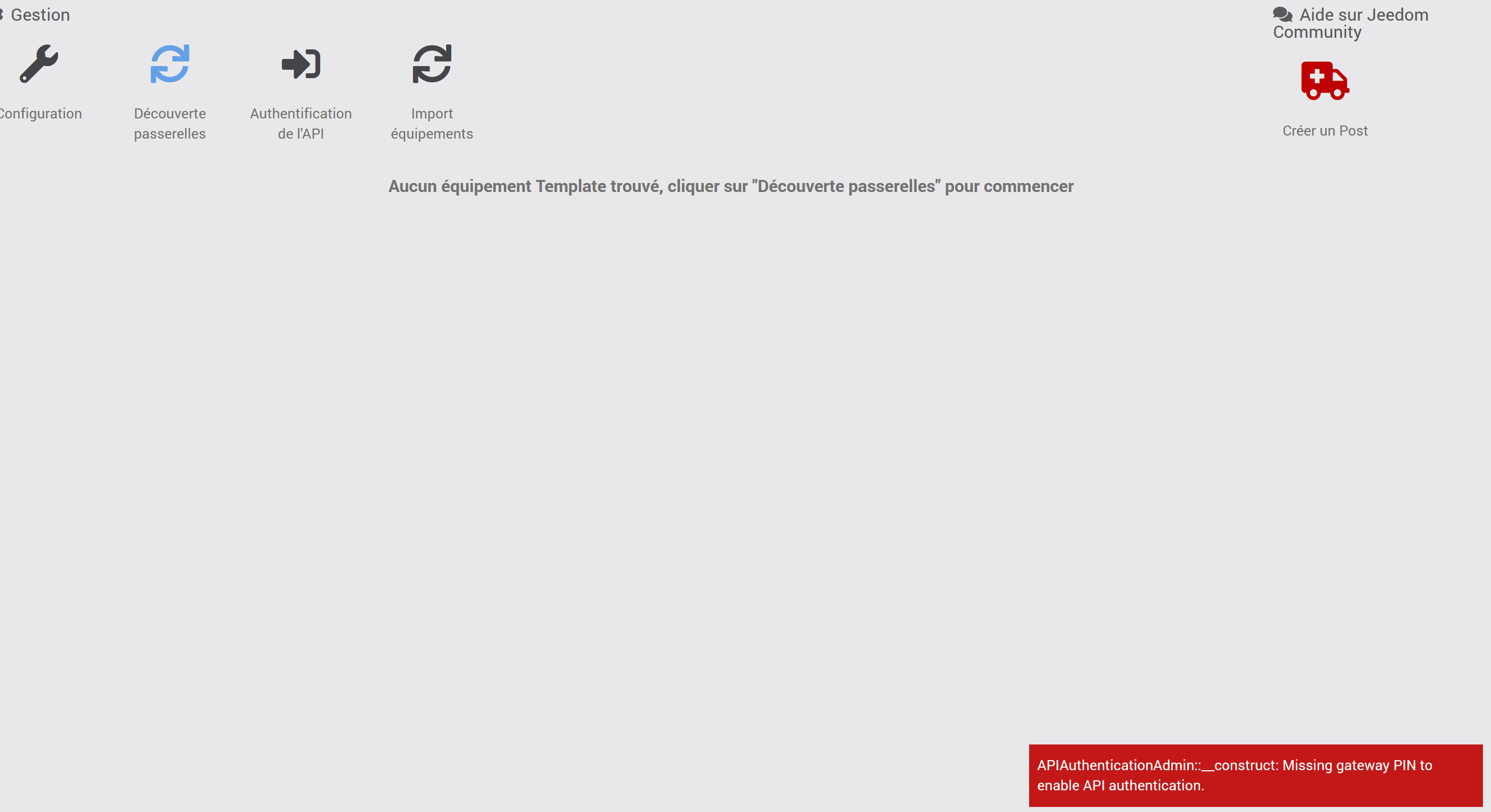
La procédure d’installation dans la doc vous demande de créer un token en utilisant le 2ème onglet de la page de configuration du plugin.
L’avez-vous fait ?

+ echo '*******************Begin of package installation******************'
*******************Begin of package installation******************
+ touch /tmp/jeedom_install_in_progress_TaHomaLocal
+ echo 1
+ echo 2
++ cut -f 2-
++ awk '$1 <= 4'
++ find /usr/local/lib/python3.9/dist-packages/ -mindepth 1 -maxdepth 1 -type d -exec du -ks '{}' +
+ RESULTTODELETE=
++ echo ''
++ sed 's, ,\ ,g'
+ RESULTTODELETE2=
+ xargs rm -rf
+ echo ''
+ echo 3
+ sudo pip3 cache purge
Files removed: 38 (1.2 MB)
Directories removed: 0
+ echo 4
+ sudo pip3 install --upgrade pip
Requirement already satisfied: pip in /usr/local/lib/python3.9/dist-packages (26.0.1)
WARNING: Error parsing dependencies of gpg: Invalid version: '1.14.0-unknown'
WARNING: Running pip as the 'root' user can result in broken permissions and conflicting behaviour with the system package manager, possibly rendering your system unusable. It is recommended to use a virtual environment instead: https://pip.pypa.io/warnings/venv. Use the --root-user-action option if you know what you are doing and want to suppress this warning.
+ echo 5
+ sudo python3 -m pip install --force-reinstall --upgrade pyudev
Collecting pyudev
Downloading pyudev-0.24.4-py3-none-any.whl.metadata (4.4 kB)
Downloading pyudev-0.24.4-py3-none-any.whl (62 kB)
WARNING: Error parsing dependencies of gpg: Invalid version: '1.14.0-unknown'
Installing collected packages: pyudev
Attempting uninstall: pyudev
Found existing installation: pyudev 0.24.4
Uninstalling pyudev-0.24.4:
Successfully uninstalled pyudev-0.24.4
Successfully installed pyudev-0.24.4
WARNING: Running pip as the 'root' user can result in broken permissions and conflicting behaviour with the system package manager, possibly rendering your system unusable. It is recommended to use a virtual environment instead: https://pip.pypa.io/warnings/venv. Use the --root-user-action option if you know what you are doing and want to suppress this warning.
+ echo 6
+ sudo python3 -m pip install --force-reinstall --upgrade requests
Collecting requests
Downloading requests-2.32.5-py3-none-any.whl.metadata (4.9 kB)
Collecting charset_normalizer<4,>=2 (from requests)
Downloading charset_normalizer-3.5.1-cp39-cp39-manylinux2014_aarch64.manylinux_2_17_aarch64.manylinux_2_28_aarch64.whl.metadata (45 kB)
Collecting idna<4,>=2.5 (from requests)
Downloading idna-3.20-py3-none-any.whl.metadata (7.2 kB)
Collecting urllib3<3,>=1.21.1 (from requests)
Downloading urllib3-2.6.3-py3-none-any.whl.metadata (6.9 kB)
Collecting certifi>=2017.4.17 (from requests)
Downloading certifi-2026.7.22-py3-none-any.whl.metadata (2.5 kB)
Downloading requests-2.32.5-py3-none-any.whl (64 kB)
Downloading charset_normalizer-3.5.1-cp39-cp39-manylinux2014_aarch64.manylinux_2_17_aarch64.manylinux_2_28_aarch64.whl (251 kB)
Downloading idna-3.20-py3-none-any.whl (69 kB)
Downloading urllib3-2.6.3-py3-none-any.whl (131 kB)
Downloading certifi-2026.7.22-py3-none-any.whl (136 kB)
WARNING: Error parsing dependencies of gpg: Invalid version: '1.14.0-unknown'
Installing collected packages: urllib3, idna, charset_normalizer, certifi, requests
Attempting uninstall: urllib3
Found existing installation: urllib3 2.6.3
Uninstalling urllib3-2.6.3:
Successfully uninstalled urllib3-2.6.3
Attempting uninstall: idna
Found existing installation: idna 3.20
Uninstalling idna-3.20:
Successfully uninstalled idna-3.20
Attempting uninstall: charset_normalizer
Found existing installation: charset-normalizer 3.5.1
Uninstalling charset-normalizer-3.5.1:
Successfully uninstalled charset-normalizer-3.5.1
Attempting uninstall: certifi
Found existing installation: certifi 2026.7.22
Uninstalling certifi-2026.7.22:
Successfully uninstalled certifi-2026.7.22
Attempting uninstall: requests
Found existing installation: requests 2.32.5
Uninstalling requests-2.32.5:
Successfully uninstalled requests-2.32.5
Successfully installed certifi-2026.7.22 charset_normalizer-3.5.1 idna-3.20 requests-2.32.5 urllib3-2.6.3
WARNING: Running pip as the 'root' user can result in broken permissions and conflicting behaviour with the system package manager, possibly rendering your system unusable. It is recommended to use a virtual environment instead: https://pip.pypa.io/warnings/venv. Use the --root-user-action option if you know what you are doing and want to suppress this warning.
+ echo 7
+ sudo killall apt apt-get unattended-upgr
apt: no process found
apt-get: no process found
unattended-upgr: no process found
+ sudo rm /var/lib/apt/lists/lock
+ sudo rm /var/cache/apt/archives/lock
+ sudo rm /var/lib/dpkg/lock /var/lib/dpkg/lock-frontend
+ sudo sudo dpkg --configure -a --force-confdef
+ sudo apt update
WARNING: apt does not have a stable CLI interface. Use with caution in scripts.
Hit:1 https://archive.debian.org/debian bullseye InRelease
Hit:2 https://archive.debian.org/debian bullseye-updates InRelease
Hit:3 https://archive.debian.org/debian bullseye-backports InRelease
Hit:5 https://deb.nodesource.com/node_22.x nodistro InRelease
Hit:4 https://snapshot.debian.org/archive/debian-security/20260830T000000Z bullseye-security InRelease
Reading package lists...
Building dependency tree...
Reading state information...
1 package can be upgraded. Run 'apt list --upgradable' to see it.
+ echo 8
+ sudo apt install -o Dpkg::Options::=--force-confdef -y avahi-daemon
WARNING: apt does not have a stable CLI interface. Use with caution in scripts.
Reading package lists...
Building dependency tree...
Reading state information...
avahi-daemon is already the newest version (0.8-5+deb11u3).
0 upgraded, 0 newly installed, 0 to remove and 1 not upgraded.
+ echo 9
+ sudo apt install -o Dpkg::Options::=--force-confdef -y avahi-utils
WARNING: apt does not have a stable CLI interface. Use with caution in scripts.
Reading package lists...
Building dependency tree...
Reading state information...
avahi-utils is already the newest version (0.8-5+deb11u3).
0 upgraded, 0 newly installed, 0 to remove and 1 not upgraded.
+ echo 10
+ sudo apt install -o Dpkg::Options::=--force-confdef -y curl
WARNING: apt does not have a stable CLI interface. Use with caution in scripts.
Reading package lists...
Building dependency tree...
Reading state information...
curl is already the newest version (7.74.0-1.3+deb11u16).
0 upgraded, 0 newly installed, 0 to remove and 1 not upgraded.
+ echo 11
+ sudo apt install -o Dpkg::Options::=--force-confdef -y php-yaml
WARNING: apt does not have a stable CLI interface. Use with caution in scripts.
Reading package lists...
Building dependency tree...
Reading state information...
php-yaml is already the newest version (2.2.1+2.1.0+2.0.4+1.3.2-2).
0 upgraded, 0 newly installed, 0 to remove and 1 not upgraded.
+ echo 12
+ sudo systemctl restart apache2
+ echo 13
+ php /var/www/html/core/class/../php/jeecli.php plugin dependancy_end TaHomaLocal
+ echo 14
+ rm /tmp/jeedom_install_in_progress_TaHomaLocal
+ echo '*******************End of package installation******************'
*******************End of package installation******************
J’ai relancé les dépendances avant la recherche de la passerelle, il y a des warning qui apparaissent dans le log packages
L’installation des dépendances semble correcte.
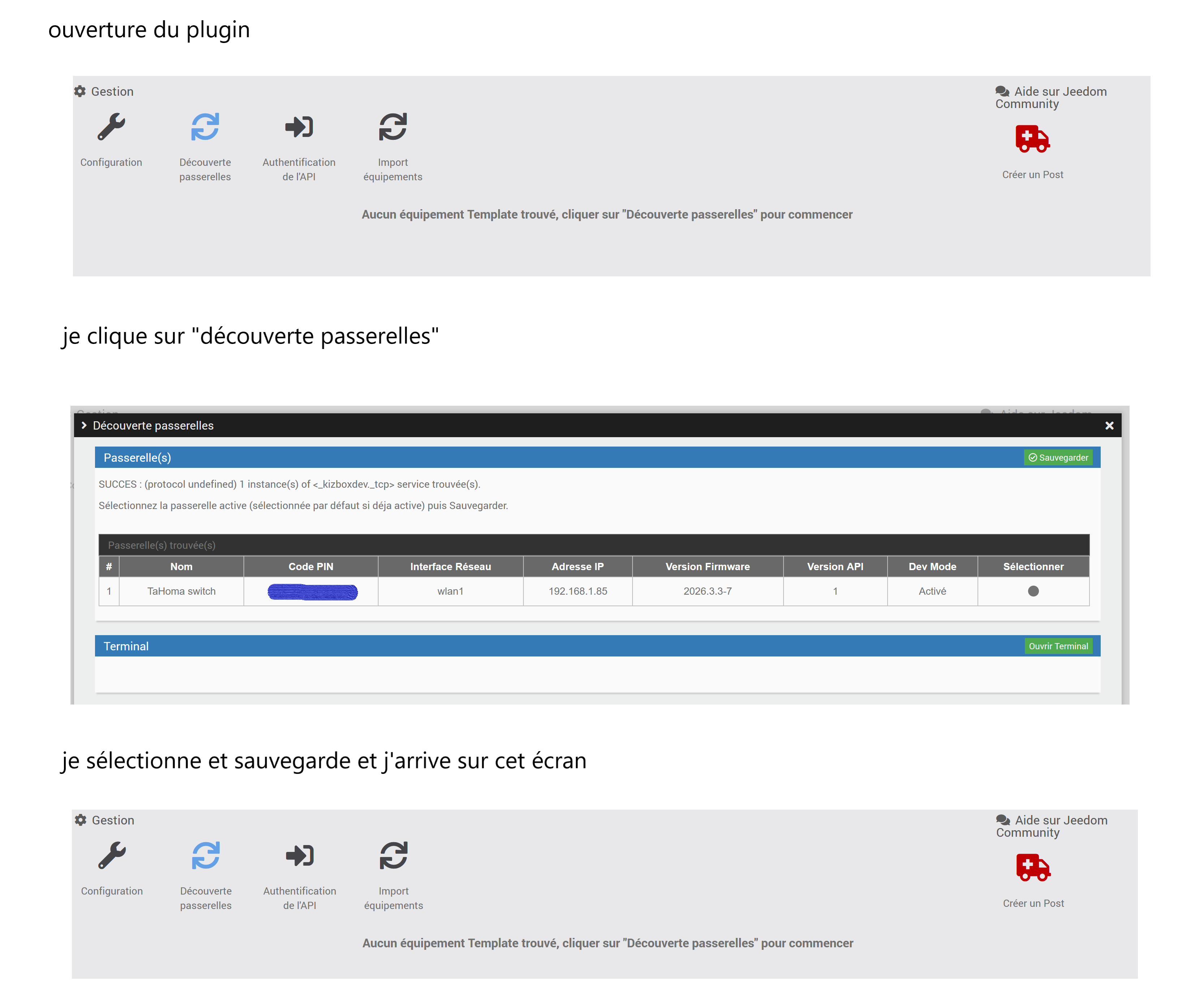
- Dans le panel Découverte passerelles, cliquer sur le point noir pour sélectionner cette passerelle puis Sauvegarder
- Dans le panel Athentification de l’API, céer un token puis Sauvegarder
Et me montrer un screenshot du panel Athentification de l’API, si message d’erreur
je viens de faire ces deux opérations que j’avais déjà fait auparavant et mème résultat le sauvegarde ne fonctionne pas voici screenshot
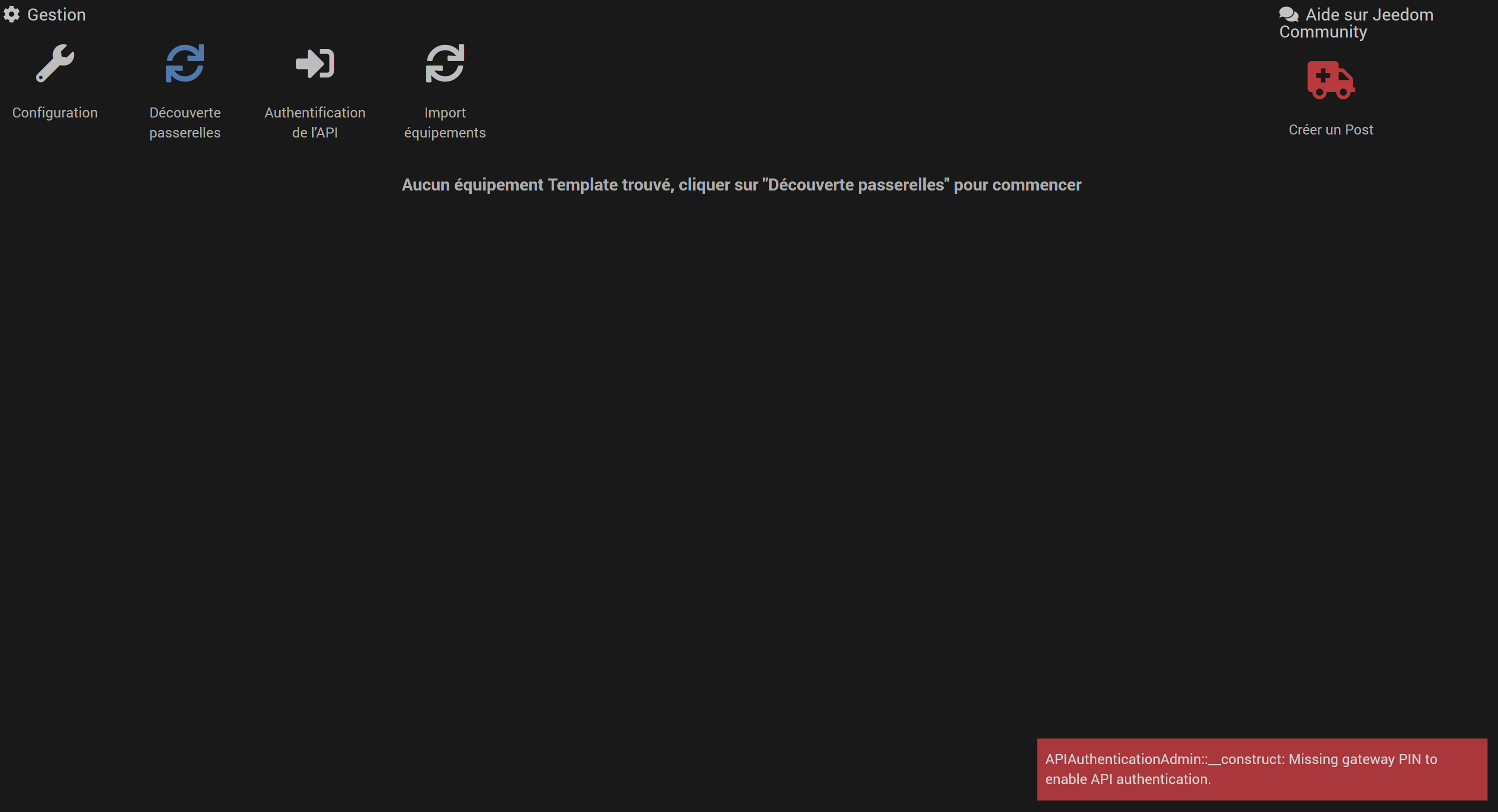
J’ai trouvé un tutoriel de votre plugin. J’ai donc vu l’écran que je devrais avoir si cela fonctionnait. En réalité je reviens sur l’écran précédent après avoir rechercher API, sélectionner et sauvegarder.
Voici l’écran (pas d’erreur)

Bonjour,
Pour votre info, vous n’êtes pas le seul à avoir installé le plugin TaHomaLocal ces derniers jours et je n’ai pas eu de remontées de problèmes autres que le votre.
Donc, j’ai tendance à en déduire que c’est plutot un soucis lié à votre configuration.
Le démarrage chez vous a été chaotique du au soucis OS Debain 11 sur les boxs Luna.
Cela n’était pas lié au plugin.
Pour repartir sur des bases saines, je suggère de désintaller complètement le plugin et le réinstaller (en version stable bien sur).
Refaire la procédure d’installation et de paramétrage et nous tenir au courant.
Installer les dépendances en premier évidement.
J’insiste sur le fait que dans l’écran « Découverte passerelles », il faut bien cliquer sur le point dans la colonne « Sélectionner » de la passerelle avant de cliquer sur « Sauvegarder ».
Bonjour,
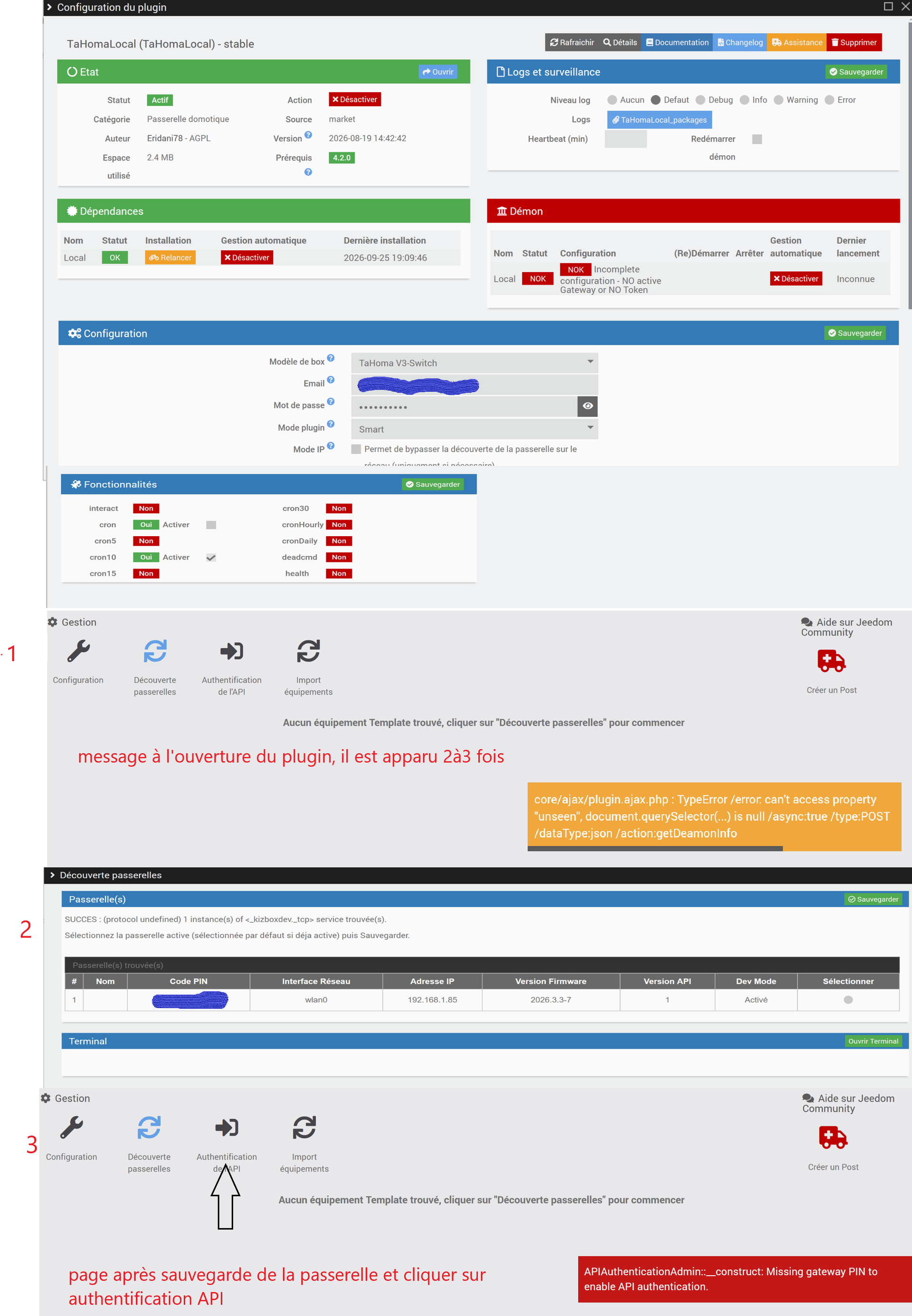
J’ai désinstallé le plugin, redémarré la box puis réinstallé le plugin. J’arrive au même résultat.
+ echo '*******************Begin of package installation******************'
*******************Begin of package installation******************
+ touch /tmp/jeedom_install_in_progress_TaHomaLocal
+ echo 1
+ echo 2
++ awk '$1 <= 4'
++ cut -f 2-
++ find /usr/local/lib/python3.9/dist-packages/ -mindepth 1 -maxdepth 1 -type d -exec du -ks '{}' +
+ RESULTTODELETE=
++ sed 's, ,\ ,g'
++ echo ''
+ RESULTTODELETE2=
+ xargs rm -rf
+ echo ''
+ echo 3
+ sudo pip3 cache purge
Files removed: 38 (1.2 MB)
Directories removed: 0
+ echo 4
+ sudo pip3 install --upgrade pip
Requirement already satisfied: pip in /usr/local/lib/python3.9/dist-packages (26.0.1)
WARNING: Error parsing dependencies of gpg: Invalid version: '1.14.0-unknown'
WARNING: Running pip as the 'root' user can result in broken permissions and conflicting behaviour with the system package manager, possibly rendering your system unusable. It is recommended to use a virtual environment instead: https://pip.pypa.io/warnings/venv. Use the --root-user-action option if you know what you are doing and want to suppress this warning.
+ echo 5
+ sudo python3 -m pip install --force-reinstall --upgrade pyudev
Collecting pyudev
Downloading pyudev-0.24.4-py3-none-any.whl.metadata (4.4 kB)
Downloading pyudev-0.24.4-py3-none-any.whl (62 kB)
WARNING: Error parsing dependencies of gpg: Invalid version: '1.14.0-unknown'
Installing collected packages: pyudev
Attempting uninstall: pyudev
Found existing installation: pyudev 0.24.4
Uninstalling pyudev-0.24.4:
Successfully uninstalled pyudev-0.24.4
Successfully installed pyudev-0.24.4
WARNING: Running pip as the 'root' user can result in broken permissions and conflicting behaviour with the system package manager, possibly rendering your system unusable. It is recommended to use a virtual environment instead: https://pip.pypa.io/warnings/venv. Use the --root-user-action option if you know what you are doing and want to suppress this warning.
+ echo 6
+ sudo python3 -m pip install --force-reinstall --upgrade requests
Collecting requests
Downloading requests-2.32.5-py3-none-any.whl.metadata (4.9 kB)
Collecting charset_normalizer<4,>=2 (from requests)
Downloading charset_normalizer-3.5.1-cp39-cp39-manylinux2014_aarch64.manylinux_2_17_aarch64.manylinux_2_28_aarch64.whl.metadata (45 kB)
Collecting idna<4,>=2.5 (from requests)
Downloading idna-3.20-py3-none-any.whl.metadata (7.2 kB)
Collecting urllib3<3,>=1.21.1 (from requests)
Downloading urllib3-2.6.3-py3-none-any.whl.metadata (6.9 kB)
Collecting certifi>=2017.4.17 (from requests)
Downloading certifi-2026.7.22-py3-none-any.whl.metadata (2.5 kB)
Downloading requests-2.32.5-py3-none-any.whl (64 kB)
Downloading charset_normalizer-3.5.1-cp39-cp39-manylinux2014_aarch64.manylinux_2_17_aarch64.manylinux_2_28_aarch64.whl (251 kB)
Downloading idna-3.20-py3-none-any.whl (69 kB)
Downloading urllib3-2.6.3-py3-none-any.whl (131 kB)
Downloading certifi-2026.7.22-py3-none-any.whl (136 kB)
WARNING: Error parsing dependencies of gpg: Invalid version: '1.14.0-unknown'
Installing collected packages: urllib3, idna, charset_normalizer, certifi, requests
Attempting uninstall: urllib3
Found existing installation: urllib3 2.6.3
Uninstalling urllib3-2.6.3:
Successfully uninstalled urllib3-2.6.3
Attempting uninstall: idna
Found existing installation: idna 3.20
Uninstalling idna-3.20:
Successfully uninstalled idna-3.20
Attempting uninstall: charset_normalizer
Found existing installation: charset-normalizer 3.5.1
Uninstalling charset-normalizer-3.5.1:
Successfully uninstalled charset-normalizer-3.5.1
Attempting uninstall: certifi
Found existing installation: certifi 2026.7.22
Uninstalling certifi-2026.7.22:
Successfully uninstalled certifi-2026.7.22
Attempting uninstall: requests
Found existing installation: requests 2.32.5
Uninstalling requests-2.32.5:
Successfully uninstalled requests-2.32.5
Successfully installed certifi-2026.7.22 charset_normalizer-3.5.1 idna-3.20 requests-2.32.5 urllib3-2.6.3
WARNING: Running pip as the 'root' user can result in broken permissions and conflicting behaviour with the system package manager, possibly rendering your system unusable. It is recommended to use a virtual environment instead: https://pip.pypa.io/warnings/venv. Use the --root-user-action option if you know what you are doing and want to suppress this warning.
+ echo 7
+ sudo killall apt apt-get unattended-upgr
apt: no process found
apt-get: no process found
+ sudo rm /var/lib/apt/lists/lock
+ sudo rm /var/cache/apt/archives/lock
+ sudo rm /var/lib/dpkg/lock /var/lib/dpkg/lock-frontend
+ sudo sudo dpkg --configure -a --force-confdef
+ sudo apt update
WARNING: apt does not have a stable CLI interface. Use with caution in scripts.
Hit:1 https://snapshot.debian.org/archive/debian-security/20260830T000000Z bullseye-security InRelease
Hit:2 https://deb.nodesource.com/node_22.x nodistro InRelease
Hit:3 https://archive.debian.org/debian bullseye InRelease
Hit:4 https://archive.debian.org/debian bullseye-updates InRelease
Hit:5 https://archive.debian.org/debian bullseye-backports InRelease
Reading package lists...
Building dependency tree...
Reading state information...
1 package can be upgraded. Run 'apt list --upgradable' to see it.
+ echo 8
+ sudo apt install -o Dpkg::Options::=--force-confdef -y avahi-daemon
WARNING: apt does not have a stable CLI interface. Use with caution in scripts.
Reading package lists...
Building dependency tree...
Reading state information...
avahi-daemon is already the newest version (0.8-5+deb11u3).
0 upgraded, 0 newly installed, 0 to remove and 1 not upgraded.
+ echo 9
+ sudo apt install -o Dpkg::Options::=--force-confdef -y avahi-utils
WARNING: apt does not have a stable CLI interface. Use with caution in scripts.
Reading package lists...
Building dependency tree...
Reading state information...
avahi-utils is already the newest version (0.8-5+deb11u3).
0 upgraded, 0 newly installed, 0 to remove and 1 not upgraded.
+ echo 10
+ sudo apt install -o Dpkg::Options::=--force-confdef -y curl
WARNING: apt does not have a stable CLI interface. Use with caution in scripts.
Reading package lists...
Building dependency tree...
Reading state information...
curl is already the newest version (7.74.0-1.3+deb11u16).
0 upgraded, 0 newly installed, 0 to remove and 1 not upgraded.
+ echo 11
+ sudo apt install -o Dpkg::Options::=--force-confdef -y php-yaml
WARNING: apt does not have a stable CLI interface. Use with caution in scripts.
Reading package lists...
Building dependency tree...
Reading state information...
php-yaml is already the newest version (2.2.1+2.1.0+2.0.4+1.3.2-2).
0 upgraded, 0 newly installed, 0 to remove and 1 not upgraded.
+ echo 12
+ sudo systemctl restart apache2
+ echo 13
+ php /var/www/html/core/class/../php/jeecli.php plugin dependancy_end TaHomaLocal
+ echo 14
+ rm /tmp/jeedom_install_in_progress_TaHomaLocal
+ echo '*******************End of package installation******************'
*******************End of package installation******************
Bonjour,
Merci pour les informations communiquées.
J’ignore ce qui se passe et pourquoi vous n’arrivez pas à configurer le plugin.
Il va faloir investiguer un peu plus profondément.
Afin que nous puissions échanger des informations dans un cadre assurant la confidentialité, je vous recontacte en MP pour continuer.