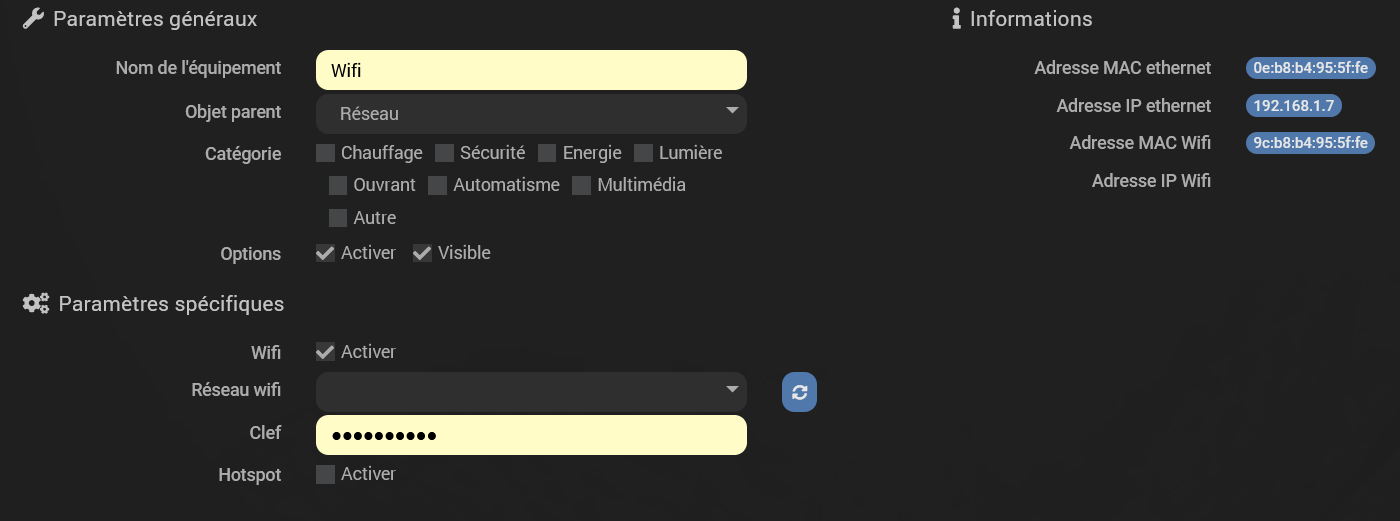
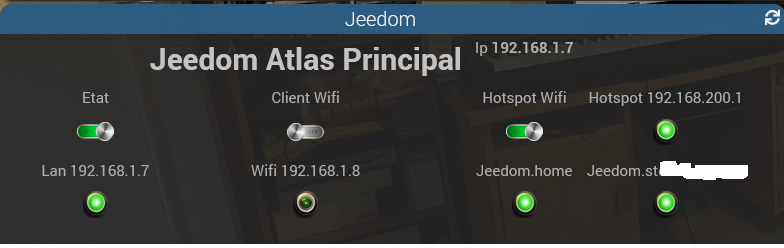
Bonjour,
J’ai voulu monter un point d’accès wifi (hotspot) en utilisant le plugin Atlas et en cochant « Activer le hotspot », pour avoir un accès de secours en cas de panne électrique ou réseau LAN.
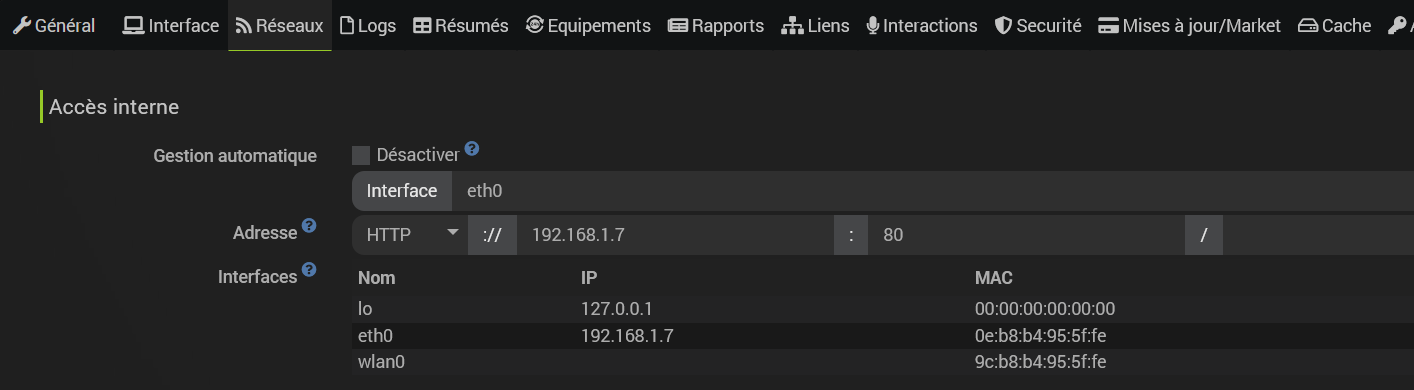
Le comportement est très erratique et en particulier l’adresse sur wlan0 ne reste pas : Elle apparait, puis disparait.
Impossible de se connecter sur ce hoptspot.
J’ai vu que le horspot était en bêta, du coup, j’ai aussi testé la version bêta, mais cela ne marche pas mieux.
Dites moi s’il faut autres choses.
Cordialement
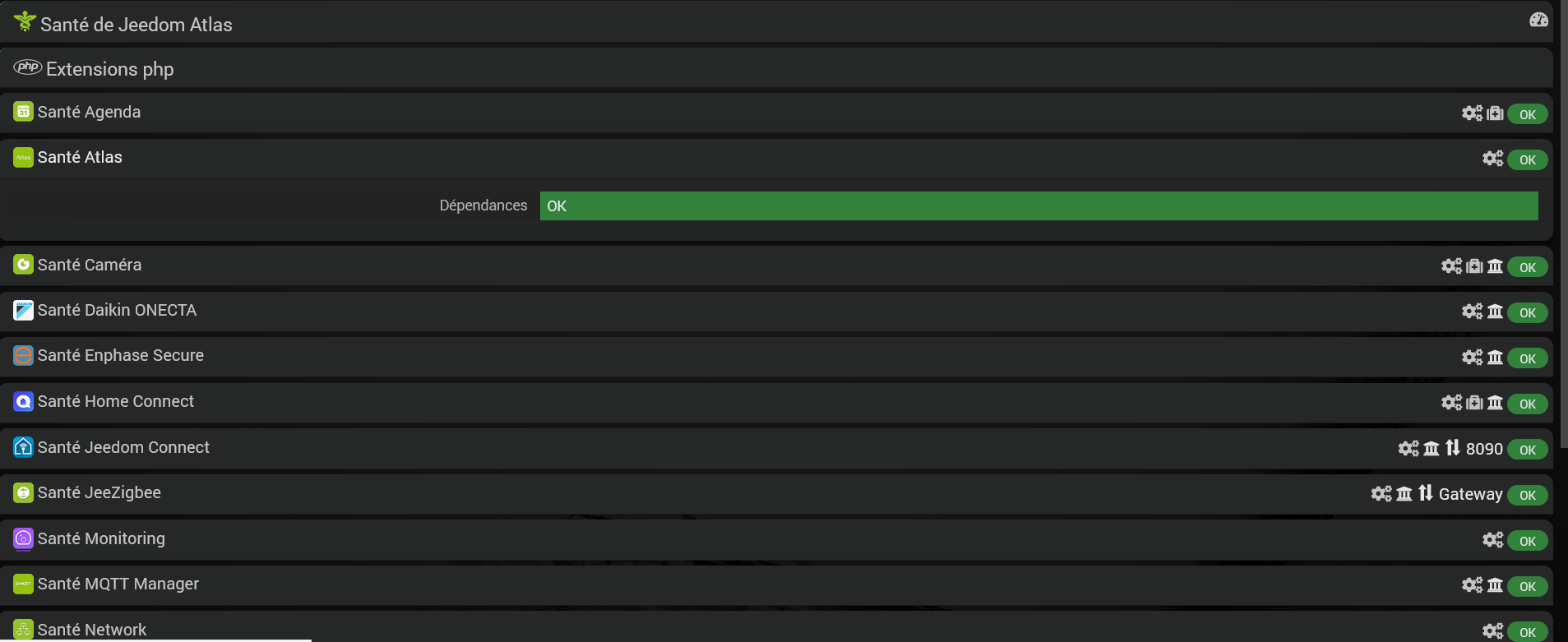
Pages Santé : Charge 0.48 - 0.96 - 1.15


Page réseau
Log cron_execution qui signale l’absence d’adresse sur wlan0
0276|WARNING: Could not obtain IP address for interface wlan0. Using 0.0.0.0 for
0277|the source address, which may not be what you want.
0278|Either configure wlan0 with an IP address, or manually specify the address
0279|with the --arpspa option.
0280|ERROR: Could not obtain interface IP address and netmask
0281|ERROR: pcap_lookupnet: wlan0: no IPv4 address assigned
Log en Debug, suite à install et on off.
0000|[2026-02-07 10:33:52] DEBUG  Lancement de : /var/www/html/core/class/../../core/php/jeePlugin.php  plugin_id=atlas function=post_plugin_install callInstallFunction=1
0001|[2026-02-07 10:36:03] INFO  Début d'activation du plugin
0002|[2026-02-07 10:36:04] INFO  Info sur le démon : {"launchable_message":"","launchable":"nok","state":"nok","log":"nok","auto":0}
0003|[2026-02-07 10:36:04] DEBUG  Lancement de : /var/www/html/core/class/../../core/php/jeePlugin.php  plugin_id=atlas function=install callInstallFunction=1
0004|[2026-02-07 10:38:44] DEBUG  Activation du Hotspot.
0005|[2026-02-07 10:38:44] DEBUG  Hotspot activé.
0006|[2026-02-07 10:38:44] DEBUG  Executing sudo nmcli dev disconnect wlan0
0007|[2026-02-07 10:38:45] DEBUG  Hotspot >
0008|[2026-02-07 10:38:45] DEBUG  Mise en plance du Profil Hotspot.
0009|[2026-02-07 10:38:45] DEBUG  Hotspot >
0010|[2026-02-07 10:38:45] DEBUG  Hotspot >
0011|[2026-02-07 10:38:46] DEBUG  Wifi enabled : 1
0012|[2026-02-07 10:47:33] DEBUG  Wifi enabled : 1
0013|[2026-02-07 10:48:30] DEBUG  Pull Cron Atlas
0014|[2026-02-07 10:48:30] DEBUG  Activation du Hotspot.
0015|[2026-02-07 10:48:30] DEBUG  Hotspot activé.
0016|[2026-02-07 10:48:30] DEBUG  Executing sudo nmcli dev disconnect wlan0
0017|[2026-02-07 10:48:31] DEBUG  Hotspot > Trying to kill lnxrouter instance associated with 551156...
0018|[2026-02-07 10:48:31] DEBUG  Mise en plance du Profil Hotspot.
0019|[2026-02-07 10:48:31] DEBUG  Hotspot > Trying to kill lnxrouter instance associated with 551156...
0020|[2026-02-07 10:48:31] DEBUG  Hotspot >
0021|[2026-02-07 10:48:31] DEBUG  Lan Ip is :192.168.1.7
0022|[2026-02-07 10:48:31] DEBUG  Wifi Ip is :192.168.186.1
0023|[2026-02-07 10:49:07] DEBUG  Wifi enabled : 1
0024|[2026-02-07 10:49:27] DEBUG  Wifi enabled : 1
0025|[2026-02-07 10:54:27] DEBUG  Pull Cron Atlas
0026|[2026-02-07 10:54:27] DEBUG  Activation du Hotspot.
0027|[2026-02-07 10:54:27] DEBUG  Hotspot activé.
0028|[2026-02-07 10:54:27] DEBUG  Executing sudo nmcli dev disconnect wlan0
0029|[2026-02-07 10:54:28] DEBUG  Hotspot > Trying to kill lnxrouter instance associated with 551156...
0030|[2026-02-07 10:54:28] DEBUG  Mise en plance du Profil Hotspot.
0031|[2026-02-07 10:54:28] DEBUG  Hotspot > Trying to kill lnxrouter instance associated with 551156...
0032|[2026-02-07 10:54:28] DEBUG  Hotspot >
0033|[2026-02-07 10:54:29] DEBUG  Lan Ip is :192.168.1.7
0034|[2026-02-07 10:54:29] DEBUG  Wifi Ip is :
0035|[2026-02-07 10:55:22] DEBUG  Pull Cron Atlas
0036|[2026-02-07 10:55:22] DEBUG  Executing sudo nmcli dev disconnect wlan0
0037|[2026-02-07 10:55:22] DEBUG  Lan Ip is :192.168.1.7
0038|[2026-02-07 10:55:22] DEBUG  Wifi Ip is :
0039|[2026-02-07 10:56:05] DEBUG  Pull Cron Atlas
0040|[2026-02-07 10:56:05] DEBUG  Activation du Hotspot.
0041|[2026-02-07 10:56:05] DEBUG  Hotspot activé.
0042|[2026-02-07 10:56:05] DEBUG  Executing sudo nmcli dev disconnect wlan0
0043|[2026-02-07 10:56:06] DEBUG  Hotspot > Trying to kill lnxrouter instance associated with 551156...
0044|[2026-02-07 10:56:06] DEBUG  Mise en plance du Profil Hotspot.
0045|[2026-02-07 10:56:06] DEBUG  Hotspot > Trying to kill lnxrouter instance associated with 551156...
0046|[2026-02-07 10:56:06] DEBUG  Hotspot >
0047|[2026-02-07 10:56:06] DEBUG  Lan Ip is :192.168.1.7
0048|[2026-02-07 10:56:06] DEBUG  Wifi Ip is :
0049|[2026-02-07 11:01:01] DEBUG  Wifi enabled : 1
0050|[2026-02-07 11:01:15] DEBUG  Activation du Hotspot.
0051|[2026-02-07 11:01:15] DEBUG  Hotspot activé.
0052|[2026-02-07 11:01:15] DEBUG  Executing sudo nmcli dev disconnect wlan0
0053|[2026-02-07 11:01:16] DEBUG  Hotspot > Trying to kill lnxrouter instance associated with 551156...
0054|[2026-02-07 11:01:16] DEBUG  Mise en plance du Profil Hotspot.
0055|[2026-02-07 11:01:16] DEBUG  Hotspot > Trying to kill lnxrouter instance associated with 551156...
0056|[2026-02-07 11:01:16] DEBUG  Hotspot >
0057|[2026-02-07 11:01:16] DEBUG  Wifi enabled : 1
0058|[2026-02-07 11:13:00] DEBUG  Pull Cron Atlas
0059|[2026-02-07 11:13:00] DEBUG  Activation du Hotspot.
0060|[2026-02-07 11:13:00] DEBUG  Hotspot activé.
0061|[2026-02-07 11:13:00] DEBUG  Executing sudo nmcli dev disconnect wlan0
0062|[2026-02-07 11:13:01] DEBUG  Hotspot > Trying to kill lnxrouter instance associated with 551156...
0063|[2026-02-07 11:13:01] DEBUG  Mise en plance du Profil Hotspot.
0064|[2026-02-07 11:13:01] DEBUG  Hotspot > Trying to kill lnxrouter instance associated with 551156...
0065|[2026-02-07 11:13:01] DEBUG  Hotspot >
0066|[2026-02-07 11:13:01] DEBUG  Lan Ip is :192.168.1.7
0067|[2026-02-07 11:13:01] DEBUG  Wifi Ip is :
0068|[2026-02-07 11:13:05] DEBUG  Wifi enabled : 1
0069|[2026-02-07 11:20:50] DEBUG  Activation du Hotspot.
A tout hasard, j’ai relancé les dépendances
0000|+ echo '*******************Begin of package installation******************'
0001|*******************Begin of package installation******************
0002|+ touch /tmp/jeedom_install_in_progress_atlas
0003|+ echo 1
0004|+ echo 2
0005|+ sudo killall apt apt-get unattended-upgr
0006|apt: no process found
0007|apt-get: no process found
0008|+ sudo rm /var/lib/apt/lists/lock
0009|+ sudo rm /var/cache/apt/archives/lock
0010|+ sudo rm /var/lib/dpkg/lock /var/lib/dpkg/lock-frontend
0011|+ sudo sudo dpkg --configure -a --force-confdef
0012|+ sudo apt update
0013|WARNING: apt does not have a stable CLI interface. Use with caution in scripts.
0014|Hit:1 http://security.debian.org bullseye-security InRelease
0015|Hit:2 http://deb.debian.org/debian bullseye InRelease
0016|Hit:3 http://deb.debian.org/debian bullseye-updates InRelease
0017|Hit:4 http://archive.debian.org/debian bullseye-backports InRelease
0018|Hit:5 https://deb.nodesource.com/node_22.x nodistro InRelease
0019|Hit:7 https://packagecloud.io/ookla/speedtest-cli/debian bullseye InRelease
0020|Hit:6 http://mirrors.qlu.edu.cn/armbian buster InRelease
0021|Reading package lists...
0022|Building dependency tree...
0023|Reading state information...
0024|225 packages can be upgraded. Run 'apt list --upgradable' to see them.
0025|+ echo 3
0026|+ sudo apt install -o Dpkg::Options::=--force-confdef -y rsync
0027|WARNING: apt does not have a stable CLI interface. Use with caution in scripts.
0028|Reading package lists...
0029|Building dependency tree...
0030|Reading state information...
0031|rsync is already the newest version (3.2.3-4+deb11u3).
0032|0 upgraded, 0 newly installed, 0 to remove and 225 not upgraded.
0033|+ echo 4
0034|+ sudo apt install -o Dpkg::Options::=--force-confdef -y cloud-guest-utils
0035|WARNING: apt does not have a stable CLI interface. Use with caution in scripts.
0036|Reading package lists...
0037|Building dependency tree...
0038|Reading state information...
0039|cloud-guest-utils is already the newest version (0.31-2).
0040|0 upgraded, 0 newly installed, 0 to remove and 225 not upgraded.
0041|+ echo 5
0042|+ sudo apt install -o Dpkg::Options::=--force-confdef -y ethtool
0043|WARNING: apt does not have a stable CLI interface. Use with caution in scripts.
0044|Reading package lists...
0045|Building dependency tree...
0046|Reading state information...
0047|ethtool is already the newest version (1:5.9-1).
0048|0 upgraded, 0 newly installed, 0 to remove and 225 not upgraded.
0049|+ echo 6
0050|+ sudo apt install -o Dpkg::Options::=--force-confdef -y hostapd
0051|WARNING: apt does not have a stable CLI interface. Use with caution in scripts.
0052|Reading package lists...
0053|Building dependency tree...
0054|Reading state information...
0055|hostapd is already the newest version (3:2.9-102~armbian20.05.2+1).
0056|0 upgraded, 0 newly installed, 0 to remove and 225 not upgraded.
0057|+ echo 7
0058|+ sudo apt install -o Dpkg::Options::=--force-confdef -y dnsmasq
0059|WARNING: apt does not have a stable CLI interface. Use with caution in scripts.
0060|Reading package lists...
0061|Building dependency tree...
0062|Reading state information...
0063|dnsmasq is already the newest version (2.85-1+deb11u1).
0064|0 upgraded, 0 newly installed, 0 to remove and 225 not upgraded.
0065|+ echo 8
0066|+ sudo apt install -o Dpkg::Options::=--force-confdef -y procps
0067|WARNING: apt does not have a stable CLI interface. Use with caution in scripts.
0068|Reading package lists...
0069|Building dependency tree...
0070|Reading state information...
0071|procps is already the newest version (2:3.3.17-5).
0072|0 upgraded, 0 newly installed, 0 to remove and 225 not upgraded.
0073|+ echo 9
0074|+ sudo apt install -o Dpkg::Options::=--force-confdef -y iproute2
0075|WARNING: apt does not have a stable CLI interface. Use with caution in scripts.
0076|Reading package lists...
0077|Building dependency tree...
0078|Reading state information...
0079|iproute2 is already the newest version (5.10.0-4).
0080|0 upgraded, 0 newly installed, 0 to remove and 225 not upgraded.
0081|+ echo 10
0082|+ sudo apt install -o Dpkg::Options::=--force-confdef -y iptables
0083|WARNING: apt does not have a stable CLI interface. Use with caution in scripts.
0084|Reading package lists...
0085|Building dependency tree...
0086|Reading state information...
0087|iptables is already the newest version (1.8.7-1).
0088|0 upgraded, 0 newly installed, 0 to remove and 225 not upgraded.
0089|+ echo 11
0090|+ sudo apt install -o Dpkg::Options::=--force-confdef -y iw
0091|WARNING: apt does not have a stable CLI interface. Use with caution in scripts.
0092|Reading package lists...
0093|Building dependency tree...
0094|Reading state information...
0095|iw is already the newest version (5.9-3).
0096|0 upgraded, 0 newly installed, 0 to remove and 225 not upgraded.
0097|+ echo 12
0098|+ sudo apt install -o Dpkg::Options::=--force-confdef -y haveged
0099|WARNING: apt does not have a stable CLI interface. Use with caution in scripts.
0100|Reading package lists...
0101|Building dependency tree...
0102|Reading state information...
0103|haveged is already the newest version (1.9.14-1).
0104|0 upgraded, 0 newly installed, 0 to remove and 225 not upgraded.
0105|+ echo 13
0106|+ sudo apt install -o Dpkg::Options::=--force-confdef -y qrencode
0107|WARNING: apt does not have a stable CLI interface. Use with caution in scripts.
0108|Reading package lists...
0109|Building dependency tree...
0110|Reading state information...
0111|qrencode is already the newest version (4.1.1-1).
0112|0 upgraded, 0 newly installed, 0 to remove and 225 not upgraded.
0113|+ echo 14
0114|+ sudo apt install -o Dpkg::Options::=--force-confdef -y network-manager
0115|WARNING: apt does not have a stable CLI interface. Use with caution in scripts.
0116|Reading package lists...
0117|Building dependency tree...
0118|Reading state information...
0119|network-manager is already the newest version (1.30.6-1+deb11u1).
0120|0 upgraded, 0 newly installed, 0 to remove and 225 not upgraded.
0121|+ echo 15
0122|+ php /var/www/html/core/class/../php/jeecli.php plugin dependancy_end atlas
0123|+ echo 16
0124|+ rm /tmp/jeedom_install_in_progress_atlas
0125|+ echo '*******************End of package installation******************'
0126|*******************End of package installation******************
et voici ce que donne en ssh, nmcli
jeedom@JeedomAtlas:~$ nmcli d show wlan0
GENERAL.DEVICE:                         wlan0
GENERAL.TYPE:                           wifi
GENERAL.HWADDR:                         9C:B8:B4:95:5F:FE
GENERAL.MTU:                            1500
GENERAL.STATE:                          10 (non-géré)
GENERAL.CONNECTION:                     --
GENERAL.CON-PATH:                       --
IP4.GATEWAY:                            --
et ip a
jeedom@JeedomAtlas:~$ ip a
1: lo: <LOOPBACK,UP,LOWER_UP> mtu 65536 qdisc noqueue state UNKNOWN group default qlen 1000
    link/loopback 00:00:00:00:00:00 brd 00:00:00:00:00:00
    inet 127.0.0.1/8 scope host lo
       valid_lft forever preferred_lft forever
    inet6 ::1/128 scope host
       valid_lft forever preferred_lft forever
2: eth0: <BROADCAST,MULTICAST,UP,LOWER_UP> mtu 1500 qdisc mq state UP group default qlen 1000
    link/ether 0e:b8:b4:95:5f:fe brd ff:ff:ff:ff:ff:ff permaddr 1a:6c:aa:97:a9:e5
    inet 192.168.1.7/24 brd 192.168.1.255 scope global dynamic noprefixroute eth0
       valid_lft 265sec preferred_lft 265sec
    inet6 fe80::cb8:b4ff:fe95:5ffe/64 scope link
       valid_lft forever preferred_lft forever
3: wlan0: <BROADCAST,MULTICAST,UP,LOWER_UP> mtu 1500 qdisc pfifo_fast state UP group default qlen 1000
    link/ether 9c:b8:b4:95:5f:fe brd ff:ff:ff:ff:ff:ff
Informations Jeedom Atlas
Core : 4.5.2 (master)
DNS Jeedom Atlas : non

Plugin : Atlas
Version : 2025-11-05 15:59:06 (stable)