Bonjour matinal 
A la mise à jour de ce matin plantage avec :
000|[2024-08-17 07:42:59.625] ERROR : Fatal error : module 'datetime' has no attribute 'UTC'
Bonjour matinal
A la mise à jour de ce matin plantage avec :
000|[2024-08-17 07:42:59.625] ERROR : Fatal error : module 'datetime' has no attribute 'UTC'
Bonjour,
Faudrait préciser que c’est la version beta non?
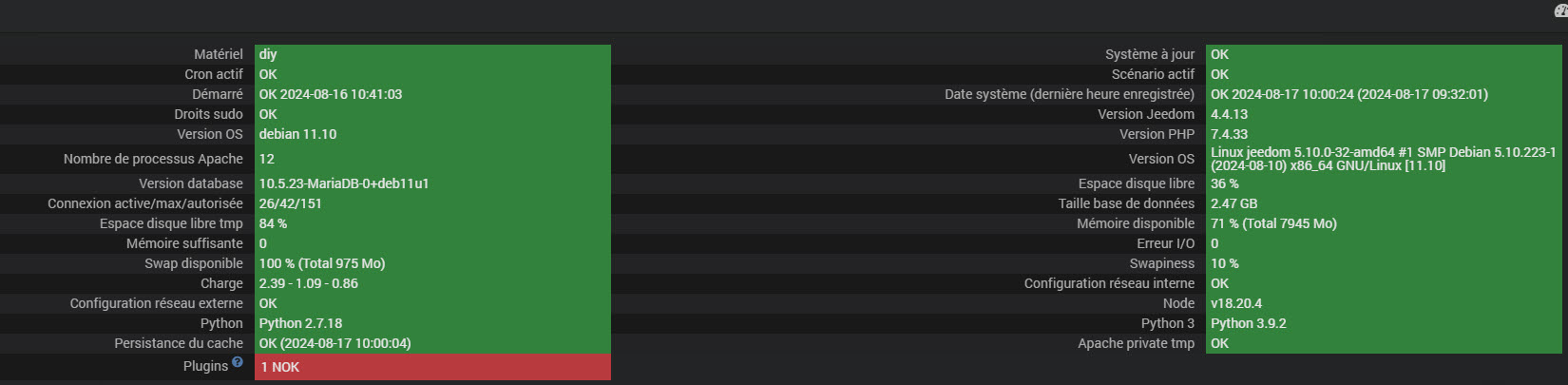
Et une page santé?
Sans oublier les logs complets (depuis la mise à jour)
Les 3.
Un minimum d’info de base pour un retour d’un beta testeur me ferait plaisir.
Ca serait cool de penser à relancer les dépendances aussi si pas fait
Bonjour,
Après MaJ et relance des dépendances, le demon ne démarre pas.
Log demon:
[2024-08-17 09:53:44.944] INFO  : Start broadlinkd
[2024-08-17 09:53:44.944] INFO  : Log level: debug
[2024-08-17 09:53:44.944] INFO  : Socket port: 55013
[2024-08-17 09:53:44.944] INFO  : Socket host: 127.0.0.1
[2024-08-17 09:53:44.944] INFO  : PID file: /tmp/jeedom/broadlink/deamon.pid
[2024-08-17 09:53:44.944] INFO  : Callback: http://127.0.0.1:80/plugins/broadlink/core/php/jeeBroadlink.php
[2024-08-17 09:53:44.944] INFO  : Cycle: 0.3
[2024-08-17 09:53:44.944] DEBUG  : Writing PID 1087514 to /tmp/jeedom/broadlink/deamon.pid
[2024-08-17 09:53:44.945] DEBUG  : Init request module v2.32.3
[2024-08-17 09:53:44.947] DEBUG  : Starting new HTTP connection (1): 127.0.0.1:80
[2024-08-17 09:53:44.952] DEBUG  : http://127.0.0.1:80 "GET /plugins/broadlink/core/php/jeeBroadlink.php?apikey=s3Ly2d5ybJtNEtLQKbOWDBZFLtsDVbCaSXsly0Fb2CGX6IV2CSmarTh873CtuhdZ HTTP/11" 200 0
[2024-08-17 09:53:44.953] DEBUG  : Start listening...
[2024-08-17 09:53:44.953] DEBUG  : Socket interface started
[2024-08-17 09:53:44.953] DEBUG  : LoopNetServer Thread started
[2024-08-17 09:53:44.954] DEBUG  : Listening on: [127.0.0.1:55013]
[2024-08-17 09:53:44.974] ERROR  : Fatal error : module 'datetime' has no attribute 'UTC'
[2024-08-17 09:53:44.974] DEBUG  : Traceback (most recent call last):
File "/var/www/html/plugins/broadlink/resources/broadlinkd/broadlinkd.py", line 245, in <module>
listen()
File "/var/www/html/plugins/broadlink/resources/broadlinkd/broadlinkd.py", line 40, in listen
read_broadlink()
File "/var/www/html/plugins/broadlink/resources/broadlinkd/broadlinkd.py", line 86, in read_broadlink
now = datetime.datetime.now(datetime.UTC)
AttributeError: module 'datetime' has no attribute 'UTC'
[2024-08-17 09:53:44.974] DEBUG  : Shutdown
[2024-08-17 09:53:44.975] DEBUG  : Removing PID file /tmp/jeedom/broadlink/deamon.pid
[2024-08-17 09:53:45.454] DEBUG  : LoopNetServer Thread stopped
[2024-08-17 09:53:45.455] DEBUG  : Exit 0
Log Broadlink:
[2024-08-17 09:53:44.944] INFO  : Start broadlinkd
[2024-08-17 09:53:44.944] INFO  : Log level: debug
[2024-08-17 09:53:44.944] INFO  : Socket port: 55013
[2024-08-17 09:53:44.944] INFO  : Socket host: 127.0.0.1
[2024-08-17 09:53:44.944] INFO  : PID file: /tmp/jeedom/broadlink/deamon.pid
[2024-08-17 09:53:44.944] INFO  : Callback: http://127.0.0.1:80/plugins/broadlink/core/php/jeeBroadlink.php
[2024-08-17 09:53:44.944] INFO  : Cycle: 0.3
[2024-08-17 09:53:44.944] DEBUG  : Writing PID 1087514 to /tmp/jeedom/broadlink/deamon.pid
[2024-08-17 09:53:44.945] DEBUG  : Init request module v2.32.3
[2024-08-17 09:53:44.947] DEBUG  : Starting new HTTP connection (1): 127.0.0.1:80
[2024-08-17 09:53:44.952] DEBUG  : http://127.0.0.1:80 "GET /plugins/broadlink/core/php/jeeBroadlink.php?apikey=s3Ly2d5ybJtNEtLQKbOWDBZFLtsDVbCaSXsly0Fb2CGX6IV2CSmarTh873CtuhdZ HTTP/11" 200 0
[2024-08-17 09:53:44.953] DEBUG  : Start listening...
[2024-08-17 09:53:44.953] DEBUG  : Socket interface started
[2024-08-17 09:53:44.953] DEBUG  : LoopNetServer Thread started
[2024-08-17 09:53:44.954] DEBUG  : Listening on: [127.0.0.1:55013]
[2024-08-17 09:53:44.974] ERROR  : Fatal error : module 'datetime' has no attribute 'UTC'
[2024-08-17 09:53:44.974] DEBUG  : Traceback (most recent call last):
File "/var/www/html/plugins/broadlink/resources/broadlinkd/broadlinkd.py", line 245, in <module>
listen()
File "/var/www/html/plugins/broadlink/resources/broadlinkd/broadlinkd.py", line 40, in listen
read_broadlink()
File "/var/www/html/plugins/broadlink/resources/broadlinkd/broadlinkd.py", line 86, in read_broadlink
now = datetime.datetime.now(datetime.UTC)
AttributeError: module 'datetime' has no attribute 'UTC'
[2024-08-17 09:53:44.974] DEBUG  : Shutdown
[2024-08-17 09:53:44.975] DEBUG  : Removing PID file /tmp/jeedom/broadlink/deamon.pid
[2024-08-17 09:53:45.454] DEBUG  : LoopNetServer Thread stopped
[2024-08-17 09:53:45.455] DEBUG  : Exit 0
Log dépendance:
+ echo '*******************Begin of package installation******************'
*******************Begin of package installation******************
+ touch /tmp/jeedom_install_in_progress_broadlink
+ echo 1
+ echo 2
+ sudo killall apt apt-get unattended-upgr
apt: no process found
apt-get: no process found
+ sudo rm /var/lib/apt/lists/lock
+ sudo rm /var/cache/apt/archives/lock
+ sudo rm /var/lib/dpkg/lock /var/lib/dpkg/lock-frontend
+ sudo sudo dpkg --configure -a --force-confdef
+ sudo apt update
WARNING: apt does not have a stable CLI interface. Use with caution in scripts.
Hit:1 http://deb.debian.org/debian bullseye InRelease
Hit:2 http://security.debian.org/debian-security bullseye-security InRelease
Get:3 http://deb.debian.org/debian bullseye-updates InRelease [44.1 kB]
Hit:4 https://deb.nodesource.com/node_18.x nodistro InRelease
Fetched 44.1 kB in 1s (59.4 kB/s)
Reading package lists...
Building dependency tree...
Reading state information...
All packages are up to date.
+ echo 3
+ sudo apt install -o Dpkg::Options::=--force-confdef -y libudev-dev
WARNING: apt does not have a stable CLI interface. Use with caution in scripts.
Reading package lists...
Building dependency tree...
Reading state information...
libudev-dev is already the newest version (247.3-7+deb11u5).
0 upgraded, 0 newly installed, 0 to remove and 0 not upgraded.
+ echo 4
+ sudo apt install -o Dpkg::Options::=--force-confdef -y libffi-dev
WARNING: apt does not have a stable CLI interface. Use with caution in scripts.
Reading package lists...
Building dependency tree...
Reading state information...
libffi-dev is already the newest version (3.3-6).
0 upgraded, 0 newly installed, 0 to remove and 0 not upgraded.
+ echo 5
+ sudo apt install -o Dpkg::Options::=--force-confdef -y libssl-dev
WARNING: apt does not have a stable CLI interface. Use with caution in scripts.
Reading package lists...
Building dependency tree...
Reading state information...
libssl-dev is already the newest version (1.1.1w-0+deb11u1).
0 upgraded, 0 newly installed, 0 to remove and 0 not upgraded.
+ echo 6
++ awk '$1 <= 4'
++ find /usr/local/lib/python2.7/dist-packages/ /usr/local/lib/python3.9/dist-packages/ -mindepth 1 -maxdepth 1 -type d -exec du -ks '{}' +
++ cut -f 2-
+ RESULTTODELETE=
++ echo ''
++ sed 's, ,\ ,g'
+ RESULTTODELETE2=
+ echo ''
+ xargs rm -rf
+ echo 7
+ sudo pip3 cache purge
Files removed: 255
+ echo 8
+ sudo pip3 install --upgrade pip
Requirement already satisfied: pip in /usr/local/lib/python3.9/dist-packages (24.1.2)
Collecting pip
Downloading pip-24.2-py3-none-any.whl.metadata (3.6 kB)
Downloading pip-24.2-py3-none-any.whl (1.8 MB)
━━━━━━━━━━━━━━━━━━━━━━━━━━━━━━━━━━━━━━━━ 1.8/1.8 MB 519.4 kB/s eta 0:00:00
WARNING: Error parsing dependencies of gpg: Invalid version: '1.14.0-unknown'
Installing collected packages: pip
Attempting uninstall: pip
Found existing installation: pip 24.1.2
Uninstalling pip-24.1.2:
Successfully uninstalled pip-24.1.2
Successfully installed pip-24.2
WARNING: Running pip as the 'root' user can result in broken permissions and conflicting behaviour with the system package manager, possibly rendering your system unusable.It is recommended to use a virtual environment instead: https://pip.pypa.io/warnings/venv. Use the --root-user-action option if you know what you are doing and want to suppress this warning.
+ echo 9
+ sudo python3 -m pip install --force-reinstall --upgrade wheel
Collecting wheel
Downloading wheel-0.44.0-py3-none-any.whl.metadata (2.3 kB)
Downloading wheel-0.44.0-py3-none-any.whl (67 kB)
WARNING: Error parsing dependencies of gpg: Invalid version: '1.14.0-unknown'
Installing collected packages: wheel
Attempting uninstall: wheel
Found existing installation: wheel 0.43.0
Uninstalling wheel-0.43.0:
Successfully uninstalled wheel-0.43.0
Successfully installed wheel-0.44.0
WARNING: Running pip as the 'root' user can result in broken permissions and conflicting behaviour with the system package manager, possibly rendering your system unusable.It is recommended to use a virtual environment instead: https://pip.pypa.io/warnings/venv. Use the --root-user-action option if you know what you are doing and want to suppress this warning.
+ echo 10
+ sudo python3 -m pip install --force-reinstall --upgrade cryptography==2.6.1
Collecting cryptography==2.6.1
Downloading cryptography-2.6.1-cp34-abi3-manylinux1_x86_64.whl.metadata (5.1 kB)
Collecting asn1crypto>=0.21.0 (from cryptography==2.6.1)
Downloading asn1crypto-1.5.1-py2.py3-none-any.whl.metadata (13 kB)
Collecting six>=1.4.1 (from cryptography==2.6.1)
Downloading six-1.16.0-py2.py3-none-any.whl.metadata (1.8 kB)
Collecting cffi!=1.11.3,>=1.8 (from cryptography==2.6.1)
Downloading cffi-1.17.0-cp39-cp39-manylinux_2_17_x86_64.manylinux2014_x86_64.whl.metadata (1.5 kB)
Collecting pycparser (from cffi!=1.11.3,>=1.8->cryptography==2.6.1)
Downloading pycparser-2.22-py3-none-any.whl.metadata (943 bytes)
Downloading cryptography-2.6.1-cp34-abi3-manylinux1_x86_64.whl (2.3 MB)
━━━━━━━━━━━━━━━━━━━━━━━━━━━━━━━━━━━━━━━━ 2.3/2.3 MB 9.1 MB/s eta 0:00:00
Downloading asn1crypto-1.5.1-py2.py3-none-any.whl (105 kB)
Downloading cffi-1.17.0-cp39-cp39-manylinux_2_17_x86_64.manylinux2014_x86_64.whl (444 kB)
Downloading six-1.16.0-py2.py3-none-any.whl (11 kB)
Downloading pycparser-2.22-py3-none-any.whl (117 kB)
WARNING: Error parsing dependencies of gpg: Invalid version: '1.14.0-unknown'
Installing collected packages: asn1crypto, six, pycparser, cffi, cryptography
Attempting uninstall: asn1crypto
Found existing installation: asn1crypto 1.5.1
Uninstalling asn1crypto-1.5.1:
Successfully uninstalled asn1crypto-1.5.1
Attempting uninstall: six
Found existing installation: six 1.16.0
Uninstalling six-1.16.0:
Successfully uninstalled six-1.16.0
Attempting uninstall: pycparser
Found existing installation: pycparser 2.22
Uninstalling pycparser-2.22:
Successfully uninstalled pycparser-2.22
Attempting uninstall: cffi
Found existing installation: cffi 1.16.0
Uninstalling cffi-1.16.0:
Successfully uninstalled cffi-1.16.0
Attempting uninstall: cryptography
Found existing installation: cryptography 42.0.8
Uninstalling cryptography-42.0.8:
Successfully uninstalled cryptography-42.0.8
ERROR: pip's dependency resolver does not currently take into account all the packages that are installed. This behaviour is the source of the following dependency conflicts.
python-miio 0.5.12 requires cryptography>=35, but you have cryptography 2.6.1 which is incompatible.
Successfully installed asn1crypto-1.5.1 cffi-1.17.0 cryptography-2.6.1 pycparser-2.22 six-1.16.0
WARNING: Running pip as the 'root' user can result in broken permissions and conflicting behaviour with the system package manager, possibly rendering your system unusable.It is recommended to use a virtual environment instead: https://pip.pypa.io/warnings/venv. Use the --root-user-action option if you know what you are doing and want to suppress this warning.
+ echo 11
+ sudo python3 -m pip install --force-reinstall --upgrade pycrypto
Collecting pycrypto
Downloading pycrypto-2.6.1.tar.gz (446 kB)
Preparing metadata (setup.py): started
Preparing metadata (setup.py): finished with status 'done'
Building wheels for collected packages: pycrypto
Building wheel for pycrypto (setup.py): started
Building wheel for pycrypto (setup.py): finished with status 'done'
Created wheel for pycrypto: filename=pycrypto-2.6.1-cp39-cp39-linux_x86_64.whl size=496583 sha256=33b68bff7b322b9926da635b92d66884131e9eb23b153c196cc158d55dcda005
Stored in directory: /root/.cache/pip/wheels/9d/29/32/8b8f22481bec8b0fbe7087927336ec167faff2ed9db849448f
Successfully built pycrypto
WARNING: Error parsing dependencies of gpg: Invalid version: '1.14.0-unknown'
Installing collected packages: pycrypto
Attempting uninstall: pycrypto
Found existing installation: pycrypto 2.6.1
Uninstalling pycrypto-2.6.1:
Successfully uninstalled pycrypto-2.6.1
Successfully installed pycrypto-2.6.1
WARNING: Running pip as the 'root' user can result in broken permissions and conflicting behaviour with the system package manager, possibly rendering your system unusable.It is recommended to use a virtual environment instead: https://pip.pypa.io/warnings/venv. Use the --root-user-action option if you know what you are doing and want to suppress this warning.
+ echo 12
+ sudo python3 -m pip install --force-reinstall --upgrade asn1crypto
Collecting asn1crypto
Using cached asn1crypto-1.5.1-py2.py3-none-any.whl.metadata (13 kB)
Using cached asn1crypto-1.5.1-py2.py3-none-any.whl (105 kB)
WARNING: Error parsing dependencies of gpg: Invalid version: '1.14.0-unknown'
Installing collected packages: asn1crypto
Attempting uninstall: asn1crypto
Found existing installation: asn1crypto 1.5.1
Uninstalling asn1crypto-1.5.1:
Successfully uninstalled asn1crypto-1.5.1
ERROR: pip's dependency resolver does not currently take into account all the packages that are installed. This behaviour is the source of the following dependency conflicts.
python-miio 0.5.12 requires cryptography>=35, but you have cryptography 2.6.1 which is incompatible.
Successfully installed asn1crypto-1.5.1
WARNING: Running pip as the 'root' user can result in broken permissions and conflicting behaviour with the system package manager, possibly rendering your system unusable.It is recommended to use a virtual environment instead: https://pip.pypa.io/warnings/venv. Use the --root-user-action option if you know what you are doing and want to suppress this warning.
+ echo 13
+ sudo python3 -m pip install --force-reinstall --upgrade requests
Collecting requests
Downloading requests-2.32.3-py3-none-any.whl.metadata (4.6 kB)
Collecting charset-normalizer<4,>=2 (from requests)
Downloading charset_normalizer-3.3.2-cp39-cp39-manylinux_2_17_x86_64.manylinux2014_x86_64.whl.metadata (33 kB)
Collecting idna<4,>=2.5 (from requests)
Downloading idna-3.7-py3-none-any.whl.metadata (9.9 kB)
Collecting urllib3<3,>=1.21.1 (from requests)
Downloading urllib3-2.2.2-py3-none-any.whl.metadata (6.4 kB)
Collecting certifi>=2017.4.17 (from requests)
Downloading certifi-2024.7.4-py3-none-any.whl.metadata (2.2 kB)
Downloading requests-2.32.3-py3-none-any.whl (64 kB)
Downloading certifi-2024.7.4-py3-none-any.whl (162 kB)
Downloading charset_normalizer-3.3.2-cp39-cp39-manylinux_2_17_x86_64.manylinux2014_x86_64.whl (142 kB)
Downloading idna-3.7-py3-none-any.whl (66 kB)
Downloading urllib3-2.2.2-py3-none-any.whl (121 kB)
WARNING: Error parsing dependencies of gpg: Invalid version: '1.14.0-unknown'
Installing collected packages: urllib3, idna, charset-normalizer, certifi, requests
Attempting uninstall: urllib3
Found existing installation: urllib3 2.2.2
Uninstalling urllib3-2.2.2:
Successfully uninstalled urllib3-2.2.2
Attempting uninstall: idna
Found existing installation: idna 3.7
Uninstalling idna-3.7:
Successfully uninstalled idna-3.7
Attempting uninstall: charset-normalizer
Found existing installation: charset-normalizer 3.3.2
Uninstalling charset-normalizer-3.3.2:
Successfully uninstalled charset-normalizer-3.3.2
Attempting uninstall: certifi
Found existing installation: certifi 2024.7.4
Uninstalling certifi-2024.7.4:
Successfully uninstalled certifi-2024.7.4
Attempting uninstall: requests
Found existing installation: requests 2.32.3
Uninstalling requests-2.32.3:
Successfully uninstalled requests-2.32.3
ERROR: pip's dependency resolver does not currently take into account all the packages that are installed. This behaviour is the source of the following dependency conflicts.
python-miio 0.5.12 requires cryptography>=35, but you have cryptography 2.6.1 which is incompatible.
Successfully installed certifi-2024.7.4 charset-normalizer-3.3.2 idna-3.7 requests-2.32.3 urllib3-2.2.2
WARNING: Running pip as the 'root' user can result in broken permissions and conflicting behaviour with the system package manager, possibly rendering your system unusable.It is recommended to use a virtual environment instead: https://pip.pypa.io/warnings/venv. Use the --root-user-action option if you know what you are doing and want to suppress this warning.
+ echo 14
+ php /var/www/html/core/class/../php/jeecli.php plugin dependancy_end broadlink
+ echo 15
+ rm /tmp/jeedom_install_in_progress_broadlink
+ echo '*******************End of package installation******************'
*******************End of package installation******************
Thierry
merci pour le log
(le log plugin et daemon sont les mêmes, il y a eu un petit mix mais pas grave)
désolé pour le soucis du coup, ca devrait être ok demain
par contre je n’ai pas testé en debian 10, je vais ajouter dans le changelog que la compatibilité n’est plus assurée
Ce sujet a été automatiquement fermé après 24 heures suivant le dernier commentaire. Aucune réponse n’est permise dorénavant.