Bonjour,
Ce n’est même pas un Pi3, mais un 2 que j’avais. Ce 4 sera mieux 
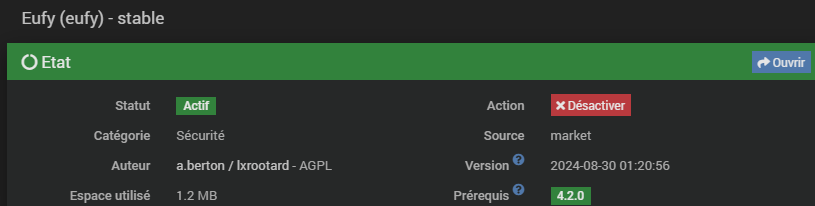
Voila pour le plugin.
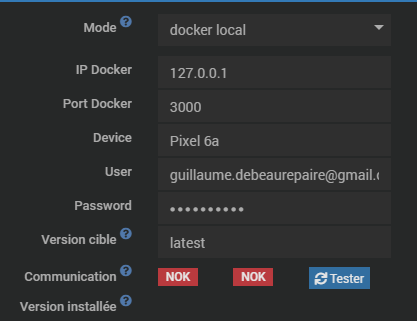
J’ai fait l’installation du plugin, puis complété les infos, puis installer eufy, et tenté de le démarrer.
Les 2 icones en bas a droite.
Mais il ne démarre pas.
Voici les logs, après une installation.
Par contre, je ne comprend pas, je n’ai pas le log deamon (dans anaylse / logs)
Eufy
[2024-09-02 20:25:02] ERROR  : Erreur pendant l'opération install du service Eufy: L'image est déjà installée
[2024-09-02 20:25:10] ERROR  : Attention je pense qu'il y a un soucis avec le démon que j'ai relancé plus de 3 fois consécutivement
[2024-09-02 20:25:11] ERROR  : Container Eufy non démarré
eufy-security-ws Pulling
no matching manifest for linux/arm/v8 in the manifest list entries
Package
) - stable
 Etat

StatutActifAction

CatégorieSécuritéSourcemarket
Auteura.berton / lxrootard - AGPLVersion 2024-08-30 01:20:56
Espace utilisé1.2 MBPrérequis 4.2.0
 Logs et surveillance

Niveau logAucunDefautDebugInfoWarningError
Logs
Heartbeat (min)
Redémarrer démon
 Dépendances
Nom	Statut	Installation	Gestion automatique	Dernière installation
Local	OK			2024-09-02 20:24:44
 Démon
Nom	Statut	Configuration	(Re)Démarrer	Arrêter	Gestion automatique	Dernier lancement
Local	NOK	OK				2024-09-02 20:25:10
 Configuration

Mode
docker local
IP Docker
127.0.0.1
Port Docker
3000
Device
Pixel 6a
User
guillaume.debeaurepaire@gmail.com
Password
Guimyl02.-
Version cible
latest
Communication NOKNOK
Version installée
Setup
 Fonctionnalités

interactNon
cronNon
cron5Non
cron10Non
cron15Non
cron30Non
cronHourlyNon
cronDailyNon
deadcmdNon
healthNon
Log du plugin eufy_packages
Log brut
Rechercher


+ echo '*******************Begin of package installation******************'
*******************Begin of package installation******************
+ touch /tmp/jeedom_install_in_progress_eufy
+ echo 1
+ echo 2
+ sudo killall apt apt-get unattended-upgr
apt: no process found
apt-get: no process found
+ sudo rm /var/lib/apt/lists/lock
+ sudo rm /var/cache/apt/archives/lock
+ sudo rm /var/lib/dpkg/lock /var/lib/dpkg/lock-frontend
+ sudo sudo dpkg --configure -a --force-confdef
+ sudo apt update
WARNING: apt does not have a stable CLI interface. Use with caution in scripts.
Hit:1 http://archive.raspberrypi.org/debian bullseye InRelease
Hit:2 https://download.docker.com/linux/debian bullseye InRelease
Get:3 http://raspbian.raspberrypi.org/raspbian bullseye InRelease [15.0 kB]
Hit:4 https://deb.nodesource.com/node_18.x nodistro InRelease
Get:5 http://raspbian.raspberrypi.org/raspbian bullseye/main armhf Packages [13.2 MB]
Fetched 13.3 MB in 49s (270 kB/s)
Reading package lists...
Building dependency tree...
Reading state information...
4 packages can be upgraded. Run 'apt list --upgradable' to see them.
+ echo 3
+ sudo apt install -o Dpkg::Options::=--force-confdef -y python3
WARNING: apt does not have a stable CLI interface. Use with caution in scripts.
Reading package lists...
Building dependency tree...
Reading state information...
python3 is already the newest version (3.9.2-3).
0 upgraded, 0 newly installed, 0 to remove and 4 not upgraded.
+ echo 4
+ sudo apt install -o Dpkg::Options::=--force-confdef -y python3-pip
WARNING: apt does not have a stable CLI interface. Use with caution in scripts.
Reading package lists...
Building dependency tree...
Reading state information...
python3-pip is already the newest version (20.3.4-4+rpt1+deb11u1).
0 upgraded, 0 newly installed, 0 to remove and 4 not upgraded.
+ echo 5
+ sudo apt install -o Dpkg::Options::=--force-confdef -y python3-pyudev
WARNING: apt does not have a stable CLI interface. Use with caution in scripts.
Reading package lists...
Building dependency tree...
Reading state information...
python3-pyudev is already the newest version (0.22.0-2).
0 upgraded, 0 newly installed, 0 to remove and 4 not upgraded.
+ echo 6
+ sudo apt install -o Dpkg::Options::=--force-confdef -y python3-requests
WARNING: apt does not have a stable CLI interface. Use with caution in scripts.
Reading package lists...
Building dependency tree...
Reading state information...
python3-requests is already the newest version (2.25.1+dfsg-2).
0 upgraded, 0 newly installed, 0 to remove and 4 not upgraded.
+ echo 7
+ sudo apt install -o Dpkg::Options::=--force-confdef -y python3-setuptools
WARNING: apt does not have a stable CLI interface. Use with caution in scripts.
Reading package lists...
Building dependency tree...
Reading state information...
python3-setuptools is already the newest version (52.0.0-4).
0 upgraded, 0 newly installed, 0 to remove and 4 not upgraded.
+ echo 8
+ sudo apt install -o Dpkg::Options::=--force-confdef -y python3-dev
WARNING: apt does not have a stable CLI interface. Use with caution in scripts.
Reading package lists...
Building dependency tree...
Reading state information...
python3-dev is already the newest version (3.9.2-3).
0 upgraded, 0 newly installed, 0 to remove and 4 not upgraded.
+ echo 9
++ cut -f 2-
++ awk '$1 <= 4'
++ find /usr/local/lib/python2.7/dist-packages/ /usr/local/lib/python3.9/dist-packages/ -mindepth 1 -maxdepth 1 -type d -exec du -ks '{}' +
+ RESULTTODELETE=
++ echo ''
++ sed 's, ,\ ,g'
+ RESULTTODELETE2=
+ echo ''
+ xargs rm -rf
+ echo 10
+ sudo pip3 cache purge
Files removed: 64
+ echo 11
+ sudo pip3 install --upgrade pip
Looking in indexes: https://pypi.org/simple, https://www.piwheels.org/simple
Requirement already satisfied: pip in /usr/local/lib/python3.9/dist-packages (24.2)
WARNING: Error parsing dependencies of gpg: Invalid version: '1.14.0-unknown'
WARNING: Running pip as the 'root' user can result in broken permissions and conflicting behaviour with the system package manager, possibly rendering your system unusable.It is recommended to use a virtual environment instead: https://pip.pypa.io/warnings/venv. Use the --root-user-action option if you know what you are doing and want to suppress this warning.
+ echo 12
+ sudo python3 -m pip install --force-reinstall --upgrade wheel
Looking in indexes: https://pypi.org/simple, https://www.piwheels.org/simple
Collecting wheel
Downloading https://www.piwheels.org/simple/wheel/wheel-0.44.0-py3-none-any.whl (67 kB)
WARNING: Error parsing dependencies of gpg: Invalid version: '1.14.0-unknown'
Installing collected packages: wheel
Attempting uninstall: wheel
Found existing installation: wheel 0.44.0
Uninstalling wheel-0.44.0:
Successfully uninstalled wheel-0.44.0
Successfully installed wheel-0.44.0
WARNING: Running pip as the 'root' user can result in broken permissions and conflicting behaviour with the system package manager, possibly rendering your system unusable.It is recommended to use a virtual environment instead: https://pip.pypa.io/warnings/venv. Use the --root-user-action option if you know what you are doing and want to suppress this warning.
+ echo 13
+ sudo python3 -m pip install --force-reinstall --upgrade requests
Looking in indexes: https://pypi.org/simple, https://www.piwheels.org/simple
Collecting requests
Downloading https://www.piwheels.org/simple/requests/requests-2.32.3-py3-none-any.whl (64 kB)
Collecting charset-normalizer<4,>=2 (from requests)
Downloading https://www.piwheels.org/simple/charset-normalizer/charset_normalizer-3.3.2-py3-none-any.whl (48 kB)
Collecting idna<4,>=2.5 (from requests)
Downloading https://www.piwheels.org/simple/idna/idna-3.8-py3-none-any.whl (66 kB)
Collecting urllib3<3,>=1.21.1 (from requests)
Downloading https://www.piwheels.org/simple/urllib3/urllib3-2.2.2-py3-none-any.whl (121 kB)
Collecting certifi>=2017.4.17 (from requests)
Downloading https://www.piwheels.org/simple/certifi/certifi-2024.8.30-py3-none-any.whl (167 kB)
WARNING: Error parsing dependencies of gpg: Invalid version: '1.14.0-unknown'
Installing collected packages: urllib3, idna, charset-normalizer, certifi, requests
Attempting uninstall: urllib3
Found existing installation: urllib3 2.2.2
Uninstalling urllib3-2.2.2:
Successfully uninstalled urllib3-2.2.2
Attempting uninstall: idna
Found existing installation: idna 3.8
Uninstalling idna-3.8:
Successfully uninstalled idna-3.8
Attempting uninstall: charset-normalizer
Found existing installation: charset-normalizer 3.3.2
Uninstalling charset-normalizer-3.3.2:
Successfully uninstalled charset-normalizer-3.3.2
Attempting uninstall: certifi
Found existing installation: certifi 2024.8.30
Uninstalling certifi-2024.8.30:
Successfully uninstalled certifi-2024.8.30
Attempting uninstall: requests
Found existing installation: requests 2.32.3
Uninstalling requests-2.32.3:
Successfully uninstalled requests-2.32.3
Successfully installed certifi-2024.8.30 charset-normalizer-3.3.2 idna-3.8 requests-2.32.3 urllib3-2.2.2
WARNING: Running pip as the 'root' user can result in broken permissions and conflicting behaviour with the system package manager, possibly rendering your system unusable.It is recommended to use a virtual environment instead: https://pip.pypa.io/warnings/venv. Use the --root-user-action option if you know what you are doing and want to suppress this warning.
+ echo 14
+ sudo python3 -m pip install --force-reinstall --upgrade pyudev
Looking in indexes: https://pypi.org/simple, https://www.piwheels.org/simple
Collecting pyudev
Downloading https://www.piwheels.org/simple/pyudev/pyudev-0.24.3-py3-none-any.whl (62 kB)
WARNING: Error parsing dependencies of gpg: Invalid version: '1.14.0-unknown'
Installing collected packages: pyudev
Attempting uninstall: pyudev
Found existing installation: pyudev 0.24.3
Uninstalling pyudev-0.24.3:
Successfully uninstalled pyudev-0.24.3
Successfully installed pyudev-0.24.3
WARNING: Running pip as the 'root' user can result in broken permissions and conflicting behaviour with the system package manager, possibly rendering your system unusable.It is recommended to use a virtual environment instead: https://pip.pypa.io/warnings/venv. Use the --root-user-action option if you know what you are doing and want to suppress this warning.
+ echo 15
+ sudo python3 -m pip install --force-reinstall --upgrade six
Looking in indexes: https://pypi.org/simple, https://www.piwheels.org/simple
Collecting six
Downloading https://www.piwheels.org/simple/six/six-1.16.0-py2.py3-none-any.whl (11 kB)
WARNING: Error parsing dependencies of gpg: Invalid version: '1.14.0-unknown'
Installing collected packages: six
Attempting uninstall: six
Found existing installation: six 1.16.0
Uninstalling six-1.16.0:
Successfully uninstalled six-1.16.0
Successfully installed six-1.16.0
WARNING: Running pip as the 'root' user can result in broken permissions and conflicting behaviour with the system package manager, possibly rendering your system unusable.It is recommended to use a virtual environment instead: https://pip.pypa.io/warnings/venv. Use the --root-user-action option if you know what you are doing and want to suppress this warning.
+ echo 16
+ sudo python3 -m pip install --force-reinstall --upgrade pyserial
Looking in indexes: https://pypi.org/simple, https://www.piwheels.org/simple
Collecting pyserial
Downloading https://www.piwheels.org/simple/pyserial/pyserial-3.5-py2.py3-none-any.whl (90 kB)
WARNING: Error parsing dependencies of gpg: Invalid version: '1.14.0-unknown'
Installing collected packages: pyserial
Attempting uninstall: pyserial
Found existing installation: pyserial 3.5
Uninstalling pyserial-3.5:
Successfully uninstalled pyserial-3.5
Successfully installed pyserial-3.5
WARNING: Running pip as the 'root' user can result in broken permissions and conflicting behaviour with the system package manager, possibly rendering your system unusable.It is recommended to use a virtual environment instead: https://pip.pypa.io/warnings/venv. Use the --root-user-action option if you know what you are doing and want to suppress this warning.
+ echo 17
+ sudo python3 -m pip install --force-reinstall --upgrade websocket-client
Looking in indexes: https://pypi.org/simple, https://www.piwheels.org/simple
Collecting websocket-client
Downloading https://www.piwheels.org/simple/websocket-client/websocket_client-1.8.0-py3-none-any.whl (58 kB)
WARNING: Error parsing dependencies of gpg: Invalid version: '1.14.0-unknown'
Installing collected packages: websocket-client
Attempting uninstall: websocket-client
Found existing installation: websocket-client 1.8.0
Uninstalling websocket-client-1.8.0:
Successfully uninstalled websocket-client-1.8.0
Successfully installed websocket-client-1.8.0
WARNING: Running pip as the 'root' user can result in broken permissions and conflicting behaviour with the system package manager, possibly rendering your system unusable.It is recommended to use a virtual environment instead: https://pip.pypa.io/warnings/venv. Use the --root-user-action option if you know what you are doing and want to suppress this warning.
+ echo 18
+ sudo chmod +x /var/www/html/core/class/../../plugins/eufy/resources/setup_eufy.sh
+ sudo /var/www/html/core/class/../../plugins/eufy/resources/setup_eufy.sh
+ echo 19
+ php /var/www/html/core/class/../php/jeecli.php plugin dependancy_end eufy
+ echo 20
+ rm /tmp/jeedom_install_in_progress_eufy
+ echo '*******************End of package installation******************'
*******************End of package installation******************
Merci par avance de ton aide.