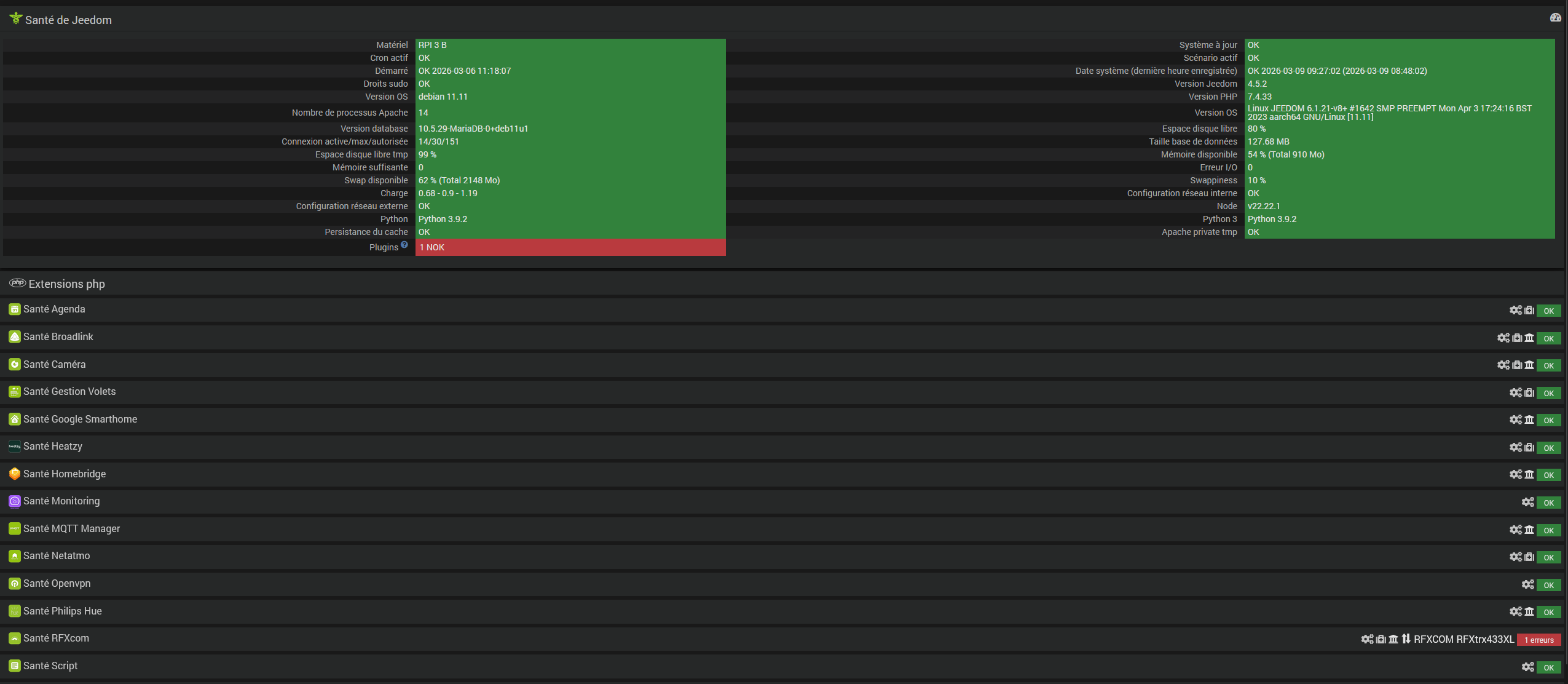
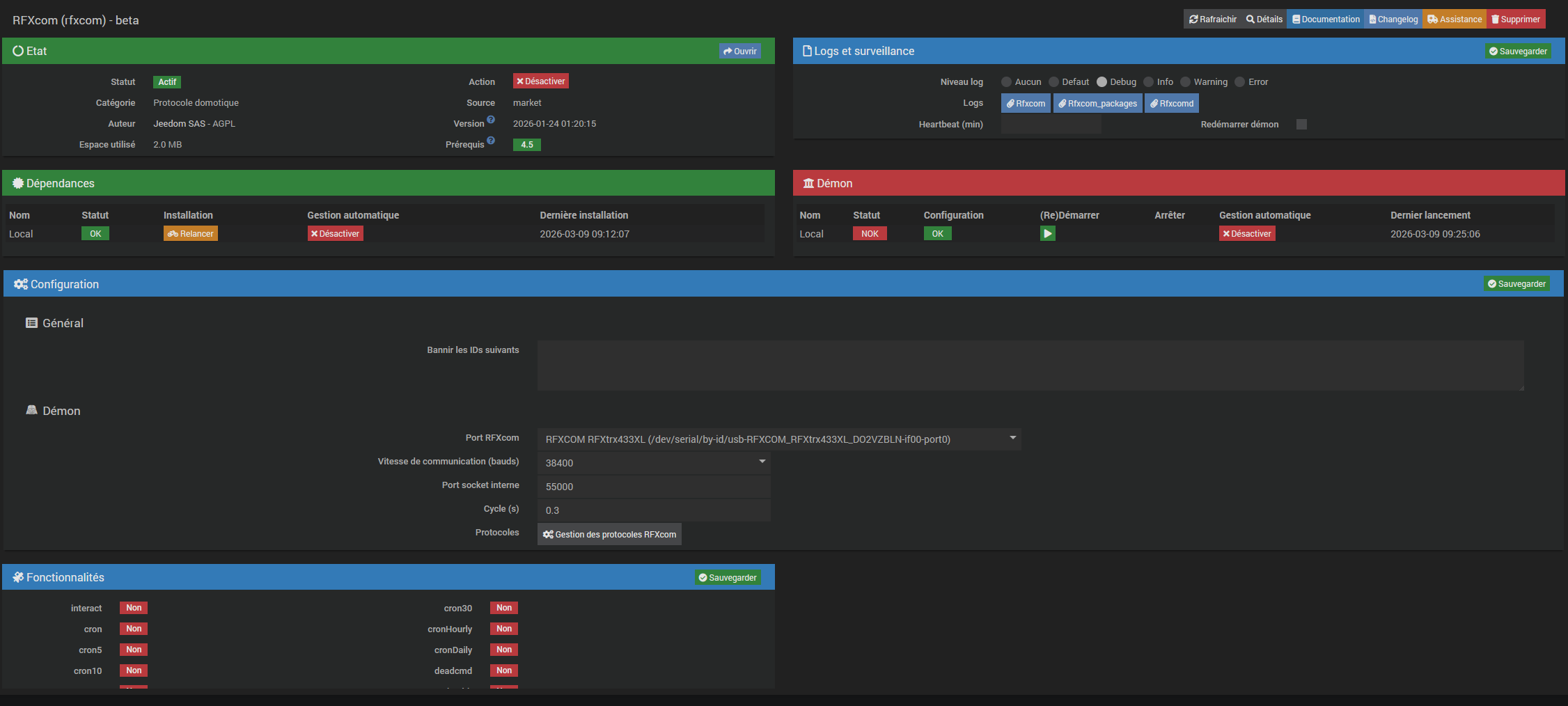
Voici les logs de l’installaiton des dépendances:
+ echo '*******************Begin of package installation******************'
*******************Begin of package installation******************
+ touch /tmp/jeedom_install_in_progress_rfxcom
+ echo 1
+ echo 2
+ sudo chmod +x /var/www/html/core/class/../../plugins/rfxcom/resources/pre-install.sh
+ sudo /var/www/html/core/class/../../plugins/rfxcom/resources/pre-install.sh
Launch pre-install of rfxcom dependancy
WARNING: Skipping serial as it is not installed.
WARNING: Running pip as the 'root' user can result in broken permissions and conflicting behaviour with the system package manager, possibly rendering your system unusable. It is recommended to use a virtual environment instead: https://pip.pypa.io/warnings/venv. Use the --root-user-action option if you know what you are doing and want to suppress this warning.
WARNING: apt does not have a stable CLI interface. Use with caution in scripts.
Reading package lists...
Building dependency tree...
Reading state information...
Package 'python3-serial' is not installed, so not removed
0 upgraded, 0 newly installed, 0 to remove and 0 not upgraded.
+ echo 3
+ sudo killall apt apt-get unattended-upgr
apt: no process found
apt-get: no process found
unattended-upgr: no process found
+ sudo rm /var/lib/apt/lists/lock
+ sudo rm /var/cache/apt/archives/lock
+ sudo rm /var/lib/dpkg/lock /var/lib/dpkg/lock-frontend
+ sudo sudo dpkg --configure -a --force-confdef
+ sudo apt update
WARNING: apt does not have a stable CLI interface. Use with caution in scripts.
Hit:1 http://deb.debian.org/debian bullseye InRelease
Hit:2 http://deb.debian.org/debian bullseye-updates InRelease
Hit:3 http://security.debian.org/debian-security bullseye-security InRelease
Get:4 http://archive.raspberrypi.org/debian bullseye InRelease [39.0 kB]
Hit:5 https://deb.nodesource.com/node_22.x nodistro InRelease
Get:7 http://archive.raspberrypi.org/debian bullseye/main armhf Packages [330 kB]
Get:8 http://archive.raspberrypi.org/debian bullseye/main arm64 Packages [323 kB]
Hit:6 https://packagecloud.io/ookla/speedtest-cli/debian bullseye InRelease
Fetched 692 kB in 12s (56.2 kB/s)
Reading package lists...
Building dependency tree...
Reading state information...
All packages are up to date.
+ echo 4
+ sudo apt install -o Dpkg::Options::=--force-confdef -y python3
WARNING: apt does not have a stable CLI interface. Use with caution in scripts.
Reading package lists...
Building dependency tree...
Reading state information...
python3 is already the newest version (3.9.2-3).
0 upgraded, 0 newly installed, 0 to remove and 0 not upgraded.
+ echo 5
+ sudo apt install -o Dpkg::Options::=--force-confdef -y python3-pip
WARNING: apt does not have a stable CLI interface. Use with caution in scripts.
Reading package lists...
Building dependency tree...
Reading state information...
python3-pip is already the newest version (20.3.4-4+rpt1+deb11u1).
0 upgraded, 0 newly installed, 0 to remove and 0 not upgraded.
+ echo 6
+ sudo apt install -o Dpkg::Options::=--force-confdef -y build-essential
WARNING: apt does not have a stable CLI interface. Use with caution in scripts.
Reading package lists...
Building dependency tree...
Reading state information...
build-essential is already the newest version (12.9).
0 upgraded, 0 newly installed, 0 to remove and 0 not upgraded.
+ echo 7
+ sudo apt install -o Dpkg::Options::=--force-confdef -y python3-pyudev
WARNING: apt does not have a stable CLI interface. Use with caution in scripts.
Reading package lists...
Building dependency tree...
Reading state information...
python3-pyudev is already the newest version (0.22.0-2).
0 upgraded, 0 newly installed, 0 to remove and 0 not upgraded.
+ echo 8
+ sudo apt install -o Dpkg::Options::=--force-confdef -y python3-dev
WARNING: apt does not have a stable CLI interface. Use with caution in scripts.
Reading package lists...
Building dependency tree...
Reading state information...
python3-dev is already the newest version (3.9.2-3).
0 upgraded, 0 newly installed, 0 to remove and 0 not upgraded.
+ echo 9
+ sudo apt install -o Dpkg::Options::=--force-confdef -y python3-requests
WARNING: apt does not have a stable CLI interface. Use with caution in scripts.
Reading package lists...
Building dependency tree...
Reading state information...
python3-requests is already the newest version (2.25.1+dfsg-2).
0 upgraded, 0 newly installed, 0 to remove and 0 not upgraded.
+ echo 10
+ sudo apt install -o Dpkg::Options::=--force-confdef -y python3-setuptools
WARNING: apt does not have a stable CLI interface. Use with caution in scripts.
Reading package lists...
Building dependency tree...
Reading state information...
python3-setuptools is already the newest version (52.0.0-4+deb11u2).
0 upgraded, 0 newly installed, 0 to remove and 0 not upgraded.
+ echo 11
++ awk '$1 <= 4'
++ find /usr/local/lib/python3.9/dist-packages/ -mindepth 1 -maxdepth 1 -type d -exec du -ks '{}' +
++ cut -f 2-
+ RESULTTODELETE=
++ echo ''
++ sed 's, ,\ ,g'
+ RESULTTODELETE2=
+ echo ''
+ xargs rm -rf
+ echo 12
+ sudo pip3 cache purge
Files removed: 136 (7.9 MB)
Directories removed: 0
+ echo 13
+ sudo pip3 install --upgrade pip
Looking in indexes: https://pypi.org/simple, https://www.piwheels.org/simple
Requirement already satisfied: pip in /usr/local/lib/python3.9/dist-packages (26.0.1)
WARNING: Error parsing dependencies of gpg: Invalid version: '1.14.0-unknown'
WARNING: Running pip as the 'root' user can result in broken permissions and conflicting behaviour with the system package manager, possibly rendering your system unusable. It is recommended to use a virtual environment instead: https://pip.pypa.io/warnings/venv. Use the --root-user-action option if you know what you are doing and want to suppress this warning.
+ echo 14
+ sudo python3 -m pip install --force-reinstall --upgrade six
Looking in indexes: https://pypi.org/simple, https://www.piwheels.org/simple
Collecting six
Downloading https://www.piwheels.org/simple/six/six-1.17.0-py2.py3-none-any.whl (11 kB)
WARNING: Error parsing dependencies of gpg: Invalid version: '1.14.0-unknown'
Installing collected packages: six
Attempting uninstall: six
Found existing installation: six 1.17.0
Uninstalling six-1.17.0:
Successfully uninstalled six-1.17.0
Successfully installed six-1.17.0
WARNING: Running pip as the 'root' user can result in broken permissions and conflicting behaviour with the system package manager, possibly rendering your system unusable. It is recommended to use a virtual environment instead: https://pip.pypa.io/warnings/venv. Use the --root-user-action option if you know what you are doing and want to suppress this warning.
+ echo 15
+ sudo python3 -m pip install --force-reinstall --upgrade requests
Looking in indexes: https://pypi.org/simple, https://www.piwheels.org/simple
Collecting requests
Downloading https://www.piwheels.org/simple/requests/requests-2.32.5-py3-none-any.whl (64 kB)
Collecting charset_normalizer<4,>=2 (from requests)
Downloading charset_normalizer-3.4.5-cp39-cp39-manylinux2014_aarch64.manylinux_2_17_aarch64.manylinux_2_28_aarch64.whl.metadata (39 kB)
Collecting idna<4,>=2.5 (from requests)
Downloading https://www.piwheels.org/simple/idna/idna-3.11-py3-none-any.whl (71 kB)
Collecting urllib3<3,>=1.21.1 (from requests)
Downloading https://www.piwheels.org/simple/urllib3/urllib3-2.6.3-py3-none-any.whl (131 kB)
Collecting certifi>=2017.4.17 (from requests)
Downloading https://www.piwheels.org/simple/certifi/certifi-2026.2.25-py3-none-any.whl (153 kB)
Downloading charset_normalizer-3.4.5-cp39-cp39-manylinux2014_aarch64.manylinux_2_17_aarch64.manylinux_2_28_aarch64.whl (189 kB)
WARNING: Error parsing dependencies of gpg: Invalid version: '1.14.0-unknown'
Installing collected packages: urllib3, idna, charset_normalizer, certifi, requests
Attempting uninstall: urllib3
Found existing installation: urllib3 2.6.3
Uninstalling urllib3-2.6.3:
Successfully uninstalled urllib3-2.6.3
Attempting uninstall: idna
Found existing installation: idna 3.11
Uninstalling idna-3.11:
Successfully uninstalled idna-3.11
Attempting uninstall: charset_normalizer
Found existing installation: charset-normalizer 3.4.5
Uninstalling charset-normalizer-3.4.5:
Successfully uninstalled charset-normalizer-3.4.5
Attempting uninstall: certifi
Found existing installation: certifi 2026.2.25
Uninstalling certifi-2026.2.25:
Successfully uninstalled certifi-2026.2.25
Attempting uninstall: requests
Found existing installation: requests 2.32.5
Uninstalling requests-2.32.5:
Successfully uninstalled requests-2.32.5
Successfully installed certifi-2026.2.25 charset_normalizer-3.4.5 idna-3.11 requests-2.32.5 urllib3-2.6.3
WARNING: Running pip as the 'root' user can result in broken permissions and conflicting behaviour with the system package manager, possibly rendering your system unusable. It is recommended to use a virtual environment instead: https://pip.pypa.io/warnings/venv. Use the --root-user-action option if you know what you are doing and want to suppress this warning.
+ echo 16
+ sudo python3 -m pip install --force-reinstall --upgrade setuptools
Looking in indexes: https://pypi.org/simple, https://www.piwheels.org/simple
Collecting setuptools
Downloading https://www.piwheels.org/simple/setuptools/setuptools-82.0.0-py3-none-any.whl (1.0 MB)
━━━━━━━━━━━━━━━━━━━━━━━━━━━━━━━━━━━━━━━━ 1.0/1.0 MB 843.1 kB/s  0:00:00
WARNING: Error parsing dependencies of gpg: Invalid version: '1.14.0-unknown'
Installing collected packages: setuptools
Attempting uninstall: setuptools
Found existing installation: setuptools 82.0.0
Uninstalling setuptools-82.0.0:
Successfully uninstalled setuptools-82.0.0
ERROR: pip's dependency resolver does not currently take into account all the packages that are installed. This behaviour is the source of the following dependency conflicts.
gpiozero 2.0.1 requires importlib-metadata~=4.6; python_version < "3.10", but you have importlib-metadata 8.7.1 which is incompatible.
gpiozero 2.0.1 requires importlib-resources~=5.0; python_version < "3.10", but you have importlib-resources 6.5.2 which is incompatible.
Successfully installed setuptools-82.0.0
WARNING: Running pip as the 'root' user can result in broken permissions and conflicting behaviour with the system package manager, possibly rendering your system unusable. It is recommended to use a virtual environment instead: https://pip.pypa.io/warnings/venv. Use the --root-user-action option if you know what you are doing and want to suppress this warning.
+ echo 17
+ sudo python3 -m pip install --force-reinstall --upgrade pyudev
Looking in indexes: https://pypi.org/simple, https://www.piwheels.org/simple
Collecting pyudev
Downloading https://www.piwheels.org/simple/pyudev/pyudev-0.24.4-py3-none-any.whl (62 kB)
WARNING: Error parsing dependencies of gpg: Invalid version: '1.14.0-unknown'
Installing collected packages: pyudev
Attempting uninstall: pyudev
Found existing installation: pyudev 0.24.4
Uninstalling pyudev-0.24.4:
Successfully uninstalled pyudev-0.24.4
Successfully installed pyudev-0.24.4
WARNING: Running pip as the 'root' user can result in broken permissions and conflicting behaviour with the system package manager, possibly rendering your system unusable. It is recommended to use a virtual environment instead: https://pip.pypa.io/warnings/venv. Use the --root-user-action option if you know what you are doing and want to suppress this warning.
+ echo 18
+ sudo python3 -m pip install --force-reinstall --upgrade pyserial
Looking in indexes: https://pypi.org/simple, https://www.piwheels.org/simple
Collecting pyserial
Downloading https://www.piwheels.org/simple/pyserial/pyserial-3.5-py2.py3-none-any.whl (90 kB)
WARNING: Error parsing dependencies of gpg: Invalid version: '1.14.0-unknown'
Installing collected packages: pyserial
Attempting uninstall: pyserial
Found existing installation: pyserial 3.5
Uninstalling pyserial-3.5:
Successfully uninstalled pyserial-3.5
Successfully installed pyserial-3.5
WARNING: Running pip as the 'root' user can result in broken permissions and conflicting behaviour with the system package manager, possibly rendering your system unusable. It is recommended to use a virtual environment instead: https://pip.pypa.io/warnings/venv. Use the --root-user-action option if you know what you are doing and want to suppress this warning.
+ echo 19
+ sudo python3 -m pip install --force-reinstall --upgrade jeedomdaemon
Looking in indexes: https://pypi.org/simple, https://www.piwheels.org/simple
Collecting jeedomdaemon
Downloading https://www.piwheels.org/simple/jeedomdaemon/jeedomdaemon-1.2.9-py3-none-any.whl (10 kB)
Collecting aiohttp (from jeedomdaemon)
Downloading aiohttp-3.13.3-cp39-cp39-manylinux2014_aarch64.manylinux_2_17_aarch64.manylinux_2_28_aarch64.whl.metadata (8.1 kB)
Collecting aiohappyeyeballs>=2.5.0 (from aiohttp->jeedomdaemon)
Downloading https://www.piwheels.org/simple/aiohappyeyeballs/aiohappyeyeballs-2.6.1-py3-none-any.whl (15 kB)
Collecting aiosignal>=1.4.0 (from aiohttp->jeedomdaemon)
Downloading https://www.piwheels.org/simple/aiosignal/aiosignal-1.4.0-py3-none-any.whl (7.5 kB)
Collecting async-timeout<6.0,>=4.0 (from aiohttp->jeedomdaemon)
Downloading https://www.piwheels.org/simple/async-timeout/async_timeout-5.0.1-py3-none-any.whl (6.2 kB)
Collecting attrs>=17.3.0 (from aiohttp->jeedomdaemon)
Downloading https://www.piwheels.org/simple/attrs/attrs-25.4.0-py3-none-any.whl (67 kB)
Collecting frozenlist>=1.1.1 (from aiohttp->jeedomdaemon)
Downloading frozenlist-1.8.0-cp39-cp39-manylinux2014_aarch64.manylinux_2_17_aarch64.manylinux_2_28_aarch64.whl.metadata (20 kB)
Collecting multidict<7.0,>=4.5 (from aiohttp->jeedomdaemon)
Downloading multidict-6.7.1-cp39-cp39-manylinux2014_aarch64.manylinux_2_17_aarch64.manylinux_2_28_aarch64.whl.metadata (5.3 kB)
Collecting propcache>=0.2.0 (from aiohttp->jeedomdaemon)
Downloading propcache-0.4.1-cp39-cp39-manylinux2014_aarch64.manylinux_2_17_aarch64.manylinux_2_28_aarch64.whl.metadata (13 kB)
Collecting yarl<2.0,>=1.17.0 (from aiohttp->jeedomdaemon)
Downloading yarl-1.22.0-cp39-cp39-manylinux2014_aarch64.manylinux_2_17_aarch64.manylinux_2_28_aarch64.whl.metadata (75 kB)
Collecting typing-extensions>=4.1.0 (from multidict<7.0,>=4.5->aiohttp->jeedomdaemon)
Downloading https://www.piwheels.org/simple/typing-extensions/typing_extensions-4.15.0-py3-none-any.whl (44 kB)
Collecting idna>=2.0 (from yarl<2.0,>=1.17.0->aiohttp->jeedomdaemon)
Using cached https://www.piwheels.org/simple/idna/idna-3.11-py3-none-any.whl (71 kB)
Downloading aiohttp-3.13.3-cp39-cp39-manylinux2014_aarch64.manylinux_2_17_aarch64.manylinux_2_28_aarch64.whl (1.7 MB)
━━━━━━━━━━━━━━━━━━━━━━━━━━━━━━━━━━━━━━━━ 1.7/1.7 MB 3.0 MB/s  0:00:00
Downloading multidict-6.7.1-cp39-cp39-manylinux2014_aarch64.manylinux_2_17_aarch64.manylinux_2_28_aarch64.whl (240 kB)
Downloading yarl-1.22.0-cp39-cp39-manylinux2014_aarch64.manylinux_2_17_aarch64.manylinux_2_28_aarch64.whl (347 kB)
Downloading frozenlist-1.8.0-cp39-cp39-manylinux2014_aarch64.manylinux_2_17_aarch64.manylinux_2_28_aarch64.whl (221 kB)
Downloading propcache-0.4.1-cp39-cp39-manylinux2014_aarch64.manylinux_2_17_aarch64.manylinux_2_28_aarch64.whl (201 kB)
WARNING: Error parsing dependencies of gpg: Invalid version: '1.14.0-unknown'
Installing collected packages: typing-extensions, propcache, idna, frozenlist, attrs, async-timeout, aiohappyeyeballs, multidict, aiosignal, yarl, aiohttp, jeedomdaemon
Attempting uninstall: typing-extensions
Found existing installation: typing_extensions 4.15.0
Uninstalling typing_extensions-4.15.0:
Successfully uninstalled typing_extensions-4.15.0
Attempting uninstall: propcache
Found existing installation: propcache 0.4.1
Uninstalling propcache-0.4.1:
Successfully uninstalled propcache-0.4.1
Attempting uninstall: idna
Found existing installation: idna 3.11
Uninstalling idna-3.11:
Successfully uninstalled idna-3.11
Attempting uninstall: frozenlist
Found existing installation: frozenlist 1.8.0
Uninstalling frozenlist-1.8.0:
Successfully uninstalled frozenlist-1.8.0
Attempting uninstall: attrs
Found existing installation: attrs 25.4.0
Uninstalling attrs-25.4.0:
Successfully uninstalled attrs-25.4.0
Attempting uninstall: async-timeout
Found existing installation: async-timeout 5.0.1
Uninstalling async-timeout-5.0.1:
Successfully uninstalled async-timeout-5.0.1
Attempting uninstall: aiohappyeyeballs
Found existing installation: aiohappyeyeballs 2.6.1
Uninstalling aiohappyeyeballs-2.6.1:
Successfully uninstalled aiohappyeyeballs-2.6.1
Attempting uninstall: multidict
Found existing installation: multidict 6.7.1
Uninstalling multidict-6.7.1:
Successfully uninstalled multidict-6.7.1
Attempting uninstall: aiosignal
Found existing installation: aiosignal 1.4.0
Uninstalling aiosignal-1.4.0:
Successfully uninstalled aiosignal-1.4.0
Attempting uninstall: yarl
Found existing installation: yarl 1.22.0
Uninstalling yarl-1.22.0:
Successfully uninstalled yarl-1.22.0
Attempting uninstall: aiohttp
Found existing installation: aiohttp 3.13.3
Uninstalling aiohttp-3.13.3:
Successfully uninstalled aiohttp-3.13.3
Attempting uninstall: jeedomdaemon
Found existing installation: jeedomdaemon 1.2.9
Uninstalling jeedomdaemon-1.2.9:
Successfully uninstalled jeedomdaemon-1.2.9
Successfully installed aiohappyeyeballs-2.6.1 aiohttp-3.13.3 aiosignal-1.4.0 async-timeout-5.0.1 attrs-25.4.0 frozenlist-1.8.0 idna-3.11 jeedomdaemon-1.2.9 multidict-6.7.1 propcache-0.4.1 typing-extensions-4.15.0 yarl-1.22.0
WARNING: Running pip as the 'root' user can result in broken permissions and conflicting behaviour with the system package manager, possibly rendering your system unusable. It is recommended to use a virtual environment instead: https://pip.pypa.io/warnings/venv. Use the --root-user-action option if you know what you are doing and want to suppress this warning.
+ echo 20
+ php /var/www/html/core/class/../php/jeecli.php plugin dependancy_end rfxcom
+ echo 21
+ rm /tmp/jeedom_install_in_progress_rfxcom
+ echo '*******************End of package installation******************'
*******************End of package installation******************
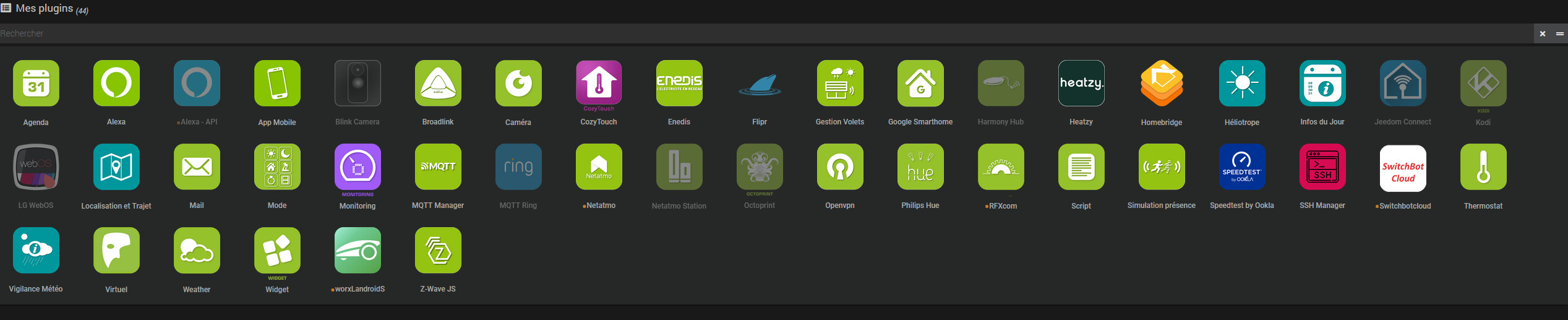
Et les plugins installés: