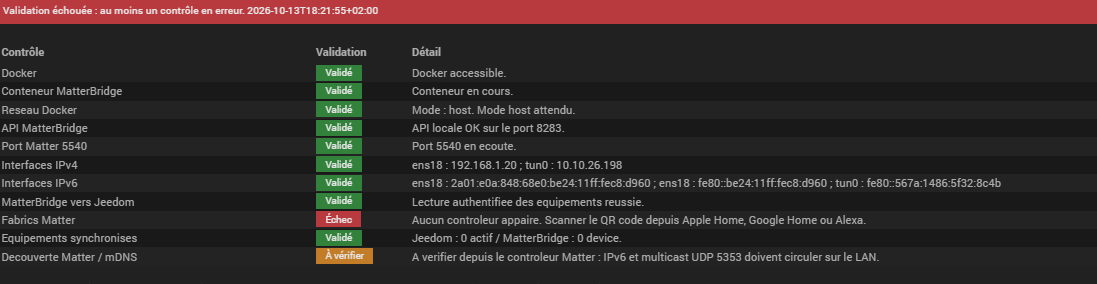
J’ai installé le plugin Jeebridge. Puis le plugin Docker Management en bêta (sinon dépendances NOK).
Mais je n’arrive pas à démarrer docker :
[2026-10-13 17:08:39] ERROR  docker compose up (rc=127): sh: 1: docker: not found
[2026-10-13 17:11:59] ERROR  docker compose up (rc=1): permission denied while trying to connect to the docker API at unix:///var/run/docker.sock
[2026-10-13 17:12:11] ERROR  docker compose stop (rc=1): permission denied while trying to connect to the docker API at unix:///var/run/docker.sock
[2026-10-13 17:13:47] ERROR  docker compose up (rc=1): permission denied while trying to connect to the docker API at unix:///var/run/docker.sock
[2026-10-13 17:15:31] ERROR  docker compose up (rc=1): permission denied while trying to connect to the docker API at unix:///var/run/docker.sock
[2026-10-13 17:15:36] ERROR  docker compose stop (rc=1): permission denied while trying to connect to the docker API at unix:///var/run/docker.sock
Log des dépendances (au 2ème lancement des dépendances) :
[2026-10-13 17:12:35][jeebridge] Vérification de Docker...
[2026-10-13 17:12:35][jeebridge] Docker OK
[2026-10-13 17:12:35][jeebridge] Téléchargement de l'image luligu/matterbridge:latest ...
[2026-10-13 17:12:36][jeebridge] latest: Pulling from luligu/matterbridge
[2026-10-13 17:12:36][jeebridge] Digest: sha256:56bf894ad9f80cd660bc55b79efe52eaaa8fc93d1cff28b6db9e26ce21671699
[2026-10-13 17:12:36][jeebridge] Status: Image is up to date for luligu/matterbridge:latest
[2026-10-13 17:12:36][jeebridge] docker.io/luligu/matterbridge:latest
[2026-10-13 17:12:36][jeebridge] Image luligu/matterbridge:latest téléchargée
[2026-10-13 17:12:37][jeebridge] Installation terminée (image ID: 56bf894ad9f8)
Ce n’est pas ce plugin Docker qu’il fallait installer ?
Informations Jeedom
Core : 4.6.1 (master)
DNS Jeedom : oui

Sur VM Proxmox

Plugin : JeeBridge
Version : 2026-10-12 22:01:14 (beta)
Statut Démon : Stoppé - (Inconnue)
Santé
🟢 Matériel : diy
🔴 Système à jour : 1
🟢 Cron actif : OK
🟢 Scénario actif : OK
🟢 Démarré : OK 2026-10-11 20:15:20
🟢 Date système (dernière heure enregistrée) : OK 2026-10-13 17:18:14 (2026-10-13 17:00:04)
🟢 Droits sudo : OK
🟢 Version Jeedom : 4.6.1
🟢 Version OS : debian 12.15
🟢 Version PHP : 8.2.34
🟢 Nombre de processus Apache : 13
🟢 Version OS : Linux Jeedom 6.1.0-53-amd64 #1 SMP PREEMPT_DYNAMIC Debian 6.1.187-1 (2026-09-07) x86_64 GNU/Linux  [12.15]
🟢 Version database : 10.11.18-MariaDB-0+deb12u1
🟢 Espace disque libre : 80 %
🟢 Connexion active/max/autorisée : 14/49/151
🟢 Taille base de données : 137.67 MB
🟢 Espace disque libre tmp : 95 %
🟢 Mémoire disponible : 60 % (Total 3915 Mo)
🟢 Mémoire suffisante : 0
🟢 Erreur I/O : 0
🟢 Swap disponible : 100 % (Total 975 Mo)
🟢 Swappiness : 10 %
🟢 Charge : 1.26 - 1.81 - 1.64
🟢 Configuration réseau interne : OK
🟢 Configuration réseau externe : OK
🟢 Node : v22.23.2
🟢 Python 3 : Python 3.11.2
🟢 Persistance du cache : OK
🟢 Apache private tmp : OK
Informations complémentaires
Informations JeeBridge
Docker installé : Non
État conteneur : error
Image : luligu/matterbridge:latest
Port frontend : 8283
MatterBridge : non joignable
Niveau de log : défaut
[2026-10-13 18:03:38] ERROR  docker compose stop (rc=1): permission denied while trying to connect to the docker API at unix:///var/run/docker.sock
[2026-10-13 18:04:46] ERROR  docker compose up (rc=1): permission denied while trying to connect to the docker API at unix:///var/run/docker.sock
De toute façon j’ai maintenant les dépendances NOK quand je relance avec le log que j’ai mis en copie dans mon 1er message.
Au cas où le log des dépendances de Docker Management :
+ echo '*******************Begin of package installation******************'
*******************Begin of package installation******************
+ touch /tmp/jeedom_install_in_progress_docker2
+ echo 1
+ echo 2
+ sudo chmod +x /var/www/html/core/class/../../plugins/docker2/resources/pre-install.sh
+ sudo /var/www/html/core/class/../../plugins/docker2/resources/pre-install.sh
Docker arch found : amd64
Hit:1 http://deb.debian.org/debian bookworm InRelease
Get:2 http://deb.debian.org/debian bookworm-updates InRelease [55.4 kB]
Get:3 http://security.debian.org/debian-security bookworm-security InRelease [34.8 kB]
Hit:4 https://deb.nodesource.com/node_22.x nodistro InRelease
Get:5 https://download.docker.com/linux/debian bookworm InRelease [46.6 kB]
Get:6 http://security.debian.org/debian-security bookworm-security/main Sources [271 kB]
Get:7 http://security.debian.org/debian-security bookworm-security/main amd64 Packages [349 kB]
Get:8 https://download.docker.com/linux/debian bookworm/stable amd64 Packages [83.7 kB]
Fetched 841 kB in 6s (134 kB/s)
Reading package lists...
+ echo 3
+ sudo killall apt apt-get unattended-upgr
apt: no process found
apt-get: no process found
unattended-upgr: no process found
+ sudo rm /var/lib/apt/lists/lock
+ sudo rm /var/cache/apt/archives/lock
+ sudo rm /var/lib/dpkg/lock /var/lib/dpkg/lock-frontend
+ sudo sudo dpkg --configure -a --force-confdef
+ sudo apt update
WARNING: apt does not have a stable CLI interface. Use with caution in scripts.
Hit:1 http://security.debian.org/debian-security bookworm-security InRelease
Hit:2 http://deb.debian.org/debian bookworm InRelease
Hit:3 http://deb.debian.org/debian bookworm-updates InRelease
Hit:4 https://download.docker.com/linux/debian bookworm InRelease
Hit:5 https://deb.nodesource.com/node_22.x nodistro InRelease
Reading package lists...
Building dependency tree...
Reading state information...
1 package can be upgraded. Run 'apt list --upgradable' to see it.
+ echo 4
+ sudo apt install -o Dpkg::Options::=--force-confdef -y docker-ce
WARNING: apt does not have a stable CLI interface. Use with caution in scripts.
Reading package lists...
Building dependency tree...
Reading state information...
The following additional packages will be installed:
containerd.io docker-buildx-plugin docker-ce-cli docker-ce-rootless-extras
docker-compose-plugin iptables libip6tc2 libnetfilter-conntrack3
libnfnetlink0 pigz
Suggested packages:
cgroupfs-mount | cgroup-lite docker-model-plugin firewalld
The following NEW packages will be installed:
containerd.io docker-buildx-plugin docker-ce docker-ce-cli
docker-ce-rootless-extras docker-compose-plugin iptables libip6tc2
libnetfilter-conntrack3 libnfnetlink0 pigz
0 upgraded, 11 newly installed, 0 to remove and 1 not upgraded.
Need to get 102 MB of archives.
After this operation, 391 MB of additional disk space will be used.
Get:1 http://deb.debian.org/debian bookworm/main amd64 libip6tc2 amd64 1.8.9-2 [19.4 kB]
Get:2 http://deb.debian.org/debian bookworm/main amd64 libnfnetlink0 amd64 1.0.2-2 [15.1 kB]
Get:3 http://deb.debian.org/debian bookworm/main amd64 libnetfilter-conntrack3 amd64 1.0.9-3 [40.7 kB]
Get:4 http://deb.debian.org/debian bookworm/main amd64 iptables amd64 1.8.9-2 [360 kB]
Get:5 http://deb.debian.org/debian bookworm/main amd64 pigz amd64 2.6-1 [64.0 kB]
Get:6 https://download.docker.com/linux/debian bookworm/stable amd64 containerd.io amd64 2.4.1-2~debian.12~bookworm [23.3 MB]
Get:7 https://download.docker.com/linux/debian bookworm/stable amd64 docker-ce-cli amd64 5:29.9.0-1~debian.12~bookworm [17.6 MB]
Get:8 https://download.docker.com/linux/debian bookworm/stable amd64 docker-ce amd64 5:29.9.0-1~debian.12~bookworm [24.5 MB]
Get:9 https://download.docker.com/linux/debian bookworm/stable amd64 docker-buildx-plugin amd64 0.38.0-1~debian.12~bookworm [17.8 MB]
Get:10 https://download.docker.com/linux/debian bookworm/stable amd64 docker-ce-rootless-extras amd64 5:29.9.0-1~debian.12~bookworm [10.2 MB]
Get:11 https://download.docker.com/linux/debian bookworm/stable amd64 docker-compose-plugin amd64 5.6.0-1~debian.12~bookworm [8081 kB]
Fetched 102 MB in 3s (37.9 MB/s)
Selecting previously unselected package containerd.io.
(Reading database ...
(Reading database ... 5%
(Reading database ... 10%
(Reading database ... 15%
(Reading database ... 20%
(Reading database ... 25%
(Reading database ... 30%
(Reading database ... 35%
(Reading database ... 40%
(Reading database ... 45%
(Reading database ... 50%
(Reading database ... 55%
(Reading database ... 60%
(Reading database ... 65%
(Reading database ... 70%
(Reading database ... 75%
(Reading database ... 80%
(Reading database ... 85%
(Reading database ... 90%
(Reading database ... 95%
(Reading database ... 100%
(Reading database ... 74497 files and directories currently installed.)
Preparing to unpack .../00-containerd.io_2.4.1-2~debian.12~bookworm_amd64.deb ...
Unpacking containerd.io (2.4.1-2~debian.12~bookworm) ...
Selecting previously unselected package docker-ce-cli.
Preparing to unpack .../01-docker-ce-cli_5%3a29.9.0-1~debian.12~bookworm_amd64.deb ...
Unpacking docker-ce-cli (5:29.9.0-1~debian.12~bookworm) ...
Selecting previously unselected package libip6tc2:amd64.
Preparing to unpack .../02-libip6tc2_1.8.9-2_amd64.deb ...
Unpacking libip6tc2:amd64 (1.8.9-2) ...
Selecting previously unselected package libnfnetlink0:amd64.
Preparing to unpack .../03-libnfnetlink0_1.0.2-2_amd64.deb ...
Unpacking libnfnetlink0:amd64 (1.0.2-2) ...
Selecting previously unselected package libnetfilter-conntrack3:amd64.
Preparing to unpack .../04-libnetfilter-conntrack3_1.0.9-3_amd64.deb ...
Unpacking libnetfilter-conntrack3:amd64 (1.0.9-3) ...
Selecting previously unselected package iptables.
Preparing to unpack .../05-iptables_1.8.9-2_amd64.deb ...
Unpacking iptables (1.8.9-2) ...
Selecting previously unselected package docker-ce.
Preparing to unpack .../06-docker-ce_5%3a29.9.0-1~debian.12~bookworm_amd64.deb ...
Unpacking docker-ce (5:29.9.0-1~debian.12~bookworm) ...
Selecting previously unselected package pigz.
Preparing to unpack .../07-pigz_2.6-1_amd64.deb ...
Unpacking pigz (2.6-1) ...
Selecting previously unselected package docker-buildx-plugin.
Preparing to unpack .../08-docker-buildx-plugin_0.38.0-1~debian.12~bookworm_amd64.deb ...
Unpacking docker-buildx-plugin (0.38.0-1~debian.12~bookworm) ...
Selecting previously unselected package docker-ce-rootless-extras.
Preparing to unpack .../09-docker-ce-rootless-extras_5%3a29.9.0-1~debian.12~bookworm_amd64.deb ...
Unpacking docker-ce-rootless-extras (5:29.9.0-1~debian.12~bookworm) ...
Selecting previously unselected package docker-compose-plugin.
Preparing to unpack .../10-docker-compose-plugin_5.6.0-1~debian.12~bookworm_amd64.deb ...
Unpacking docker-compose-plugin (5.6.0-1~debian.12~bookworm) ...
Setting up libip6tc2:amd64 (1.8.9-2) ...
Setting up docker-buildx-plugin (0.38.0-1~debian.12~bookworm) ...
Setting up containerd.io (2.4.1-2~debian.12~bookworm) ...
Created symlink /etc/systemd/system/multi-user.target.wants/containerd.service -> /lib/systemd/system/containerd.service.
Setting up docker-compose-plugin (5.6.0-1~debian.12~bookworm) ...
Setting up docker-ce-cli (5:29.9.0-1~debian.12~bookworm) ...
Setting up pigz (2.6-1) ...
Setting up libnfnetlink0:amd64 (1.0.2-2) ...
Setting up docker-ce-rootless-extras (5:29.9.0-1~debian.12~bookworm) ...
Setting up libnetfilter-conntrack3:amd64 (1.0.9-3) ...
Setting up iptables (1.8.9-2) ...
update-alternatives: using /usr/sbin/iptables-legacy to provide /usr/sbin/iptables (iptables) in auto mode
update-alternatives: using /usr/sbin/ip6tables-legacy to provide /usr/sbin/ip6tables (ip6tables) in auto mode
update-alternatives: using /usr/sbin/iptables-nft to provide /usr/sbin/iptables (iptables) in auto mode
update-alternatives: using /usr/sbin/ip6tables-nft to provide /usr/sbin/ip6tables (ip6tables) in auto mode
update-alternatives: using /usr/sbin/arptables-nft to provide /usr/sbin/arptables (arptables) in auto mode
update-alternatives: using /usr/sbin/ebtables-nft to provide /usr/sbin/ebtables (ebtables) in auto mode
Setting up docker-ce (5:29.9.0-1~debian.12~bookworm) ...
Created symlink /etc/systemd/system/multi-user.target.wants/docker.service -> /lib/systemd/system/docker.service.
Created symlink /etc/systemd/system/sockets.target.wants/docker.socket -> /lib/systemd/system/docker.socket.
Processing triggers for man-db (2.11.2-2) ...
Processing triggers for libc-bin (2.36-9+deb12u14) ...
+ echo 5
+ sudo apt install -o Dpkg::Options::=--force-confdef -y docker-ce-cli
WARNING: apt does not have a stable CLI interface. Use with caution in scripts.
Reading package lists...
Building dependency tree...
Reading state information...
docker-ce-cli is already the newest version (5:29.9.0-1~debian.12~bookworm).
docker-ce-cli set to manually installed.
0 upgraded, 0 newly installed, 0 to remove and 1 not upgraded.
+ echo 6
+ sudo apt install -o Dpkg::Options::=--force-confdef -y containerd.io
WARNING: apt does not have a stable CLI interface. Use with caution in scripts.
Reading package lists...
Building dependency tree...
Reading state information...
containerd.io is already the newest version (2.4.1-2~debian.12~bookworm).
containerd.io set to manually installed.
0 upgraded, 0 newly installed, 0 to remove and 1 not upgraded.
+ echo 7
+ sudo chmod +x /var/www/html/core/class/../../plugins/docker2/resources/post-install.sh
+ sudo /var/www/html/core/class/../../plugins/docker2/resources/post-install.sh
rm: cannot remove '/usr/local/bin/docker-compose': No such file or directory
rm: cannot remove '/usr/bin/docker-compose': No such file or directory
% Total    % Received % Xferd  Average Speed   Time    Time     Time  Current
Dload  Upload   Total   Spent    Left  Speed
0     0    0     0    0     0      0      0 --:--:-- --:--:-- --:--:--     0
  0     0    0     0    0     0      0      0 --:--:-- --:--:-- --:--:--     0
75 24.7M   75 18.7M    0     0  22.6M      0  0:00:01 --:--:--  0:00:01 22.6M
100 24.7M  100 24.7M    0     0  27.5M      0 --:--:-- --:--:-- --:--:-- 91.4M
+ echo 8
+ php /var/www/html/core/class/../php/jeecli.php plugin dependancy_end docker2
+ echo 9
+ rm /tmp/jeedom_install_in_progress_docker2
+ echo '*******************End of package installation******************'
*******************End of package installation******************
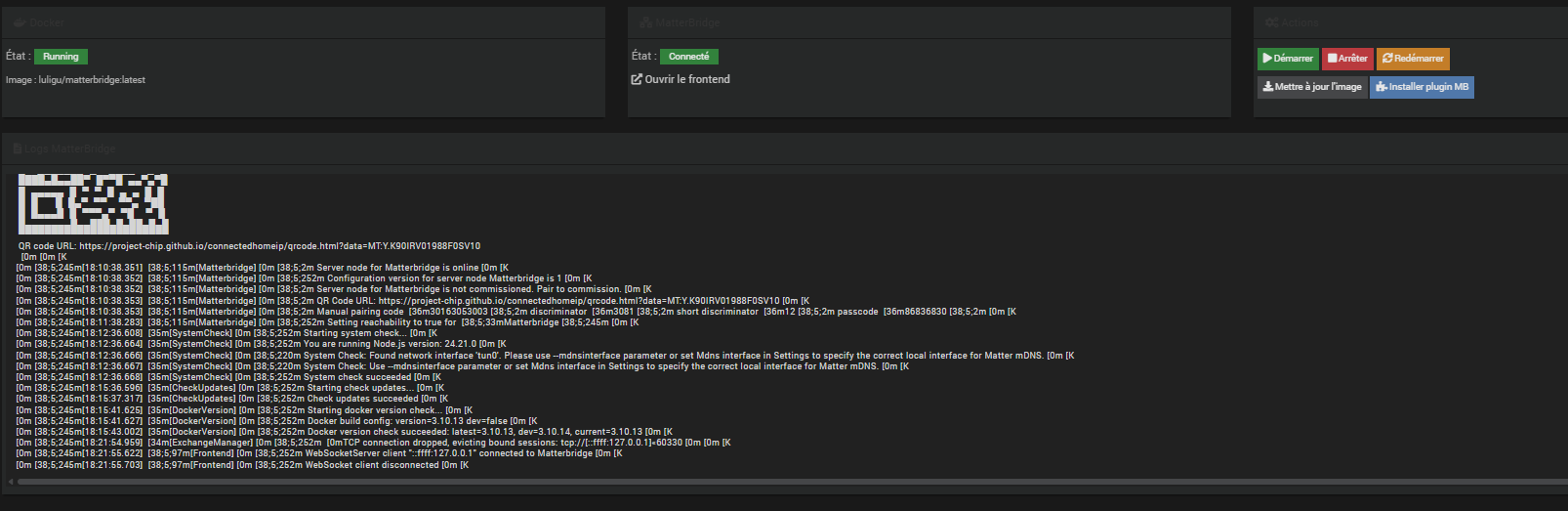
J’ai bien par contre dans docker management le container et il est démarré selon le log :
merci pour le retour j’ai ajouté dans le plugin la gestion de l’utilisateur et le redémarrage apache . je n’ai pas eu le soucis car c’est fait dans le plugin matter et mes 3 machines de test l’avait d’installé
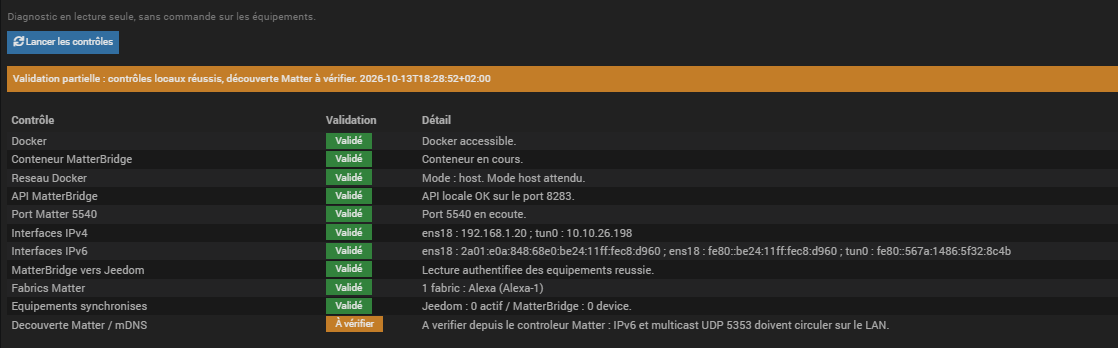
Je viens de tester mon mode télé et ça fonctionne parfaitement sur mon Alexa+. Il lance un scénario qui gère les différentes actions nécessaires.
Merci encore pour ce super plugin. De nouveau l’ergonomie est très bien
Je pense que pour le reste de mes commandes je vais rester sur le plugin ash. Du moins pour le moment