Salut à tous,
C’était long et un peu indigeste mais après pas mal de recherche voici pourquoi vos interrupteurs ts004f ne fonctionne pas correctement et surtout comment les faire fonctionner avec les 12 commandes possible.
Déjà ce qu’il faut savoir c’est que les ts004f peuvent devenir identique en tout point ou presque a des ts0044.
Ce qui diffère c’est que le ts004f a 2 modes : « Dimmer » et « Switch ». Par défaut c’est le mode « Dimmer ».
Pour changer de mode il vous faut rester appuyer sur les boutons 2 et 4 jusqu’à ce que le bouton 3 flash 1 fois.
Ce qui est con c’est que la manip pour changer de mode le ts004f en Switch doit ce faire après chaque inclusion étant donné que le bouton 3 d’association réinitialise l’interrupteur et remet donc celui dans son état par défaut « Dimmer ».
Donc Jeedom découvre systématiquement l’interrupteur quand il est en mode « Dimmer » et changer son mode après ne le fera pas découvrir les autres endpoints 2,3,4 donc seul le bouton 1 fonctionnera.
Le plugin Zigbee se base sur zhaquirk.
Il faut donc créer un custom Zhaquirks et le déposer la ou le plugin Zigbee vient chercher justement si il existe des custom class : html/plugins/zigbee/resources/zigbeed/quirks/ts004f.py .
Malheureusement le plugin jeedom est payant donc pas de git où faire une pull request…
Voici donc la démarche a suivre :
-
Supprimer vos interrupteurs.
-
Ajouter les fichiers ci-dessous.
-
Redémarrer le démon du plugin Jeedom pour prendre en compte le fichier du module.
-
Refaire une association en restant appuyé sur 3 pendant 10 secs.
-
Passer en mode « Switch » en restant appuyé sur 2 et 4 jusqu’à ce que le bouton 3 flash 1 fois.
Et voila enfin les 12 commandes dispos !
Chacun des boutons a un type d’appui : 0 = short 1 = double 2 = long
Je vous conseille d’utiliser le plugin Jexplorer de jeedom pour ceux qui n’ont pas d’accès SSH pour déposer les fichiers.
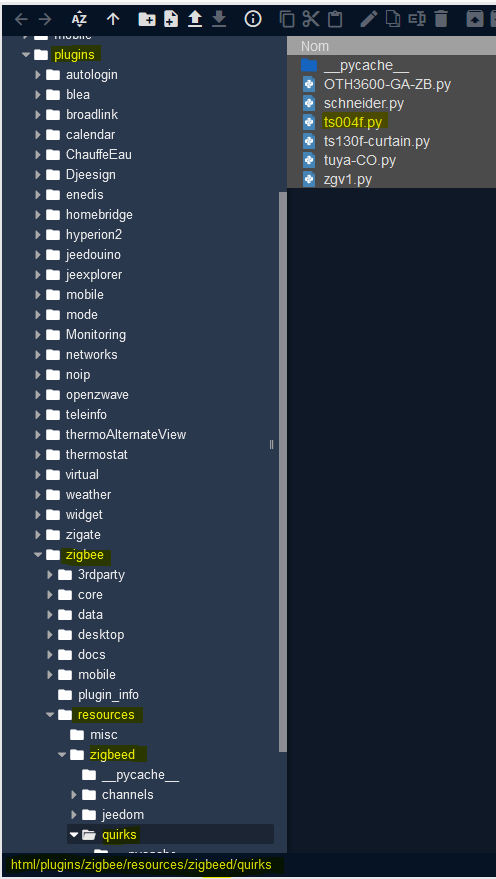
html/plugins/zigbee/resources/zigbeed/quirks/ts004f.py :
"""Tuya 4 Button Remote."""

from zigpy.profiles import zha
from zigpy.quirks import CustomDevice
from zigpy.zcl.clusters.general import (
    Basic,
    Groups,
    Identify,
    LevelControl,
    OnOff,
    Ota,
    PowerConfiguration,
    Scenes,
    Time,
)

from zigpy.zcl.clusters.lightlink import LightLink


from zhaquirks.const import (
    BUTTON_1,
    BUTTON_2,
    BUTTON_3,
    BUTTON_4,
    COMMAND,
    DEVICE_TYPE,
    DOUBLE_PRESS,
    ENDPOINT_ID,
    ENDPOINTS,
    INPUT_CLUSTERS,
    LONG_PRESS,
    MODEL,
    OUTPUT_CLUSTERS,
    PROFILE_ID,
    SHORT_PRESS,
)
from zhaquirks.tuya import TuyaSmartRemoteOnOffCluster


class Tuya4ButtonTriggers:
    """Tuya 4-button remote device triggers."""

    device_automation_triggers = {
        (SHORT_PRESS, BUTTON_1): {ENDPOINT_ID: 1, COMMAND: SHORT_PRESS},
        (LONG_PRESS, BUTTON_1): {ENDPOINT_ID: 1, COMMAND: LONG_PRESS},
        (DOUBLE_PRESS, BUTTON_1): {ENDPOINT_ID: 1, COMMAND: DOUBLE_PRESS},
        (SHORT_PRESS, BUTTON_2): {ENDPOINT_ID: 2, COMMAND: SHORT_PRESS},
        (LONG_PRESS, BUTTON_2): {ENDPOINT_ID: 2, COMMAND: LONG_PRESS},
        (DOUBLE_PRESS, BUTTON_2): {ENDPOINT_ID: 2, COMMAND: DOUBLE_PRESS},
        (SHORT_PRESS, BUTTON_3): {ENDPOINT_ID: 3, COMMAND: SHORT_PRESS},
        (LONG_PRESS, BUTTON_3): {ENDPOINT_ID: 3, COMMAND: LONG_PRESS},
        (DOUBLE_PRESS, BUTTON_3): {ENDPOINT_ID: 3, COMMAND: DOUBLE_PRESS},
        (SHORT_PRESS, BUTTON_4): {ENDPOINT_ID: 4, COMMAND: SHORT_PRESS},
        (LONG_PRESS, BUTTON_4): {ENDPOINT_ID: 4, COMMAND: LONG_PRESS},
        (DOUBLE_PRESS, BUTTON_4): {ENDPOINT_ID: 4, COMMAND: DOUBLE_PRESS},
    }


class ZemiSmartRemote0044f(CustomDevice, Tuya4ButtonTriggers):
    """Tuya 4-button remote device with time on in cluster."""

    signature = {
        # "node_descriptor": "NodeDescriptor(byte1=2, byte2=64, mac_capability_flags=128, manufacturer_code=4098, maximum_buffer_size=82, maximum_incoming_transfer_size=82, server_mask=11264, maximum_outgoing_transfer_size=82, descriptor_capability_field=0, *allocate_address=True, *complex_descriptor_available=False, *is_alternate_pan_coordinator=False, *is_coordinator=False, *is_end_device=True, *is_full_function_device=False, *is_mains_powered=False, *is_receiver_on_when_idle=False, *is_router=False, *is_security_capable=False, *is_valid=True, *logical_type=<LogicalType.EndDevice: 2>, *user_descriptor_available=False)",
        # SizePrefixedSimpleDescriptor(endpoint=1, profile=260, device_type=260, device_version=1, input_clusters=[0, 1, 3, 4, 6, 4096], output_clusters=[25, 10, 3, 4, 5, 6, 8, 4096])
        MODEL: "TS004F",
        ENDPOINTS: {
            1: {
                PROFILE_ID: zha.PROFILE_ID,
                DEVICE_TYPE: zha.DeviceType.DIMMER_SWITCH,
                INPUT_CLUSTERS: [
                    Basic.cluster_id,
                    PowerConfiguration.cluster_id,
                    Identify.cluster_id,
                    Groups.cluster_id,
                    OnOff.cluster_id,
                    LightLink.cluster_id,
                ],
                OUTPUT_CLUSTERS: [
                    Ota.cluster_id,
                    Time.cluster_id,
                    Identify.cluster_id,
                    Groups.cluster_id,
                    Scenes.cluster_id,
                    OnOff.cluster_id,
                    LevelControl.cluster_id,
                    LightLink.cluster_id,
                ],
            }
        },
    }
    replacement = {
        ENDPOINTS: {
            1: {
                PROFILE_ID: zha.PROFILE_ID,
                DEVICE_TYPE: zha.DeviceType.REMOTE_CONTROL,
                INPUT_CLUSTERS: [
                    Basic.cluster_id,
                    PowerConfiguration.cluster_id,
                    TuyaSmartRemoteOnOffCluster,
                    Time.cluster_id,
                ],
                OUTPUT_CLUSTERS: [Ota.cluster_id],
            },
            2: {
                PROFILE_ID: zha.PROFILE_ID,
                DEVICE_TYPE: zha.DeviceType.REMOTE_CONTROL,
                INPUT_CLUSTERS: [
                    PowerConfiguration.cluster_id,
                    TuyaSmartRemoteOnOffCluster,
                ],
                OUTPUT_CLUSTERS: [],
            },
            3: {
                PROFILE_ID: zha.PROFILE_ID,
                DEVICE_TYPE: zha.DeviceType.REMOTE_CONTROL,
                INPUT_CLUSTERS: [
                    PowerConfiguration.cluster_id,
                    TuyaSmartRemoteOnOffCluster,
                ],
                OUTPUT_CLUSTERS: [],
            },
            4: {
                PROFILE_ID: zha.PROFILE_ID,
                DEVICE_TYPE: zha.DeviceType.REMOTE_CONTROL,
                INPUT_CLUSTERS: [
                    PowerConfiguration.cluster_id,
                    TuyaSmartRemoteOnOffCluster,
                ],
                OUTPUT_CLUSTERS: [],
            },
        },
    }
J’ai aussi modifié le fichier de commande Jeedom pour faciliter l’inclusion des commandes.

html/plugins/zigbee/core/config/device/tuya/TZ3000_xabckq1v.TS004F.json :
{
  "name": "Interrupteur intelligent 4 boutons avec piles",
  "ref": "TS004F",
  "configuration": {
    "battery_type": "1x3V CR2430"
  },
  "commands": [
{
      "name": "Bouton 1",
      "type": "info",
      "subtype": "numeric",
      "isVisible": 1,
      "isHistorized": 0,
      "logicalId": "1::6::cmd::0",
      "configuration": {
        "repeatEventManagement": "always"
      }
    },
    {
      "name": "Bouton 2",
      "type": "info",
      "subtype": "numeric",
      "isVisible": 1,
      "isHistorized": 0,
      "logicalId": "2::6::cmd::0",
      "configuration": {
        "repeatEventManagement": "always"
      }
    },
    {
      "name": "Bouton 3",
      "type": "info",
      "subtype": "numeric",
      "isVisible": 1,
      "isHistorized": 0,
      "logicalId": "3::6::cmd::0",
      "configuration": {
        "repeatEventManagement": "always"
      }
    },
    {
      "name": "Bouton 4",
      "type": "info",
      "subtype": "numeric",
      "isVisible": 1,
      "isHistorized": 0,
      "logicalId": "4::6::cmd::0",
      "configuration": {
        "repeatEventManagement": "always"
      }
    },
    {
      "name": "Bouton 1 type",
      "type": "info",
      "subtype": "numeric",
      "isVisible": 1,
      "isHistorized": 0,
      "logicalId": "1::6::cmd::1",
      "configuration": {
        "repeatEventManagement": "always"
      }
    },
    {
      "name": "Bouton 2 type",
      "type": "info",
      "subtype": "numeric",
      "isVisible": 1,
      "isHistorized": 0,
      "logicalId": "2::6::cmd::1",
      "configuration": {
        "repeatEventManagement": "always"
      }
    },
    {
      "name": "Bouton 3 type",
      "type": "info",
      "subtype": "numeric",
      "isVisible": 1,
      "isHistorized": 0,
      "logicalId": "3::6::cmd::1",
      "configuration": {
        "repeatEventManagement": "always"
      }
    },
    {
      "name": "Bouton 4 type",
      "type": "info",
      "subtype": "numeric",
      "isVisible": 1,
      "isHistorized": 0,
      "logicalId": "4::6::cmd::1",
      "configuration": {
        "repeatEventManagement": "always"
      }
    }
  ]
}
J’espère que ça aidera du monde  !
!